
Solved System Partition on Wrong Disk

Infinite

Closed as requested
Local time
3:31 PM
Messages
958
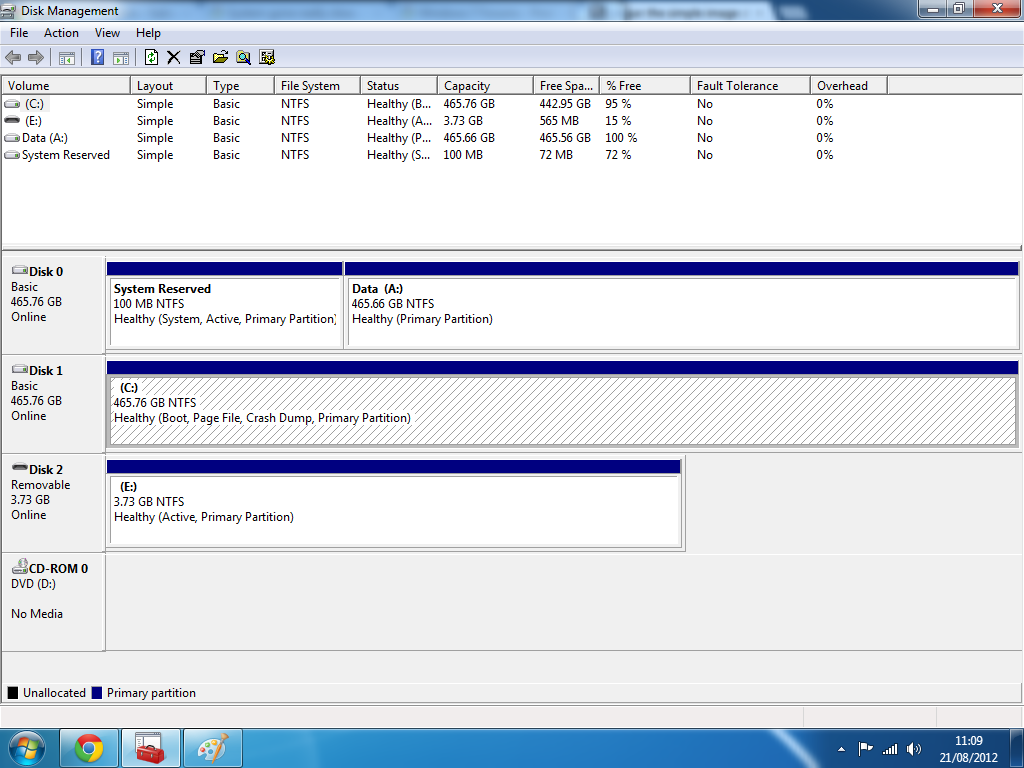
So, I installed 64 bit Windows 7 on my computer, all seems good except the system paritition is not on the disk I installed Windows 7 to. I can not get inside the computer to remove one hard drive and then reinstall and I would prefer not to even reinstall again.

Disk E is my USB Stick.

Is there anyway to manually fix this:?
0RvRl.png
 

My Computer

Computer type
PC/Desktop
Computer Manufacturer/Model Number
Novatech iRush Pro
OS
Windows 7 Ultimate SP1 - 64 Bit
CPU
Intel Core i5 2500k
Motherboard
Foxconn H67M-S/H67M-V/H67
Memory
2x4GB DDR3 1333Hz
Graphics Card(s)
Ati Radeon 6770
Sound Card
None
Monitor(s) Displays
Samsung S22B150
Screen Resolution
1920x1080
Hard Drives
2x500GB
PSU
500W
Cooling
Fan
Keyboard
HP KU0316
Mouse
Wireless Logitech M185
Internet Speed
20MB/s
Antivirus
Avast Free
Browser
Google Chrome
Other Info
Logitech M185 Mouse
KU-M316 Keyboard

My Computer

Computer Manufacturer/Model Number
HP, Dell, Gateway, Toshiba - 4 laptops and 2 desktops
OS
Vista, Windows7, Mint Mate, Zorin, Windows 8
CPU
from 1.6GHz Duo to i7
Monitor(s) Displays
2x HP w2207
Hard Drives
5x HDD, 7x SSD, 12x Externals
Keyboard
with trackball - no mices
Mouse
Trackball mice
Internet Speed
DSL 6000
A good process is to open an administrative command prompt and type bcdboot C:\Windows /s C: to put the boot files on the C: partition, then make C: partition active with diskpart or Disk Management.

You will then have to change the boot order or make the partition on the other drive inactive, which can be done using diskpart.

Diskpart
lis dis
sel dis 0 <-
make sure this is the drive you want to work on.
lis par
sel par 1
<- make sure this is the correct partition number
inactive
exit

Just an alternative if you felt like doing it yourself.
 

My Computer

Computer Manufacturer/Model Number
Homebuilt
OS
Windows 7 x64
CPU
i7-2600K
Motherboard
Asus P8Z77-v Pro
Memory
8 G
Graphics Card(s)
GTX 480
Sound Card
Onboard
Monitor(s) Displays
LG W2753V
Screen Resolution
1920x1080
Hard Drives
Crucial M4 128 G SSD
In the end, I just reinstalled and did it again. It is good now. Thanks anyway.
 

My Computer

Computer type
PC/Desktop
Computer Manufacturer/Model Number
Novatech iRush Pro
OS
Windows 7 Ultimate SP1 - 64 Bit
CPU
Intel Core i5 2500k
Motherboard
Foxconn H67M-S/H67M-V/H67
Memory
2x4GB DDR3 1333Hz
Graphics Card(s)
Ati Radeon 6770
Sound Card
None
Monitor(s) Displays
Samsung S22B150
Screen Resolution
1920x1080
Hard Drives
2x500GB
PSU
500W
Cooling
Fan
Keyboard
HP KU0316
Mouse
Wireless Logitech M185
Internet Speed
20MB/s
Antivirus
Avast Free
Browser
Google Chrome
Other Info
Logitech M185 Mouse
KU-M316 Keyboard
In the end, I just reinstalled and did it again. It is good now. Thanks anyway.
Hmm, that was the complicated way to solve that problem.
 

My Computer

Computer Manufacturer/Model Number
HP, Dell, Gateway, Toshiba - 4 laptops and 2 desktops
OS
Vista, Windows7, Mint Mate, Zorin, Windows 8
CPU
from 1.6GHz Duo to i7
Monitor(s) Displays
2x HP w2207
Hard Drives
5x HDD, 7x SSD, 12x Externals
Keyboard
with trackball - no mices
Mouse
Trackball mice
Internet Speed
DSL 6000

My Computer

Computer type
PC/Desktop
Computer Manufacturer/Model Number
Novatech iRush Pro
OS
Windows 7 Ultimate SP1 - 64 Bit
CPU
Intel Core i5 2500k
Motherboard
Foxconn H67M-S/H67M-V/H67
Memory
2x4GB DDR3 1333Hz
Graphics Card(s)
Ati Radeon 6770
Sound Card
None
Monitor(s) Displays
Samsung S22B150
Screen Resolution
1920x1080
Hard Drives
2x500GB
PSU
500W
Cooling
Fan
Keyboard
HP KU0316
Mouse
Wireless Logitech M185
Internet Speed
20MB/s
Antivirus
Avast Free
Browser
Google Chrome
Other Info
Logitech M185 Mouse
KU-M316 Keyboard
Greg, he has no recovery partition. So I don't think it matters if he loses the F8 capability.
 

My Computer

Computer Manufacturer/Model Number
HP, Dell, Gateway, Toshiba - 4 laptops and 2 desktops
OS
Vista, Windows7, Mint Mate, Zorin, Windows 8
CPU
from 1.6GHz Duo to i7
Monitor(s) Displays
2x HP w2207
Hard Drives
5x HDD, 7x SSD, 12x Externals
Keyboard
with trackball - no mices
Mouse
Trackball mice
Internet Speed
DSL 6000
That's not just for Recovery, Wolfgang. I'm not sure why System Recovery Options tutorial says that, but those are onboard WinRE tools which are best included on every Win7 installation, and only written by the installer or running Startup Repair 3 separate times on the Active partition:

 
Yeah, you have a point there. I guess I never use these tools because I rely totally on my images. But for a lot of paople those are certainly useful.
 

My Computer

Computer Manufacturer/Model Number
HP, Dell, Gateway, Toshiba - 4 laptops and 2 desktops
OS
Vista, Windows7, Mint Mate, Zorin, Windows 8
CPU
from 1.6GHz Duo to i7
Monitor(s) Displays
2x HP w2207
Hard Drives
5x HDD, 7x SSD, 12x Externals
Keyboard
with trackball - no mices
Mouse
Trackball mice
Internet Speed
DSL 6000
Unplugging other HD's does the trick

I also had the problem of the system and boot partitions being on separate drives (as seen in the Disk Management Console). It prevented my backup program (EaseUS ToDo 8.9) from being able to do a proper system backup. I have four hard drives. The one containing Win7 was marked as Boot, but one of the other three HDs was marked as System. I did the following:

  1. Shut down PC.
  2. Unplug the other three HDs.
  3. Reboot into Win7.
  4. Check the Disk Management Console to ensure that my main HD is now marked as Boot AND System.
  5. Shut down PC and reconnect the other three HDs.
  6. Reboot into Win7.
  7. Check the Disk Management Console to ensure that my main HD is still marked as Boot AND System.

Thanks for the help and I hope this reply helps others.
 

My Computer

Computer Manufacturer/Model Number
Self-built
OS
Windows 7 64-bit
CPU
Intel Core i7 3.07GHz overclocked to 3.6GHz
Motherboard
Asus Sabertooth X58
Memory
Corsair Vengeance DDR3 6 x 4GB @1504MHz
Graphics Card(s)
PNY GTX460 (OC: Core clock 855MHz; Memory clock 1000MHz)
Sound Card
SoundBlaster
Monitor(s) Displays
Samsung SyncMaster 2232BW (using DVI input)
Screen Resolution
1680 x 1050 x 32
Hard Drives
Seagate Barracuda 7200 500GB
PSU
Ultra 650-watt ATX
Case
Antec 300
Cooling
Corsair liquid CPU cooler
Keyboard
Microsoft Wireless
Mouse
Microsoft Wireless
Internet Speed
Cable (25Mbps)
Other Info
Flight simulator USB hardware: CH Products control yoke; Saitek rudders; Saitek switch panel; Saitek autopilot panel; Saitek COM panel. 2GB RAM disk.
Even if you had a disk on port 1, as long as you create an install partition (on Disk 1 etc) and mark it Active, windows will put the system files there and it would be perfect. It`s when there is no Active partition that windows will create one on the 1st drive it finds available.

But, this is why we always to people to unplug all the other drives during an install.

Even when creating a dual boot, it no longer makes any sense, more harm then good.
 

My Computer

Computer type
PC/Desktop
Computer Manufacturer/Model Number
Skylake Special #666
OS
Windows 10 Pro x64
CPU
Intel Core i7 6700K
Motherboard
Asus Sabertooth Z170 Mark 1
Memory
GSkill TridentZ RGB 16GB 3600 16-16-16-36
Graphics Card(s)
EVGA GTX 980 Ti SC x2
Sound Card
Realtek High Definition
Monitor(s) Displays
AOC G2460PG
Screen Resolution
1920 x 1080 144Hz
Hard Drives
Samsung 860 Pro 256GB, Seagate Barracuda 4TB x2
PSU
EVGA 1000 P2, EVGA White Custom Braided Cables
Case
Corsair Vengeance C70 Gunmetal Black
Cooling
Corsair H100i v2, Corsair ML120 x2, Thermal Grizzly Kryonaut
Keyboard
Logitech G910 Orion Spectrum
Mouse
Logitech G700s
Internet Speed
Verizon Fios Quantum Gateway 75/75
Antivirus
Windows Defender, Malwarebytes Free 3.8.3
Browser
Chrome
Other Info
Corsair SP120 x4, LG Blu-ray Drive, Durabrand HT-395 100 Watt Dolby Digital Amp, Corsair H2100 Wireless 7.1 Headset
Easiest would be to transfer the bootmgr to C - then you can disregard the system partition. http://www.sevenforums.com/tutorials/209885-bootmgr-move-c-easybcd.html

The reason your system partition landed on Disk0 is because the installer always grabs the disk with the lowest port number for it.
Hey ..I need your help...I was using windows xp installed in my c drive...later I installed windows 7 ..but on another disk...now I want to remove windows xp and make 7 as primary one...how to do it
 

My Computer

OS
Windows 7 32 bit
You have to copy the bootmgr to C as to the instructions above. You have to run Windows7 so that this is C. Then you can delete the XP partition.
 

My Computer

Computer Manufacturer/Model Number
HP, Dell, Gateway, Toshiba - 4 laptops and 2 desktops
OS
Vista, Windows7, Mint Mate, Zorin, Windows 8
CPU
from 1.6GHz Duo to i7
Monitor(s) Displays
2x HP w2207
Hard Drives
5x HDD, 7x SSD, 12x Externals
Keyboard
with trackball - no mices
Mouse
Trackball mice
Internet Speed
DSL 6000
You have to copy the bootmgr to C as to the instructions above. You have to run Windows7 so that this is C. Then you can delete the XP partition.
OK..so it will move windows 7 to c drive?..can u provide with a full guide..thanks
 

My Computer

OS
Windows 7 32 bit
You don't "move" windows7 to the C drive. It will be the C drive when it is running.
 

My Computer

Computer Manufacturer/Model Number
HP, Dell, Gateway, Toshiba - 4 laptops and 2 desktops
OS
Vista, Windows7, Mint Mate, Zorin, Windows 8
CPU
from 1.6GHz Duo to i7
Monitor(s) Displays
2x HP w2207
Hard Drives
5x HDD, 7x SSD, 12x Externals
Keyboard
with trackball - no mices
Mouse
Trackball mice
Internet Speed
DSL 6000
Back
Top