"System" process

BewilderedBob

New member
Local time
11:59 AM
Messages
20
Windows 7 runs a process "System" (visible in task mgr) but unlike other processes there is no supporting info (description, company). Only PID = 4. Has this been hacked ? It seems strange than an essential process would lack important info.

Bewildered Bob
 

My Computer

Computer type
PC/Desktop
Computer Manufacturer/Model Number
Acer Aspire 7736Z
OS
Microsoft Windows 7 Home Premium 64-bit 7601 Multiprocessor Free Service Pack 1
CPU
Pentium(R) Dual-Core CPU T4300 @ 2.10GHz
Motherboard
Acer JV50
Memory
4.00 GB
Graphics Card(s)
(1) Mobile Intel(R) 4 Series Express Chipset Family (2) Mo
Sound Card
(1) Realtek High Definition Audio (2) Intel(R) High Defini
Hard Drives
WD 7200 RPM
Antivirus
MSE & Malwarebytes Premium
Browser
Firefox
Windows 7 runs a process "System" (visible in task mgr) but unlike other processes there is no supporting info (description, company). Only PID = 4. Has this been hacked ? It seems strange than an essential process would lack important info.

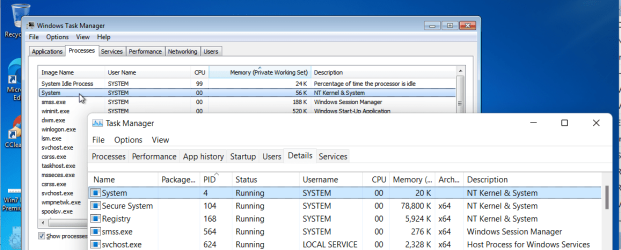
No, that is perfectly normal, every version of Windows has that. The PID of 4 is such a low number because this is operating system's kernel, one of the very first things to load at boot. I'm surprised you don't see a description of 'NT Kernel & System' in Windows 7's Task Manager as I do, though I don't see it's PID there.

Here it is in both Task managers from Windows 7 and Windows 11 (this W7 is running in a virtual machine on a W11 Host PC).

image.png

- - - Updated - - -

Sorted my PID now, it was un-ticked in View > Select Columns. If you're missing your description column you can add it there.

image.png
 

My Computers

System One System Two

  • Computer type
    Laptop
    Computer Manufacturer/Model Number
    Toshiba satellite C650D
    OS
    Windows 7 Home Premium x64
    CPU
    AMD V120
    Memory
    4GB
    Internet Speed
    150 Mbps
    Antivirus
    MSE
    Browser
    IE11, Edge, Firefox
    Other Info
    I also have W7 Pro on my System Two, and several W7 Hyper-V VMs. My other machines run Windows 10/11. Their specs are in my Ten Forums & Eleven Forum profiles.
  • Computer type
    Laptop
    System Manufacturer/Model Number
    Lenovo Thinkpad T430
    OS
    Windows 7 Pro x64
    CPU
    Intel i5-3320M
    Memory
    8 GB
    Hard Drives
    250GB Samsung SSD 860 EVO
    Other Info
    Antivirus: MSE
If you're really interested on seeing how to scan all the modules that are loaded via the system process, then watch my video.


Use 720p and full screen.


My Computer

Computer type
PC/Desktop
OS
Windows 7 Ultimate x64
Back
Top