System Protection Restore Points - Delete

How to Delete System Protection Restore Points in Windows 7 and Windows 8

   Information
This will show you how to delete all, all but the most recent, or individual System Protection restore points for a selected hard disk in Windows 7 and Windows 8.

System Restore isn't available for Windows RT.

   Warning
If you delete all of the restore points, then you cannot restore the disk until System Protection is on and a restore point is created for the hard disk again.

It has been reported that some 3rd party disk defragmentation programs could also delete your restore points when used.


OPTION ONE

Use System Protection Properties to Delete Restore Points


:warn:WARNING: This will delete all restore points (system settings and previous versions of files) for the selected hard disk.
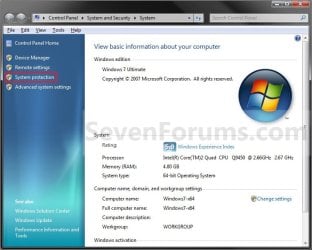
1. Open the Control Panel (icons view) in Windows 7 or Windows 8, and click/tap on the System icon.

2. In the left side of System, click/tap on the System Protection link. (See screenshot below)

3. If prompted by UAC, then click/tap on Yes.

4. Close the System window. (See screenshot below)
System.jpg
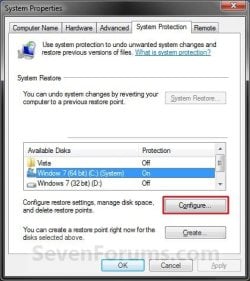
5. Click/tap on the available hard disk drive or partition, that you want to delete the System Protection restore points for, to select it. (See screenshot below step 6)
NOTE: Windows should be the C: disk with (System). System Protection will need to be turned on for the selected disk to be able to delete the restore points.

6. Click/tap on the Configure button. (See screenshot below)
System_Properties.jpg
7. Click/tap on the Delete button. (See screenshot below)
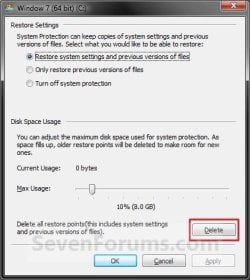
Configure-Delete.jpg
8. Click/tap on the Continue button to confirm the deletion. (See screenshot below)
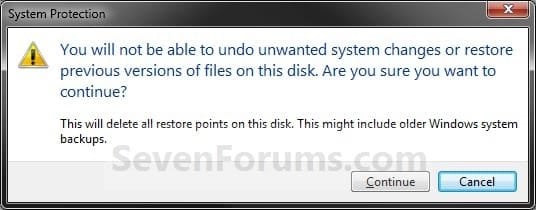
Confirm_Delete_All.jpg
9. Click/tap on Close in the success prompt. (See screenshot below)

Success.jpg
10. Click/tap on OK. (See screenshot below step 7)

11. Click/tap on OK. (See screenshot below step 6)


OPTION TWO

Use Disk Cleanup to Delete Restore Points


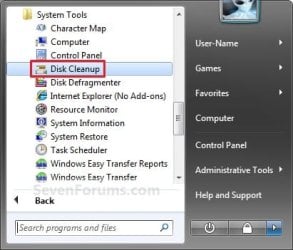
NOTE: This will help free up more disk space for the selected hard disk by removing all but the most recent restore point. This will also include deleting shadow copies (Previous Versions) that were created with a deleted restore point.
1. Press the Windows + R keys to open the Run dialog, type cleanmgr, and press Enter.

2. Select the hard disk you want to use Disk Cleanup on, and click/tap on OK. (See screenshot below)
NOTE: You will not see this window unless you have more than one drive or partition on your computer.
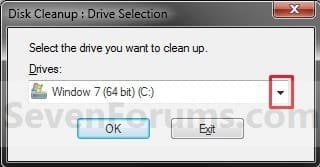
Select_Drive.jpg
3. You will now see this scanning screenshot below for a few seconds.
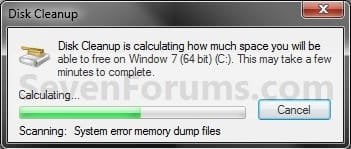
Scanning.jpg
4. Click/tap on the Clean up system files button. (See screenshot below)
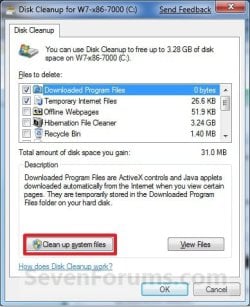
Disk_Cleanup-1.jpg
5. If prompted by UAC, then click/tap on Yes.

6. Select the hard disk you want to use Disk Cleanup on, and click/tap on OK. (See screenshot below step 2)
NOTE: You will not see this window unless you have more than one drive or partition on your computer.

7. Click/tap on the More Options tab, and click/tap on the Clean up button under the System Restore and Shadow Copies section. (See screenshot below)
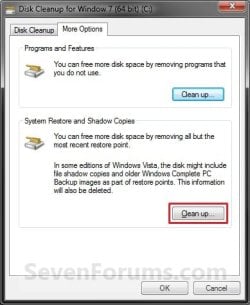
More_Options.jpg
8. Click/tap on the Delete button in the confirm deletion window. (See screenshot below)
Confirm.jpg
9. Close the Disk Cleanup window. (See screenshot below step 7)
WARNING: Do not click on OK unless you wanted to delete the checked files in the Disk Cleanup tab.


OPTION THREE

Use CCleaner to Delete Individual Restore Points


1. If you have not already, download and install the free program CCleaner and run it.

2. In CCleaner, click on the Tools icon, System Restore button, then select the restore points that you wish to delete and click on Remove. (see screenshot below)
NOTE: You can press and hold the CTRL key while clicking on the restore points to be able to select random restore points.
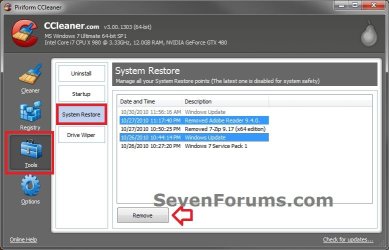
CCleaner.jpg
3. Click on OK to confirm deleting them. (see screenshot below)
CCleaner2.jpg
4. When finished, close CCleaner. The selected restore points have been deleted.


OPTION FOUR

Use "System Restore Explorer" to Delete Individual Restore Points


   Note
You could also use the System Restore Explorer program to mount specific restore points to be able to browse and copy individual files and folders from a mounted restore point back into Windows without having to use Previous Versions or to do a full System Restore.

For more on this, see:
How to Extract Files and Folders from System Restore Points in Windows 7 and Vista


1. If you have not already, download and install the free program System Restore Explorer and run it.

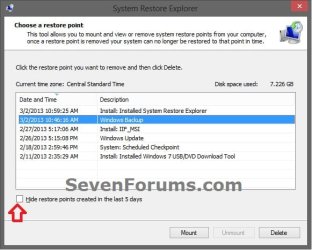
2. In System Restore Explorer, select a specific restore point that you would like to delete, and click on the Delete button. (see screenshot below)
NOTE: If displayed, uncheck the Hide restore points created in last 5 days box to see all restore points.
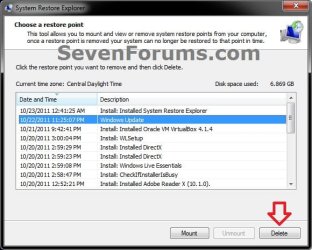
System-Restore-Explorer-1.jpg

System_Restore_Explorer_unhide.jpg

3. Click on Yes to confirm the deletion. (see screenshot below)
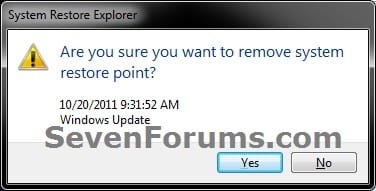
System-Restore-Explorer-2.jpg
4. When finished, close System Restore Explorer. The selected restore points have been deleted.


OPTION FIVE

Use "Manage Windows Backup disk space" to Delete System Image Restore Points


   Note
This option is good to delete the System Image Restore Point "Backup" type restore points like below.
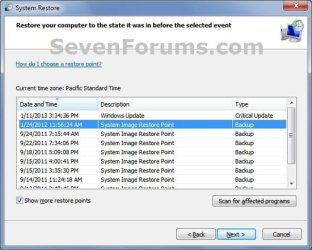
System_Image_Restore_Point.jpg


1. Use step 5 in OPTION ONE of the tutorial below to select the Keep only the latest system image and minimum space used by backup option, and click/tap on OK.
How to Delete Windows 7 User Data and System Image Backup Files
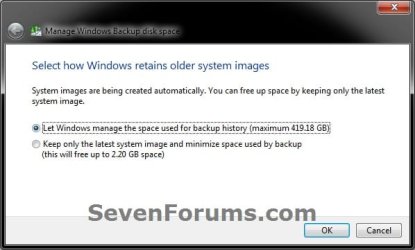

Manage_on.jpg


That's it,
Shawn


Attachments

  • Start_Menu.jpg
    Start_Menu.jpg
    24.8 KB · Views: 548
Last edited:
Hello Carmine,

Do you have UAC turned off or logged into the built-in Administrator account? If so, that may be why the Clean up system files button is missing to elevate (run as administrator) Disk Cleanup.

Hope this helps,
Shawn
 

My Computer

Computer type
PC/Desktop
Computer Manufacturer/Model Number
Self built custom
OS
64-bit Windows 11 Pro for Workstations
CPU
Intel i7-8700K OC'd to 5 GHz
Motherboard
ASUS ROG Maximus XI Formula Z390
Memory
64 GB (4x16GB) G.SKILL TridentZ RGB DDR4 3600 MHz
Graphics Card(s)
ASUS ROG-STRIX-GTX1080TI-O11G-GAMING
Sound Card
Integrated
Monitor(s) Displays
2 x Samsung Odyssey G7 27"
Screen Resolution
2560x1440
Hard Drives
1TB Samsung 990 PRO M.2,
4TB Samsung 990 PRO PRO M.2,
TerraMaster F8 SSD Plus NAS
PSU
Seasonic Prime Titanium 850W
Case
Thermaltake Core P3
Cooling
Corsair Hydro H115i
Keyboard
Logitech wireless K800
Mouse
Logitech MX Master 4
Internet Speed
2 Gb/s Download and 100 Mb/s Upload
Antivirus
Malwarebyte Anti-Malware Premium
Browser
Google Chrome
Other Info
Logitech Z625 speaker system,
Logitech BRIO 4K Pro webcam,
HP Color LaserJet Pro MFP M477fdn,
APC SMART-UPS RT 1000 XL - SURT1000XLI,
Galaxy S23 Plus phone
UAC is off \\\


thanks Shawn

I'll leave it be
 

My Computer

Computer Manufacturer/Model Number
Gateway/NV7923u & NV79C52u Laptops
OS
windows 7 professional & ultimate 64bit laptops
CPU
2.27 boost to 2.53 & 2.53 boost to 2.80
Motherboard
Mobile Intel® HM55 Express Chipset ???
Memory
4GB
Graphics Card(s)
Intel® Graphics Media Accelerator HD
Sound Card
realtek High-definition audio support
Monitor(s) Displays
17.3 " HD 1600 x 900
Hard Drives
hatachi Travelstar 5400 500GB & west digital 500GB
Internet Speed
35MB fios
Okey doke. :)
 

My Computer

Computer type
PC/Desktop
Computer Manufacturer/Model Number
Self built custom
OS
64-bit Windows 11 Pro for Workstations
CPU
Intel i7-8700K OC'd to 5 GHz
Motherboard
ASUS ROG Maximus XI Formula Z390
Memory
64 GB (4x16GB) G.SKILL TridentZ RGB DDR4 3600 MHz
Graphics Card(s)
ASUS ROG-STRIX-GTX1080TI-O11G-GAMING
Sound Card
Integrated
Monitor(s) Displays
2 x Samsung Odyssey G7 27"
Screen Resolution
2560x1440
Hard Drives
1TB Samsung 990 PRO M.2,
4TB Samsung 990 PRO PRO M.2,
TerraMaster F8 SSD Plus NAS
PSU
Seasonic Prime Titanium 850W
Case
Thermaltake Core P3
Cooling
Corsair Hydro H115i
Keyboard
Logitech wireless K800
Mouse
Logitech MX Master 4
Internet Speed
2 Gb/s Download and 100 Mb/s Upload
Antivirus
Malwarebyte Anti-Malware Premium
Browser
Google Chrome
Other Info
Logitech Z625 speaker system,
Logitech BRIO 4K Pro webcam,
HP Color LaserJet Pro MFP M477fdn,
APC SMART-UPS RT 1000 XL - SURT1000XLI,
Galaxy S23 Plus phone
Any solution yet?

I have the same issue. I diligently created several system images as I was building the machine, now they are redundant and I have deleted the images, however the references remain in System Restore. Has anyone discovered how to remove the redundant entries?

Update:
I created another backup and then deleted all backups via the manage space option in the backup and restore dialog and most of my entries were removed. I had to create and delete on every drive I had previously created a backup on in order clear the list completely.
 
Last edited:

My Computer

OS
Windows 7 Pro x64
Smootchat, Marsmimar.....I got the same problem, did you ever find a good solution?
 

My Computer

OS
Win 7 Home Prem 64
Hello
chriswchrisw,

Like I said above, I created another backup and then deleted all backups via the manage space option in the backup and restore dialog and most of my entries were removed. I then had to create and delete on every destination drive I had previously created a backup to, in order clear the list completely.

I now use Macrium reflect. Macrium Reflect FREE Edition - Information and download

It does an excellent job, it's flexible and it's free. Used it to restore several times now as I tweak my system.
 

My Computer

OS
Windows 7 Pro x64
Brink, do you know how removing individual restore points affects the system? For example, I've been trying to troubleshoot random AHCI controller errors, so I increased the amount of storage available for system restore so I can restore all the way back to fresh. I boot to Acronis True Image and save images anyway, but I thought I'd try system restore also. A recent install of HDTune Pro has been crashing so I used a system restore point created immediately before installing HDTune Pro. There were a couple restore points created after installing HDTune Pro.

1. Can I delete those restore points created after installing HDTune Pro?

2. Am I correct that they are no longer useful?
 

My Computer

Computer Manufacturer/Model Number
Assembled by me
OS
Windows 7 Professional 64-bit
CPU
Intel Core i7-960 Bloomfield 3.2GHz 8MB L3 Cache Quad-Core
Motherboard
ASUS P6X58D Premium LGA 1366 Intel X58 SATA 6Gb/s USB 3.0
Memory
12 gb Corsair Dominator DDR3 1866 (PC3 15000) Triple Channel
Graphics Card(s)
XFX Radeon HD 5770 1GB 128-bit DDR5
Sound Card
Asus Essence STX Audiophile Heaven!
Monitor(s) Displays
ViewSonic VP201b
Screen Resolution
1600 x 1200
Hard Drives
(1) Crucial Real SSD C300
(2) WD Velociraptor 300gb
(1) Seagate DB35 750gb
PSU
Seasonic 750 Gold
Case
Lian Li 2100
Cooling
Noctua
Keyboard
Microsoft Wireless Comfort 5000
Mouse
Logitech USB Trackman Wheel
Internet Speed
1gp/s
Hello Barefoot,

Deleting the individual restore points as described in Method Three will have no affect on the system other than you no longer being able to use it anymore to restore back to that date and time.

It's really up to you to decide if the restore point contained anything useful or not though. If you have no plans on restoring back to that date, then I suppose it'll be fine to delete if you like.

Hope this helps,
Shawn
 

My Computer

Computer type
PC/Desktop
Computer Manufacturer/Model Number
Self built custom
OS
64-bit Windows 11 Pro for Workstations
CPU
Intel i7-8700K OC'd to 5 GHz
Motherboard
ASUS ROG Maximus XI Formula Z390
Memory
64 GB (4x16GB) G.SKILL TridentZ RGB DDR4 3600 MHz
Graphics Card(s)
ASUS ROG-STRIX-GTX1080TI-O11G-GAMING
Sound Card
Integrated
Monitor(s) Displays
2 x Samsung Odyssey G7 27"
Screen Resolution
2560x1440
Hard Drives
1TB Samsung 990 PRO M.2,
4TB Samsung 990 PRO PRO M.2,
TerraMaster F8 SSD Plus NAS
PSU
Seasonic Prime Titanium 850W
Case
Thermaltake Core P3
Cooling
Corsair Hydro H115i
Keyboard
Logitech wireless K800
Mouse
Logitech MX Master 4
Internet Speed
2 Gb/s Download and 100 Mb/s Upload
Antivirus
Malwarebyte Anti-Malware Premium
Browser
Google Chrome
Other Info
Logitech Z625 speaker system,
Logitech BRIO 4K Pro webcam,
HP Color LaserJet Pro MFP M477fdn,
APC SMART-UPS RT 1000 XL - SURT1000XLI,
Galaxy S23 Plus phone
Hi I'm new here,,, I have the problem of NOT being able to delete old restore points, (which I have done before) I tried various things and can report that in System Protection it states that system restore has been disabled by Group Policy.
and I can't seem to turn it on. A restore point of today was available but failed. I am not on a network but have recently installed a Bluetooth dongle, and accessed my web site host via Filezilla ftp program.
My worries are twofold, decreasing disc space and no Restore Points. Any advice on how to turn SR back on and override Group policy would be much appreciated.
 

My Computer

OS
Windows 64bit
If I want to delete my shadows, I use
Vssadmin Resize ShadowStorage /For=C: /On=C: /MaxSize=300MB.
Then I start anew.
 

My Computer

Computer Manufacturer/Model Number
HP, Dell, Gateway, Toshiba - 4 laptops and 2 desktops
OS
Vista, Windows7, Mint Mate, Zorin, Windows 8
CPU
from 1.6GHz Duo to i7
Monitor(s) Displays
2x HP w2207
Hard Drives
5x HDD, 7x SSD, 12x Externals
Keyboard
with trackball - no mices
Mouse
Trackball mice
Internet Speed
DSL 6000

My Computer

Computer type
PC/Desktop
Computer Manufacturer/Model Number
Self built custom
OS
64-bit Windows 11 Pro for Workstations
CPU
Intel i7-8700K OC'd to 5 GHz
Motherboard
ASUS ROG Maximus XI Formula Z390
Memory
64 GB (4x16GB) G.SKILL TridentZ RGB DDR4 3600 MHz
Graphics Card(s)
ASUS ROG-STRIX-GTX1080TI-O11G-GAMING
Sound Card
Integrated
Monitor(s) Displays
2 x Samsung Odyssey G7 27"
Screen Resolution
2560x1440
Hard Drives
1TB Samsung 990 PRO M.2,
4TB Samsung 990 PRO PRO M.2,
TerraMaster F8 SSD Plus NAS
PSU
Seasonic Prime Titanium 850W
Case
Thermaltake Core P3
Cooling
Corsair Hydro H115i
Keyboard
Logitech wireless K800
Mouse
Logitech MX Master 4
Internet Speed
2 Gb/s Download and 100 Mb/s Upload
Antivirus
Malwarebyte Anti-Malware Premium
Browser
Google Chrome
Other Info
Logitech Z625 speaker system,
Logitech BRIO 4K Pro webcam,
HP Color LaserJet Pro MFP M477fdn,
APC SMART-UPS RT 1000 XL - SURT1000XLI,
Galaxy S23 Plus phone
Unable to Delete/Create Restore Points because of a Group Policy

Hi Brink, Thanks for answering my question.

My problem, again was that I could not delete my Restore Points or Configure Restore Points because of a Group Policy being in place and quoted within System Properties.

The following removed the Group Policy and enabled me to a) delete restore points as well as re-enabling me to create Restore Points.

1. Click Start, Run and type regedit.exe and press Enter
2. Navigate to the following key:
HKEY_LOCAL_MACHINE \ Software \ Policies \ Microsoft \ Windows NT \ SystemRestore
In the right-pane:
Delete the value DisableConfig
Delete the value DisableSR
3. Exit the Registry Editor.

In Windowsl, you can accomplish the above using Group Policy Editor as well.

1. Click Start, Run and type GPEDIT.MSC
2. Navigate to this path:
-> Computer Configuration
--> Administrative Templates
---> System
----> System Restore
3. Set Turn off System Restore to Not Configured
4. Set Turn off Configuration to Not Configured

from Gurpreet Singh J.

Robert
 

My Computer

OS
Windows 64bit

My Computer

Computer type
PC/Desktop
Computer Manufacturer/Model Number
Self built custom
OS
64-bit Windows 11 Pro for Workstations
CPU
Intel i7-8700K OC'd to 5 GHz
Motherboard
ASUS ROG Maximus XI Formula Z390
Memory
64 GB (4x16GB) G.SKILL TridentZ RGB DDR4 3600 MHz
Graphics Card(s)
ASUS ROG-STRIX-GTX1080TI-O11G-GAMING
Sound Card
Integrated
Monitor(s) Displays
2 x Samsung Odyssey G7 27"
Screen Resolution
2560x1440
Hard Drives
1TB Samsung 990 PRO M.2,
4TB Samsung 990 PRO PRO M.2,
TerraMaster F8 SSD Plus NAS
PSU
Seasonic Prime Titanium 850W
Case
Thermaltake Core P3
Cooling
Corsair Hydro H115i
Keyboard
Logitech wireless K800
Mouse
Logitech MX Master 4
Internet Speed
2 Gb/s Download and 100 Mb/s Upload
Antivirus
Malwarebyte Anti-Malware Premium
Browser
Google Chrome
Other Info
Logitech Z625 speaker system,
Logitech BRIO 4K Pro webcam,
HP Color LaserJet Pro MFP M477fdn,
APC SMART-UPS RT 1000 XL - SURT1000XLI,
Galaxy S23 Plus phone
Thank you for all fine Image!!
 

My Computer

Computer type
Laptop
Computer Manufacturer/Model Number
Azure Blade 15.6
OS
Windows 10 Pro Version 22H2 64-bit Edition
CPU
Intel(R) Core(TM) i7-10875H CPU @ 2.30GHz 2.30 GHz
Memory
2.0 GB (31.8 GB usable)
Monitor(s) Displays
4K UHD OLED TOUCH
Screen Resolution
3840 x 2160
Hard Drives
1 TB
Mouse
Logitech MX Master 3S
Antivirus
Windows Security
Browser
Google Chrome
Other Info
______________________________________________


______________________________________________
Thanks for that - I used the CC Cleaner method. And thanks for the reg fix that makes 8's file system usable.
 

My Computer

Computer type
PC/Desktop
Computer Manufacturer/Model Number
custom
OS
windows 7 64 bit
CPU
amd black 64
Is there a way of changing the recovery file to an external hd or make a back up of windows to an external hd without all the installed applications?
I use my OS on an SSD and everything else is on a HD, but the way I know if something happens I still have to reinstall everything.
Thank you.
 

My Computer

Computer type
PC/Desktop
Computer Manufacturer/Model Number
Custom Build
OS
Windows 7 x64 Ultimate
CPU
Intel 4770k
Motherboard
Asus Maximus VI Formula
Memory
Corsair Vengance DDR3 (2x8) 16GB
Graphics Card(s)
Zotac 580 GTX (nVidia)
Sound Card
Onboard
Monitor(s) Displays
Samsung XL2370
Screen Resolution
1920x1080p
Hard Drives
1 SSD Corsair Neutron
1 WD Blue
1 Seagate
PSU
Thermaltake 1000W
Case
NZXT Phantom 530
Cooling
4 case coolers, Zalman 9900MAX CPU and GPU stock cooler
Keyboard
Microsoft X4 Sidewinder
Mouse
G700 wireless Logitech
Internet Speed
10mb/s
Antivirus
Kaspersky PURE 3
Browser
Firefox and Thor
Other Info
DVD-ROM Sony Opticarc OEM

My Computer

Computer type
PC/Desktop
Computer Manufacturer/Model Number
Self built custom
OS
64-bit Windows 11 Pro for Workstations
CPU
Intel i7-8700K OC'd to 5 GHz
Motherboard
ASUS ROG Maximus XI Formula Z390
Memory
64 GB (4x16GB) G.SKILL TridentZ RGB DDR4 3600 MHz
Graphics Card(s)
ASUS ROG-STRIX-GTX1080TI-O11G-GAMING
Sound Card
Integrated
Monitor(s) Displays
2 x Samsung Odyssey G7 27"
Screen Resolution
2560x1440
Hard Drives
1TB Samsung 990 PRO M.2,
4TB Samsung 990 PRO PRO M.2,
TerraMaster F8 SSD Plus NAS
PSU
Seasonic Prime Titanium 850W
Case
Thermaltake Core P3
Cooling
Corsair Hydro H115i
Keyboard
Logitech wireless K800
Mouse
Logitech MX Master 4
Internet Speed
2 Gb/s Download and 100 Mb/s Upload
Antivirus
Malwarebyte Anti-Malware Premium
Browser
Google Chrome
Other Info
Logitech Z625 speaker system,
Logitech BRIO 4K Pro webcam,
HP Color LaserJet Pro MFP M477fdn,
APC SMART-UPS RT 1000 XL - SURT1000XLI,
Galaxy S23 Plus phone
SYS RESTORE EXPLORER

Hi everyone,
I did not take the time to read all of the numerous pages of responses to this tutorial, but I stumbled onto a problem with OPTION #4 with SYSTEM RESTORE EXPLORER that may have been experienced by someone else other than myself.

I have a dual boot system on a single hard drive. Each system has its own separate partition obviously. I used SYSTEM RESTORE EXPLORER to delete individual restore points on one system of the dual boot system. It turns out that SYSTEM RESTORE EXPLORER not only deleted the individual restore points that I chose, but deleted ALL of the restore points on the other system of my dual boot system.

I repeated the experiment without deleting individual restore points. Simply launching SYSTEM RESTORE EXPLORER on one system will result in the deletion of ALL restore points on the other system.

Has anyone seen this behavior? If so is there a workaround?

HOPING for some INSIGHT!
 

My Computer

Computer type
PC/Desktop
OS
Windows 7 Home Prem 32 bit
Hi everyone,
I did not take the time to read all of the numerous pages of responses to this tutorial, but I stumbled onto a problem with OPTION #4 with SYSTEM RESTORE EXPLORER that may have been experienced by someone else other than myself.

I have a dual boot system on a single hard drive. Each system has its own separate partition obviously. I used SYSTEM RESTORE EXPLORER to delete individual restore points on one system of the dual boot system. It turns out that SYSTEM RESTORE EXPLORER not only deleted the individual restore points that I chose, but deleted ALL of the restore points on the other system of my dual boot system.

I repeated the experiment without deleting individual restore points. Simply launching SYSTEM RESTORE EXPLORER on one system will result in the deletion of ALL restore points on the other system.

Has anyone seen this behavior? If so is there a workaround?

HOPING for some INSIGHT!

Just a NOTE:
You can reproduce this behavior on own your own machine if you have another system partition existing on the same HARD drive.. If so, install some innocuous application & attempt to delete it with SYSTEM RESTORE EXPLORER. You will find that the restore points on your OTHER SYSTEM are wiped out!

What can be done about this?
 

My Computer

Computer type
PC/Desktop
OS
Windows 7 Home Prem 32 bit
Back
Top