System Recovery 4 doesn't work

Jerbert

New member
Local time
2:09 AM
Messages
4
It's hard to explain, but here's what happened. I thought I was having audio problems, so I did a system recovery (on a Samsung R480 only a month old). Since I did the system recovery, everything is messed up. I will open Yahoo Messenger and I have pictures but no words. I cannot log into my gmail because I have boxes but now words. If I try to open a Microsoft Word document the computer does a dump and restarts. It's just totally messed up now. For some reasons I have no restore points at all, and I thought restore was automatically on. The Samsung guy said I could still make a backup and use it. I wasn't sure how that was going to work, because I'd be backing up the crap system, not the good system, but he's the 'expert' so I did what he said. And sure enough, all I did was make a backup of the bad system. Is there anything I can do to restore my computer to factory condition since I have no restore points and System Recovery 4 is what put it in this funky state in the first place....and obviously I have no operating disks like everyone used to get with all computers. Thank you in advance for your help.
 

My Computer

OS
Windows 7 64 Bit
   Information
We always assume you have made your Recovery Disks using the OEM manufacturer's app the first day you had your new PC.
& made the Startup Repair CD.
startup repair disc-create


Did you make the OEM manufacturer's Recovery Disks?

How to use Samsung Recovery, make Recovery disks:
Get Downloads, Firmware, Manuals and Software for Samsung NP-RF511-S02US#
What Is Samsung Recovery Solution III?
What Is Samsung Recovery Solution 4?

Get Downloads, Firmware, Manuals and Software for Samsung NP-RF511-S02US#
 

My Computer

OS
ME/XP/Vista/Win7
I made the start up disk, but I didn't make the other disks. I tried to, but didn't have the right disks. I was going to get the right disks, but this happened that same day. When I first tried the start up disk it said boot mgr not found or something similar to that, now it's like it doesn't even recognize it.
 

My Computer

OS
Windows 7 64 Bit

My Computer

Computer type
Laptop
Computer Manufacturer/Model Number
Sony Vaio VPCEB47GM Laptop
OS
Win 7 Pro 64-bit
CPU
Intel i5 2.4 Ghz
Memory
8GB DDR3
Graphics Card(s)
Intel HD 3000
Sound Card
IDT High Definition
Monitor(s) Displays
15.6 WGXA Anti-Glare LED
Screen Resolution
1280x800
Hard Drives
640Gb 7200rpm
Antivirus
MSE
Browser
Opera (primary) with IE9 backup
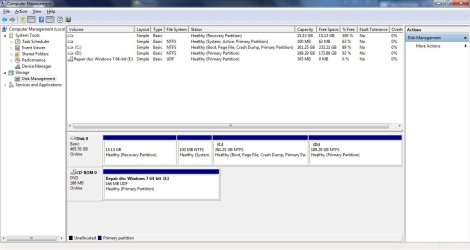
Okay, let's see if this worked or not.....

Disk Mgt Window.jpg
 

My Computer

OS
Windows 7 64 Bit
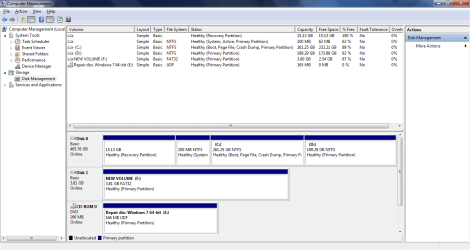
That was so little -- let's try this again... If this doesn't make it bigger, then I guess I'm not sure how to....

Disk Mgt Window 2.png
 

My Computer

OS
Windows 7 64 Bit
You did good on the snips. Now for my usual disclaimer: I'm not an expert at anything.

In looking at the snips, it shows you have a Healthy Recovery Partition that's 15.13GB in size. Depending on each manufacturer and how much they include in the recovery partition (like trialware, office products, DVD burning software, etc) most recovery partitions I've seen are around 10-15GB. But ... your recovery partition shows it has 15.13GB free space (100% of the partition is free, meaning nothing is written to the partition.) That sounds like something happened to delete the entire recovery partition.

I'm not familiar with Samsung Recovery Solution and how it's supposed to work. You have another partition called (D: ) that's 189.29GB in size. I believe that's the only partition that could possibly contain a system image if one was made by the Samsung Recovery Solution. A system image would probably be at least 50GB based on my experiences with the Windows 7 imaging tool and another free tool called Macrium. Unless one of the other forum members has a better suggestion, you may want to contact Samsung (theog gave you the link in his post - it's the last one) and see if they can sell you a set of recovery disks for your computer. I think that would be the best solution to return your machine to factory specs.

If I'm wrong I hope someone else with more experience jumps in to correct me.
 

My Computer

Computer type
Laptop
Computer Manufacturer/Model Number
Sony Vaio VPCEB47GM Laptop
OS
Win 7 Pro 64-bit
CPU
Intel i5 2.4 Ghz
Memory
8GB DDR3
Graphics Card(s)
Intel HD 3000
Sound Card
IDT High Definition
Monitor(s) Displays
15.6 WGXA Anti-Glare LED
Screen Resolution
1280x800
Hard Drives
640Gb 7200rpm
Antivirus
MSE
Browser
Opera (primary) with IE9 backup
Back
Top