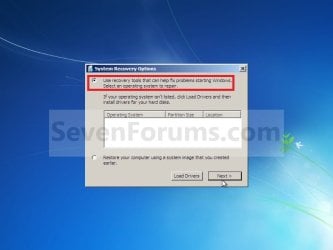
System Recovery Options

How to Boot to the System Recovery Options in Windows 7


   Information
This will show you how to boot to the System Recovery Options screen to select the Startup Repair, System Restore, Complete PC Restore, Memory Diagnostic Tool, or Command Prompt option to use on Windows 7.
   Note
The System Recovery Options menu is on the Windows 7 installation disc. If your computer manufacturer (OEM) has preinstalled recovery options, the menu might also be installed on your hard disk as a recovery partition. If your computer does not include the System Recovery Options menu, your computer manufacturer (OEM) might have customized or replaced the tool. Check the information that came with your computer or go to the manufacturer's website.


OPTION ONE

Using an OEM Recovery Partition


NOTE: This is if your computer did not come with a Windows 7 installation DVD, and has pre-installed recovery options (recovery partition) instead.
1. Start or Restart the computer.

2. Boot into the Advanced Boot Options screen.
A) Select Repair your computer and press Enter.
3. Select your keyboard language preferences and click on Next. (See screeshot below).
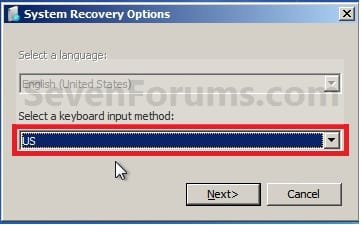
Step6.jpg
4. Select your user name and type in the password, and then click on OK.
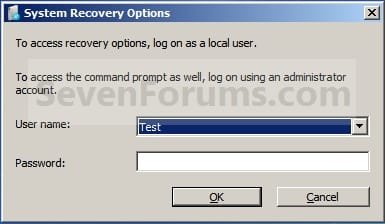
Step6A.jpg
5. Go to step 6 in OPTION TWO below.


OPTION TWO

Using a Windows 7 Installation or System Repair Disc


1. Insert the Windows 7 installation disc, slipstream Windows 7 SP1 installation disc, or System Repair Disc into the CD/DVD drive and restart the computer.
WARNING: Check to make sure that you set the BIOS to have the CD or DVD drive listed first in the boot order.

2. If prompted, press any key to boot from the Windows 7 installation DVD. (See screenshot below)
NOTE: You will only have about 8 seconds to press this key.

boot-from-cd-prompt.jpg
3. Select your language preferences and click on Next. (See screeshot below).
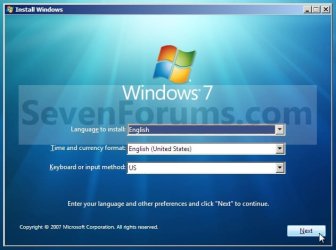
Language.jpg
4. Click on Repair your computer. (See screenshot below)
Repair_Option.jpg
5. Select which operating system you want to restore and the click on Next. (See screenshot below)
NOTE: If Windows 7 is not listed here, or it is blank, then it is ok. Click on Next anyway.
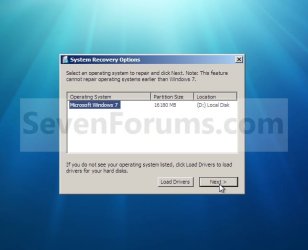
Select_OS.jpg

XP-W7_3.jpg

6. Select the system recovery option you want to do. (See screenshot below)
System_Recovery_Options.jpg
That's it,
Shawn


Last edited:
I tried booting from my win7 INstallation disk but there is no option for "repair computer or system recovery " :cry:
any other way to solve this? thank you


You have to click here and there a bit. it will show up eventually.

It was the same for me.
 

My Computer

OS
Windows 7 x86
I tried booting from my win7 INstallation disk but there is no option for "repair computer or system recovery " :cry:
any other way to solve this? thank you

Hello Lintasiril, and welcome to Seven Forums.

What type of Windows 7 installation disk do you have?

If it's not a retail copy, then you can create a System Repair Disk to use instead.

Hope this helps,
Shawn
 

My Computer

Computer type
PC/Desktop
Computer Manufacturer/Model Number
Self built custom
OS
64-bit Windows 11 Pro for Workstations
CPU
Intel i7-8700K OC'd to 5 GHz
Motherboard
ASUS ROG Maximus XI Formula Z390
Memory
64 GB (4x16GB) G.SKILL TridentZ RGB DDR4 3600 MHz
Graphics Card(s)
ASUS ROG-STRIX-GTX1080TI-O11G-GAMING
Sound Card
Integrated
Monitor(s) Displays
2 x Samsung Odyssey G7 27"
Screen Resolution
2560x1440
Hard Drives
1TB Samsung 990 PRO M.2,
4TB Samsung 990 PRO PRO M.2,
TerraMaster F8 SSD Plus NAS
PSU
Seasonic Prime Titanium 850W
Case
Thermaltake Core P3
Cooling
Corsair Hydro H115i
Keyboard
Logitech wireless K800
Mouse
Logitech MX Master 4
Internet Speed
2 Gb/s Download and 100 Mb/s Upload
Antivirus
Malwarebyte Anti-Malware Premium
Browser
Google Chrome
Other Info
Logitech Z625 speaker system,
Logitech BRIO 4K Pro webcam,
HP Color LaserJet Pro MFP M477fdn,
APC SMART-UPS RT 1000 XL - SURT1000XLI,
Galaxy S23 Plus phone
This disk helped me to get out of a really nasty situation on my Acer Notebook the other night so I felt compelled to share this little nugget of gold to possibly help somebody else in the same situation I was as nobody else anywhere knows about it (to my knowledge):


I discovered this little trick last night on my AS5738PG-6306 Notebook when my “Acer eRecovery” Factory Image Restore disks failed, and I happened to have a Windows 7 Recovery Disk. I found that through this disk you can tell the system to have Acer eRecovery Management to restore the system to Acer’s Factory Settings (the exact same thing that the Factory Image Recovery disks do, but without using up your expensive DVD-R’s).

Please note that I have absolutely no idea if this will work on all Windows 7 Acer Notebooks.

With that said, after you have made your Windows 7 Recovery Disk insert it and restart your computer. Providing the BIOS boot order is set to look for bootable media in the disk drive, the disk should boot without you having to do anything.

Preliminary steps:

1. Secure a good quality blank DVD or two.
2. BACKUP ALL OF YOUR IMPORTANT FILES, THEY WILL BE COMPLETELY REMOVED! (e.x. Documents, Videos, Pictures, Music, game save files, etc. all).
3. Make sure that your system’s BIOS Boot Order is set to Boot the Optical Drive FIRST. (Go ahead and give this a google if you don’t know how to enter BIOS on your specific Acer PC already – Acer’s site claims you have to hold down [Ctrl] + [ALT] + [Escape] keys to enter the BIOS Setup and the hit [F12] to enter into the “Boot Menu”, though I’m unsure if this is for all Acer systems or not).
4. Create a Windows 7 Recovery Disk.
5. Load the Windows 7 Recovery Disk into the Drive.
6. Restart your computer.

Here is what is going to happen throughout this process and how you should respond:

1. “Press any key to boot from CD/DVD…” should appear, quickly press any key now.
2. “Windows is loading files…” will appear. Wait for it to complete loading.
3. Microsoft logo and loading bar should now display… wait for it to stop.
4. Language Selection Menu is displayed, choose your language and click “Next”.
5. System Recovery Options is loading… wait for it to stop.
6. Choose “Restore your computer using a system image that you created earlier” and click “Next” (don’t worry, we’re not going to do it that way but we have to click this to proceed…)
7. DON’T INSERT RECOVERY DISKS OR CONNECT ANY DEVICE WITH THE SYSTEM IMAGE BACKUP DATA WHEN YOU ARE PROMPTED TO DO SO ON THE SCREEN THAT WILL POP UP!
8. Click “Cancel” to exit out of this secondary pop-up screen telling you to load the image restore data.
9. Click “Cancel” again to exit out of the remaining and main screen.
10. A new Options Menu is displayed…
11. Select the “Recovery Management” option at the very end and bottom of the list.
12. Acer eRecovery Management Options menu is displayed.
13. Choose the “Completely Restore System to Factory Defaults” option.
14. Let eRecovery Management finish all of the steps and restart the system.

That’s it, your system will now be completely wiped out, the HDD will be reformatted and your system will be returned to the precise state that you first received it in from Acer, using Acer’s hidden recovery partition (which is where the Recovery Disks data also comes from).

After you set up your Windows 7 account information and settings and log on ‘for the first time’ after the Factory Restore process has worked its magic, Acer eRecovery Management will automatically begin reinstalling all of your drivers and OEM applications (i.e. Windows 7 Touch Pack if you are also on the AS5738PG-6306 Notebook or other Touch-Screen model) from the Hidden Recovery Partition.

Sure beats wasting three DVD-R's rather than just one, and having them not work after a while and when you really need them, huh?
 

My Computer

Computer Manufacturer/Model Number
Acer Aspire 5738PG-6306
OS
7 Ultimate x64 SP1
CPU
Core 2 Duo T6600 @ 2.20GHz
Motherboard
Acer JV50 | Intel PM45 Chipset | BIOS Phoenix v1.21
Memory
4GB SDRAM DDR2 667
Graphics Card(s)
ATI Mobility Radeon 4570HD 512MB VDDR3 (2.25GB HyperMemory)
Sound Card
Integrated Dolby Home Theater HD Audio Support
Monitor(s) Displays
15.6" LED backlight HD/WS CineCrystal w/ Multi-Touch
Screen Resolution
Notebook: 1366x768 | Syncmaster P2370HD: 1920x1080
Hard Drives
Primary internal: 320GB WD3200BEVT-22ZCT0 @ 5400 RPM | Secondary external 1: 2TB Cavalry CAXB3702T0 @7200 RPM (USB 2.0) | Secondary external 2: 500GB Calvary CAUM @7200 RPM (USB 2.0).
PSU
AC Adapter
Case
Blue Clam shell
Cooling
OEM Bult-in.
Keyboard
Microsoft Wireless 3000 (USB)
Mouse
Logitech V220 (USB)
Internet Speed
31Mbps DL/25Mbps UL - Verizon fiOs/Netgear WNDR37AV
Other Info
EXTERNAL DISPLAY: 23" Samsung Syncmaster P2370HD | EXTERNAL SOUND: 300 Watt MX-KB30 JVC Stereo (AUX) | ROUTER: Netgear WNDR37AV 802.11a/b/g/n Dual-Band Gigabit | Satechi 12-Port USB 2.0 Hub | GAME PAD: SteelSeries 3GC USB 2.0 (JoyToKey Mapping) | DETAILED SYSTEM SPECIFICATIONS: http://www.tigerdirect.com/applications/SearchTools/item-details.asp?EdpNo=5265887&CatId=4938
Thank you. Being fairly new to Windows I am finding your Forum to be indispensable. Thank you all for the great Tutorials and other much needed information
 

My Computer

Computer Manufacturer/Model Number
Pry-C7300XPP
OS
Windows 7 Ultimate x64
CPU
Intel Core 2 Duo E7300
Motherboard
MSI G31M3 (MS 7528)
Memory
4GB
Graphics Card(s)
Intel G33/31 Express GMA 3100 controller
Sound Card
Intergrated ALC888
Monitor(s) Displays
LG Flatron L1919S
Hard Drives
WD 10EADS- 11M2B3
WD 5000ADS- 00m2B0
PSU
ATX
Case
Pyron
Cooling
4 Pin Cpu and plus 80mm x80mm Case fan
You're most welcome Peter, and welcome to Seven Forums. Thank you. :)
 

My Computer

Computer type
PC/Desktop
Computer Manufacturer/Model Number
Self built custom
OS
64-bit Windows 11 Pro for Workstations
CPU
Intel i7-8700K OC'd to 5 GHz
Motherboard
ASUS ROG Maximus XI Formula Z390
Memory
64 GB (4x16GB) G.SKILL TridentZ RGB DDR4 3600 MHz
Graphics Card(s)
ASUS ROG-STRIX-GTX1080TI-O11G-GAMING
Sound Card
Integrated
Monitor(s) Displays
2 x Samsung Odyssey G7 27"
Screen Resolution
2560x1440
Hard Drives
1TB Samsung 990 PRO M.2,
4TB Samsung 990 PRO PRO M.2,
TerraMaster F8 SSD Plus NAS
PSU
Seasonic Prime Titanium 850W
Case
Thermaltake Core P3
Cooling
Corsair Hydro H115i
Keyboard
Logitech wireless K800
Mouse
Logitech MX Master 4
Internet Speed
2 Gb/s Download and 100 Mb/s Upload
Antivirus
Malwarebyte Anti-Malware Premium
Browser
Google Chrome
Other Info
Logitech Z625 speaker system,
Logitech BRIO 4K Pro webcam,
HP Color LaserJet Pro MFP M477fdn,
APC SMART-UPS RT 1000 XL - SURT1000XLI,
Galaxy S23 Plus phone
Hello there.

I tried to start the System Recovery Options both from the DVD and from my hard disk. I have the following problem: after the step "In the next window click on the 'Repair your computer' link." I never get the next window, where I should select the OS I want to repair!

EDIT: Through Shift+F10 I can start the X:\Sources console. There I executed "bootrec /fixmbr" and "bootrec /fixboot" without problems. I tried to execute "bootrec /RebuildBcd" and after 30 minutes was still going. I decided to close the console, re-executed the first 2 fixes, restarted, same as before, Windows doesnt start.

Any suggestions?

Thank you in advance :)
 
Last edited:

My Computer

OS
windows 7
Hello Oksens, and welcome to Seven Forums.

Sometimes if it detects a boot problem, it may run Startup Repair automatically, then return to the right screenshot under step 5 afterwards or go straight to step 6.

What are you seeing after that instead?
 

My Computer

Computer type
PC/Desktop
Computer Manufacturer/Model Number
Self built custom
OS
64-bit Windows 11 Pro for Workstations
CPU
Intel i7-8700K OC'd to 5 GHz
Motherboard
ASUS ROG Maximus XI Formula Z390
Memory
64 GB (4x16GB) G.SKILL TridentZ RGB DDR4 3600 MHz
Graphics Card(s)
ASUS ROG-STRIX-GTX1080TI-O11G-GAMING
Sound Card
Integrated
Monitor(s) Displays
2 x Samsung Odyssey G7 27"
Screen Resolution
2560x1440
Hard Drives
1TB Samsung 990 PRO M.2,
4TB Samsung 990 PRO PRO M.2,
TerraMaster F8 SSD Plus NAS
PSU
Seasonic Prime Titanium 850W
Case
Thermaltake Core P3
Cooling
Corsair Hydro H115i
Keyboard
Logitech wireless K800
Mouse
Logitech MX Master 4
Internet Speed
2 Gb/s Download and 100 Mb/s Upload
Antivirus
Malwarebyte Anti-Malware Premium
Browser
Google Chrome
Other Info
Logitech Z625 speaker system,
Logitech BRIO 4K Pro webcam,
HP Color LaserJet Pro MFP M477fdn,
APC SMART-UPS RT 1000 XL - SURT1000XLI,
Galaxy S23 Plus phone
Hey Brink,
thank you for the answer. I am seeing just the background, without the window showed in the screenshot. Now, after executing fixmbr and fixboot, the window which should appear in the step 5 is there, but is loading forever (showing the "loading" circle.)

Should I wait until it loads?
 

My Computer

OS
windows 7
I'd give it a bit to see if it may be able to load for you.

What happens when you try to boot Windows 7 normally?
 

My Computer

Computer type
PC/Desktop
Computer Manufacturer/Model Number
Self built custom
OS
64-bit Windows 11 Pro for Workstations
CPU
Intel i7-8700K OC'd to 5 GHz
Motherboard
ASUS ROG Maximus XI Formula Z390
Memory
64 GB (4x16GB) G.SKILL TridentZ RGB DDR4 3600 MHz
Graphics Card(s)
ASUS ROG-STRIX-GTX1080TI-O11G-GAMING
Sound Card
Integrated
Monitor(s) Displays
2 x Samsung Odyssey G7 27"
Screen Resolution
2560x1440
Hard Drives
1TB Samsung 990 PRO M.2,
4TB Samsung 990 PRO PRO M.2,
TerraMaster F8 SSD Plus NAS
PSU
Seasonic Prime Titanium 850W
Case
Thermaltake Core P3
Cooling
Corsair Hydro H115i
Keyboard
Logitech wireless K800
Mouse
Logitech MX Master 4
Internet Speed
2 Gb/s Download and 100 Mb/s Upload
Antivirus
Malwarebyte Anti-Malware Premium
Browser
Google Chrome
Other Info
Logitech Z625 speaker system,
Logitech BRIO 4K Pro webcam,
HP Color LaserJet Pro MFP M477fdn,
APC SMART-UPS RT 1000 XL - SURT1000XLI,
Galaxy S23 Plus phone
I'd give it a bit to see if it may be able to load for you.

What happens when you try to boot Windows 7 normally?

It comes to the "logo point", and stucks there.

Now I started the System Repair from the Console, x:\sources\recovery -> StartRep.exe. The window opened and is now showing a running blue bar, beside which is written "Search for problems". Let's see if it finds something :)
 

My Computer

OS
windows 7
Oksens,

If all else fails and you have a retail Windows 7 installation disc, then you could do a custom install of Windows 7 and still save everything you have in your current installation.

A custom install is like a clean install except that it will also add a C:\Windows.old folder during installation that contains a complete copy of your current installation. After the new installation is finished, you can just copy any files you want from within the C:\Windows.old back into the new installation. Afterwards, you could delete the C:\Windows.old folder to regain the hdd space. You will still have to reinstall all programs and drivers though.
 

My Computer

Computer type
PC/Desktop
Computer Manufacturer/Model Number
Self built custom
OS
64-bit Windows 11 Pro for Workstations
CPU
Intel i7-8700K OC'd to 5 GHz
Motherboard
ASUS ROG Maximus XI Formula Z390
Memory
64 GB (4x16GB) G.SKILL TridentZ RGB DDR4 3600 MHz
Graphics Card(s)
ASUS ROG-STRIX-GTX1080TI-O11G-GAMING
Sound Card
Integrated
Monitor(s) Displays
2 x Samsung Odyssey G7 27"
Screen Resolution
2560x1440
Hard Drives
1TB Samsung 990 PRO M.2,
4TB Samsung 990 PRO PRO M.2,
TerraMaster F8 SSD Plus NAS
PSU
Seasonic Prime Titanium 850W
Case
Thermaltake Core P3
Cooling
Corsair Hydro H115i
Keyboard
Logitech wireless K800
Mouse
Logitech MX Master 4
Internet Speed
2 Gb/s Download and 100 Mb/s Upload
Antivirus
Malwarebyte Anti-Malware Premium
Browser
Google Chrome
Other Info
Logitech Z625 speaker system,
Logitech BRIO 4K Pro webcam,
HP Color LaserJet Pro MFP M477fdn,
APC SMART-UPS RT 1000 XL - SURT1000XLI,
Galaxy S23 Plus phone
No OS option available

When I get to the step where I have to select a OS, there isn't one? What should I do?
 

My Computer

OS
windows 7 64bit
Hello Srprzy, and welcome to Seven Forums.

Using the note under step 5 of Option Two; "If Windows 7 is not listed here, or it is blank, then it is ok. Click on Next anyway.". You may need to run a Startup Repair. :)

Hope this helps,
Shawn
 

My Computer

Computer type
PC/Desktop
Computer Manufacturer/Model Number
Self built custom
OS
64-bit Windows 11 Pro for Workstations
CPU
Intel i7-8700K OC'd to 5 GHz
Motherboard
ASUS ROG Maximus XI Formula Z390
Memory
64 GB (4x16GB) G.SKILL TridentZ RGB DDR4 3600 MHz
Graphics Card(s)
ASUS ROG-STRIX-GTX1080TI-O11G-GAMING
Sound Card
Integrated
Monitor(s) Displays
2 x Samsung Odyssey G7 27"
Screen Resolution
2560x1440
Hard Drives
1TB Samsung 990 PRO M.2,
4TB Samsung 990 PRO PRO M.2,
TerraMaster F8 SSD Plus NAS
PSU
Seasonic Prime Titanium 850W
Case
Thermaltake Core P3
Cooling
Corsair Hydro H115i
Keyboard
Logitech wireless K800
Mouse
Logitech MX Master 4
Internet Speed
2 Gb/s Download and 100 Mb/s Upload
Antivirus
Malwarebyte Anti-Malware Premium
Browser
Google Chrome
Other Info
Logitech Z625 speaker system,
Logitech BRIO 4K Pro webcam,
HP Color LaserJet Pro MFP M477fdn,
APC SMART-UPS RT 1000 XL - SURT1000XLI,
Galaxy S23 Plus phone
Thanks for the welcome! I'm getting a "startup repair cannot repair this computer automatically" :/
 

My Computer

OS
windows 7 64bit

My Computer

Computer type
PC/Desktop
Computer Manufacturer/Model Number
Self built custom
OS
64-bit Windows 11 Pro for Workstations
CPU
Intel i7-8700K OC'd to 5 GHz
Motherboard
ASUS ROG Maximus XI Formula Z390
Memory
64 GB (4x16GB) G.SKILL TridentZ RGB DDR4 3600 MHz
Graphics Card(s)
ASUS ROG-STRIX-GTX1080TI-O11G-GAMING
Sound Card
Integrated
Monitor(s) Displays
2 x Samsung Odyssey G7 27"
Screen Resolution
2560x1440
Hard Drives
1TB Samsung 990 PRO M.2,
4TB Samsung 990 PRO PRO M.2,
TerraMaster F8 SSD Plus NAS
PSU
Seasonic Prime Titanium 850W
Case
Thermaltake Core P3
Cooling
Corsair Hydro H115i
Keyboard
Logitech wireless K800
Mouse
Logitech MX Master 4
Internet Speed
2 Gb/s Download and 100 Mb/s Upload
Antivirus
Malwarebyte Anti-Malware Premium
Browser
Google Chrome
Other Info
Logitech Z625 speaker system,
Logitech BRIO 4K Pro webcam,
HP Color LaserJet Pro MFP M477fdn,
APC SMART-UPS RT 1000 XL - SURT1000XLI,
Galaxy S23 Plus phone
Oh crikey

Hiyya Brink
Mate have my laptop go ERROR:F3-F200-0002 on trying to do factory default ignatsatsonic suggested I try your tutorials and have tried all of the options that we have here and apart from one which sits ion initiating the partition or something like that it just reverts back to the above.

Guess the hard drive physically dead now??
 

My Computer

Computer type
PC/Desktop
Computer Manufacturer/Model Number
Own build (new) Desk1 / Asus ROG Win 7 / Desk2 1st build
OS
Desk1 7 Home Prem / Desk2 10 Pro / Main lap Asus ROG 10 Pro 2 laptop Toshiba 7 Pro Asus P2520 7 & 10
CPU
Desk1 i5 3750K / Laptop i7 GTX 860M / Desk2 i5 2500
Motherboard
Desk1 Asus P877-V / Desk2 Gigabyte H67 UD3H / Laptop ?
Memory
Desk1 8GB (1866) / Desk2 16GB (1333) / Laptop 8Gb DDR3
Graphics Card(s)
Desk 1& 2NVidia GTX 650 & Laptops on board Intel
Sound Card
Desk 1 & 2 -XONAR DG Realtek High Def audio Laptop
Monitor(s) Displays
Desk 1 Benq HD 2450 / Desk2 Philips 24" / Laptop 17.5"
Screen Resolution
1920x1080 D1 & D2 & Laptop 1
Hard Drives
Desk1 Samsung 120GB 830 SSD
Asus ROG 256GB 850 Pro SSD
Desk2 Samsung 840 256 SSD
Toshiba 120GB EVO
PSU
Desk 1 Corsair HX 1050/ Laptop ? / Desk 2 Corsair HX 650
Case
Desk 1 Cooler HAF XM ? Toshiba laptop / Desk2 Coolermaster
Cooling
Fans on all Desk1 -2 Desk2 - all Coolermasters 5 Laptop ?
Keyboard
Desk 1 MS Sidewinder X6 Desk 2 MS Sidewinder X 4
Mouse
Desk 1&2 - Gigabyte MS 900 gamer - laptop - Logitec wireless
Internet Speed
ADSL2+
Other Info
One other Desktop (tester) and spare Toshba laptop both with SSD's
Running Kaspersky 2016 ISS on all machines config'd identically
Logitec audio stereo systems on each machine (x3)
Canon MG5250MFC
Router/modem TP-Link running WPA2SK
Hello John,

From your original thread on this, it could be something wrong with the OEM factory recovery partition or disc.
 

My Computer

Computer type
PC/Desktop
Computer Manufacturer/Model Number
Self built custom
OS
64-bit Windows 11 Pro for Workstations
CPU
Intel i7-8700K OC'd to 5 GHz
Motherboard
ASUS ROG Maximus XI Formula Z390
Memory
64 GB (4x16GB) G.SKILL TridentZ RGB DDR4 3600 MHz
Graphics Card(s)
ASUS ROG-STRIX-GTX1080TI-O11G-GAMING
Sound Card
Integrated
Monitor(s) Displays
2 x Samsung Odyssey G7 27"
Screen Resolution
2560x1440
Hard Drives
1TB Samsung 990 PRO M.2,
4TB Samsung 990 PRO PRO M.2,
TerraMaster F8 SSD Plus NAS
PSU
Seasonic Prime Titanium 850W
Case
Thermaltake Core P3
Cooling
Corsair Hydro H115i
Keyboard
Logitech wireless K800
Mouse
Logitech MX Master 4
Internet Speed
2 Gb/s Download and 100 Mb/s Upload
Antivirus
Malwarebyte Anti-Malware Premium
Browser
Google Chrome
Other Info
Logitech Z625 speaker system,
Logitech BRIO 4K Pro webcam,
HP Color LaserJet Pro MFP M477fdn,
APC SMART-UPS RT 1000 XL - SURT1000XLI,
Galaxy S23 Plus phone
Yeah you're spot on

Hiyya Brink You are right on as the drive has had problems from almost day one - mostly controller issues and now after the 4th factory default attempt I think the disk itself has eaten the biscuit so to speak.

This is my second Toshiba (and last) laptop that the drive has gone in and I don't understand because it's not as if it wasn't an el cheapo brand - it was a Toshiba one of which the model number escapes me - it was something like an MX ##### whatever.

I paid $1500 for this machine about fifteen months ago because it had the larger screen and an i5 dual core in it plus 7 Pro not to mention that I also got them to up the RAM to 4GB when i bought it.

So now I am pretty cranky and see the equivalents now are about half that price but one lives and learns eh? Just hope that they will do it on the extended warranty I took out at the time as they are telling me that they have no record of it. My only evidence is my receipt from the dealer who is also not terribly helpful at the best of times.

I think the worse bit is probably the down time it will take to fix - just as well I bought an el cheapo ready built desky afterwards eh?

Hey sorry about the rant and thanks for your time and patience.
 

My Computer

Computer type
PC/Desktop
Computer Manufacturer/Model Number
Own build (new) Desk1 / Asus ROG Win 7 / Desk2 1st build
OS
Desk1 7 Home Prem / Desk2 10 Pro / Main lap Asus ROG 10 Pro 2 laptop Toshiba 7 Pro Asus P2520 7 & 10
CPU
Desk1 i5 3750K / Laptop i7 GTX 860M / Desk2 i5 2500
Motherboard
Desk1 Asus P877-V / Desk2 Gigabyte H67 UD3H / Laptop ?
Memory
Desk1 8GB (1866) / Desk2 16GB (1333) / Laptop 8Gb DDR3
Graphics Card(s)
Desk 1& 2NVidia GTX 650 & Laptops on board Intel
Sound Card
Desk 1 & 2 -XONAR DG Realtek High Def audio Laptop
Monitor(s) Displays
Desk 1 Benq HD 2450 / Desk2 Philips 24" / Laptop 17.5"
Screen Resolution
1920x1080 D1 & D2 & Laptop 1
Hard Drives
Desk1 Samsung 120GB 830 SSD
Asus ROG 256GB 850 Pro SSD
Desk2 Samsung 840 256 SSD
Toshiba 120GB EVO
PSU
Desk 1 Corsair HX 1050/ Laptop ? / Desk 2 Corsair HX 650
Case
Desk 1 Cooler HAF XM ? Toshiba laptop / Desk2 Coolermaster
Cooling
Fans on all Desk1 -2 Desk2 - all Coolermasters 5 Laptop ?
Keyboard
Desk 1 MS Sidewinder X6 Desk 2 MS Sidewinder X 4
Mouse
Desk 1&2 - Gigabyte MS 900 gamer - laptop - Logitec wireless
Internet Speed
ADSL2+
Other Info
One other Desktop (tester) and spare Toshba laptop both with SSD's
Running Kaspersky 2016 ISS on all machines config'd identically
Logitec audio stereo systems on each machine (x3)
Canon MG5250MFC
Router/modem TP-Link running WPA2SK
Anytime John. Maybe you'll get lucky and be able to RMA only the HDD so that you could get another cheap 2.5" HDD to use in the laptop until the replacement gets there.
 

My Computer

Computer type
PC/Desktop
Computer Manufacturer/Model Number
Self built custom
OS
64-bit Windows 11 Pro for Workstations
CPU
Intel i7-8700K OC'd to 5 GHz
Motherboard
ASUS ROG Maximus XI Formula Z390
Memory
64 GB (4x16GB) G.SKILL TridentZ RGB DDR4 3600 MHz
Graphics Card(s)
ASUS ROG-STRIX-GTX1080TI-O11G-GAMING
Sound Card
Integrated
Monitor(s) Displays
2 x Samsung Odyssey G7 27"
Screen Resolution
2560x1440
Hard Drives
1TB Samsung 990 PRO M.2,
4TB Samsung 990 PRO PRO M.2,
TerraMaster F8 SSD Plus NAS
PSU
Seasonic Prime Titanium 850W
Case
Thermaltake Core P3
Cooling
Corsair Hydro H115i
Keyboard
Logitech wireless K800
Mouse
Logitech MX Master 4
Internet Speed
2 Gb/s Download and 100 Mb/s Upload
Antivirus
Malwarebyte Anti-Malware Premium
Browser
Google Chrome
Other Info
Logitech Z625 speaker system,
Logitech BRIO 4K Pro webcam,
HP Color LaserJet Pro MFP M477fdn,
APC SMART-UPS RT 1000 XL - SURT1000XLI,
Galaxy S23 Plus phone
Back
Top