System Repair Disk not booting into repair options

Bob Vance

New member
Local time
4:48 PM
Messages
11
Created it with no problems, apparently at least. My BIOS is set to boot from CD drive...so why won't my machine boot from the system repair disk? There were no errors when disk was created. My machine just boots to windows.

Anyone else experience this with Win 7 Professional?

Any tips?
 

My Computer My Computer

At a glance

Windows 7 Professional4GB
Computer Manufacturer/Model Number
HP Pavilllion Dv7
OS
Windows 7 Professional
Memory
4GB
You can also access the Repair console by booting into the Installer, or using f8 at bootup if you have the 100mb boot/repair partition installed along with Win7.
 
Thanks. Glad you brought that up. I was going to ask if I could do this without the disc. I am sure I have that small partition
 

My Computer My Computer

At a glance

Windows 7 Professional4GB
Computer Manufacturer/Model Number
HP Pavilllion Dv7
OS
Windows 7 Professional
Memory
4GB
Try This..
Put you CD in the tray when Windows 7 is on and you are logged on is there anything on the CD??

It should look something like this.(screenshot below):)
That will at least rule out your CD/DVD Drive..
Hope this Helps..
 

Attachments

  • Capture57.JPG
    Capture57.JPG
    50.2 KB · Views: 265

My Computer My Computer

At a glance

Windows Seven x642.2 GHz Dual Core4GBATI Mobility RADEON HD 3470
Computer Manufacturer/Model Number
HP Pavilion dv5 Notebook PC
OS
Windows Seven x64
CPU
2.2 GHz Dual Core
Motherboard
Quanta 3600
Memory
4GB
Graphics Card(s)
ATI Mobility RADEON HD 3470
Sound Card
ATI
Monitor(s) Displays
Laptop
Hard Drives
ATA Hitachi HTS543215 (5400RPM)
Case
Laptop
Cooling
Fan
Internet Speed
Basic DSL 1.5 up and Down
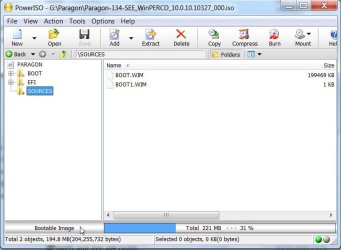
You can check it is bootable - pick it up with the free ( unregistered ) version of PowerIso- just click the d/l link :

PowerISO - Create, Edit, Compress, Encrypt, Split, Mount, Extract ISO file, ISO/BIN converter, Virtual Drive

The problem with booting WinRe is - it only works if you can get as far as bootmanager.

Usually you want to use it because you can't boot.


Created it with no problems, apparently at least. My BIOS is set to boot from CD drive...so why won't my machine boot from the system repair disk? There were no errors when disk was created. My machine just boots to windows.

Anyone else experience this with Win 7 Professional?

Any tips?
 

My Computers My Computers

  • At a glance

    7 X64i5 84002x8gb 3200mhz
    Computer type
    PC/Desktop
    OS
    7 X64
    CPU
    i5 8400
    Motherboard
    gigabyte b365m ds3h
    Memory
    2x8gb 3200mhz
    Hard Drives
    various
    PSU
    pure power 11 400w cm
    Case
    Coolermaster
    Cooling
    cryorig m9i
  • At a glance

    7x64g54008gb ddr4 2400
    Computer type
    PC/Desktop
    OS
    7x64
    CPU
    g5400
    Motherboard
    ga b365m ds3h
    Memory
    8gb ddr4 2400
    PSU
    xfx pro 450w
Try This..
Put you CD in the tray when Windows 7 is on and you are logged on is there anything on the CD??

It should look something like this.(screenshot below):)
That will at least rule out your CD/DVD Drive..
Hope this Helps..

Yes. I did see this. Thanks. There was 264MB of data on disk as I checked properties.
 

My Computer My Computer

At a glance

Windows 7 Professional4GB
Computer Manufacturer/Model Number
HP Pavilllion Dv7
OS
Windows 7 Professional
Memory
4GB
You can check it is bootable - pick it up with the free ( unregistered ) version of PowerIso- just click the d/l link :

PowerISO - Create, Edit, Compress, Encrypt, Split, Mount, Extract ISO file, ISO/BIN converter, Virtual Drive

The problem with booting WinRe is - it only works if you can get as far as bootmanager.

Usually you want to use it because you can't boot.


Created it with no problems, apparently at least. My BIOS is set to boot from CD drive...so why won't my machine boot from the system repair disk? There were no errors when disk was created. My machine just boots to windows.

Anyone else experience this with Win 7 Professional?

Any tips?

That raises a huge question if its not bootable. That would be a first in all OS i have used. I will check to see if its bootable. Good tip
 

My Computer My Computer

At a glance

Windows 7 Professional4GB
Computer Manufacturer/Model Number
HP Pavilllion Dv7
OS
Windows 7 Professional
Memory
4GB
You can check it is bootable - pick it up with the free ( unregistered ) version of PowerIso- just click the d/l link :

PowerISO - Create, Edit, Compress, Encrypt, Split, Mount, Extract ISO file, ISO/BIN converter, Virtual Drive

The problem with booting WinRe is - it only works if you can get as far as bootmanager.

Usually you want to use it because you can't boot.


Created it with no problems, apparently at least. My BIOS is set to boot from CD drive...so why won't my machine boot from the system repair disk? There were no errors when disk was created. My machine just boots to windows.

Anyone else experience this with Win 7 Professional?

Any tips?

That raises a huge question if its not bootable. That would be a first in all OS i have used. I will check to see if its bootable. Good tip

By the way, How will I know if its bootable or not via this software?
 

My Computer My Computer

At a glance

Windows 7 Professional4GB
Computer Manufacturer/Model Number
HP Pavilllion Dv7
OS
Windows 7 Professional
Memory
4GB
It tells you at bottom left:

BOOTABLE-2009-11-05_024512.jpg

You can also use it to create a virtual cdrom drive and run it from that.You can edit .iso's too - up to 300mb with the free version - which is often all you need.
 

My Computers My Computers

  • At a glance

    7 X64i5 84002x8gb 3200mhz
    Computer type
    PC/Desktop
    OS
    7 X64
    CPU
    i5 8400
    Motherboard
    gigabyte b365m ds3h
    Memory
    2x8gb 3200mhz
    Hard Drives
    various
    PSU
    pure power 11 400w cm
    Case
    Coolermaster
    Cooling
    cryorig m9i
  • At a glance

    7x64g54008gb ddr4 2400
    Computer type
    PC/Desktop
    OS
    7x64
    CPU
    g5400
    Motherboard
    ga b365m ds3h
    Memory
    8gb ddr4 2400
    PSU
    xfx pro 450w
Im an idiot. My BIOS was not set to boot to CD first. Fixed!! But thanks for tips. I learned a lot tonight

Next problem. Tried making system recovery disks but it keeps conking out on second of three DVDs to write telling me I need higher quality disks. Frst disk was written. Maybe I will just buy them from HP
 

My Computer My Computer

At a glance

Windows 7 Professional4GB
Computer Manufacturer/Model Number
HP Pavilllion Dv7
OS
Windows 7 Professional
Memory
4GB
Im an idiot. My BIOS was not set to boot to CD first. Fixed!! But thanks for tips. I learned a lot tonight

Next problem. Tried making system recovery disks but it keeps conking out on second of three DVDs to write telling me I need higher quality disks. Frst disk was written. Maybe I will just buy them from HP

You can wait to order those recovery disks until you need to reinstall Vista, which you will never have to do if.....

After you get Win7 installed and running to your satisfaction, you'll never need to reinstall either OS again if you use the Win7 Backup Imaging utlity to make an image of your HDD which can easily be reimaged.

I make a primary formatted partition on each of my machines to store the image for easy detection if reimaging is needed, but it is best to store a copy externally in case of HDD failure. You just boot from the installer's Repair console, Recover Using Image and reimage your HDD or a replacement in 15 minutes.
 
I agree with gregrocker, I would use the imaging utilities within Windows 7 to make your backups, that in the event of a Windows 7 crash you can just re-image your HDD the way before it crashed and not have the hassle of unstalling all of that software that came with your computer and installing all the software that you need...

Hope this Helps..
 

My Computer My Computer

At a glance

Windows Seven x642.2 GHz Dual Core4GBATI Mobility RADEON HD 3470
Computer Manufacturer/Model Number
HP Pavilion dv5 Notebook PC
OS
Windows Seven x64
CPU
2.2 GHz Dual Core
Motherboard
Quanta 3600
Memory
4GB
Graphics Card(s)
ATI Mobility RADEON HD 3470
Sound Card
ATI
Monitor(s) Displays
Laptop
Hard Drives
ATA Hitachi HTS543215 (5400RPM)
Case
Laptop
Cooling
Fan
Internet Speed
Basic DSL 1.5 up and Down
Thanks for replies. I did make an image the moment the machine was registered. I always like to have all my options covered but I have always used images to restore my mistakes on XP and older OS'. Im a bit irked that I could not make the recovery disks myself but now understand I have about 4 other options outside of recovery disks. The system reapir disc and F8 on boot up both work

My next experiment will be seeing if I can use Seagate DiskWizard (free Seagate/Maxtor OEM version of Acronis True Image) to image machine. I like their .tib files better than the Windows imaging. Seagate support said it should work on Windows 7
 

My Computer My Computer

At a glance

Windows 7 Professional4GB
Computer Manufacturer/Model Number
HP Pavilllion Dv7
OS
Windows 7 Professional
Memory
4GB
Back
Top