
You are using an out of date browser. It may not display this or other websites correctly.
You should upgrade or use an alternative browser.
You should upgrade or use an alternative browser.
Solved System reserve partition
- Thread starter BobZolto
- Start date

Hello again.
No none of it is 'needed' though is helpful to create the "System Reserved" partition.
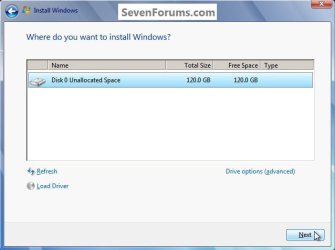
You could just click to select/highlight the desired partition to install Windows 7 to and click next when you are presented with this dialog box during the installation process and Windows will do all that's needed with no intervention from the user.
Though this is not the best way to go about it.
No none of it is 'needed' though is helpful to create the "System Reserved" partition.
You could just click to select/highlight the desired partition to install Windows 7 to and click next when you are presented with this dialog box during the installation process and Windows will do all that's needed with no intervention from the user.
Though this is not the best way to go about it.
click to enlarge
My Computer
- Computer Manufacturer/Model Number
- * BFK Customs *
- OS
- W 7 64-bit Ultimate
- CPU
- Intel Q9550 Yorkfield
- Motherboard
- ASUS P5Q Pro
- Memory
- 8GB Dominator 8500C5D
- Graphics Card(s)
- ATI : XFX 5870
- Sound Card
- Realtek HD Audio 7-1
- Monitor(s) Displays
- 1x 47" LCD HDMI & 3x 26" LCD HDMI
- Screen Resolution
- 1920x1080P & 1920x1200
- Hard Drives
- 1x 80GB Intel X25-M G2 SSD : 1x 500GB & 1x 640GB WD Caviar Black(s)
- PSU
- Corsair 620HX
- Case
- Cooler Master RC-690
- Cooling
- Tuniq Tower 120, 2x 140mm and 3x 120mm case fans
- Keyboard
- Microsoft 500
- Mouse
- Razer Diamondback 3G
- Internet Speed
- 14 Mb/s
- Other Info
- 1x Koutech 3Gb/s SATA HDD Hot Swap Rack
You're welcome.
If I were doing a new clean install I would definitely use the method outlined in Step Two #3 to create the 200MB SysResv and a single 100GB partition to do the install of Windows 7 to, just run the commands as they're listed.
SSD / HDD : Optimize for Windows Reinstallation
If I were doing a new clean install I would definitely use the method outlined in Step Two #3 to create the 200MB SysResv and a single 100GB partition to do the install of Windows 7 to, just run the commands as they're listed.
SSD / HDD : Optimize for Windows Reinstallation
My Computer
- Computer Manufacturer/Model Number
- * BFK Customs *
- OS
- W 7 64-bit Ultimate
- CPU
- Intel Q9550 Yorkfield
- Motherboard
- ASUS P5Q Pro
- Memory
- 8GB Dominator 8500C5D
- Graphics Card(s)
- ATI : XFX 5870
- Sound Card
- Realtek HD Audio 7-1
- Monitor(s) Displays
- 1x 47" LCD HDMI & 3x 26" LCD HDMI
- Screen Resolution
- 1920x1080P & 1920x1200
- Hard Drives
- 1x 80GB Intel X25-M G2 SSD : 1x 500GB & 1x 640GB WD Caviar Black(s)
- PSU
- Corsair 620HX
- Case
- Cooler Master RC-690
- Cooling
- Tuniq Tower 120, 2x 140mm and 3x 120mm case fans
- Keyboard
- Microsoft 500
- Mouse
- Razer Diamondback 3G
- Internet Speed
- 14 Mb/s
- Other Info
- 1x Koutech 3Gb/s SATA HDD Hot Swap Rack
Thanks, that was what I was going to do.
It's a piece of cake, don't be concerned; since you've already run the "clean all" if you should make an error running the format commands start over using just the "clean" command to remove the format data (if created) "clean all" isn't necessary once you've run it and not actually done the install yet.
Be sure to keep me informed.
My Computer
- Computer Manufacturer/Model Number
- * BFK Customs *
- OS
- W 7 64-bit Ultimate
- CPU
- Intel Q9550 Yorkfield
- Motherboard
- ASUS P5Q Pro
- Memory
- 8GB Dominator 8500C5D
- Graphics Card(s)
- ATI : XFX 5870
- Sound Card
- Realtek HD Audio 7-1
- Monitor(s) Displays
- 1x 47" LCD HDMI & 3x 26" LCD HDMI
- Screen Resolution
- 1920x1080P & 1920x1200
- Hard Drives
- 1x 80GB Intel X25-M G2 SSD : 1x 500GB & 1x 640GB WD Caviar Black(s)
- PSU
- Corsair 620HX
- Case
- Cooler Master RC-690
- Cooling
- Tuniq Tower 120, 2x 140mm and 3x 120mm case fans
- Keyboard
- Microsoft 500
- Mouse
- Razer Diamondback 3G
- Internet Speed
- 14 Mb/s
- Other Info
- 1x Koutech 3Gb/s SATA HDD Hot Swap Rack
Thanks....I thnk
I want to express my thanks to the members of this forum for all the help they have offered me. You all guided me through the upgrade of a sick Vista system to Windows 7 with patience and plain speaking.
After that success, a friend offered to sell me (at New Egg's price) an OEM Windows 7 version he had bought but not used. I planned to install in on an XP system and then slowly upgrade that machine as my pocketbook allowed. Before I could even get started, I was warned about problems using an OEM version and then changing the motherboard. This led me to say the heck with my budget. I now have a new mobo, CPU, GPU, PSU, a second larger HD and Windows 7.
I thank you all again for helping me with your advice and guidance. There was never a condescending remark, no matter how trivial the question. (Although I'm not sure the Chancellor of my Exchequer thanks you all as much as i DO).
Thanks again, especially to Bare Foot Kid.
Bob
I want to express my thanks to the members of this forum for all the help they have offered me. You all guided me through the upgrade of a sick Vista system to Windows 7 with patience and plain speaking.
After that success, a friend offered to sell me (at New Egg's price) an OEM Windows 7 version he had bought but not used. I planned to install in on an XP system and then slowly upgrade that machine as my pocketbook allowed. Before I could even get started, I was warned about problems using an OEM version and then changing the motherboard. This led me to say the heck with my budget. I now have a new mobo, CPU, GPU, PSU, a second larger HD and Windows 7.
I thank you all again for helping me with your advice and guidance. There was never a condescending remark, no matter how trivial the question. (Although I'm not sure the Chancellor of my Exchequer thanks you all as much as i DO).
Thanks again, especially to Bare Foot Kid.
Bob
My Computer
- OS
- Windows 7 Home Premium

Barefoot has helped many; new and old alike.
Thanks for all the tuts Ted.
Thanks for all the tuts Ted.
My Computer
- Computer type
- PC/Desktop
- Computer Manufacturer/Model Number
- Dell XPS 420
- OS
- Windows 10, Home Clean Install
- CPU
- Intel Core2 processsor Q8200(2.33Ghz 1333FSB) Quad Core Tech
- Motherboard
- Dell
- Memory
- 6 gb
- Graphics Card(s)
- ATI Radeon 256MB HD3650
- Sound Card
- Intergrated 7.1 Channel Audio
- Monitor(s) Displays
- Dell SP2009W 20"
- Hard Drives
- 640 GB Serial ATA Hard drive
- Cooling
- Fan
- Keyboard
- Dell USB Keyboard
- Mouse
- Dell Premium Optical USB
- Internet Speed
- DSL 2.85
Thank you Bob and Richard, it's been my pleasure. 
My Computer
- Computer Manufacturer/Model Number
- * BFK Customs *
- OS
- W 7 64-bit Ultimate
- CPU
- Intel Q9550 Yorkfield
- Motherboard
- ASUS P5Q Pro
- Memory
- 8GB Dominator 8500C5D
- Graphics Card(s)
- ATI : XFX 5870
- Sound Card
- Realtek HD Audio 7-1
- Monitor(s) Displays
- 1x 47" LCD HDMI & 3x 26" LCD HDMI
- Screen Resolution
- 1920x1080P & 1920x1200
- Hard Drives
- 1x 80GB Intel X25-M G2 SSD : 1x 500GB & 1x 640GB WD Caviar Black(s)
- PSU
- Corsair 620HX
- Case
- Cooler Master RC-690
- Cooling
- Tuniq Tower 120, 2x 140mm and 3x 120mm case fans
- Keyboard
- Microsoft 500
- Mouse
- Razer Diamondback 3G
- Internet Speed
- 14 Mb/s
- Other Info
- 1x Koutech 3Gb/s SATA HDD Hot Swap Rack