
- Local time
- 11:47 AM
- Messages
- 269
Hello again, I need some help here on another issue. I have several Windows 7 64-bit Pro systems and I just was checking on things when one system has what I think is an issue.
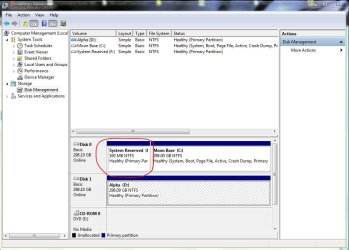
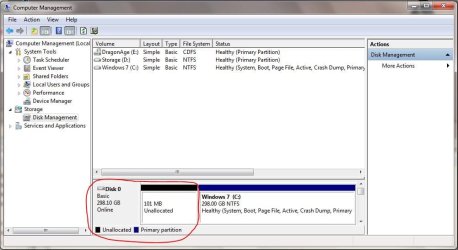
In the Computer Management under the Disk Management section, my one system shows the small partition for the System Reserve, but it does not say System Reserve like all my other Windows 7 computers.
The pic called "Capture" is what all my other systems shows
The pic called "Capture1" is what my one system says.
How do get the System Reserve and it's files to go in there so it can match my other systems?
An early thanks for your help
In the Computer Management under the Disk Management section, my one system shows the small partition for the System Reserve, but it does not say System Reserve like all my other Windows 7 computers.
The pic called "Capture" is what all my other systems shows
The pic called "Capture1" is what my one system says.
How do get the System Reserve and it's files to go in there so it can match my other systems?
An early thanks for your help
Attachments
My Computer
- Computer type
- PC/Desktop
- Computer Manufacturer/Model Number
- Home Built
- OS
- Windows 10 Pro 64-bit
- CPU
- Core I7-6700
- Motherboard
- Asus Maximus VIII Hero
- Memory
- 8GB Corsair Dominator
- Graphics Card(s)
- Asus STRIX GTX 980Ti
- Monitor(s) Displays
- Asus PG278Q, Dell U2410
- Screen Resolution
- 2560 x 1440, 1920 x 1200
- Hard Drives
- 1 x Samsung 950 Pro 512GB
1 x 1TB HGST
- PSU
- 750W Seasonic
- Case
- Antec 900 v3
- Cooling
- Stock
- Internet Speed
- Cable Internet

