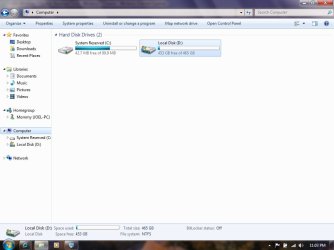
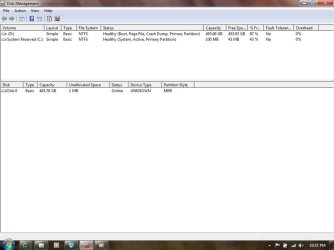
"System Reserved (C:)" and "Local Disk (D:)" ??

professornate

New member
Local time
11:53 AM
Messages
1
Newbie here. I have searched around for a while but have not found a post with my exact situation.

I just installed a new Seagate Momentus 500gb (7200rpm) SATA drive in my Lenovo X61 laptop and have been working on a installation of Windows7 Ultimate.

Not realizing this was an upgrade install disk, I tried to install Win7. I didn't know about the clean install method, so I started over with an installation of WinXP (slipstreamed to deal with the SATA drive).

Next, I ran the Custom Installation upgrade to Win7.

So far, it seems to be working ok.

However, the Local Drive is D: instead of C:. The System Reserved drive in labeled C:. Should I be concerned? Should/Can I change this?

Attached are screenshots of Disk Management and explorer window.

Thank you for any info.
-Nate
 

Attachments
  • DiskManagement.jpg
    DiskManagement.jpg
    42.5 KB · Views: 156
  • ComputerScreenShot.jpg
    ComputerScreenShot.jpg
    46.5 KB · Views: 211

My Computer

Computer Manufacturer/Model Number
Lenovo x61 (Tablet)
OS
Windows 7 Ultimate 32bit (upgrade from XP)
CPU
Intel Core Duo L7500 @ 1.60GHz
Memory
2.00GB
Hard Drives
Seagate Monmentus 7200RPM 500Gb
Try removing the System Reserved drive letter in Disk Management to see if Win7 claims C instead. It sometimes works.

There is no reason you can't operate with Win7 as D even though it is meant to always assume the C letter unless it's installer is run from another OS.

But if you do I would not allow a drive letter for SysReserved as programs can write to and corrupt it, especially the ability to make Win7 backup images.

Now that you know you can clean install Win7 without needing XP on the HD, I would strongly consider booting the installer to do a Custom install, choose Drive Options to Delete all partitions, Create new as you wish, then Format before installing to first partition after SysReserved it will create for you. The installer will see an OS at boot to allow use of Upgrade version key upfront during install.

Here are tips to get a perfect reinstall - use the ones which apply: Clean Reinstall steps
 
As the System Reserved is on partition 2, Windows installer will assign a letter.
 

My Computer

OS
ME/XP/Vista/Win7
FhSNz7l.jpg

Any suggestion with this? First at all System Reserved(F: ) is empty ( no hidden files too )
And how i can move memory and files from C: to F:
Thanks, cheers
Btw i can create a new thread its not the problem, but this one looks like a best one for that problem.
 
Last edited:

My Computer

Computer type
PC/Desktop
Computer Manufacturer/Model Number
Asus
OS
Windows 7 Ultimate x64
CPU
Intel(R) Core(TM) i3-2100 CPU @ 3.10GHz 3.10GHz
Motherboard
ASUSTeK Computer INC. P8H61-M LX2
Memory
4gb
Graphics Card(s)
AMD Radeon HD 5670
Hard Drives
Model SAMSUNG HD103SI ATA Device
Bytes/Sector 512
Size 931,51GB (1.000.202.273.280 bytes)
Mouse
Logitech G400s Optical Gaming Mouse
Antivirus
Microsoft Security Essentials
Browser
Opera
"...First at all System Reserved(F: ) is empty ( no hidden files too )..."No, leave that partition alone; System Reserved partition is not empty; explorer.exe cannot see the contents without help from another utility. If it exists, SysRes is necessary for Windows 7 boot.
 

My Computer

Computer type
PC/Desktop
Computer Manufacturer/Model Number
Antec desktop; Acer Aspire laptops
OS
Windows 7 Professional 64-bit
CPU
Desktop i5; Acers i5 & i7
Memory
desktop 16GB; 1 Acer 8GB & 1 Acer 16GB
Hard Drives
1TB split into 2 equal partitions [OS and data] usable by RJS
Internet Speed
AT&T DSL
Browser
FF, GChrome, msIE
Other Info
Windows 7 Firewall, Emsisoft AM/AV, MSE [scan-only], SpywareBlaster, Ruiware/BillP combine
"...First at all System Reserved(F: ) is empty ( no hidden files too )..."No, leave that partition alone; System Reserved partition is not empty; explorer.exe cannot see the contents without help from another utility. If it exists, SysRes is necessary for Windows 7 boot.

Am I able to move local C: to System Reserved with memory ( make a one partition )
 

My Computer

Computer type
PC/Desktop
Computer Manufacturer/Model Number
Asus
OS
Windows 7 Ultimate x64
CPU
Intel(R) Core(TM) i3-2100 CPU @ 3.10GHz 3.10GHz
Motherboard
ASUSTeK Computer INC. P8H61-M LX2
Memory
4gb
Graphics Card(s)
AMD Radeon HD 5670
Hard Drives
Model SAMSUNG HD103SI ATA Device
Bytes/Sector 512
Size 931,51GB (1.000.202.273.280 bytes)
Mouse
Logitech G400s Optical Gaming Mouse
Antivirus
Microsoft Security Essentials
Browser
Opera
No, leave SysRes partition as is. Nice idea, however, such won't work :)
 

My Computer

Computer type
PC/Desktop
Computer Manufacturer/Model Number
Antec desktop; Acer Aspire laptops
OS
Windows 7 Professional 64-bit
CPU
Desktop i5; Acers i5 & i7
Memory
desktop 16GB; 1 Acer 8GB & 1 Acer 16GB
Hard Drives
1TB split into 2 equal partitions [OS and data] usable by RJS
Internet Speed
AT&T DSL
Browser
FF, GChrome, msIE
Other Info
Windows 7 Firewall, Emsisoft AM/AV, MSE [scan-only], SpywareBlaster, Ruiware/BillP combine

My Computer

Computer type
PC/Desktop
Computer Manufacturer/Model Number
Asus
OS
Windows 7 Ultimate x64
CPU
Intel(R) Core(TM) i3-2100 CPU @ 3.10GHz 3.10GHz
Motherboard
ASUSTeK Computer INC. P8H61-M LX2
Memory
4gb
Graphics Card(s)
AMD Radeon HD 5670
Hard Drives
Model SAMSUNG HD103SI ATA Device
Bytes/Sector 512
Size 931,51GB (1.000.202.273.280 bytes)
Mouse
Logitech G400s Optical Gaming Mouse
Antivirus
Microsoft Security Essentials
Browser
Opera
Back
Top