System reserved drives

ajkjr

New member
Local time
4:23 PM
Messages
7
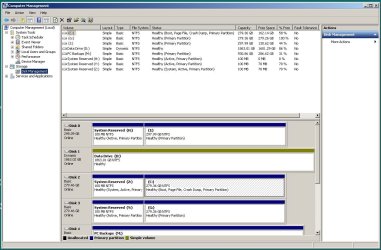
I have three "System Reserved" disks each 100mb. I understand there is supposed to be 1 with Windows 7 but why do I have three? I occasionally get "low disk space" warning for these drives. When I look at them under disk management 1 is at 100% used and the other 2 are at 30%. I originally had a RAID 1 setup but it is now broken in case that may have something to do with it. Thanks for any help or direction to information that can help me. Joe
 

My Computer

OS
Windows 7 professinal 64 bit
Retain the one that is "Active" and delete the other 2. You may want to first image them - just in case.
 

My Computer

Computer Manufacturer/Model Number
HP, Dell, Gateway, Toshiba - 4 laptops and 2 desktops
OS
Vista, Windows7, Mint Mate, Zorin, Windows 8
CPU
from 1.6GHz Duo to i7
Monitor(s) Displays
2x HP w2207
Hard Drives
5x HDD, 7x SSD, 12x Externals
Keyboard
with trackball - no mices
Mouse
Trackball mice
Internet Speed
DSL 6000
System Reserved Drives

All three say "active, primary partition" but one says "system, active, primary partition". SHould I keep the one that says system and delete the other two. I assume you mean to do an image of my primary partition (in this case C).

Thanks again.

Joe
 

My Computer

OS
Windows 7 professinal 64 bit
No, I meant to make an image of the little partitions you are about to delete. But that may not be neccessary because instead of deleting them, it may be easier to first set 2 of those little ones to "Logical" (and keep the one that says "system, active, primary). To set them to logical, use the bootable CD of this program ( BEST FREE Partition Manager Software for Windows supports all 32-bit & 64 bit Windows No-server OS. ). The controls are in the Partition tab > Modify.

If that works, we can still delete the partitions. I think that would be the cautious approach.

The advantage of the bootable CD of Partition Wizard is that you can still manipulate the partitions even if the system goes on the blink.
 

My Computer

Computer Manufacturer/Model Number
HP, Dell, Gateway, Toshiba - 4 laptops and 2 desktops
OS
Vista, Windows7, Mint Mate, Zorin, Windows 8
CPU
from 1.6GHz Duo to i7
Monitor(s) Displays
2x HP w2207
Hard Drives
5x HDD, 7x SSD, 12x Externals
Keyboard
with trackball - no mices
Mouse
Trackball mice
Internet Speed
DSL 6000
Yes, you want the System Active partition which is booting Win7. And it should be the only System and/or Active partition.

However, to be sure please post back a screenshot of your full Disk Mgmt drive map with listings, using Snipping Tool in Start Menu.

Always wipe the HD's when reinstalling Win7, or at least delete all partitions.
 
Last edited:
System reserved drive

Here is screen shot of my drives. Thanks for all the help.
 

Attachments

  • Capture.JPG
    Capture.JPG
    127 KB · Views: 192

My Computer

OS
Windows 7 professinal 64 bit
Yea, you can delete H and Y without repercussion. The only System Reserved partition you need is on the main boot drive, which appears to be the Z partition.
 

My Computer

OS
XP / Win7 x64 Pro
CPU
Intel Quad-Core Q9450 @ 3.2GHz
Motherboard
Asus P5-E
Memory
2x2GB GSkill DDR2
Graphics Card(s)
NVIDIA GeForce 8600 GTS (EVGA)
Monitor(s) Displays
Dell 2408WFP
Screen Resolution
1920x1200
Have a look at Option Two of this tutorial at the link below for an outline of the process needed to recover the space from any "System Reserved" partition you wish to recover into the other partitions though you won't need to do Step Three.

Partition Wizard : Use the Bootable CD
 

My Computer

Computer Manufacturer/Model Number
* BFK Customs *
OS
W 7 64-bit Ultimate
CPU
Intel Q9550 Yorkfield
Motherboard
ASUS P5Q Pro
Memory
8GB Dominator 8500C5D
Graphics Card(s)
ATI : XFX 5870
Sound Card
Realtek HD Audio 7-1
Monitor(s) Displays
1x 47" LCD HDMI & 3x 26" LCD HDMI
Screen Resolution
1920x1080P & 1920x1200
Hard Drives
1x 80GB Intel X25-M G2 SSD : 1x 500GB & 1x 640GB WD Caviar Black(s)
PSU
Corsair 620HX
Case
Cooler Master RC-690
Cooling
Tuniq Tower 120, 2x 140mm and 3x 120mm case fans
Keyboard
Microsoft 500
Mouse
Razer Diamondback 3G
Internet Speed
14 Mb/s
Other Info
1x Koutech 3Gb/s SATA HDD Hot Swap Rack
Yes to the above.
But I would make your current disk 2 (Z:, C: ) disk 0 with a cable swap. Also I would remove the letter (Z: ) from system reserved. That is, don't assign it a letter. Only assign it a letter on the rare occasion you go inside for a look, then remove the letter.
 

My Computer

Computer type
PC/Desktop
Computer Manufacturer/Model Number
Own build
OS
Windows 7x64 Home Premium SP1
CPU
Intel i7 2600k
Motherboard
ASUS P8Z68 Deluxe
Memory
G.Skill Ripjaws (DDR3-1600) 2x4GB
Graphics Card(s)
Nvidia GeForce GTS 450; Intel HD Graphics 3000(GT2+)
Monitor(s) Displays
Dell Ultrasharp IPS panel U2311H, Samsung SyncMaster P2350
Screen Resolution
1920x1080
Hard Drives
Samsung 850 Pro SSD 256GB, Samsung SSD 840 120GB, Seagates 1TB Barracuda ST31000528AS x2
PSU
Seasonic M12II 520W
Case
Lian Li Lancool PC-K60
Cooling
Case: 1x120mm, 3x140mm CPU: Hyper 212+
Keyboard
Logitech MK520 (wireless)
Mouse
Logitech MK520
Internet Speed
6-7 Mbps
Antivirus
Norton Security Premium, Malwarebytes on 2 (MSE on 3rd PC)
Browser
FireFox
Other Info
Audio: Logitech Z523 2.1
Use Partition Wizard bootable CD as suggested to rightclick Delete the non-System 100mb SysReserved partitions, click OK.

then rightclick the adjacent partition next to each deleted 100mb, choose Resize, drag the left grey border to the far left to recover the 100mb, OK.

Next rightclick Z to remove the drive letter, OK, Apply all steps.

When you have a chance rightclick on each partition to Check File System and run a Surface Scan to check disk integrity.
 
System Reserved Drive

I think I did this right but the two small partitions seem to still be there. I did the resize but the left gray bar was already all the way to the left.

Thanks
 

Attachments

  • Capture1.JPG
    Capture1.JPG
    143.9 KB · Views: 18

My Computer

OS
Windows 7 professinal 64 bit
I think I did this right but the two small partitions seem to still be there. I did the resize but the left gray bar was already all the way to the left.

Thanks


You have to click and hold the left gray bar to drag it to the left all the way even if it doesn't look like there's any space there and then in the left pane "Operations Pending" column you have to click "Apply" then "Yes" for the changes to take effect.
 

My Computer

Computer Manufacturer/Model Number
* BFK Customs *
OS
W 7 64-bit Ultimate
CPU
Intel Q9550 Yorkfield
Motherboard
ASUS P5Q Pro
Memory
8GB Dominator 8500C5D
Graphics Card(s)
ATI : XFX 5870
Sound Card
Realtek HD Audio 7-1
Monitor(s) Displays
1x 47" LCD HDMI & 3x 26" LCD HDMI
Screen Resolution
1920x1080P & 1920x1200
Hard Drives
1x 80GB Intel X25-M G2 SSD : 1x 500GB & 1x 640GB WD Caviar Black(s)
PSU
Corsair 620HX
Case
Cooler Master RC-690
Cooling
Tuniq Tower 120, 2x 140mm and 3x 120mm case fans
Keyboard
Microsoft 500
Mouse
Razer Diamondback 3G
Internet Speed
14 Mb/s
Other Info
1x Koutech 3Gb/s SATA HDD Hot Swap Rack
The numers in the unallocated boxes should both be 0.
You still haven't got your boot disk in disk 0 position (disk 1 Partition Wizard numbering). Never mind.
Did you mean for Disk 4 (PW screen shot) to be dynamic?
 

My Computer

Computer type
PC/Desktop
Computer Manufacturer/Model Number
Own build
OS
Windows 7x64 Home Premium SP1
CPU
Intel i7 2600k
Motherboard
ASUS P8Z68 Deluxe
Memory
G.Skill Ripjaws (DDR3-1600) 2x4GB
Graphics Card(s)
Nvidia GeForce GTS 450; Intel HD Graphics 3000(GT2+)
Monitor(s) Displays
Dell Ultrasharp IPS panel U2311H, Samsung SyncMaster P2350
Screen Resolution
1920x1080
Hard Drives
Samsung 850 Pro SSD 256GB, Samsung SSD 840 120GB, Seagates 1TB Barracuda ST31000528AS x2
PSU
Seasonic M12II 520W
Case
Lian Li Lancool PC-K60
Cooling
Case: 1x120mm, 3x140mm CPU: Hyper 212+
Keyboard
Logitech MK520 (wireless)
Mouse
Logitech MK520
Internet Speed
6-7 Mbps
Antivirus
Norton Security Premium, Malwarebytes on 2 (MSE on 3rd PC)
Browser
FireFox
Other Info
Audio: Logitech Z523 2.1
Back
Top