

- Local time
- 7:32 PM
- Messages
- 63
Greeting All!
Today I installed a M4 64 gig ssd...did a fresh install of the O.S. Loving it...WOW!!
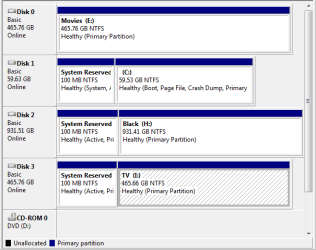
Anyways I have 3 other Drives in there making a total of 4.
3 out of the 4 drives have the 100 meg system reserved on them whilst 1 drive doesn't.
Can I remove them on all but my boot drive the M4?
Today I installed a M4 64 gig ssd...did a fresh install of the O.S. Loving it...WOW!!
Anyways I have 3 other Drives in there making a total of 4.
3 out of the 4 drives have the 100 meg system reserved on them whilst 1 drive doesn't.
Can I remove them on all but my boot drive the M4?
Attachments
My Computer
At a glance
Windows 7 Ultimate x64AMD X6 1090T16 Gig Kingston HyperXSaphire Radeon 6700
- Computer Manufacturer/Model Number
- Unforgiven!!
- OS
- Windows 7 Ultimate x64
- CPU
- AMD X6 1090T
- Motherboard
- ASUS m4a79xtd evo
- Memory
- 16 Gig Kingston HyperX
- Graphics Card(s)
- Saphire Radeon 6700
- Sound Card
- O/B
- Monitor(s) Displays
- 23" Acer 19"Acer
- Screen Resolution
- 1920x1080 Native
- Hard Drives
- M4 64 Gig SSD
W/D Cav Black 1 T/B
W/D Scorpio Blue 500 Gig X2
- PSU
- OCZ 650 watt 80+ Modular
- Case
- Cooler Master 690 Basic
- Cooling
- Cooler Master Hyper 212+ Push/Pull
- Keyboard
- Razer Black Widow Ultimate
- Mouse
- Razer D/A 3500dpi
- Internet Speed
- Meh...it's okay


