System Reserved Fragmented - Auslogics

meridius21

New member
Member
Local time
1:05 AM
Messages
69
I have been using Auslogics Disk Defrag for quite some time. Then going into the Windows Defragmenter, I noticed the System Reserved partition was at 6%. I then defragmented again and it went to 8%. It hasn't moved from there. Is this anything to worry about? All my W7 os's never moved from 0% in the System Reserved partition.
 

My Computer

Computer type
PC/Desktop
OS
Windows 7 HP & Pro 64 bit
Hi Meridius,
Thats VERY concerting.
The system reserved partition is usually only 100MB and NOT used for or by anything else.
The question becomes whats been using it.
Have you been infected recently?

Roy
 

My Computer

Computer type
PC/Desktop
Computer Manufacturer/Model Number
medionl/Aspire 6930G/acer x55a
OS
W7 home premium 32bit/W7HP 64bit/w10 tp insider ring
CPU
E5300 dual core
Motherboard
medion MS7366
Memory
3gb
Graphics Card(s)
Nvidia Geforce 7100 Nforce 630i
Monitor(s) Displays
avixc
Internet Speed
n (isp resticted to 72)
Antivirus
mse/pands
Browser
palemoon
Other Info
Belkin Fd7050 n USB using Railink RT2870 drivers, more upto date
Hi meridius


First, is this System Reserved partition hidden, if not then changed to hidden.

It is best to left it as it is.

That is to say, sometimes this is default.

Is there any problem in the computer &or system.

If there is no problem, then do not do anything.
 

My Computer

Computer type
Laptop
Computer Manufacturer/Model Number
Toshiba L630 and L735
OS
Windows 7 x64
Hard Drives
240 GB SSD
OK. I did a full scan with Kaspersky Internet Security and no viruses. Also a disk boot sectors and hidden startup objects scan with Kaspersky Rescue Disk and also no viruses (I will do a full one with Kaspersky Rescue Disk tomorrow).

I can only access the System Reserved partition from disk management so does that count as hidden?

Other than that there is no problem with the os. Is there anything else I should do?

N.B. Auslogics algorithms moves system files to the beginning of the HDD but that shouldn't be anything to do with the System Reserved partition.
 

My Computer

Computer type
PC/Desktop
OS
Windows 7 HP & Pro 64 bit
As i had mentioned, do change this System Reserved partition as hidden.

This is where the OS will check during booting process.
Should there be any issue, the computer may hang and trigger something else.

As the System Reserved partition will occupy the very first part of the HDD for booting, as this is the purpose.
Since you can access, do copy it to the C:\ drive in case this System Reserved partition is damaged.
You can set C:\ drive to enable to boot, instead of the System Reserved partition.
There are 3 main files & folders, which is necessary for the system to boot up.

As currently there is no issue, then do nothing and set as hidden.
System Reserved partition do not need to be defrag, as it only contain a few MB.
As for the size, it is not necessary to be 100 MB exact, as long as there are 3 files & folder.


Recently when i bought a laptop and while doing cloning process (as backup) using Mini Tools Partition Wizard.
I did not check properly, and somehow this System Reserved partition was turn off.
Upon switching on the laptop, the Windows did not boot, as it go into black&white (like DOS mode) then it crashed.
Went back to the repairman, he mentioned that the system failed.

 

My Computer

Computer type
Laptop
Computer Manufacturer/Model Number
Toshiba L630 and L735
OS
Windows 7 x64
Hard Drives
240 GB SSD
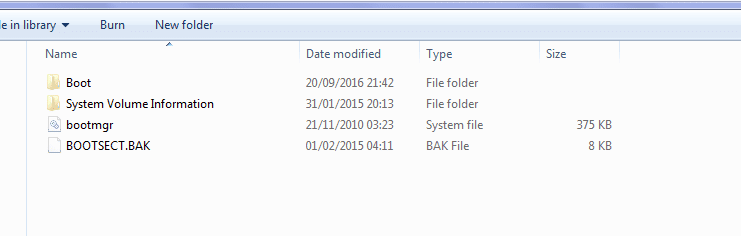
There are only 4 folders/files in that partition

your System Reserved partition shoud be like this, see screenshot, if the file sizes are different
something IS wrong.
Once installed THEY ARE NOT ADDED TO, so they should NOT need defragging
UNLESS your dual booting
note bootmgr date should beyour original OS install date


This partition will be AT the front of the DRIVE otherwise no boot, Auslogic will not have moved it

suggest you run specific rootkit tools.
How to use Malwarebytes Anti-Rootkit to remove rootkits from a Computer
RKill Download
GMER Download
TDSSKiller Download


Roy
 

Attachments

  • rspcheck.PNG
    rspcheck.PNG
    12.5 KB · Views: 4

My Computer

Computer type
PC/Desktop
Computer Manufacturer/Model Number
medionl/Aspire 6930G/acer x55a
OS
W7 home premium 32bit/W7HP 64bit/w10 tp insider ring
CPU
E5300 dual core
Motherboard
medion MS7366
Memory
3gb
Graphics Card(s)
Nvidia Geforce 7100 Nforce 630i
Monitor(s) Displays
avixc
Internet Speed
n (isp resticted to 72)
Antivirus
mse/pands
Browser
palemoon
Other Info
Belkin Fd7050 n USB using Railink RT2870 drivers, more upto date
On normal, Legacy - MBR, win 7 installation there is no System Reserved partition. There is a RAW MSR partition (no format) and a big NTFS partition for Windows.
On UEFI you will also have a 100M Fat32 partition.

System Reserved partition are created by OEM builders and has maintenance tools, sometimes the boot loader, as Roy mentioned, and Factory Recover images. They can be ~10 to 15G in size.

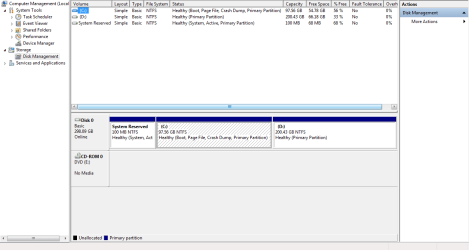
Please open disk manager, expand the columns, with sniping tool take a snapshot and attach the image so we can have a look.
 

My Computers

System One System Two

  • Computer type
    PC/Desktop
    Computer Manufacturer/Model Number
    custom build
    OS
    Windows 7 HP 64
    CPU
    i5 6600K - 800MHz to 4200MHz
    Motherboard
    GA-Z170-HD3P
    Memory
    4+4G GSkill DDR4 3000
    Graphics Card(s)
    IG - Intel 530
    Monitor(s) Displays
    Samsung 226BW
    Screen Resolution
    1680x1050
    Hard Drives
    (1) -1 SM951 – 128GB M.2 AHCI PCIe SSD drive for Windows 7 and Lubuntu
    (2) -1 WD SATA 3 - 1T for Data
    (3) -1 WD SATA 3 - 1T for backup
    PSU
    Thermaltake 450W TR2 gold
    Keyboard
    Old and good Chicony mechanical keyboard
    Mouse
    Logitech mX performance - 9 buttons (had to disable some)
    Internet Speed
    500Mb/s
    Browser
    Firefox 64
    Other Info
    TinyWall firewall
  • Computer type
    Laptop
    System Manufacturer/Model Number
    Asus Q550LF
    OS
    Windows 7 Pro
    CPU
    i7-4500U 800MHz to 3.0GHz
    Motherboard
    Asus Q550LF
    Memory
    (4+4)G DDR3 1600
    Graphics Card(s)
    IG intel 4400 + NVIDIA GeForce GT 745M
    Sound Card
    Realtek
    Monitor(s) Displays
    LG Display LP156WF4-SPH1
    Screen Resolution
    1920 x 1080
    Hard Drives
    BX500 120G SSD for Windows and programs +
    1T HDD for data
    Internet Speed
    500 Mb/s
    Browser
    Firefox
    Other Info
    TinyWall firewall
I have some basic questions:

- How exactly do I hide the System Reserved partition?

- Where (i.e. in what directory/folder) do I access the files for the System Reserved partition?

I attach a snapshot of Disk Management.
 

Attachments

  • DiskManagement.png
    DiskManagement.png
    42 KB · Views: 4

My Computer

Computer type
PC/Desktop
OS
Windows 7 HP & Pro 64 bit
Don't see any thing not normal. It only has the boot loader as Roy mentioned.
What you mean by hide the System Reserved partition? It's already hidden.
As the partition doesn't have a letter assign to it you can't see it in Explorer. I don't think Windows will allow, but, on Disk Manager, try to assign a drive letter to the partition. Then you'll be able to see it in Explorer.
 

My Computers

System One System Two

  • Computer type
    PC/Desktop
    Computer Manufacturer/Model Number
    custom build
    OS
    Windows 7 HP 64
    CPU
    i5 6600K - 800MHz to 4200MHz
    Motherboard
    GA-Z170-HD3P
    Memory
    4+4G GSkill DDR4 3000
    Graphics Card(s)
    IG - Intel 530
    Monitor(s) Displays
    Samsung 226BW
    Screen Resolution
    1680x1050
    Hard Drives
    (1) -1 SM951 – 128GB M.2 AHCI PCIe SSD drive for Windows 7 and Lubuntu
    (2) -1 WD SATA 3 - 1T for Data
    (3) -1 WD SATA 3 - 1T for backup
    PSU
    Thermaltake 450W TR2 gold
    Keyboard
    Old and good Chicony mechanical keyboard
    Mouse
    Logitech mX performance - 9 buttons (had to disable some)
    Internet Speed
    500Mb/s
    Browser
    Firefox 64
    Other Info
    TinyWall firewall
  • Computer type
    Laptop
    System Manufacturer/Model Number
    Asus Q550LF
    OS
    Windows 7 Pro
    CPU
    i7-4500U 800MHz to 3.0GHz
    Motherboard
    Asus Q550LF
    Memory
    (4+4)G DDR3 1600
    Graphics Card(s)
    IG intel 4400 + NVIDIA GeForce GT 745M
    Sound Card
    Realtek
    Monitor(s) Displays
    LG Display LP156WF4-SPH1
    Screen Resolution
    1920 x 1080
    Hard Drives
    BX500 120G SSD for Windows and programs +
    1T HDD for data
    Internet Speed
    500 Mb/s
    Browser
    Firefox
    Other Info
    TinyWall firewall
At this stage I probably won't do too much more except for scanning. If I have to, a reinstall...

Also how good is Kaspersky Rescue Disk? I ran a scan for a full 3 hours yesterday and it found nothing. Does it also scan the boot files?
 

My Computer

Computer type
PC/Desktop
OS
Windows 7 HP & Pro 64 bit
I have been using Auslogics Disk Defrag for quite some time. Then going into the Windows Defragmenter, I noticed the System Reserved partition was at 6%. I then defragmented again and it went to 8%. It hasn't moved from there. Is this anything to worry about? All my W7 os's never moved from 0% in the System Reserved partition.
Leave it alone and let the Windows OS software handle it. Don't defrag it and don't assign a drive letter - ie keep it hidden.

This may explain a little of its original purpose when MS designed its original architecture:
reflect updates
It is post 24 that is the relevant post.

The PBR, bootmgr and BCD are key elements in this small partition that are critical in the MBR boot process. If you want these functions can be incorporated into the main OS partition using for example:
Bootmgr - Move to C:\ with EasyBCD

The 100mB system reserved partition must have ~ 50% free space if you want to use Windows inbuilt system imaging but most people here prefer system imaging software like (free) Macrium Reflect.
 

My Computer

Computer type
PC/Desktop
Computer Manufacturer/Model Number
Own build
OS
Windows 7x64 Home Premium SP1
CPU
Intel i7 2600k
Motherboard
ASUS P8Z68 Deluxe
Memory
G.Skill Ripjaws (DDR3-1600) 2x4GB
Graphics Card(s)
Nvidia GeForce GTS 450; Intel HD Graphics 3000(GT2+)
Monitor(s) Displays
Dell Ultrasharp IPS panel U2311H, Samsung SyncMaster P2350
Screen Resolution
1920x1080
Hard Drives
Samsung 850 Pro SSD 256GB, Samsung SSD 840 120GB, Seagates 1TB Barracuda ST31000528AS x2
PSU
Seasonic M12II 520W
Case
Lian Li Lancool PC-K60
Cooling
Case: 1x120mm, 3x140mm CPU: Hyper 212+
Keyboard
Logitech MK520 (wireless)
Mouse
Logitech MK520
Internet Speed
6-7 Mbps
Antivirus
Norton Security Premium, Malwarebytes on 2 (MSE on 3rd PC)
Browser
FireFox
Other Info
Audio: Logitech Z523 2.1
Thanks for the information and especially on EasyBCD which remains an option.

I guess theoretically System Reserved is better in security terms as the essential boot files are not mixed up with the C drive i.e. less susceptible to viruses.

Also is it possible that the defragmenter is misreporting? Is there any way to reinstall the Windows defragmenter?
 

My Computer

Computer type
PC/Desktop
OS
Windows 7 HP & Pro 64 bit
I guess theoretically System Reserved is better in security terms as the essential boot files are not mixed up with the C drive i.e. less susceptible to viruses.
I tend to think not.

I think one of the objectives of the system reserved partition was to facilitate mutibooting through the BCD (boot configuration data), it did have the bitlocked security facility but I was never comfortable with this.
I believe in keeping your OS partition and installed programs of a manageable size ( 256GB SSD should be plenty) and keep a number of system images. I keep large data on other drives and back it up independently. If a nasty hits me it will be a pain in the neck but recoverable I hope.
 

My Computer

Computer type
PC/Desktop
Computer Manufacturer/Model Number
Own build
OS
Windows 7x64 Home Premium SP1
CPU
Intel i7 2600k
Motherboard
ASUS P8Z68 Deluxe
Memory
G.Skill Ripjaws (DDR3-1600) 2x4GB
Graphics Card(s)
Nvidia GeForce GTS 450; Intel HD Graphics 3000(GT2+)
Monitor(s) Displays
Dell Ultrasharp IPS panel U2311H, Samsung SyncMaster P2350
Screen Resolution
1920x1080
Hard Drives
Samsung 850 Pro SSD 256GB, Samsung SSD 840 120GB, Seagates 1TB Barracuda ST31000528AS x2
PSU
Seasonic M12II 520W
Case
Lian Li Lancool PC-K60
Cooling
Case: 1x120mm, 3x140mm CPU: Hyper 212+
Keyboard
Logitech MK520 (wireless)
Mouse
Logitech MK520
Internet Speed
6-7 Mbps
Antivirus
Norton Security Premium, Malwarebytes on 2 (MSE on 3rd PC)
Browser
FireFox
Other Info
Audio: Logitech Z523 2.1
Back
Top