"system reserved" on the second HDD?

albert1234

New member
Local time
11:56 PM
Messages
7
Location
Heidelberg
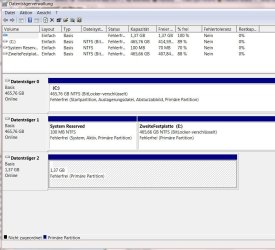
I have just bought a laptop. Looking to HDDs I realized that "system reserved" is on the second drive(e:\) whereas windows7 is on the first drive( c:\)
Now I wonder What would happen if I exchange my second HDD? As far as I know "system reserved" contains files which are used during boot. So could I face a disaster while booting the computer after having removed the first HDD?
 

My Computer

OS
windows7
I have just bought a laptop. Looking to HDDs I realized that "system reserved" is on the second drive(e:\) whereas windows7 is on the first drive( c:\)
Now I wonder What would happen if I exchange my second HDD? As far as I know "system reserved" contains files which are used during boot. So could I face a disaster while booting the computer after having removed the first HDD?


Absolutely correct. system reserved (and the hidden boot) needs to be left where they were installed

Ken
 

My Computer

Computer Manufacturer/Model Number
HP Pavillion dv-7 1005 Tx
OS
Win 8 Release candidate 8400
CPU
[email protected]
Memory
4 gigs
Graphics Card(s)
Nvidia 9600M
Sound Card
HD built-in
Monitor(s) Displays
17" Wxga
Screen Resolution
1440x900
Cooling
none
Internet Speed
45Mb down 5Mb up
So could I face a disaster while booting the computer after having removed the first HDD?
Yes....But you can recover...

Did you load Win 7 on the system?

Can you attach a snipping tool picture of your disk management window?
 

My Computer

Computer Manufacturer/Model Number
Homebuilt
OS
Windows 7 x64
CPU
i7-2600K
Motherboard
Asus P8Z77-v Pro
Memory
8 G
Graphics Card(s)
GTX 480
Sound Card
Onboard
Monitor(s) Displays
LG W2753V
Screen Resolution
1920x1080
Hard Drives
Crucial M4 128 G SSD
The Win7 System MBR can be recovered into Win7 after removing the 100mb System Reserved partition. Here's how:

Mark Win7 partition active using Diskpart from Repair CD/Win7 DVD, or 3rd party Partition manager.

Boot into Win7 DVD Repair console or Repair CD, click through to Recovery Tools list to run Startup Repair up to 3 separate times with reboots to write the MBR to Win7 partition.
 
Thankyou for helping me. I have a attached a picture of my system.There are two HDDs. The partition on Disc on disc 2(which does not exist physically) is for bitlocker purposes.
A last question: Why shall I perform the repair procedure three times?
 

Attachments

  • HDD.JPG
    HDD.JPG
    103.8 KB · Views: 165

My Computer

OS
windows7
Absolutely correct. system reserved (and the hidden boot) needs to be left where they were installed
Why?
You can move the files to the 1st disk!

Code:
Copy bootmgr, bootsect.bak and boot-directory’s files from d: to c:

bcdedit /export c:\Boot\BCD
bcdedit /store c:\Boot\BCD /set {9dea862c-5cdd-4e70-acc1-f32b344d4795} device partition=c:
bcdedit /store c:\Boot\BCD /set {b2721d73-1db4-4c62-bf78-c548a880142d} device partition=c:
"  bcdedit /store c:\Boot\BCD /set {466f5a88-0af2-4f76-9038-095b170dc21c} device partition=c:  '

Windows 7 DVD:\BOOT\BOOTSECT /NT60 c: /FORCE

DISKPART
  select disk 0
  select partition 1
  active
Reboot

{466f5a88-0af2-4f76-9038-095b170dc21c} = the GUID for NTLDR.
{b2721d73-1db4-4c62-bf78-c548a880142d} = the GUID for Diagnostic Tools
{9dea862c-5cdd-4e70-acc1-f32b344d4795} = the GUID for the Boot Manager

So the {466f5a88-0af2-4f76-9038-095b170dc21c} is not needed ( only for xp )

BUT gregrocker's method is easier I think:)
 
Last edited:

My Computer

OS
WIN 7 x64
I have no experience with bitlocker and how it works. I heard once the System Reserve partition was used in conjunction with that. If you currently have your drives set up to use it, I would have to do some extra research and testing.

Maybe someone else would know for sure.
 

My Computer

Computer Manufacturer/Model Number
Homebuilt
OS
Windows 7 x64
CPU
i7-2600K
Motherboard
Asus P8Z77-v Pro
Memory
8 G
Graphics Card(s)
GTX 480
Sound Card
Onboard
Monitor(s) Displays
LG W2753V
Screen Resolution
1920x1080
Hard Drives
Crucial M4 128 G SSD
Boot into Win7 DVD Repair console or Repair CD, click through to Recovery Tools list to run Startup Repair up to 3 separate times with reboots to write the MBR to Win7 partition.
Does this work if the system partition is encrypted?
 

My Computer

OS
windows7
I believe System Reserved partition supports Bitlocker. If you are using Bitlocker then I would leave it in place or try moving it to DISK0 after making a Win7 backup image so you have a path back.

The way I would move it is to use free Partition Wizard bootable CD. Rightclick Win7>Resize then slide border over to make space for SysReserved partition, OK.

Now rightclick SysReserved>Copy to new space created for it, OK. Then delete original SysReserved partition, OK, Apply all Steps.

If necessary, boot Win7 DVD repair console, click through to Startup Repair to run up to 3 separate times with reboots to repair or rewrite the MBR onto DISK0.
 
Last edited:
Thankyou guys,

I think I should have managed this before I encrypted drives(!6hrs). So I will first take action when I have to do this for another reason.
 

My Computer

OS
windows7
Back
Top