System Reserved Partition

csoyen

New member
Local time
11:40 PM
Messages
53
Hello,

I intall W7 RTM on 2 computers. On the first the installation process is normal ... it intalls like Vista.

But, at the secound computer the installation process have created a new partition, the name is System Reserved and the size is 100MB.

Why in the first PC the System Reserved partition wasn't created?
 

My Computer

OS
Windows 7 Ultimate x64
CPU
Intel Pentium Dual Core E5200 - 2.5 GHz @ 3.0 GHz
Motherboard
Asus P5KPL-CM
Memory
4GB (2*2) 667 @ 800 Mhz DC
Graphics Card(s)
ATI Radeon HD 4850
Sound Card
HD Audio (On-Board)
Monitor(s) Displays
Samsung 19''
Screen Resolution
1440*900
Hard Drives
500GB SATA II + 500GB SATA II (All Samsung)
PSU
LC Power 550W
Case
Cooler Master Elite 334
Keyboard
Lifetech
Mouse
Microsoft
Internet Speed
~2Mb
I want to know also, but I have not really researched this phenomenon. The reserved partition has something to do with BitLocker AFAIK. I encountered this belief here at SF.

This partiton is, or contains, the "Trusted Platform Module Security Device" on those boards that don't have one of the two chips. I'm guessing and guessing is not allowed.
 
If you create the partitions during installation it will create that system partition. If you create the partitions from another OS it will not.

That's what I noticed during my 892 build installations.
 

My Computer

OS
7264x64/7260x86
7 will create a 100 mb System, Active partition during installation if there is not already an active partition present.

If there is an already an Active partition, it will use that as the System partition - presumably in case you already have an o/s installed.
 

My Computers

System One System Two

  • Computer type
    PC/Desktop
    OS
    7 X64
    CPU
    i5 8400
    Motherboard
    gigabyte b365m ds3h
    Memory
    2x8gb 3200mhz
    Hard Drives
    various
    PSU
    pure power 11 400w cm
    Case
    Coolermaster
    Cooling
    cryorig m9i
  • Computer type
    PC/Desktop
    OS
    7x64
    CPU
    g5400
    Motherboard
    ga b365m ds3h
    Memory
    8gb ddr4 2400
    PSU
    xfx pro 450w
Okay.

Thanks.
 

My Computer

OS
Windows 7 Ultimate x64
CPU
Intel Pentium Dual Core E5200 - 2.5 GHz @ 3.0 GHz
Motherboard
Asus P5KPL-CM
Memory
4GB (2*2) 667 @ 800 Mhz DC
Graphics Card(s)
ATI Radeon HD 4850
Sound Card
HD Audio (On-Board)
Monitor(s) Displays
Samsung 19''
Screen Resolution
1440*900
Hard Drives
500GB SATA II + 500GB SATA II (All Samsung)
PSU
LC Power 550W
Case
Cooler Master Elite 334
Keyboard
Lifetech
Mouse
Microsoft
Internet Speed
~2Mb
SIW2 one question if i format the system reserved partition how i can reinstall the boot?

Is because i installed windows xp for test and i think xp install some files there, then i want format the boot partition for leave it like new.
 

My Computer

OS
Windows 7 Ultimate x64
Hello aub7, welcome to Seven Forums!


Before we make any specific recommendations will you please post a snip/screen-shot of the entire disk management drive map with a full description as to which drive/partition is which, so we can see what you have going on as there may be a fairly simple way to resolve the situation.

In the Windows start menu right click computer and click manage, in the left pane of the "Computer Management" window that opens click disk management and post a snip of that.

How to Upload and Post a Screenshot and File in Seven Forums


Be sure to post back with any further questions you may have and to keep us informed.
 

My Computer

Computer Manufacturer/Model Number
* BFK Customs *
OS
W 7 64-bit Ultimate
CPU
Intel Q9550 Yorkfield
Motherboard
ASUS P5Q Pro
Memory
8GB Dominator 8500C5D
Graphics Card(s)
ATI : XFX 5870
Sound Card
Realtek HD Audio 7-1
Monitor(s) Displays
1x 47" LCD HDMI & 3x 26" LCD HDMI
Screen Resolution
1920x1080P & 1920x1200
Hard Drives
1x 80GB Intel X25-M G2 SSD : 1x 500GB & 1x 640GB WD Caviar Black(s)
PSU
Corsair 620HX
Case
Cooler Master RC-690
Cooling
Tuniq Tower 120, 2x 140mm and 3x 120mm case fans
Keyboard
Microsoft 500
Mouse
Razer Diamondback 3G
Internet Speed
14 Mb/s
Other Info
1x Koutech 3Gb/s SATA HDD Hot Swap Rack
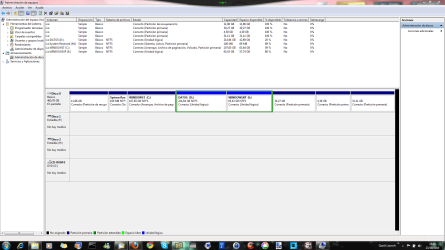
hello bare, thanks for responding here I left a screenshot of my partitions, the last three partitions are partitions of ubuntu.
Well want to know how I can reinstall the boot, because now I had a problem making a backup of the system and it gave me the error 0x81000033 after some research it appears that the problem was that the partition of 100mb lacked space for a temporary file using the backup windows, giving the solution was to delete the USN journal file system recovery, but not work for me, then I realized it was because of windows xp, surely, as installed in a extended partition, but used as partition C: to boot the system recovery partition so that Windows XP creates some files to booting in system recovery including a pagefile.sys that weighs 40 mb, I deleted that file and then I could make the backup

So I think it would be very useful to know to format that partition and re-create the files in case that is filled with garbage.

thanks.
 

Attachments

  • Captura.PNG
    Captura.PNG
    72.1 KB · Views: 723
Last edited:

My Computer

OS
Windows 7 Ultimate x64
There are two approaches to take to this problem:

1) Enlarge the 100mb System Reserved partition using Partition Wizard to Resize C taking about 200mb from its left, then Resize SysReserved into the freed space. This may be all that is required, and will save you having to Repair Win7 and possibly XP from boot to write the boot files into the WIn7 partition.

2) delete the 100mb Sys Reserved partition, using PW to recover its space into Win7 and mark Win7 Active, then run Startup Repair up to 3 separate times from booted Win7 DVD Repair console to recover the System MBR into Win7 partition. You can then use EasyBCD 2.0 from Win7 to add XP to Dual Boot: accept offered boot files, autocompletes, Save, Restart.

http://www.sevenforums.com/tutorials/93322-partition-wizard-use-bootable-cd.html
http://www.sevenforums.com/tutorials/105541-startup-repair-run-3-separate-times.html
 
There are two approaches to take to this problem:

thanks, thats good but is not a good solution for me.

1) Enlarge the 100mb System Reserved partition using Partition Wizard to Resize C taking about 200mb from its left, then Resize SysReserved into the freed space. This may be all that is required, and will save you having to Repair Win7 and possibly XP from boot to write the boot files into the WIn7 partition.

2) delete the 100mb Sys Reserved partition, using PW to recover its space into Win7 and mark Win7 Active, then run Startup Repair up to 3 separate times from booted Win7 DVD Repair console to recover the System MBR into Win7 partition. You can then use EasyBCD 2.0 from Win7 to add XP to Dual Boot: accept offered boot files, autocompletes, Save, Restart.

http://www.sevenforums.com/tutorials/93322-partition-wizard-use-bootable-cd.html
http://www.sevenforums.com/tutorials/105541-startup-repair-run-3-separate-times.html

1st I can not give more space to the reserved system partition, because, I have installed after W7, then would have to remove space to the installation of W7, to give system reserved in my case is very complicated because you see I have the disk full of partitions and therefore would have to modify all.

2nd something I like about W7 is that the boot files are separated in their own install partition, something approaching a little to linux and I find most useful in case of any problem of starting just reinstall that partition would suffice. So such as I have a backup of that partition if the boot fails me, then I just simply restore that partition and not all windows7

So I think that is more useful to know how to reinstall that partition, in case you want to uninstall Windows XP and boot cleaning needless files
 

My Computer

OS
Windows 7 Ultimate x64
In Step 1 I gave you the option to easily add more space into SysReserved by only Resizing Win7 from the left by about 100-200mb, then Resizing SysReserved into that space. There are no other partitions that need resizing to do this operation, which we have helped do here dozens of times successfully since Win7 release using the best tool for Win7, free Partition Wizard bootable CD.

Yes you can back up SysReserved if you decide to restore but it would take a few extra steps since you would need to reactivate the System Active boot files in it by marking Win7 partition Inactive and running Startup Repair up to 3 times. You could just as easily reconstruct a new SysReserved partition, mark it active and reinstall it using Startup Repair x3.

It is done similar to this, although we can give you more exacts steps if you need them: http://www.sevenforums.com/installation-setup/120044-system-reserved-create-dual-boot.html
 
thanks man, but my problem was, as had 3 primary partitions could not create one for windows xp, hiding the other primary partitions, files would be stored in the same boot partition of windows xp. But I could not do that because I had 3 primary partitions before, vaio recovery partition, system recovery and Windows 7. So I had to do all this mess. Anyway it worked and windows xp is fine for me but the drive where Windows XP is installed has put the letter E and the letter C is worn by the partition, system reserved.

That is why i think is good know how make a clean reinstall of that partition.
 

My Computer

OS
Windows 7 Ultimate x64
You can add a fourth Primary partition using free Partition WIzard bootable CD: http://www.sevenforums.com/tutorials/93322-partition-wizard-use-bootable-cd.html

It is best to remove the drive letter from SysReserved so nothing writes to it and clogs the partition. EasyBCD will config it without a letter in v2.01.

You can install an OS to a Logical partition if you have a primary which is already System Active, so the boot files can be placed there since they cannot be placed on a Logical partition.
 
You can add a fourth Primary partition using free Partition WIzard bootable CD: http://www.sevenforums.com/tutorials/93322-partition-wizard-use-bootable-cd.html

It is best to remove the drive letter from SysReserved so nothing writes to it and clogs the partition. EasyBCD will config it without a letter in v2.01.

You can install an OS to a Logical partition if you have a primary which is already System Active, so the boot files can be placed there since they cannot be placed on a Logical partition.

Yes man i know, but if i made an fourth primary partition where i put the ubuntu partition and the data partition, is not posible make a fifth partition even if i make it like extended.
 

My Computer

OS
Windows 7 Ultimate x64
You can install Ubuntu to Logical.

I would put Ubuntu on a separate HD if possible as GRUB will corrupt Win7.
 
You can install Ubuntu to Logical.

I would put Ubuntu on a separate HD if possible as GRUB will corrupt Win7.

I already have ubuntu on a logical drive, in fact, since the partition data until the end of the hard drive is all within an extended partition but the Windows 7 Disk Manager does not display that it does not recognize the ubuntu partition.

Yes i think the same is better install diferents SO on diferents HD but i just have one, then i try this.
 

My Computer

OS
Windows 7 Ultimate x64
Back
Top