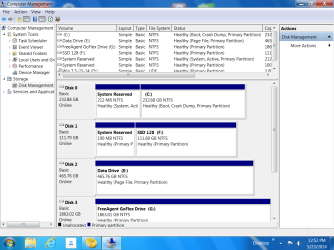
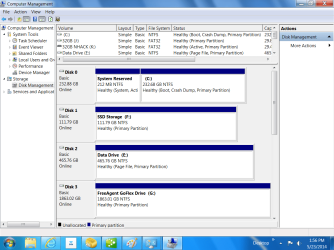
When my machine was built I opted for an SSD C: drive. The guy put one in but It got to small after several months. I had a new one installed twice as big. The old one was re-assigned and being used a just another drive. I asked them to do a "repair install" as I was having windows update issues.
Now the new SSD has the System Reserved partition NP except the partition now has the drive letter D: assigned to it. I've looked all over for a fix and have found several methods to accomplish this ranging from "just delete the drive letter" to "don't do it" with things in between like delete the drive letter then re-image the drive or remount Etc. How can I delete the drive letter, bottom line, the simpler the better.
Also, now rhe DVD drive only shows up when there is a disk in the drive, all other times the drive is "hidden". This is not a real issue, I can live with it. The other is very important to me.
Any comments or suggestions welcome.
Tnx,
Dusty
Now the new SSD has the System Reserved partition NP except the partition now has the drive letter D: assigned to it. I've looked all over for a fix and have found several methods to accomplish this ranging from "just delete the drive letter" to "don't do it" with things in between like delete the drive letter then re-image the drive or remount Etc. How can I delete the drive letter, bottom line, the simpler the better.
Also, now rhe DVD drive only shows up when there is a disk in the drive, all other times the drive is "hidden". This is not a real issue, I can live with it. The other is very important to me.
Any comments or suggestions welcome.
Tnx,
Dusty
My Computer
- Computer Manufacturer/Model Number
- Alert Micro D67
- OS
- Win 7 Pro 64 bit
- CPU
- Intel i7
- Motherboard
- Intel DQ67SW
- Memory
- 8 Gb
- Graphics Card(s)
- Intel Processor Integrated Graphics & Geforce GTX670
- Sound Card
- On Mothernoard
- Monitor(s) Displays
- 28" LG
- Hard Drives
- Intel 200Gb SSD C drive
500 GB WD
Seagate GoFlex 2TB