System Restart - possibly caused by Windows Backup and Restore?

justjeffindc

New member
Local time
1:43 AM
Messages
28
My homebuilt machine has been working great for about two months now. In the past week I've noticed that after a certain amount of HD thrashing the system will suddenly restart without warning.

I've found that I can reliably force it to do this by starting a backup using Windows Backup and Restore. Beyond that I have no idea what is happening. Here's what I've done:

1) WhoCrashedMe notes (correctly) that the system is configured to write small dump files. However, these files are not being created.
2) Memtest86 finds nothing of concern.
3) sfc from the command prompt also finds nothing of concern.

I've attached the Seven Forums zip file. Please help, I'm quite clueless at this point.
 

Attachments

My Computer My Computer

At a glance

Windows 7 Professional 64 bit
Computer Manufacturer/Model Number
Homebuilt
OS
Windows 7 Professional 64 bit

My Computer My Computer

At a glance

Windows 10, Home Clean InstallIntel Core2 processsor Q8200(2.33Ghz 1333FSB)...6 gbATI Radeon 256MB HD3650
Computer type
PC/Desktop
Computer Manufacturer/Model Number
Dell XPS 420
OS
Windows 10, Home Clean Install
CPU
Intel Core2 processsor Q8200(2.33Ghz 1333FSB) Quad Core Tech
Motherboard
Dell
Memory
6 gb
Graphics Card(s)
ATI Radeon 256MB HD3650
Sound Card
Intergrated 7.1 Channel Audio
Monitor(s) Displays
Dell SP2009W 20"
Hard Drives
640 GB Serial ATA Hard drive
Cooling
Fan
Keyboard
Dell USB Keyboard
Mouse
Dell Premium Optical USB
Internet Speed
DSL 2.85
It's a WD internal SATA-6 drive, and the WD diagnostics program just gave it a clean bill of health.
 

My Computer My Computer

At a glance

Windows 7 Professional 64 bit
Computer Manufacturer/Model Number
Homebuilt
OS
Windows 7 Professional 64 bit
I should perhaps add that I can manually write files to this drive without a problem. Just copied over about 6GB using Explorer and it was nice and fast. :D
 

My Computer My Computer

At a glance

Windows 7 Professional 64 bit
Computer Manufacturer/Model Number
Homebuilt
OS
Windows 7 Professional 64 bit
Test with a clean boot
http://support.microsoft.com/kb/929135

If it is not a hardware problem, a system restore from a week before the problem began will solve it, if the above does not work.
 
Last edited:

My Computer My Computer

At a glance

Windows 10, Home Clean InstallIntel Core2 processsor Q8200(2.33Ghz 1333FSB)...6 gbATI Radeon 256MB HD3650
Computer type
PC/Desktop
Computer Manufacturer/Model Number
Dell XPS 420
OS
Windows 10, Home Clean Install
CPU
Intel Core2 processsor Q8200(2.33Ghz 1333FSB) Quad Core Tech
Motherboard
Dell
Memory
6 gb
Graphics Card(s)
ATI Radeon 256MB HD3650
Sound Card
Intergrated 7.1 Channel Audio
Monitor(s) Displays
Dell SP2009W 20"
Hard Drives
640 GB Serial ATA Hard drive
Cooling
Fan
Keyboard
Dell USB Keyboard
Mouse
Dell Premium Optical USB
Internet Speed
DSL 2.85
I will try this tomorrow evening and report what happens.
 

My Computer My Computer

At a glance

Windows 7 Professional 64 bit
Computer Manufacturer/Model Number
Homebuilt
OS
Windows 7 Professional 64 bit
More bad news. I tried the clean boot and was able to remove all non-Microsoft drivers and still get the system crash.

So I tried restoring to a previous point. The restore fired off and ... my system died again! I am unable to do the restore, but fortunately my system was able to reboot to the current configuration so no harm done. I think.

But this may be a clue. I can cause the crash by either doing a restore or backup. Thoughts?
 

My Computer My Computer

At a glance

Windows 7 Professional 64 bit
Computer Manufacturer/Model Number
Homebuilt
OS
Windows 7 Professional 64 bit
No harm was done, but it is either a basic driver or hardware.
The HD thrashing can be the computer preparing the reports, which you should have.
My feeling is that it is harware, take a memory test that is the most common hardware problem.

Download memtest86 and test RAM
www.sevenforums.com/tutorials/105647-ram-test-memtest86.html
Run for 8 passes
If passes try a good stick in each slot for 3 passes
If fails do the same for 8 passes.

The crash during back up and restore CAN be the fact that you were using too much memory that is not there due to a defect.
 

My Computer My Computer

At a glance

Windows 10, Home Clean InstallIntel Core2 processsor Q8200(2.33Ghz 1333FSB)...6 gbATI Radeon 256MB HD3650
Computer type
PC/Desktop
Computer Manufacturer/Model Number
Dell XPS 420
OS
Windows 10, Home Clean Install
CPU
Intel Core2 processsor Q8200(2.33Ghz 1333FSB) Quad Core Tech
Motherboard
Dell
Memory
6 gb
Graphics Card(s)
ATI Radeon 256MB HD3650
Sound Card
Intergrated 7.1 Channel Audio
Monitor(s) Displays
Dell SP2009W 20"
Hard Drives
640 GB Serial ATA Hard drive
Cooling
Fan
Keyboard
Dell USB Keyboard
Mouse
Dell Premium Optical USB
Internet Speed
DSL 2.85
OK, I'll try that. I ran memtest earlier but only for 2 passes. I have 8GB RAM in four sticks, fwiw.

I can't help but wonder if this isn't a Windows problem, if only because it happens at about the same time after starting either Backup or System Restore. If it were hardware would it be more random? Just curious.
 

My Computer My Computer

At a glance

Windows 7 Professional 64 bit
Computer Manufacturer/Model Number
Homebuilt
OS
Windows 7 Professional 64 bit
What you say makes sense, but we have to start somewhere and it can be memory, too.
If its not memory it may very well be a driver.

On a hunch disable your anti virus and test (unless its Microsoft Security Essentials)
 

My Computer My Computer

At a glance

Windows 10, Home Clean InstallIntel Core2 processsor Q8200(2.33Ghz 1333FSB)...6 gbATI Radeon 256MB HD3650
Computer type
PC/Desktop
Computer Manufacturer/Model Number
Dell XPS 420
OS
Windows 10, Home Clean Install
CPU
Intel Core2 processsor Q8200(2.33Ghz 1333FSB) Quad Core Tech
Motherboard
Dell
Memory
6 gb
Graphics Card(s)
ATI Radeon 256MB HD3650
Sound Card
Intergrated 7.1 Channel Audio
Monitor(s) Displays
Dell SP2009W 20"
Hard Drives
640 GB Serial ATA Hard drive
Cooling
Fan
Keyboard
Dell USB Keyboard
Mouse
Dell Premium Optical USB
Internet Speed
DSL 2.85
It's MSE - sorry. :geek:

One of the reasons I was looking forward to building this system was to ditch McAfee. It hogged memory and failed to catch Antimalware Doctor. So far I've been quite happy with MSE.

I'll do the memory test overnight and keep my fingers crossed. For what, I'm not really sure, but I'll keep them crossed anyway.
 

My Computer My Computer

At a glance

Windows 7 Professional 64 bit
Computer Manufacturer/Model Number
Homebuilt
OS
Windows 7 Professional 64 bit
OK, I left memtest going all night and all day while I was at work. I came back just now and found that after 17 passes memtest found no errors.
 

My Computer My Computer

At a glance

Windows 7 Professional 64 bit
Computer Manufacturer/Model Number
Homebuilt
OS
Windows 7 Professional 64 bit
And now the good stick in each slot test has passed as well. What's next? I'm starting to wonder if a repair install is in my future ...
 

My Computer My Computer

At a glance

Windows 7 Professional 64 bit
Computer Manufacturer/Model Number
Homebuilt
OS
Windows 7 Professional 64 bit
Using event viewer, by typing that in search. What are the codes and errors that caused the crash?
In the left panel use the adminsitrative position to look for the errors.
 

My Computer My Computer

At a glance

Windows 10, Home Clean InstallIntel Core2 processsor Q8200(2.33Ghz 1333FSB)...6 gbATI Radeon 256MB HD3650
Computer type
PC/Desktop
Computer Manufacturer/Model Number
Dell XPS 420
OS
Windows 10, Home Clean Install
CPU
Intel Core2 processsor Q8200(2.33Ghz 1333FSB) Quad Core Tech
Motherboard
Dell
Memory
6 gb
Graphics Card(s)
ATI Radeon 256MB HD3650
Sound Card
Intergrated 7.1 Channel Audio
Monitor(s) Displays
Dell SP2009W 20"
Hard Drives
640 GB Serial ATA Hard drive
Cooling
Fan
Keyboard
Dell USB Keyboard
Mouse
Dell Premium Optical USB
Internet Speed
DSL 2.85
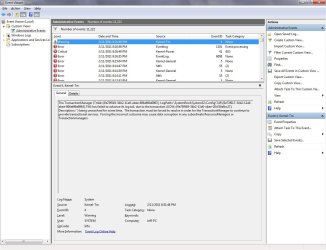
There is a series of errors associated with each crash:

1) Warning from Kernel-Tm (event id 4) stating "The TransactionManager [snip] has failed to advance its log tail, due to the transaction [snip] being unresolved for some time.
2) Crash happens some time after that, with "some time" being anywhere from a few minutes to a few hours.

Then in rapid succession ...
3) Error from EventLog (event id 6008) stating "The previous system shutdown at xxx on xxx was unexpected."
4) Critical from Kernel-Power (event id 41) stating "The system has rebooted without cleanly shutting down first. This error could be caused if the system stopped responding, crashed, or lost power unexpectedly."
5) Error from EventLog (event id 1101) stating "Audit events have been dropped by the transport. 0"
 

My Computer My Computer

At a glance

Windows 7 Professional 64 bit
Computer Manufacturer/Model Number
Homebuilt
OS
Windows 7 Professional 64 bit
Can you give me a screen shot?
 

My Computer My Computer

At a glance

Windows 10, Home Clean InstallIntel Core2 processsor Q8200(2.33Ghz 1333FSB)...6 gbATI Radeon 256MB HD3650
Computer type
PC/Desktop
Computer Manufacturer/Model Number
Dell XPS 420
OS
Windows 10, Home Clean Install
CPU
Intel Core2 processsor Q8200(2.33Ghz 1333FSB) Quad Core Tech
Motherboard
Dell
Memory
6 gb
Graphics Card(s)
ATI Radeon 256MB HD3650
Sound Card
Intergrated 7.1 Channel Audio
Monitor(s) Displays
Dell SP2009W 20"
Hard Drives
640 GB Serial ATA Hard drive
Cooling
Fan
Keyboard
Dell USB Keyboard
Mouse
Dell Premium Optical USB
Internet Speed
DSL 2.85
Screenshot is attached.

I've been testing different permutations of the memory chips and am still able to get it to crash. Not done with all the possibilities yet but am not having any luck with finding bad RAM.
 

Attachments

  • Untitled.jpg
    Untitled.jpg
    112.4 KB · Views: 116

My Computer My Computer

At a glance

Windows 7 Professional 64 bit
Computer Manufacturer/Model Number
Homebuilt
OS
Windows 7 Professional 64 bit
Are these the errors that occurred at the time of the problem?
 

My Computer My Computer

At a glance

Windows 10, Home Clean InstallIntel Core2 processsor Q8200(2.33Ghz 1333FSB)...6 gbATI Radeon 256MB HD3650
Computer type
PC/Desktop
Computer Manufacturer/Model Number
Dell XPS 420
OS
Windows 10, Home Clean Install
CPU
Intel Core2 processsor Q8200(2.33Ghz 1333FSB) Quad Core Tech
Motherboard
Dell
Memory
6 gb
Graphics Card(s)
ATI Radeon 256MB HD3650
Sound Card
Intergrated 7.1 Channel Audio
Monitor(s) Displays
Dell SP2009W 20"
Hard Drives
640 GB Serial ATA Hard drive
Cooling
Fan
Keyboard
Dell USB Keyboard
Mouse
Dell Premium Optical USB
Internet Speed
DSL 2.85
They are the events that happen at a time surrounding one of the crashes, yes. There is never a logged error at the specific time of a crash. When the system comes back up it logs the events I mentioned earlier:

3) Error from EventLog (event id 6008) stating "The previous system shutdown at xxx on xxx was unexpected."
4) Critical from Kernel-Power (event id 41) stating "The system has rebooted without cleanly shutting down first. This error could be caused if the system stopped responding, crashed, or lost power unexpectedly."
 

My Computer My Computer

At a glance

Windows 7 Professional 64 bit
Computer Manufacturer/Model Number
Homebuilt
OS
Windows 7 Professional 64 bit
I should add that when the crash occurs I usually just leave the machine off until I need to bring it back up - the amount of time between the pre- and post-crash events of course includes that.
 

My Computer My Computer

At a glance

Windows 7 Professional 64 bit
Computer Manufacturer/Model Number
Homebuilt
OS
Windows 7 Professional 64 bit
Back
Top