[1] Windows 7 deletes all system restore points on reboot"Astonishingly, the so-called system restore feature in Windows 7 deletes restore points without warning when the system is rebooted. This forum thread on answers.microsoft.com shows some of the users who have experienced the problem[1]. Today I did a clean install of Windows 7 Ultimate 32-bit (no dual boot), and noticed that whenever the machine rebooted after installing an application or driver, the disk churned for several minutes on the 'starting Windows' screen. Turns out that churning was the sound of my diligently created system restore points being deleted. Unfortunately I only found this out when Windows barfed at a USB dongle and I wanted to restore the system to an earlier state. This is an extraordinarily bad bug, which I suspect most Windows 7 users won't realise is affecting them until it's too late."
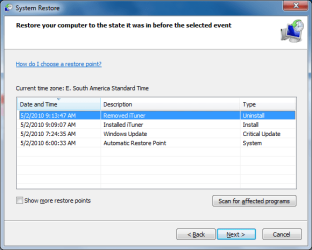
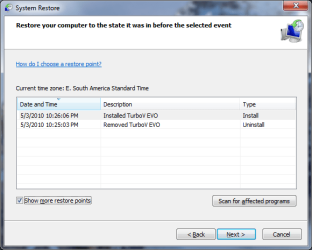
Source: Slashdot Technology Story | Win7 Can Delete All System Restore Points On Reboot
My Computer
- OS
- Windows 7 Ultimate x64 SP1 | OSX Lion 10.7 x64
- CPU
- Intel Core i5 750
- Motherboard
- Asus P7P55D LE
- Memory
- 4x Corsair Value DDR-3 1333MHz 2Gb
- Graphics Card(s)
- Sapphire HD4850 512Mb HDMI+DVI+VGA
- Sound Card
- Sound Blaster Audigy 2 ZS Platinum
- Monitor(s) Displays
- Samsung Syncmaster 245BW
- Screen Resolution
- 1920x1200
- Hard Drives
- Samsung Spinpoint 160Gb
Seagate Barracuda 200Gb
- PSU
- Seventeam 650W ATX 2.3
- Case
- Coolermaster Centurion 532
- Cooling
- Stock cooling system
- Keyboard
- Logitech G15 Gaming Keyboard
- Mouse
- Razer Deathadder
- Internet Speed
- 10Mbit Down / 1Mbit Up ADSL2+M
- Other Info
- Apple AirPort Extreme 802.11n (single band)
1Tb External USB HDD (AEBS volume)
Linksys WAG120N ADSL2+ Modem/Router