
System Restore encountered an error

tnks2hp

New member
Local time
1:12 PM
Messages
3
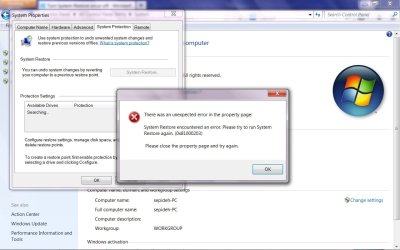
Windows 7 pro when accessing the control panel- system - system configuration I get error message attached. I can by pass the error, but windows searches forever and doesn't find a restore point and comes back after a few minutes with the same error message. ( attached )

There was an unexpected error in the property page:
System Restore encountered an error. Please try to run System Restore again (0x81000203)

I googled the error code and the answers I got didn't work. One was to set the local group policy - Administrative templates - system - system restore, to "not configured". It was already set to not configured.

Any ideas would be greatly appreciated.
 

Attachments
  • system restore error message.jpg
    system restore error message.jpg
    93.8 KB · Views: 0

My Computer

Computer type
Laptop
Computer Manufacturer/Model Number
HP Pavilion
OS
Windows 7 Professional
CPU
Intel Core 2 Duo CPU
Memory
3.00
Antivirus
AVG
Browser
Firefox

My Computer

Computer type
PC/Desktop
Computer Manufacturer/Model Number
Custom Bulid/Self made
OS
Windows 11 x64
CPU
i5 2500K @ 3.3 GHz
Motherboard
ASUS P8 Z77 V pro
Memory
16 GB DDR 3 @ 1600Mhz
Graphics Card(s)
MSI 1050TI 4GB OC version
Sound Card
On Board (Realtek HD audio)
Monitor(s) Displays
Samsung 22" LCD
Screen Resolution
1920*1080
Hard Drives
Seagate 1 TB, WD 1TB, Seagate 2 TB ( I use a lot of space)
PSU
coolermaster 750 W
Case
Coolermaster HAF912
Cooling
Coolermaster hyper 212 EVO
Keyboard
Samsung
Mouse
Dell Wireless
Internet Speed
Wireless 50 Mbps
Antivirus
AVG 2016 Internet Security
Browser
Google Chrome
Disabling the anti-virus program I have (AVG) didn't bring back the message. However, I'm going to have to re enable the anti-virus program. How can I have both to work together?
 

My Computer

Computer type
Laptop
Computer Manufacturer/Model Number
HP Pavilion
OS
Windows 7 Professional
CPU
Intel Core 2 Duo CPU
Memory
3.00
Antivirus
AVG
Browser
Firefox
I just tested it again and it didn't give me the error message after I re enabled the anti virus software. I don't see the error message anymore.

Thanks for your help. Hopefully this won't have a domino's effect on other things.
 

My Computer

Computer type
Laptop
Computer Manufacturer/Model Number
HP Pavilion
OS
Windows 7 Professional
CPU
Intel Core 2 Duo CPU
Memory
3.00
Antivirus
AVG
Browser
Firefox
So, were you able to complete the restore?
 

My Computer

Computer type
PC/Desktop
Computer Manufacturer/Model Number
Custom Bulid/Self made
OS
Windows 11 x64
CPU
i5 2500K @ 3.3 GHz
Motherboard
ASUS P8 Z77 V pro
Memory
16 GB DDR 3 @ 1600Mhz
Graphics Card(s)
MSI 1050TI 4GB OC version
Sound Card
On Board (Realtek HD audio)
Monitor(s) Displays
Samsung 22" LCD
Screen Resolution
1920*1080
Hard Drives
Seagate 1 TB, WD 1TB, Seagate 2 TB ( I use a lot of space)
PSU
coolermaster 750 W
Case
Coolermaster HAF912
Cooling
Coolermaster hyper 212 EVO
Keyboard
Samsung
Mouse
Dell Wireless
Internet Speed
Wireless 50 Mbps
Antivirus
AVG 2016 Internet Security
Browser
Google Chrome
Back
Top