
Solved System restore exceeds max quota

Karote

New member
Local time
4:59 AM
Messages
2
Hi All,

Does anyone know what might cause this issue? I have defined max usage for the system restore to be ~46 GB, but suddenly Win7 reports that it's using 62 GB? (see the attached pic below)
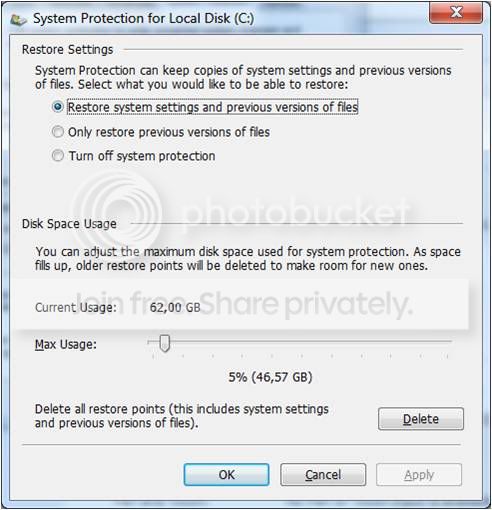
sysrestore.jpg


I have had quite many installations lately, and Win7 tends to create new restore point for each installation, but shouldn't it be able to erase older restore points away? Or is there some rule that overrides the max quota setting that restore points has to be remained for a certain period of time?

regards, karote
 

My Computer

OS
Windows 7 professional x64
CPU
i7 920
Motherboard
ASUS P6T SE
Memory
12 GB
Graphics Card(s)
HD 5850
Hard Drives
2 x 1TB
PSU
Corsair 750W
Hello Karote, and welcome to Seven Forums.

Was it already at 62GB before you set to 5% (46GB)? If so that would be why it's showing that.

If you do not think that you will need your current set of restore points and previous versions, then you could click on the Delete button them to clear and reset this and have it only use the max of 5% (46GB) again.

Hope this helps,
Shawn
 

My Computer

Computer type
PC/Desktop
Computer Manufacturer/Model Number
Self built custom
OS
64-bit Windows 11 Pro for Workstations
CPU
Intel i7-8700K OC'd to 5 GHz
Motherboard
ASUS ROG Maximus XI Formula Z390
Memory
64 GB (4x16GB) G.SKILL TridentZ RGB DDR4 3600 MHz
Graphics Card(s)
ASUS ROG-STRIX-GTX1080TI-O11G-GAMING
Sound Card
Integrated
Monitor(s) Displays
2 x Samsung Odyssey G7 27"
Screen Resolution
2560x1440
Hard Drives
1TB Samsung 990 PRO M.2,
4TB Samsung 990 PRO PRO M.2,
TerraMaster F8 SSD Plus NAS
PSU
Seasonic Prime Titanium 850W
Case
Thermaltake Core P3
Cooling
Corsair Hydro H115i
Keyboard
Logitech wireless K800
Mouse
Logitech MX Master 4
Internet Speed
2 Gb/s Download and 100 Mb/s Upload
Antivirus
Malwarebyte Anti-Malware Premium
Browser
Google Chrome
Other Info
Logitech Z625 speaker system,
Logitech BRIO 4K Pro webcam,
HP Color LaserJet Pro MFP M477fdn,
APC SMART-UPS RT 1000 XL - SURT1000XLI,
Galaxy S23 Plus phone
solved

This issue is solved. And I did nothing. It seems that the removal of the old system restore points is a bit slow process and the system allows them to exceed the maximum usage value temporarily. As said, the computer made the clean-up by itself at some point yesterday. Now it's back within the specified limits.

Regards,
Karote


solved.jpg
 

My Computer

OS
Windows 7 professional x64
CPU
i7 920
Motherboard
ASUS P6T SE
Memory
12 GB
Graphics Card(s)
HD 5850
Hard Drives
2 x 1TB
PSU
Corsair 750W
That's great news Karote. Thank you for posting back with your results and findings. :)
 

My Computer

Computer type
PC/Desktop
Computer Manufacturer/Model Number
Self built custom
OS
64-bit Windows 11 Pro for Workstations
CPU
Intel i7-8700K OC'd to 5 GHz
Motherboard
ASUS ROG Maximus XI Formula Z390
Memory
64 GB (4x16GB) G.SKILL TridentZ RGB DDR4 3600 MHz
Graphics Card(s)
ASUS ROG-STRIX-GTX1080TI-O11G-GAMING
Sound Card
Integrated
Monitor(s) Displays
2 x Samsung Odyssey G7 27"
Screen Resolution
2560x1440
Hard Drives
1TB Samsung 990 PRO M.2,
4TB Samsung 990 PRO PRO M.2,
TerraMaster F8 SSD Plus NAS
PSU
Seasonic Prime Titanium 850W
Case
Thermaltake Core P3
Cooling
Corsair Hydro H115i
Keyboard
Logitech wireless K800
Mouse
Logitech MX Master 4
Internet Speed
2 Gb/s Download and 100 Mb/s Upload
Antivirus
Malwarebyte Anti-Malware Premium
Browser
Google Chrome
Other Info
Logitech Z625 speaker system,
Logitech BRIO 4K Pro webcam,
HP Color LaserJet Pro MFP M477fdn,
APC SMART-UPS RT 1000 XL - SURT1000XLI,
Galaxy S23 Plus phone
Back
Top