System Restore In Safe Mode :S ?

redman

New member
Member
Local time
10:33 AM
Messages
28
I have had windows 7 for about 3 months. No problems thus far.

Today was a different story.

So today I was watching some inappropriate videos on the internet when someone walked in the door. I quickly tried to exit the internet browser firefox but it wasnt exiting for some weird reason. So I quickly then turn off the monitor, and hold the shutdown button on my PC for 10 seconds to get it to turn off.

When I turn it back on, everything starts up fine, but as I start clicking and doing things, the computer becomes increasingly less and less responsive, to the point where it does NOTHING.

Its really quite weird. I click my start button works fine once or twice but then it starts lagging terribly.

I turned the computer off again, but I cant shut it down normally, it wont make it that far, and it just sits at a black screen with a mouse when I try to do so.

I can start my PC in safe mode fine, its working great in safe mode. So how should I go about fixing my problem? What methods would you suggest.

Should I do system restore? I couldnt get it to work because it said it was turned off and I needed to turn it on, so even then I dont know if I have any restore points. It wouldnt let me turn it on in safe mode, the guide on the internet had some missing bridges in safe mode.

Thanks for any help :)
 

My Computer

OS
7
Once you turn safemode of you got no restore points...

It seems like you've damaged your hard drive. I've always heard about the "shock" of just turning of your PC the hard way and how it affects a currently working hard drive.

Of course I've never experienced it after many power offs like that and worse.... So.. This is all suspicion :D


Rofl@ inappropriate videos
 

My Computer

Computer type
PC/Desktop
Computer Manufacturer/Model Number
DELL VOSTRO 3650
OS
Windows 8.1 PRO
CPU
3rd Generation Intel Core i7‐3612QM CPU @ 2.10GHZ
Memory
8GB DDR3
Graphics Card(s)
NVIDIA GeForce GT 525M (128 bit), 1GB Grpahics
Screen Resolution
1920X1080
Hard Drives
750GB 5400RPM
Try purging all temp and Temp Internet Files (I guess FireFox has TIF files).

Safe Mode working OK is a reasonable indication that your "hard" drive survived the coitus interruptus.
 
Safe Mode working OK is a reasonable indication that your "hard" drive survived the coitus interruptus.


:roflmao::roflmao::roflmao:

Yer killing me man, stop .... I got tears rolling down my face .... please, stop!
 

My Computer

Computer type
PC/Desktop
Computer Manufacturer/Model Number
LENOVO K450 @3.0GHZ
OS
64-bit Windows 8.1 Pro
CPU
Core(TM) i5 CPU 4330 Haswell @ 3.20GHz
Motherboard
LENOVO
Memory
12.00 GB
Graphics Card(s)
Intel(R) HD Graphics
Sound Card
Intel HD integtrated
Monitor(s) Displays
HP 25' ISP Monitor
Screen Resolution
1900/1020
Hard Drives
(1) ST1000DM003-1CH162 (2) Generic STORAGE DEVICE USB Device (3) Generic STORAGE DEVICE USB Device
Internet Speed
100mb down/10mb up
haha very funny lol.

What do you mean purging the temporary internet files, how do I do that.

Ive already went into firefox and deleted all my history , cookies etc.

Still the same problem when I start PC.
 

My Computer

OS
7
Lol I am retarded.

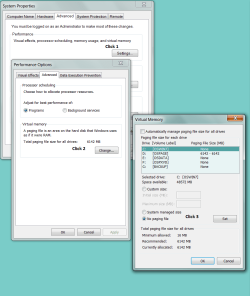
What is your 'page file'.
 

My Computer

OS
7
Start
Computer - right click
Properties
Advanced
Settings
Change

can you take it from there?
 

Attachments

  • Capture.PNG
    Capture.PNG
    42.6 KB · Views: 1,432
ok, so i click no paging, then reboot in regular mode not safe mode, and then if it works i uncheck that no paging thing?

if i do this i will be able to reboot my pc with no problems right?
 

My Computer

OS
7
If you had your system specs loaded it would be possible for me to be sure, but if you have at least a gig of RAM you should be fine, maybe a litle slow, maybe not.

Safe mode boot not necessary. Please boot normal.

If it works, reset your page file - yes.

I am getting so sleepy.
 
sorry thanks 4 the help.

i got 2 gb of ram, and intel core 2 2.14 GHZ
 

My Computer

OS
7
Take a short nap Antman... Ill wake you up when the OP responds.... :sleep:
 

My Computer

Computer type
PC/Desktop
Computer Manufacturer/Model Number
LENOVO K450 @3.0GHZ
OS
64-bit Windows 8.1 Pro
CPU
Core(TM) i5 CPU 4330 Haswell @ 3.20GHz
Motherboard
LENOVO
Memory
12.00 GB
Graphics Card(s)
Intel(R) HD Graphics
Sound Card
Intel HD integtrated
Monitor(s) Displays
HP 25' ISP Monitor
Screen Resolution
1900/1020
Hard Drives
(1) ST1000DM003-1CH162 (2) Generic STORAGE DEVICE USB Device (3) Generic STORAGE DEVICE USB Device
Internet Speed
100mb down/10mb up
Spunds good .. all except for the creme soda, give mine to Joli Bear.. :D
 

My Computer

Computer type
PC/Desktop
Computer Manufacturer/Model Number
LENOVO K450 @3.0GHZ
OS
64-bit Windows 8.1 Pro
CPU
Core(TM) i5 CPU 4330 Haswell @ 3.20GHz
Motherboard
LENOVO
Memory
12.00 GB
Graphics Card(s)
Intel(R) HD Graphics
Sound Card
Intel HD integtrated
Monitor(s) Displays
HP 25' ISP Monitor
Screen Resolution
1900/1020
Hard Drives
(1) ST1000DM003-1CH162 (2) Generic STORAGE DEVICE USB Device (3) Generic STORAGE DEVICE USB Device
Internet Speed
100mb down/10mb up
no didnt work, i am uploading a video of what happens..

when i got back to safe mode i looked @ the settings and it was switched to system managed size.

[ame="http://www.youtube.com/watch?v=Fw-IW0JmDC4"]YouTube - Windows 7 ...[/ame]

video, sorry for bad quality, i did it on my phone.
 
Last edited:

My Computer

OS
7
9lejk6.png


audio service not running in safe mode, idk if that means anything i doubt it..
 

My Computer

OS
7
anyone else habe any ideas

To be honest at some point you should start thinking about a clean re-install. Might take less time that way.

Ken
 

My Computer

Computer Manufacturer/Model Number
HP Pavillion dv-7 1005 Tx
OS
Win 8 Release candidate 8400
CPU
[email protected]
Memory
4 gigs
Graphics Card(s)
Nvidia 9600M
Sound Card
HD built-in
Monitor(s) Displays
17" Wxga
Screen Resolution
1440x900
Cooling
none
Internet Speed
45Mb down 5Mb up
ugh ok, ill be going back to vista
 

My Computer

OS
7
Back
Top