Solved System Restore Issue

timw128

New member
Member
VIP
Local time
4:14 AM
Messages
294
Location
Michigan, USA
Good Mornin'-

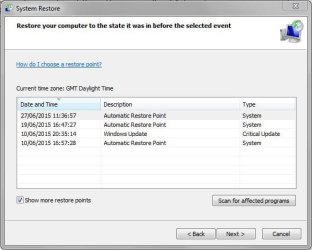
Today, we have an issue with System Restore. Ever since June 25, 2015 the system has failed to set an automatic restore point. Nothing has been changed in Task Scheduler, 'CKHDSK /F' reports nothing, and we have not ran 'SFC /SCANNOW', as the last two times ran we wound up having to do a System Recovery because it wouldn't fix the corrupt or missing files. One thing I did notice is that Volume Shadow Copy in 'services.msc' was set to manual and not running- we restarted and set to automatic last night. Another thing is that I had running the computer 'on' all the time with sleep mode engaged to go to sleep every 20 minutes.
I have never had so many issues with a brand new computer before in my life, and am about completely burned out from all of this frustration and chasing the various anomalies.
Could someone please help me out here?... I would greatly appreciate it!... One last thing- I have considered booting to 'Last Known Good Config', but wanted to wait until I got some input here.
Thanks, in advance, for any and all help on this matter.

Kind Regards-

tim
 

My Computer

Computer type
PC/Desktop
Computer Manufacturer/Model Number
HP ENVY 700-515xt CTO, with more cam, headers, and 4.11 gears.
OS
Windows 7 Pro SP1 x64
CPU
Intel Haswell i7-4770 3.4GHz
Motherboard
OEM Kaili2 (MSI MS-7826 v2.0)
Memory
G. SKILLS 32GB Ripjaws X Series DDR3 1600 SDRAM
Graphics Card(s)
Integrated HD4600- upgrade coming!
Sound Card
Integrated...for now.
Monitor(s) Displays
Dell ST-2310 Digital
Screen Resolution
I like 1920x1080
Hard Drives
C\:-Samsung 850PRO SSD-256gb, D:\-SG Barracuda 7200 HDD 1 TB (Storage)
PSU
350w OEM (About to become a display in the aquarium!)
Case
ENVY OEM
Cooling
FANS
Keyboard
Logitech and HP- USB.
Mouse
Logitech LS1 (Alltime favorite of mine!) and HP- both USB
Internet Speed
65Mbps Down (min)/4.5Mbps UP- Charter Comm HS cable
Antivirus
avast! Internet Security 2015/MBAM
Browser
Opera, at present. Love that Chromium horsepower!

My Computer

Computer type
PC/Desktop
Computer Manufacturer/Model Number
Custom Build
OS
W7 Pro x64 SP1 | W10 Pro IP x64 | W8.1 Pro x64 VM | Linux Mint VM
CPU
i7-4790k @ 4GHz (4.4GHz Boost)
Motherboard
ASUS Sabertooth Z87 (BIOS Rev 2004)
Memory
16GB DDR3 Kingston HyperX Fury @ 1600MHz CL 9-9-9-27
Graphics Card(s)
EVGA GTX 980 Classified
Sound Card
Realtek Onboard
Monitor(s) Displays
Samsung S27D390
Screen Resolution
1920 x 1080
Hard Drives
240GB Intel 520 Series SSD |
Samsung 850 EVO 120GB SSD |
2TB WD Caviar Black |
2TB WD Caviar Green
PSU
Corsair HX850-80 Gold Modular
Case
Cooler Master Silencio 650
Cooling
Corsair H80i w/2 x Corsair SP120 | 2 x 120mm Noctua NF-S12B
Keyboard
Microsoft Sidewinder X4
Mouse
Gigabyte M6900 optical
Internet Speed
152mb
Antivirus
F-Secure
Browser
Firefox 38.0
Other Info
Backup Rig: Win 7 Pro 64-bit | AMD A10-5800k | ASUS F2A85-V Pro | 8GB Samsung DDR3 @1600MHz | 120GB Toshiba SDD | 2TB Seagate HDD | Cooler Master Silencio 550
I don't even have any Automatic Restore Points in mine.

Run sfc /scannow - Do you avoid the doctor because he may find something wrong with you? :p

"Last Known Good Configuration" only loads the registry values of the last successful boot.

Can you list the problem with your PC? I am just curious.
 

My Computer

Computer type
PC/Desktop
Computer Manufacturer/Model Number
Custom Build
OS
Windows 7 Ultimate x64 SP1
CPU
AMD Phenom 2 1090T
Motherboard
Gigabyte GA-890FXA-UD5
Memory
2x8GB Kingston HyperX Fury Black 1600Mhz Unganged
Graphics Card(s)
MSI GTX 970 Gaming 4G
Sound Card
Realtek On-Board HD 7.1 Audio / Logitech G35
Monitor(s) Displays
3xAcer GD245HQ
Screen Resolution
1920x1080
Hard Drives
Samsung 850 Pro 512GB SSD - OS /
WD Caviar Black SATA 3 - 1 TBx2 - Dynamic RAID 0 /
WD Caviar Green SATA 2 - 640GBx2 - Dynamic RAID 0 /
WD Caviar Green SATA 2 - 640GB - Internal Backup /
Seagate Barracude SATA 3 - 3TB - External Backup/ Sync
PSU
HighPower 1000W
Case
Cooler Master HAF 932
Cooling
Noctua NH-D14
Keyboard
Logitech G19
Mouse
Logitech G500
Internet Speed
100/4 Mbit Cable (100GB quota)
Antivirus
ZoneAlarm Extreme Security / MBAM Pro / MBAE Free / SAS Free
Browser
IE 11 - Firefox - Chrome
Other Info
Logitech F710/ G27/ G940/ Z5500 // TrackIR 5 // Nvidia 3D Surround Vision
If you ran SFC SCANNOW Command and it couldn't repair damaged System Files in three attempts, then the next step would not be to restore the corrupt Factory Install - the worst possible install of Win7 one can have. The next step would be to do a Repair Install to see if it can sort out the factory install bloatware and duplicate utilities that interfere with better versions built into Win7.

But I would instead invest now in a perfect Clean Reinstall Windows 7 following the steps which compile everything that works best in Win7 based on tens of thousands of installs we've directly helped with here.
 
Your system files are not corrupt, there are dozens of threads on it here.

Simply uninstall and hide these 2 updates and you`ll be fine.

KB3022345 and KB3068708

Why wouldn`t you choose Last Known Good Configuration :)

You should not be having any issues with Windows 7

Look over Greg`s tutorial and consider doing a clean install, it takes 15 minutes.
 

My Computer

Computer type
PC/Desktop
Computer Manufacturer/Model Number
Skylake Special #666
OS
Windows 10 Pro x64
CPU
Intel Core i7 6700K
Motherboard
Asus Sabertooth Z170 Mark 1
Memory
GSkill TridentZ RGB 16GB 3600 16-16-16-36
Graphics Card(s)
EVGA GTX 980 Ti SC x2
Sound Card
Realtek High Definition
Monitor(s) Displays
AOC G2460PG
Screen Resolution
1920 x 1080 144Hz
Hard Drives
Samsung 860 Pro 256GB, Seagate Barracuda 4TB x2
PSU
EVGA 1000 P2, EVGA White Custom Braided Cables
Case
Corsair Vengeance C70 Gunmetal Black
Cooling
Corsair H100i v2, Corsair ML120 x2, Thermal Grizzly Kryonaut
Keyboard
Logitech G910 Orion Spectrum
Mouse
Logitech G700s
Internet Speed
Verizon Fios Quantum Gateway 75/75
Antivirus
Windows Defender, Malwarebytes Free 3.8.3
Browser
Chrome
Other Info
Corsair SP120 x4, LG Blu-ray Drive, Durabrand HT-395 100 Watt Dolby Digital Amp, Corsair H2100 Wireless 7.1 Headset
I wouldn't say that before seeing the sfcdetails.txt file :P

run in cmd: sfc /scannow
and if corruption is found run in cmd:
Code:
findstr /c:"[SR]" %windir%\logs\cbs\cbs.log >sfcdetails.txt

And attach sfcdetails.txt here
 

My Computer

Computer type
PC/Desktop
Computer Manufacturer/Model Number
Custom Build
OS
Windows 7 Ultimate x64 SP1
CPU
AMD Phenom 2 1090T
Motherboard
Gigabyte GA-890FXA-UD5
Memory
2x8GB Kingston HyperX Fury Black 1600Mhz Unganged
Graphics Card(s)
MSI GTX 970 Gaming 4G
Sound Card
Realtek On-Board HD 7.1 Audio / Logitech G35
Monitor(s) Displays
3xAcer GD245HQ
Screen Resolution
1920x1080
Hard Drives
Samsung 850 Pro 512GB SSD - OS /
WD Caviar Black SATA 3 - 1 TBx2 - Dynamic RAID 0 /
WD Caviar Green SATA 2 - 640GBx2 - Dynamic RAID 0 /
WD Caviar Green SATA 2 - 640GB - Internal Backup /
Seagate Barracude SATA 3 - 3TB - External Backup/ Sync
PSU
HighPower 1000W
Case
Cooler Master HAF 932
Cooling
Noctua NH-D14
Keyboard
Logitech G19
Mouse
Logitech G500
Internet Speed
100/4 Mbit Cable (100GB quota)
Antivirus
ZoneAlarm Extreme Security / MBAM Pro / MBAE Free / SAS Free
Browser
IE 11 - Firefox - Chrome
Other Info
Logitech F710/ G27/ G940/ Z5500 // TrackIR 5 // Nvidia 3D Surround Vision
OK, OK, OK... Some advice noted, and appreciated- Thank you!... However, the health and Dr. analogy isn't- animate vs. inanimate-ie- apples n' oranges.
On a clean install, I have no OEM disc(s) other than the recovery discs we created from within Windows 7. The OEM's, at least HP, do not supply those anymore. They built a D:\HP_Recovery into the HDD.
I'll look into those 2 KB's you noted, AddRAM.
Regarding Automatic Restore Points, up until I set the pc to Sleep Mode, it was doing an Automatic Restore Point once every 24 hrs.
GokAy, I'll heed your direction and post back with sfc log. I have a print out of the last 'sfc /scannow' prior to running a Recovery from my D:\ partition, too.
Thanks, everyone, for your input and advice.

Regards-

tim
 

My Computer

Computer type
PC/Desktop
Computer Manufacturer/Model Number
HP ENVY 700-515xt CTO, with more cam, headers, and 4.11 gears.
OS
Windows 7 Pro SP1 x64
CPU
Intel Haswell i7-4770 3.4GHz
Motherboard
OEM Kaili2 (MSI MS-7826 v2.0)
Memory
G. SKILLS 32GB Ripjaws X Series DDR3 1600 SDRAM
Graphics Card(s)
Integrated HD4600- upgrade coming!
Sound Card
Integrated...for now.
Monitor(s) Displays
Dell ST-2310 Digital
Screen Resolution
I like 1920x1080
Hard Drives
C\:-Samsung 850PRO SSD-256gb, D:\-SG Barracuda 7200 HDD 1 TB (Storage)
PSU
350w OEM (About to become a display in the aquarium!)
Case
ENVY OEM
Cooling
FANS
Keyboard
Logitech and HP- USB.
Mouse
Logitech LS1 (Alltime favorite of mine!) and HP- both USB
Internet Speed
65Mbps Down (min)/4.5Mbps UP- Charter Comm HS cable
Antivirus
avast! Internet Security 2015/MBAM
Browser
Opera, at present. Love that Chromium horsepower!
Can you list the problem with your PC? I am just curious.

GokAy, there are a plethora of issues with this 6 week old machine. This is the second OEM machine I have bought in my life, the rest I have built using Windows Full Retail OS's, and I'll not do this again. Time frame restrictions is the reason I bought this machine. As a Consulting Engineer, I have little time, at present, to fiddle with a build. Most of the issues we have been experiencing have to do with outdated Drivers, and being at the mercy of HP for updated ones. Intel is about 2 revisions ahead and the Intel direct Drivers will not install on this machine due to some code HP has put in-not unlike locked BIOS. The Display Adapter Driver is the primary source of my problems- HD 4600 Integrated Graphics, crash and recovery- Event 4101-igfx.
Thanks for the question.

regards-

tim
 

My Computer

Computer type
PC/Desktop
Computer Manufacturer/Model Number
HP ENVY 700-515xt CTO, with more cam, headers, and 4.11 gears.
OS
Windows 7 Pro SP1 x64
CPU
Intel Haswell i7-4770 3.4GHz
Motherboard
OEM Kaili2 (MSI MS-7826 v2.0)
Memory
G. SKILLS 32GB Ripjaws X Series DDR3 1600 SDRAM
Graphics Card(s)
Integrated HD4600- upgrade coming!
Sound Card
Integrated...for now.
Monitor(s) Displays
Dell ST-2310 Digital
Screen Resolution
I like 1920x1080
Hard Drives
C\:-Samsung 850PRO SSD-256gb, D:\-SG Barracuda 7200 HDD 1 TB (Storage)
PSU
350w OEM (About to become a display in the aquarium!)
Case
ENVY OEM
Cooling
FANS
Keyboard
Logitech and HP- USB.
Mouse
Logitech LS1 (Alltime favorite of mine!) and HP- both USB
Internet Speed
65Mbps Down (min)/4.5Mbps UP- Charter Comm HS cable
Antivirus
avast! Internet Security 2015/MBAM
Browser
Opera, at present. Love that Chromium horsepower!
Would you please read the Clean Reinstall tutorial before commenting on availability of reinstall media. This is dealt with at length in Step 1.
 
Would you please read the Clean Reinstall tutorial before commenting on availability of reinstall media. This is dealt with at length in Step 1.

Certainly will, gregrocker, and I appreciate that direction. This is my first time dealing with Recovery Media so I am a bit green there. The last time we ran 'sfc /scannow' and had the 'corruption and missing files that can't be fixed' message, normally what I would have done before a Recovery is went to the media disc and extracted the corrupt or missing elements and patched them over. Some times that works, sometimes it doesn't- maybe that's possible with the Recovery Media discs. I'll go to that tutorial and study it. Thanks!

Regards-

tim
 

My Computer

Computer type
PC/Desktop
Computer Manufacturer/Model Number
HP ENVY 700-515xt CTO, with more cam, headers, and 4.11 gears.
OS
Windows 7 Pro SP1 x64
CPU
Intel Haswell i7-4770 3.4GHz
Motherboard
OEM Kaili2 (MSI MS-7826 v2.0)
Memory
G. SKILLS 32GB Ripjaws X Series DDR3 1600 SDRAM
Graphics Card(s)
Integrated HD4600- upgrade coming!
Sound Card
Integrated...for now.
Monitor(s) Displays
Dell ST-2310 Digital
Screen Resolution
I like 1920x1080
Hard Drives
C\:-Samsung 850PRO SSD-256gb, D:\-SG Barracuda 7200 HDD 1 TB (Storage)
PSU
350w OEM (About to become a display in the aquarium!)
Case
ENVY OEM
Cooling
FANS
Keyboard
Logitech and HP- USB.
Mouse
Logitech LS1 (Alltime favorite of mine!) and HP- both USB
Internet Speed
65Mbps Down (min)/4.5Mbps UP- Charter Comm HS cable
Antivirus
avast! Internet Security 2015/MBAM
Browser
Opera, at present. Love that Chromium horsepower!
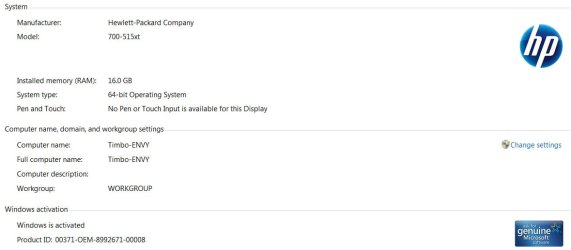
I wish people would pay attention to my threads from the get-go. I have been perfectly clear on ALL matters. Period, the end on that matter. My machine, HP Envy 700-515xt CTO w/Windows 7 Professional SP1 x64 build 7601(6.1.7601) was purchased by ME, directly FROM HP (6-7 weeks ago). The OS IS AN OEM INSTALL (meaning it is chocked full of HP bloatware, etc.), AND THERE IS A GENUINE MICROSOFT WINDOWS 7 COA OEM STICKER ON THE CASE!...IS THIS CLEAR NOW?...

'...what do you mean by "went the OEM route"'- OEM=Original Equipment Manufacturer, as in I bought an OEM machine/system vs. a custom build, in my shop, by me, whereas I would purchase either a Full Retail version of Windows 7 Professional (N/A anymore), or an OEM version of Windows 7 Professional SP1 x64 with COA from a vendor source, such as newegg.com.

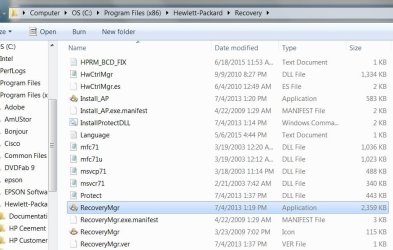
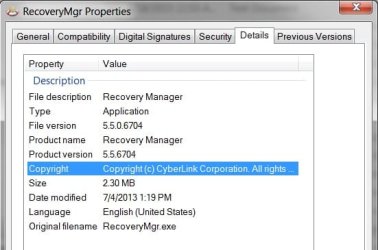
HP does NOT offer authentic OEM Windows discs anymore with a pc purchase- like in days gone by. They install a Recovery Partition (D:\), will sell you a 4 DVD Recovery Kit, or, as I did, burned my own 4 DVD Recovery kit from within Windows-ie- Cyberlink Recovery Manager installed as a prog, by HP, on my machine. I am trying, with success to get a legit Windows 7 Pro disc that is strictly the program without the OEM bloatware and added progs, although a couple of them are quite convenient for diagnostic purposes. Please note screen shots below.

There- I hope I have condensed and/or compressed everything to the point where y'all can comprehend now.

tim

I hope this affords some clarity-

SysInfo.jpg

Untitled.jpg

RecMgr.jpg

RecMgrProp.jpg
 
Last edited:

My Computer

Computer type
PC/Desktop
Computer Manufacturer/Model Number
HP ENVY 700-515xt CTO, with more cam, headers, and 4.11 gears.
OS
Windows 7 Pro SP1 x64
CPU
Intel Haswell i7-4770 3.4GHz
Motherboard
OEM Kaili2 (MSI MS-7826 v2.0)
Memory
G. SKILLS 32GB Ripjaws X Series DDR3 1600 SDRAM
Graphics Card(s)
Integrated HD4600- upgrade coming!
Sound Card
Integrated...for now.
Monitor(s) Displays
Dell ST-2310 Digital
Screen Resolution
I like 1920x1080
Hard Drives
C\:-Samsung 850PRO SSD-256gb, D:\-SG Barracuda 7200 HDD 1 TB (Storage)
PSU
350w OEM (About to become a display in the aquarium!)
Case
ENVY OEM
Cooling
FANS
Keyboard
Logitech and HP- USB.
Mouse
Logitech LS1 (Alltime favorite of mine!) and HP- both USB
Internet Speed
65Mbps Down (min)/4.5Mbps UP- Charter Comm HS cable
Antivirus
avast! Internet Security 2015/MBAM
Browser
Opera, at present. Love that Chromium horsepower!
The original subject of this thread, System Restore Issue' appears to have been resolved. In all likelihood, it seems that the 2 KB's mentioned above, of which only one was installed on this machine, may have been the culprit.

I would like to extend a heartfelt thanks to everyone who participated- THANK YOU!

Kind Regards-

tim
 

My Computer

Computer type
PC/Desktop
Computer Manufacturer/Model Number
HP ENVY 700-515xt CTO, with more cam, headers, and 4.11 gears.
OS
Windows 7 Pro SP1 x64
CPU
Intel Haswell i7-4770 3.4GHz
Motherboard
OEM Kaili2 (MSI MS-7826 v2.0)
Memory
G. SKILLS 32GB Ripjaws X Series DDR3 1600 SDRAM
Graphics Card(s)
Integrated HD4600- upgrade coming!
Sound Card
Integrated...for now.
Monitor(s) Displays
Dell ST-2310 Digital
Screen Resolution
I like 1920x1080
Hard Drives
C\:-Samsung 850PRO SSD-256gb, D:\-SG Barracuda 7200 HDD 1 TB (Storage)
PSU
350w OEM (About to become a display in the aquarium!)
Case
ENVY OEM
Cooling
FANS
Keyboard
Logitech and HP- USB.
Mouse
Logitech LS1 (Alltime favorite of mine!) and HP- both USB
Internet Speed
65Mbps Down (min)/4.5Mbps UP- Charter Comm HS cable
Antivirus
avast! Internet Security 2015/MBAM
Browser
Opera, at present. Love that Chromium horsepower!
Back
Top