System Restore Keeps Resetting

peck1234

Banned
Local time
11:21 PM
Messages
103
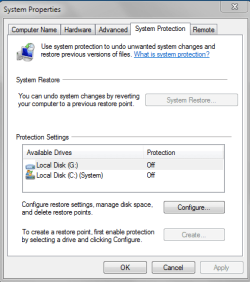
I want system restore off by deafault. (Which I currently have set)

BUT, every couple of months system restore magically turns itself back on?

What am I doing wrong?
 

Attachments

  • Capture.PNG
    Capture.PNG
    13.5 KB · Views: 7

My Computer

Computer Manufacturer/Model Number
Custom Build
OS
Windows 7 Ultimate (64-bit) Build 7600 RTM
CPU
Intel Core I7 920
Motherboard
GA-EX58-UD3R Rev 1 F11 Bios
Memory
8 GB Corsair DDR3 @ 1600mhz
Graphics Card(s)
XFX GTX 285
Sound Card
Integrated Realtek
Monitor(s) Displays
Dell 19inch @ 75hz
Screen Resolution
1440x900
Hard Drives
2 WD 500G Hardrives in RAID 0 (1TB)
PSU
OCZ Extreme Modular 700W
Case
Antec 1200
Cooling
Coolermaster V8
Keyboard
MX™ 3000 Laser
Mouse
Dell
Internet Speed
Cable 15mbps Download 2mbps Upload
Some utilities turn it back on for example when you compact the registry. There was once a service pack that turned it back on also.

I check it once in a while and haven't seen it go back on in a month or so.
 

My Computer

Computer Manufacturer/Model Number
HP DV7-2270US
OS
Windows 7 64-bit
CPU
Intel Core 2 quad (2000MHZ, 4 core)
Motherboard
HP
Memory
4 Gig
Graphics Card(s)
ATI HD4650
Sound Card
IDT HD and ATI HD
Monitor(s) Displays
17" wide laptop and 65" secondary (for 'work' :) )
Screen Resolution
1600X900
Hard Drives
Patriot 64-Gig M28 SSD in bay 1
Seagate ST9500420AS 500 Gig in bay 2(laptop)
Case
HP Laptop
Internet Speed
T3
I want system restore off by deafault. (Which I currently have set)

BUT, every couple of months system restore magically turns itself back on?

What am I doing wrong?

I agree with the prior poster, but what you may also want to do is go to the task scheduler and cancel the schedule that is shown. In the event that system restore is turned back on, it will not make any restore points. You will not even know that it is on.
 

My Computer

Computer type
PC/Desktop
Computer Manufacturer/Model Number
Dell XPS 420
OS
Windows 10, Home Clean Install
CPU
Intel Core2 processsor Q8200(2.33Ghz 1333FSB) Quad Core Tech
Motherboard
Dell
Memory
6 gb
Graphics Card(s)
ATI Radeon 256MB HD3650
Sound Card
Intergrated 7.1 Channel Audio
Monitor(s) Displays
Dell SP2009W 20"
Hard Drives
640 GB Serial ATA Hard drive
Cooling
Fan
Keyboard
Dell USB Keyboard
Mouse
Dell Premium Optical USB
Internet Speed
DSL 2.85
I also noticed my power settings got changed to.
 

My Computer

Computer Manufacturer/Model Number
Custom Build
OS
Windows 7 Ultimate (64-bit) Build 7600 RTM
CPU
Intel Core I7 920
Motherboard
GA-EX58-UD3R Rev 1 F11 Bios
Memory
8 GB Corsair DDR3 @ 1600mhz
Graphics Card(s)
XFX GTX 285
Sound Card
Integrated Realtek
Monitor(s) Displays
Dell 19inch @ 75hz
Screen Resolution
1440x900
Hard Drives
2 WD 500G Hardrives in RAID 0 (1TB)
PSU
OCZ Extreme Modular 700W
Case
Antec 1200
Cooling
Coolermaster V8
Keyboard
MX™ 3000 Laser
Mouse
Dell
Internet Speed
Cable 15mbps Download 2mbps Upload
Installing or uninstalling programs often say "creating restore point"... could that be turning it on?
 

My Computer

Computer Manufacturer/Model Number
me / #1
OS
windows 7 x64 Home Premium
CPU
intel q6600
Motherboard
gigbyte ga ep45 ud3l
Memory
g.skill 8gb ddr2 1066 (pc2 8500)
Graphics Card(s)
evga geforce 9800 gtx 512 mb
Screen Resolution
1680 x 1050
Hard Drives
wd caviar black 500 gb
wd caviar black 1tb
wd elements 1tb external hd x2
PSU
raidmax 500w
Case
smilodon (yes, t'was the pretty blue lites that got me!)

My Computer

Computer Manufacturer/Model Number
Custom Build
OS
Windows 7 Ultimate (64-bit) Build 7600 RTM
CPU
Intel Core I7 920
Motherboard
GA-EX58-UD3R Rev 1 F11 Bios
Memory
8 GB Corsair DDR3 @ 1600mhz
Graphics Card(s)
XFX GTX 285
Sound Card
Integrated Realtek
Monitor(s) Displays
Dell 19inch @ 75hz
Screen Resolution
1440x900
Hard Drives
2 WD 500G Hardrives in RAID 0 (1TB)
PSU
OCZ Extreme Modular 700W
Case
Antec 1200
Cooling
Coolermaster V8
Keyboard
MX™ 3000 Laser
Mouse
Dell
Internet Speed
Cable 15mbps Download 2mbps Upload
If you resize the shadowstorage to 300MBs (which is the allowed minimum), it cannot really write any restore points (shadows). Just move the slider in Sytem properties > System protection > Configure.
 

My Computer

Computer Manufacturer/Model Number
HP, Dell, Gateway, Toshiba - 4 laptops and 2 desktops
OS
Vista, Windows7, Mint Mate, Zorin, Windows 8
CPU
from 1.6GHz Duo to i7
Monitor(s) Displays
2x HP w2207
Hard Drives
5x HDD, 7x SSD, 12x Externals
Keyboard
with trackball - no mices
Mouse
Trackball mice
Internet Speed
DSL 6000
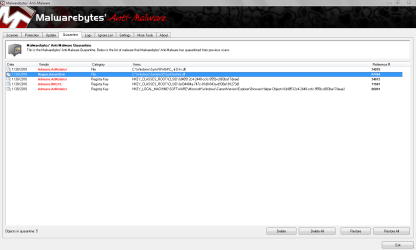
Seems like this problem was related to a specific malware that "wanted system restore on"
 

Attachments

  • Capture.PNG
    Capture.PNG
    51.3 KB · Views: 70
Last edited:

My Computer

Computer Manufacturer/Model Number
Custom Build
OS
Windows 7 Ultimate (64-bit) Build 7600 RTM
CPU
Intel Core I7 920
Motherboard
GA-EX58-UD3R Rev 1 F11 Bios
Memory
8 GB Corsair DDR3 @ 1600mhz
Graphics Card(s)
XFX GTX 285
Sound Card
Integrated Realtek
Monitor(s) Displays
Dell 19inch @ 75hz
Screen Resolution
1440x900
Hard Drives
2 WD 500G Hardrives in RAID 0 (1TB)
PSU
OCZ Extreme Modular 700W
Case
Antec 1200
Cooling
Coolermaster V8
Keyboard
MX™ 3000 Laser
Mouse
Dell
Internet Speed
Cable 15mbps Download 2mbps Upload
Back
Top