
You are using an out of date browser. It may not display this or other websites correctly.
You should upgrade or use an alternative browser.
You should upgrade or use an alternative browser.
System Restore Points
- Thread starter t8ntlikly
- Start date

Hello t8ntlikly, welcome to Seven Forums!
Have a look at this tutorial at the link below to see what the space available to store System Restore points is set at, though it's not a good idea to store too many SR points as they become less dependable with time.
Change the System Protection Disk Space Usage
This tutorial lists 2 separate methods to create System Restore points automatically so there's always good points for use if needed.
System Restore Point : Create at System Startup
Have a look at this tutorial at the link below to see what the space available to store System Restore points is set at, though it's not a good idea to store too many SR points as they become less dependable with time.
Change the System Protection Disk Space Usage
This tutorial lists 2 separate methods to create System Restore points automatically so there's always good points for use if needed.
System Restore Point : Create at System Startup
My Computer
- Computer Manufacturer/Model Number
- * BFK Customs *
- OS
- W 7 64-bit Ultimate
- CPU
- Intel Q9550 Yorkfield
- Motherboard
- ASUS P5Q Pro
- Memory
- 8GB Dominator 8500C5D
- Graphics Card(s)
- ATI : XFX 5870
- Sound Card
- Realtek HD Audio 7-1
- Monitor(s) Displays
- 1x 47" LCD HDMI & 3x 26" LCD HDMI
- Screen Resolution
- 1920x1080P & 1920x1200
- Hard Drives
- 1x 80GB Intel X25-M G2 SSD : 1x 500GB & 1x 640GB WD Caviar Black(s)
- PSU
- Corsair 620HX
- Case
- Cooler Master RC-690
- Cooling
- Tuniq Tower 120, 2x 140mm and 3x 120mm case fans
- Keyboard
- Microsoft 500
- Mouse
- Razer Diamondback 3G
- Internet Speed
- 14 Mb/s
- Other Info
- 1x Koutech 3Gb/s SATA HDD Hot Swap Rack

Have you been using some sort of cleaner. Some of them will do that. Is their anything else not working on your computer as it should. Try updating your security programs and then run them. Let us know if all that works. Reason for all this is; some viruses will stop you from going to restore point and you security programs trying to stop you from removing them.
My Computer
- Computer type
- PC/Desktop
- Computer Manufacturer/Model Number
- Home made Desktop
- OS
- Windows 10 Pro. 64/ version 1709 Windows 7 Pro/64
- CPU
- Intel i7-6800K @ 4.3
- Motherboard
- ASUS X-99 Deluxe II
- Memory
- Corsair Platinum 16 gig @2400
- Graphics Card(s)
- EVGA GTX 1070 OC
- Monitor(s) Displays
- Asus 27" LED LCD/VE278Q
- Screen Resolution
- 1920-1080 or 1280-720 HDMI
- Hard Drives
- INTEL SSD 730-240 Gb Sata 3.0/
- PSU
- EVGA Platium 1200W
- Case
- Phanteks Luxe Tempered Glass 8 fans/ one radiator
- Cooling
- XSPC/ Water Cooled CPU
- Keyboard
- Das 4 Professional
- Mouse
- Logitech M705/MX Anywhere 2-S
- Internet Speed
- 100 mbits
- Antivirus
- Microsoft Security Essentials/ Malwarebytes Premium 3.0/ SAS
- Browser
- I.E. 11 default/Firefox/ ISP Time Warner Cable/Spectrum
- Other Info
- LG BluRay Burner/
Sound system-KLipsch-THX/
Icy Dock ssd Hot Swap bays.
Thanks Bare Foot. I am set at 20% I created a restore point about an hour ago and checked it several times and it seemed Ok, that is until I rebooted. Now the only items in there are 2 System Image Restore Point. One of which was created on 09/12/2010, and the other on 1/3/2011.
Thanks Layback. I have been using Uniblue for almost two years with no problems. A couple of weeks ago I made an ID10T error, that forced me to use system restore, and that is when I saw that there weren't any in there, only the System Image Restore Points. Which by the way I have set to run tomorrow at 09:00.
As for antivirus I am using MSE and haven't had any problem, but suggestion taken and I will run malwarebytes this afternoon.
No, the computer is an HP dv5000TUS and runs like a clock. I bought it right before Vista came out, but I didn't upgrade!!! It runs even better now with W7.
Thanks Layback. I have been using Uniblue for almost two years with no problems. A couple of weeks ago I made an ID10T error, that forced me to use system restore, and that is when I saw that there weren't any in there, only the System Image Restore Points. Which by the way I have set to run tomorrow at 09:00.
As for antivirus I am using MSE and haven't had any problem, but suggestion taken and I will run malwarebytes this afternoon.
No, the computer is an HP dv5000TUS and runs like a clock. I bought it right before Vista came out, but I didn't upgrade!!! It runs even better now with W7.
My Computer
- OS
- Windows 7 Ultimate 32bit
To be sure, and there are no other drives/partitions set for SR points to be created for?
As a test, set the allotted space to around 4GB to see if that makes a difference over the next day or so.
As a test, set the allotted space to around 4GB to see if that makes a difference over the next day or so.
My Computer
- Computer Manufacturer/Model Number
- * BFK Customs *
- OS
- W 7 64-bit Ultimate
- CPU
- Intel Q9550 Yorkfield
- Motherboard
- ASUS P5Q Pro
- Memory
- 8GB Dominator 8500C5D
- Graphics Card(s)
- ATI : XFX 5870
- Sound Card
- Realtek HD Audio 7-1
- Monitor(s) Displays
- 1x 47" LCD HDMI & 3x 26" LCD HDMI
- Screen Resolution
- 1920x1080P & 1920x1200
- Hard Drives
- 1x 80GB Intel X25-M G2 SSD : 1x 500GB & 1x 640GB WD Caviar Black(s)
- PSU
- Corsair 620HX
- Case
- Cooler Master RC-690
- Cooling
- Tuniq Tower 120, 2x 140mm and 3x 120mm case fans
- Keyboard
- Microsoft 500
- Mouse
- Razer Diamondback 3G
- Internet Speed
- 14 Mb/s
- Other Info
- 1x Koutech 3Gb/s SATA HDD Hot Swap Rack
No on the other drives, I checked and the "D" HP recovery partition is not listed. My "G" drive is listed, but it is off.
I will set it down to 4GB as per your suggestion and see what happens.
I just ran a Malwarebytes Quick scan and it found nothing.
John
I will set it down to 4GB as per your suggestion and see what happens.
I just ran a Malwarebytes Quick scan and it found nothing.
John
My Computer
- OS
- Windows 7 Ultimate 32bit
Hello John.
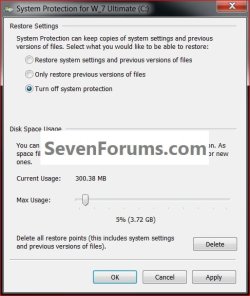
If it is on for the G: but "off" that may be causing the issue, click that drive to highlight it and click configure to make sure you have it listed like this; make sure the C: is the only one "on".
If it is on for the G: but "off" that may be causing the issue, click that drive to highlight it and click configure to make sure you have it listed like this; make sure the C: is the only one "on".
click to enlarge
My Computer
- Computer Manufacturer/Model Number
- * BFK Customs *
- OS
- W 7 64-bit Ultimate
- CPU
- Intel Q9550 Yorkfield
- Motherboard
- ASUS P5Q Pro
- Memory
- 8GB Dominator 8500C5D
- Graphics Card(s)
- ATI : XFX 5870
- Sound Card
- Realtek HD Audio 7-1
- Monitor(s) Displays
- 1x 47" LCD HDMI & 3x 26" LCD HDMI
- Screen Resolution
- 1920x1080P & 1920x1200
- Hard Drives
- 1x 80GB Intel X25-M G2 SSD : 1x 500GB & 1x 640GB WD Caviar Black(s)
- PSU
- Corsair 620HX
- Case
- Cooler Master RC-690
- Cooling
- Tuniq Tower 120, 2x 140mm and 3x 120mm case fans
- Keyboard
- Microsoft 500
- Mouse
- Razer Diamondback 3G
- Internet Speed
- 14 Mb/s
- Other Info
- 1x Koutech 3Gb/s SATA HDD Hot Swap Rack