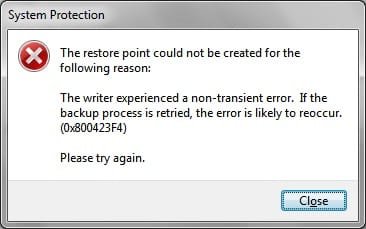
System Restore- restore point creation error

Jevans

New member
Local time
7:10 AM
Messages
10
Hi guys,

I'm a newbie on this forum and this is my first thread. I just tried to create a restore point and ended up with this error:

Any help would be much appreciated.
 

Attachments

  • system protection.jpg
    system protection.jpg
    12.8 KB · Views: 17

My Computer

Computer Manufacturer/Model Number
ASUS F5R
OS
Windows 7 Home Premium & Windows XP Pro SP3 Dualboot
CPU
Intel Pentium Dual Core T2060 @ 1.6Ghz
Memory
1048MB DDR2 Ram
Graphics Card(s)
ATI Xpress 200M
Sound Card
Realtek High Definition Audio
Hard Drives
Western Digital Scorpio Blue 250 GB, SATA 3 Gb/s, 8 MB Cache, 5400 RPM
Keyboard
Microsoft Digital Media 3000
Other Info
Sound System: Logitech Z313 2.1
By chance did you have a virtual machine running when you tried to create the restore point? If yes, try creating restore point without VM.
 

My Computer

Computer type
Laptop
Computer Manufacturer/Model Number
Sony Vaio VPCEB47GM Laptop
OS
Win 7 Pro 64-bit
CPU
Intel i5 2.4 Ghz
Memory
8GB DDR3
Graphics Card(s)
Intel HD 3000
Sound Card
IDT High Definition
Monitor(s) Displays
15.6 WGXA Anti-Glare LED
Screen Resolution
1280x800
Hard Drives
640Gb 7200rpm
Antivirus
MSE
Browser
Opera (primary) with IE9 backup
To troubleshoot such an error, you google the text and ID#'s. Just the first few results:

There is a hotfix for this error in Vista here: http://support.microsoft.com/kb/826936
It may work for Win7.

This error is caused by a bug in the driver for Intel ICH5R chipset that results in critical disk 0 not being marked as fixed hard disk. There is no workaround because. According to Intel, this version is not Windows Vista compatible: [URL="http://support.intel.com/support/chipsets/imsm/sb/CS-023616.htm"]http://support.intel.com/support/chipsets/imsm/sb/CS-023616.htm[/URL]

Did you change out the chipset given by Win7 installer? It may have been more compatible than the factory chipset or Intel's own chipset, if you have installed either of those.

If not and this if factory install, is there a Win7 chipset available on the Support Downloads webpage for your model computer? It may be modified to fix this error.

Taking the error cause literally, you could try moving Win7 HD to another HD port to become DISK1, etc. Then change it to boot first in BIOS setup.
 
thanks you guys for all your help. I did a system reboot and somehow :eek: it fixed itself!!!!! Don't know if thats a good thing or not!!

BTW: How do i mark this as solved or whatever??
 
Last edited:

My Computer

Computer Manufacturer/Model Number
ASUS F5R
OS
Windows 7 Home Premium & Windows XP Pro SP3 Dualboot
CPU
Intel Pentium Dual Core T2060 @ 1.6Ghz
Memory
1048MB DDR2 Ram
Graphics Card(s)
ATI Xpress 200M
Sound Card
Realtek High Definition Audio
Hard Drives
Western Digital Scorpio Blue 250 GB, SATA 3 Gb/s, 8 MB Cache, 5400 RPM
Keyboard
Microsoft Digital Media 3000
Other Info
Sound System: Logitech Z313 2.1
Looks like it was transient. If it comes back, google the text and ID# and go to town. We'll be here to help.
 

My Computer

Computer type
Laptop
Computer Manufacturer/Model Number
Sony Vaio VPCEB47GM Laptop
OS
Win 7 Pro 64-bit
CPU
Intel i5 2.4 Ghz
Memory
8GB DDR3
Graphics Card(s)
Intel HD 3000
Sound Card
IDT High Definition
Monitor(s) Displays
15.6 WGXA Anti-Glare LED
Screen Resolution
1280x800
Hard Drives
640Gb 7200rpm
Antivirus
MSE
Browser
Opera (primary) with IE9 backup
Back
Top