
For about a month, Windows 7 system restore (which is turned on solely for the OS partition) has often been using more space than the 6% -- 15GB -- I have specified as the maximum. For instance, right now it reports using 19.27GB. That's probably the highest discrepancy I've seen thus far. Eventually it goes back under 15GB (i.e., some restore point(s) self-delete), but soon the issue recurs.
Has anyone else seen this happen before? And does it matter, other than using more space? (A couple weeks ago I thought maybe this, or a hard drive issue, could be the culprit when my pc suddenly became very sluggish, but the sluggishness self-resolved in less than two days.)
Any idea on why this might be happening, and how to fix it? I haven't tried resetting system restore recently because I don't want to lose the restore points I have, but I know I did do a system restore reset, to free some space, not long before the issue first surfaced.
Thanks.
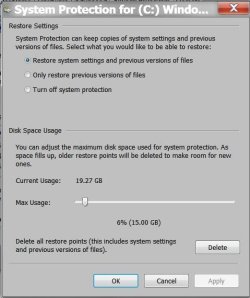
Has anyone else seen this happen before? And does it matter, other than using more space? (A couple weeks ago I thought maybe this, or a hard drive issue, could be the culprit when my pc suddenly became very sluggish, but the sluggishness self-resolved in less than two days.)
Any idea on why this might be happening, and how to fix it? I haven't tried resetting system restore recently because I don't want to lose the restore points I have, but I know I did do a system restore reset, to free some space, not long before the issue first surfaced.
Thanks.
My Computer
- Computer type
- PC/Desktop
- Computer Manufacturer/Model Number
- Lenovo
- OS
- Windows 7 Pro x64


