system restore

frantheman7

Banned
Local time
4:02 PM
Messages
44
Hello all,

Why does my system restore only go back a half an hour?

TIA
 

My Computer

OS
Microsoft Windows Professional 32bit
CPU
Intel(R) Core(TM) i5 CPU 650 @ 3.20GHz, 3201 Mhz, 2 Core(s),
Memory
4.00 GB
Graphics Card(s)
NVIDIA GeForce 9800 GT
Sound Card
High Definition Audio Device
Monitor(s) Displays
?
Screen Resolution
1600 x 900 x 59 hertz
Hard Drives
Drive C:
Description Local Fixed Disk
Compressed No
File System NTFS
Size 1.36 TB (1,500,299,264,000 bytes)
Free Space 285.78 GB (306,854,465,536 bytes)
Volume Name
Volume Serial Number A82602D7

Drive D:
Description CD-ROM Disc

Drive
PSU
?
Case
?
Cooling
?
Mouse
Optical Elite Model#72121
Internet Speed
Time Warner (Fast)

My Computer

Computer type
PC/Desktop
Computer Manufacturer/Model Number
Self built custom
OS
64-bit Windows 11 Pro for Workstations
CPU
Intel i7-8700K OC'd to 5 GHz
Motherboard
ASUS ROG Maximus XI Formula Z390
Memory
64 GB (4x16GB) G.SKILL TridentZ RGB DDR4 3600 MHz
Graphics Card(s)
ASUS ROG-STRIX-GTX1080TI-O11G-GAMING
Sound Card
Integrated
Monitor(s) Displays
2 x Samsung Odyssey G7 27"
Screen Resolution
2560x1440
Hard Drives
1TB Samsung 990 PRO M.2,
4TB Samsung 990 PRO PRO M.2,
TerraMaster F8 SSD Plus NAS
PSU
Seasonic Prime Titanium 850W
Case
Thermaltake Core P3
Cooling
Corsair Hydro H115i
Keyboard
Logitech wireless K800
Mouse
Logitech MX Master 4
Internet Speed
2 Gb/s Download and 100 Mb/s Upload
Antivirus
Malwarebyte Anti-Malware Premium
Browser
Google Chrome
Other Info
Logitech Z625 speaker system,
Logitech BRIO 4K Pro webcam,
HP Color LaserJet Pro MFP M477fdn,
APC SMART-UPS RT 1000 XL - SURT1000XLI,
Galaxy S23 Plus phone
This is showing the box circled in yellow to check for it to show more restore points that Brink referenced.
 

Attachments

  • Sys restore2.PNG
    Sys restore2.PNG
    14.3 KB · Views: 1,437

My Computer

Computer Manufacturer/Model Number
Hopalong/ Godzilla
OS
Windows7 Pro 64bit SP-1; Windows XP Pro 32bit
CPU
Intel Core i7-870 Lynnfield 2.93GHz LGA 1156 95W Quad-Core
Motherboard
ASUS P7P55D-E PRO
Memory
8GB@1400MHz Crucial Ballistix DDR3-1600 4x2GB
Graphics Card(s)
ASUS ENGTX460 DirectCU/2DI/1GD5 1GB 256-bit GDDR5
Sound Card
VIA Onboard
Monitor(s) Displays
Asus VS248H-P 24"; Samsung SyncMaster 941BW 19"ws
Screen Resolution
1920x1080; 1440x900
Hard Drives
Samsung 830 120GB SSD
Intel 320 120GB SSD
Western Digital Caviar Black WD7501AALS 750GB 7200 RPM SATA 3.0Gb/s
Western Digital Caviar Black WD6401AALS 640GB 7200 RPM SATA 3.0Gb/s
PSU
COOLER MASTER Silent Pro RS850-AMBAJ3-US 850W Modular
Case
COOLER MASTER HAF 932 RC-932-KKN5-GP Black
Cooling
Scythe "Mugen-2 Rev.B" (2 ScytheKaze-Jyuni PWM fans)
Keyboard
Logitech K-320
Mouse
Kensington
Antivirus
Avast Inernet Suite
Browser
IE 9 ; Chrome
Hello Brink,

Well I upgraded from XP about 4 months ago, so don't think this is it.
No I didn't delete any restore points, I feel the more the merrier.
Well my C: drive is 1.36 TB and I have 280 GB left.
Yes, but it didn't show any other restore points, but that half an hour.
I was just looking at a post you did about system restore,
and in the screen shot you had the level set at 10%,
and mine was set all the way to the left, I now have it set at 10% as well.
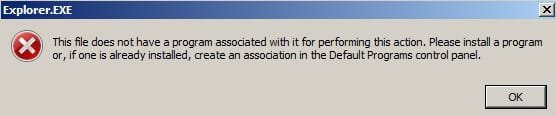
The reason that I tried to restore my system is, when I tried to delete the control panel
from the right click on the my computer, it didn't work, and now I have a control panel
on my right click that only gives me an error LOL, I'm some piece of work :(.
Anyway this is the error, I hope it post, it's a jpg.
 

Attachments

  • error.jpg
    error.jpg
    9.8 KB · Views: 8

My Computer

OS
Microsoft Windows Professional 32bit
CPU
Intel(R) Core(TM) i5 CPU 650 @ 3.20GHz, 3201 Mhz, 2 Core(s),
Memory
4.00 GB
Graphics Card(s)
NVIDIA GeForce 9800 GT
Sound Card
High Definition Audio Device
Monitor(s) Displays
?
Screen Resolution
1600 x 900 x 59 hertz
Hard Drives
Drive C:
Description Local Fixed Disk
Compressed No
File System NTFS
Size 1.36 TB (1,500,299,264,000 bytes)
Free Space 285.78 GB (306,854,465,536 bytes)
Volume Name
Volume Serial Number A82602D7

Drive D:
Description CD-ROM Disc

Drive
PSU
?
Case
?
Cooling
?
Mouse
Optical Elite Model#72121
Internet Speed
Time Warner (Fast)
How did you try and delete the Control Panel from it? The more details the better. :)

Perhaps we may be able to help you undo it manually to get rid of the error.
 

My Computer

Computer type
PC/Desktop
Computer Manufacturer/Model Number
Self built custom
OS
64-bit Windows 11 Pro for Workstations
CPU
Intel i7-8700K OC'd to 5 GHz
Motherboard
ASUS ROG Maximus XI Formula Z390
Memory
64 GB (4x16GB) G.SKILL TridentZ RGB DDR4 3600 MHz
Graphics Card(s)
ASUS ROG-STRIX-GTX1080TI-O11G-GAMING
Sound Card
Integrated
Monitor(s) Displays
2 x Samsung Odyssey G7 27"
Screen Resolution
2560x1440
Hard Drives
1TB Samsung 990 PRO M.2,
4TB Samsung 990 PRO PRO M.2,
TerraMaster F8 SSD Plus NAS
PSU
Seasonic Prime Titanium 850W
Case
Thermaltake Core P3
Cooling
Corsair Hydro H115i
Keyboard
Logitech wireless K800
Mouse
Logitech MX Master 4
Internet Speed
2 Gb/s Download and 100 Mb/s Upload
Antivirus
Malwarebyte Anti-Malware Premium
Browser
Google Chrome
Other Info
Logitech Z625 speaker system,
Logitech BRIO 4K Pro webcam,
HP Color LaserJet Pro MFP M477fdn,
APC SMART-UPS RT 1000 XL - SURT1000XLI,
Galaxy S23 Plus phone
Bongo gave me this link:
How to remove
to delete this two entries
Map network drives
Disconnect network drives.
It work so good, and being the a*s I an though it would be
a good idea to try and delete all of them the same way lol.
Sh*t like this happens to me all the time, got to stop assuming things.
 

My Computer

OS
Microsoft Windows Professional 32bit
CPU
Intel(R) Core(TM) i5 CPU 650 @ 3.20GHz, 3201 Mhz, 2 Core(s),
Memory
4.00 GB
Graphics Card(s)
NVIDIA GeForce 9800 GT
Sound Card
High Definition Audio Device
Monitor(s) Displays
?
Screen Resolution
1600 x 900 x 59 hertz
Hard Drives
Drive C:
Description Local Fixed Disk
Compressed No
File System NTFS
Size 1.36 TB (1,500,299,264,000 bytes)
Free Space 285.78 GB (306,854,465,536 bytes)
Volume Name
Volume Serial Number A82602D7

Drive D:
Description CD-ROM Disc

Drive
PSU
?
Case
?
Cooling
?
Mouse
Optical Elite Model#72121
Internet Speed
Time Warner (Fast)
1)
You can try this first. If it finds errors run it up to three times to fix things. It doesn't always fix all in one run.
It attempts to restore registry.
http://www.sevenforums.com/tutorials/1538-sfc-scannow-command-system-file-checker.html?ltr=S

2)
Worst case scenario. You need your Windows installation disk for this.
http://www.sevenforums.com/tutorials/3413-repair-install.html

You will not loose your files, folders or pictures etc. using this as you would with a reinstall.
This will reinstall the correct registry.
Mike
 

My Computer

Computer Manufacturer/Model Number
Hopalong/ Godzilla
OS
Windows7 Pro 64bit SP-1; Windows XP Pro 32bit
CPU
Intel Core i7-870 Lynnfield 2.93GHz LGA 1156 95W Quad-Core
Motherboard
ASUS P7P55D-E PRO
Memory
8GB@1400MHz Crucial Ballistix DDR3-1600 4x2GB
Graphics Card(s)
ASUS ENGTX460 DirectCU/2DI/1GD5 1GB 256-bit GDDR5
Sound Card
VIA Onboard
Monitor(s) Displays
Asus VS248H-P 24"; Samsung SyncMaster 941BW 19"ws
Screen Resolution
1920x1080; 1440x900
Hard Drives
Samsung 830 120GB SSD
Intel 320 120GB SSD
Western Digital Caviar Black WD7501AALS 750GB 7200 RPM SATA 3.0Gb/s
Western Digital Caviar Black WD6401AALS 640GB 7200 RPM SATA 3.0Gb/s
PSU
COOLER MASTER Silent Pro RS850-AMBAJ3-US 850W Modular
Case
COOLER MASTER HAF 932 RC-932-KKN5-GP Black
Cooling
Scythe "Mugen-2 Rev.B" (2 ScytheKaze-Jyuni PWM fans)
Keyboard
Logitech K-320
Mouse
Kensington
Antivirus
Avast Inernet Suite
Browser
IE 9 ; Chrome
Hi Mike,

Did No. 1) and got this message:
(Windows Resource Protection did not find any integrity violations)
To afread to try step 2).
Think i'm just going to leave it the way it is for now,
but thanks for your help.

Later, Franny
 

My Computer

OS
Microsoft Windows Professional 32bit
CPU
Intel(R) Core(TM) i5 CPU 650 @ 3.20GHz, 3201 Mhz, 2 Core(s),
Memory
4.00 GB
Graphics Card(s)
NVIDIA GeForce 9800 GT
Sound Card
High Definition Audio Device
Monitor(s) Displays
?
Screen Resolution
1600 x 900 x 59 hertz
Hard Drives
Drive C:
Description Local Fixed Disk
Compressed No
File System NTFS
Size 1.36 TB (1,500,299,264,000 bytes)
Free Space 285.78 GB (306,854,465,536 bytes)
Volume Name
Volume Serial Number A82602D7

Drive D:
Description CD-ROM Disc

Drive
PSU
?
Case
?
Cooling
?
Mouse
Optical Elite Model#72121
Internet Speed
Time Warner (Fast)
Franny,

If you do not remember what changes you made in the registy to undo them, then it looks like you're left with a repair install to fix it as Mike mentioned above. :(
 

My Computer

Computer type
PC/Desktop
Computer Manufacturer/Model Number
Self built custom
OS
64-bit Windows 11 Pro for Workstations
CPU
Intel i7-8700K OC'd to 5 GHz
Motherboard
ASUS ROG Maximus XI Formula Z390
Memory
64 GB (4x16GB) G.SKILL TridentZ RGB DDR4 3600 MHz
Graphics Card(s)
ASUS ROG-STRIX-GTX1080TI-O11G-GAMING
Sound Card
Integrated
Monitor(s) Displays
2 x Samsung Odyssey G7 27"
Screen Resolution
2560x1440
Hard Drives
1TB Samsung 990 PRO M.2,
4TB Samsung 990 PRO PRO M.2,
TerraMaster F8 SSD Plus NAS
PSU
Seasonic Prime Titanium 850W
Case
Thermaltake Core P3
Cooling
Corsair Hydro H115i
Keyboard
Logitech wireless K800
Mouse
Logitech MX Master 4
Internet Speed
2 Gb/s Download and 100 Mb/s Upload
Antivirus
Malwarebyte Anti-Malware Premium
Browser
Google Chrome
Other Info
Logitech Z625 speaker system,
Logitech BRIO 4K Pro webcam,
HP Color LaserJet Pro MFP M477fdn,
APC SMART-UPS RT 1000 XL - SURT1000XLI,
Galaxy S23 Plus phone
Hi Brink,

Man you have been so darn helpful, your a good guy, thanks!
But I think i'm not going to deal with this one anymore.

Again thank you and thank all of you so much.
 

My Computer

OS
Microsoft Windows Professional 32bit
CPU
Intel(R) Core(TM) i5 CPU 650 @ 3.20GHz, 3201 Mhz, 2 Core(s),
Memory
4.00 GB
Graphics Card(s)
NVIDIA GeForce 9800 GT
Sound Card
High Definition Audio Device
Monitor(s) Displays
?
Screen Resolution
1600 x 900 x 59 hertz
Hard Drives
Drive C:
Description Local Fixed Disk
Compressed No
File System NTFS
Size 1.36 TB (1,500,299,264,000 bytes)
Free Space 285.78 GB (306,854,465,536 bytes)
Volume Name
Volume Serial Number A82602D7

Drive D:
Description CD-ROM Disc

Drive
PSU
?
Case
?
Cooling
?
Mouse
Optical Elite Model#72121
Internet Speed
Time Warner (Fast)
Back
Top