Solved System Restore

Powell41

New member
Member
Local time
5:46 PM
Messages
97
Location
Red Deer County, Alberta, Canada
Good Morning (MST) Folks:

I require some assistance in regard to the titled subject, if you please.

I'm running Windows 7 Home Premium, preinstalled, on a Dell Inspiron 620S.

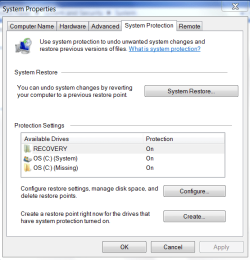
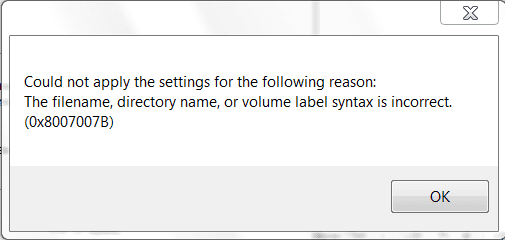
I have no system restore function. In the System Protection window I have the three options (See attached snip #1), although the third option indicates that option 3 [OS(C)] is missing? When I attempt to configure any of these items, including the disk space allocation, I get a message informing me of error code 0X8007007B. (See attached snip #2).

I have also performed a reinstallation of the OS with the same result. Any help would be greatly appreciated.

Regards
Powell Lucas :confused:
 

Attachments

  • Snip-1.PNG
    Snip-1.PNG
    20.7 KB · Views: 13
  • Snip-2.PNG
    Snip-2.PNG
    5.5 KB · Views: 8

My Computer

Computer Manufacturer/Model Number
Dell Inspiron 620s
OS
Windows Home Premium, 64 4.096 bit
CPU
i3-2100
Motherboard
Dell 0DGGBY
Memory
Dimm0, Samsung 64 bit, 4.096 Mb; Dimm1, Hyundai 64 bit, 2.04
Graphics Card(s)
Intel HD Graphics Family
Sound Card
?
Monitor(s) Displays
Dell E197FP
Hard Drives
?
PSU
?
Case
?
Cooling
?
Why is this marked solved already?

It looks like you have the recovery highlighted on that screenshot, do you get that error on all three?

You can get rid of the missing one by clicking on it to highlight it and then the configure button, then turn off system protection,

http://www.sevenforums.com/tutorials/330-system-protection-turn-off.html

Everything I've ran across so far for that error code seems to point to that missing OS being there.

Let us know how it goes.
 

My Computer

Computer type
PC/Desktop
Computer Manufacturer/Model Number
Self Built
OS
Win 10 Pro x64
CPU
Intel I5-2500K @3.3GHz
Motherboard
Asrock P67 Extreme4
Memory
16GB G.Skill Ripjaws X (4x4GB)
Graphics Card(s)
EVGA GeForce 750 Ti SC 2GB
Sound Card
ASUS Xonar DG 5.1 Channels 24-bit 96KHz PCI Interface Sound
Monitor(s) Displays
auria eq2367
Screen Resolution
1920 x 1080
Hard Drives
250GB Samsung 850 EVO SSD
1TB WD Blue
1TB Hitachi
PSU
SeaSonic X 650W 80 Plus Gold
Case
Corsair Obsidian 750D
Cooling
Corsair H60, Three 140mm case fans
Keyboard
Logitech Wireless Keyboard K520
Mouse
Logitech Wireless Mouse M310
Internet Speed
Wave Broadband ~ 100 dn 5 up
Antivirus
Windows Defender, Malwarebytes Premium
Browser
Edge, IE11, Chrome
Other Info
Laptop specs: HP g7-1365dx /
CPU: AMD A6-3420M APU with Radeon(tm) HD Graphics /
RAM: Crucial 8Gb (2x4Gb) /
SSD: Crucial M4-CT128M4SSD2 ATA Device/ FW 000F /
GFX: AMD Radeon HD 6520G /
OS: Windows 10 Pro x64

My Computer

Computer type
Laptop
Computer Manufacturer/Model Number
Sony Vaio VPCEB47GM Laptop
OS
Win 7 Pro 64-bit
CPU
Intel i5 2.4 Ghz
Memory
8GB DDR3
Graphics Card(s)
Intel HD 3000
Sound Card
IDT High Definition
Monitor(s) Displays
15.6 WGXA Anti-Glare LED
Screen Resolution
1280x800
Hard Drives
640Gb 7200rpm
Antivirus
MSE
Browser
Opera (primary) with IE9 backup
Derek has it right as what's happened here is the Repair function of Win7 has recovered Win7 but left the earlier version SysRestore engaged causing a failure loop.

The solution is to highlight the Missing one as Derek says, then Turn it Off. Make sure the current C drive remains On.

I don't think Recovery should be On either since it should never have anything written to it which would need Restore. The rule of thumb is to leave Recovery alone, but I don't think it was set On in SysProtection to begin with so I'd turn it off myself.

Lee's idea to see a screenshot of your maximized DIsk Management drive map with listings is also important now with these anomalies. Use Snipping Tool in Start Menu.
 
Back
Top