System Scan Sound files...

luxtelum

New member
Local time
6:42 PM
Messages
4
Location
Southwest
I let WMP12 do a scan on my system for all sound files.

It picked up all of the system sound files...(ding...chord...etc etc) and they ended up in WMP12.

I don't want to delete them, just remove them out of WMP12. They are at the end of the media player list.

For some reason, WMP won't let me move them out of the library.

Any help greatly appreciated....
 

My Computer

Computer Manufacturer/Model Number
HP g71 445us
OS
win 7
CPU
Intel Duo Core
Motherboard
intel
Memory
4 gb
Graphics Card(s)
intel
Sound Card
internal
Hard Drives
wd 300 gb
According to the WMP12 help file, go to "Library" and then the "Music Library" and you can manually remove files there (and it's only from the library not the actual file on the hard drive).
 

My Computer

Computer type
PC/Desktop
Computer Manufacturer/Model Number
My Own Build
OS
Windows 10 64 bit
CPU
Intel i7 6700K
Motherboard
ASUS ROG Maximus VIII Hero
Memory
16GB Corsair Dominator
Graphics Card(s)
Intel CPU Graphics
Sound Card
RealTek
Monitor(s) Displays
27" Dell S2719dgf
Screen Resolution
2560X1440
Hard Drives
1 TB Samsung 850 EVO SSD for Win 10 Pro
500GB Samsung 850 EVO SSD for Win 10 Insider
2 TB drive for backup
PSU
EVGA Supernova 750G2
Case
BeQuiet Silent Base 600
Cooling
Deepcool Captain 120EX
Keyboard
Microsoft Wireless 2000
Mouse
Microsoft wireless
Internet Speed
100 MB/sec (Cable)
Antivirus
Microsoft Defender and Malwarebytes
Browser
Edge/Firefox
Other Info
Cakewalk (Sonar) by BandLab and Studio One 4.1 Pro recording studio software. MOTU 896Mk3 Hybrid recording interface, Frontier Tranzport wireless control unit, Behringer X-Touch Control Surface.
Five USB connected optical drives for CD Audio production using Nero BurningROM
Nope

Sorry Fire...your advice didnt work, any other ideas???
 

My Computer

Computer Manufacturer/Model Number
HP g71 445us
OS
win 7
CPU
Intel Duo Core
Motherboard
intel
Memory
4 gb
Graphics Card(s)
intel
Sound Card
internal
Hard Drives
wd 300 gb
Tried the good old right click and delete? If not make sure you change to only delete from the library.
 

My Computer

Computer type
PC/Desktop
Computer Manufacturer/Model Number
Me
OS
Win 7 Ultimate x64
CPU
FX-8350 @ 4.6 GHz so far
Motherboard
Asus M5A97 EVO
Memory
ADATA XPG V1 Series Black 8GB DDR3 1600
Graphics Card(s)
Sapphire R9 270x Dual-X
Sound Card
Xonar DGX w/ Corsair Vengence 1300
Monitor(s) Displays
Acer S232HL Abid
Screen Resolution
1920x1080
Hard Drives
120 GB OCZ Vertex 3
500 GB Seagate 7200.12
PSU
Antec Earthwatts 650W Green
Case
Antec Three Hundred
Cooling
Cooler Master 212 EVO
Keyboard
Logitech G510
Mouse
Logitech G500s
Internet Speed
35000/3000
Nope Stormy..thats the last thing I want to do...

Somehow, when I did a system scan for sound files....the dings and chords and all the very small sound files ended up in WMP.

"Trusted Installer" wont let me fully delete them, which is good, I just want to get their physical presences, or in this case, their typed presence, out of WMP..Their presence also prevents me from automatically synching my flash drive to back up my media player library..

I'l keep looking around...I'm trying to find a direct line to MS..to get answers from the folx that wrote this stuff...if anyone should know...they should. (I hope).

So nope...the right click delete...won't work either.
 

My Computer

Computer Manufacturer/Model Number
HP g71 445us
OS
win 7
CPU
Intel Duo Core
Motherboard
intel
Memory
4 gb
Graphics Card(s)
intel
Sound Card
internal
Hard Drives
wd 300 gb
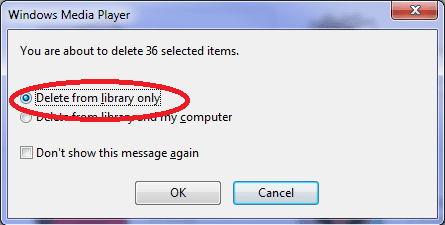
Right click and delete should give you this first,

deletewmp.png

Just need to change it as the default is library and computer.
 

My Computer

Computer type
PC/Desktop
Computer Manufacturer/Model Number
Me
OS
Win 7 Ultimate x64
CPU
FX-8350 @ 4.6 GHz so far
Motherboard
Asus M5A97 EVO
Memory
ADATA XPG V1 Series Black 8GB DDR3 1600
Graphics Card(s)
Sapphire R9 270x Dual-X
Sound Card
Xonar DGX w/ Corsair Vengence 1300
Monitor(s) Displays
Acer S232HL Abid
Screen Resolution
1920x1080
Hard Drives
120 GB OCZ Vertex 3
500 GB Seagate 7200.12
PSU
Antec Earthwatts 650W Green
Case
Antec Three Hundred
Cooling
Cooler Master 212 EVO
Keyboard
Logitech G510
Mouse
Logitech G500s
Internet Speed
35000/3000
The box you showed me in your reply is not the same one that appears when I try to move the files out of the library..Trusted Installer saw to that..

Trusted Installer keeps me from practically doing anything system related...

Is it possible to completely delete the whole media center and begin again?

Thanks for all the help...but until someone tells me, or teaches me, how to get around "Trusted Installer".....i'm pretty much screwed...

Thanks for all the help....
 

My Computer

Computer Manufacturer/Model Number
HP g71 445us
OS
win 7
CPU
Intel Duo Core
Motherboard
intel
Memory
4 gb
Graphics Card(s)
intel
Sound Card
internal
Hard Drives
wd 300 gb
Back
Top