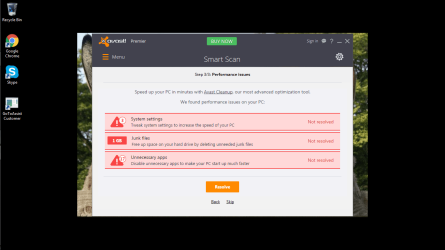
system settings tune up, junk files, unnecessary apps?

fluidmotion

New member
Member
VIP
Local time
5:41 PM
Messages
275
Avast detected junk files.
how do you remove them?

also,
how to tune up system settings?

last,
how do you spot unnecessary apps?
 

Attachments

  • pc performance.png
    pc performance.png
    55.1 KB · Views: 3

My Computer My Computer

At a glance

Win7 Starter 32 bits
Computer Manufacturer/Model Number
MP Mini Netbook 110
OS
Win7 Starter 32 bits
You can ignore all three of those things found by AVAST.


If you just cannot stand it, then use CCleaner to remove "junk files". You probably will not notice any performance gains by removing temp files (junk files). It might make antivirus scans go a tiny bit quicker - since there will be fewer files to be scanned when doing a full scan.


Unless AVAST tells you what system settings it thinks should be changed to speed things up, we probably are not going to be able to tell you if it is a good idea to make those changes.


You can uninstall apps that you do not use - but it is sometimes hard to know if you need an app or not. You can post screenshots of the items found by "Programs and Features" and maybe forum members can suggest things to uninstall.
 

My Computer My Computer

At a glance

W7 Pro SP1 64biti78GBIntel HD Graphics
Computer type
Laptop
Computer Manufacturer/Model Number
Employer provided Dell Latitude
OS
W7 Pro SP1 64bit
CPU
i7
Memory
8GB
Graphics Card(s)
Intel HD Graphics
Hard Drives
crappy SSD
Antivirus
Employer mandated Symantec Endpoint Protection
Browser
Pale Moon 64bit, IE11 64bit & Chrome 64bit
The default system settings will be optimum for most users. In recent years Microsoft has been near obsessed with performance and has developed complex technology that in many cases provides only minor performance improvements. If there were registry settings that made a significant improvement they would be the default.

Over the years quite a few settings have been recommended by various "tweaking" sites. Few are useful, and then only under unusual situations. Some may have been useful years ago but are no longer supported. The advantages of some (many) are based on misunderstandings of what they do. Some never worked and their origins remain a mystery.

I would hope that Avast somewhere documents what these settings are. To me it would be irresponsible not to.
 

My Computer My Computer

At a glance

Windows 7 Pro 64 bitXeon W35208 GBNvidia Geforce 210
Computer type
PC/Desktop
Computer Manufacturer/Model Number
HP
OS
Windows 7 Pro 64 bit
CPU
Xeon W3520
Memory
8 GB
Graphics Card(s)
Nvidia Geforce 210
Back
Top
