
System Showing Wierd SP1 Version

toughbook

New member
Power User
VIP
Local time
12:32 AM
Messages
241
Location
Georgia
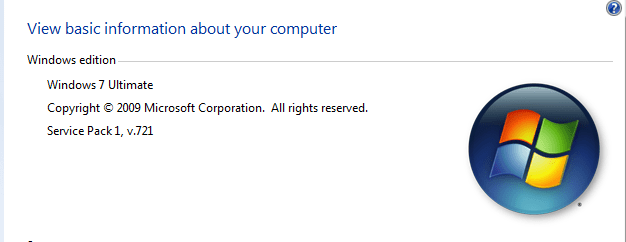
I have loaded SP1 on 2 of my laptops. One of them is simply statting Service Pack 1 under my Properties. The other is showing a Service Pack 1 v721. What is this all about?
 

Attachments

  • SP1.PNG
    SP1.PNG
    11.3 KB · Views: 16

My Computer

Computer type
Laptop
Computer Manufacturer/Model Number
Panasonic Toughbook CF54
OS
W7 Pro
CPU
Intel Core i-5300U
Motherboard
America MegaTrends
Memory
16Gb DDR3
Graphics Card(s)
Intel HD Graphics 5500
Sound Card
SoundMax
Monitor(s) Displays
DFP W/CircularPolarization 1000 Nit Touch
Screen Resolution
1920X1080
Hard Drives
Samsung SSD 850 Pro 512Gb
PSU
N/A
Case
Magnesium
Cooling
Passive
Keyboard
Emissive
Internet Speed
U-Verse Extreme 21MBPS,
Antivirus
MSE, Malwarebytes Professional
Where did you download it from?
 

My Computer

Computer type
PC/Desktop
Computer Manufacturer/Model Number
Bruce ... somewhere in his 40's
OS
Windows 7 Ultimate 32bit SP1
CPU
Intel(R) Core(TM)2 Quad CPU @ 2.40GHz, 2400 MHz
Motherboard
INTEL/D975XBX2
Memory
4 GB
Graphics Card(s)
ATI Radeon HD 2600 Pro
Monitor(s) Displays
Samsung SyncMaster 914v
Screen Resolution
1280 x 1024
Hard Drives
2/500GB each ... ST3500630AS ATA Device.
One is not connected
PSU
Rocketfish 700 W
Case
G.Skill Gigabyte Chassis
Keyboard
Standard PS/2 Keyboard
Mouse
Microsoft PS/2 Mouse
Internet Speed
DSL
Antivirus
Avira Internet Security
Browser
IE 11
Other Info
ATI HDMI Audio
That's funny. I just installed the SP1 on my laptop using Windows Update and I see nothing like that, I mean, I see just "Service Pack 1" there, no "v.xxx".

How did you install the SP1?

Would be good to know, I still need to install it on my main machine.
 

My Computer

Computer Manufacturer/Model Number
Dell Inspiron 530
OS
Windows 7 Ultimate (x64)
CPU
Q6600
Memory
8 GB
Graphics Card(s)
ATI Radeon HD 2600 XT
Monitor(s) Displays
Samsung Syncmaster P2450
Screen Resolution
1920x1080
Hard Drives
Samsung HD103UJ
Samsung HD501LJ
Internet Speed
25 Mb/s
Well, that's what I was just thinking. The 721 was downloaded from Softpedia last week. The other one, that just says Service Pack 1 is from WU. I am trying to find out if there is a difference. Where do you go to see your OS version string? I can't remember!
 

My Computer

Computer type
Laptop
Computer Manufacturer/Model Number
Panasonic Toughbook CF54
OS
W7 Pro
CPU
Intel Core i-5300U
Motherboard
America MegaTrends
Memory
16Gb DDR3
Graphics Card(s)
Intel HD Graphics 5500
Sound Card
SoundMax
Monitor(s) Displays
DFP W/CircularPolarization 1000 Nit Touch
Screen Resolution
1920X1080
Hard Drives
Samsung SSD 850 Pro 512Gb
PSU
N/A
Case
Magnesium
Cooling
Passive
Keyboard
Emissive
Internet Speed
U-Verse Extreme 21MBPS,
Antivirus
MSE, Malwarebytes Professional
I would remove it right away and start running some malware scans. I suggest it over and over to people, but always get your OSes and service packs from legit sources, after they go final and are made public.

If the system comes up clean, download and install the real SP1, either from Windows Update or from the single file executable.
 

My Computer

OS
Windows 7 Ultimate x64 SP1
CPU
Intel Core i7-2600
Motherboard
Gigabyte GA-P67A-UD3P-B3
Memory
12 GB Patriot Extreme DDR3-1333
Graphics Card(s)
Nvidia GTX 470
Monitor(s) Displays
Dell UltraSharp 2209WA
Hard Drives
OCZ Agility3 240 GB, WD5001AALS, WD7501AALS
PSU
OCZ ModStream 700W
Case
CoolerMaster HAF 912 Advanced
Cooling
CoolerMaster Hyper 212 Plus
The SP1 version in the screenshot above is the RC not the Final

If you install the final but still see that version number, simply remove SP1, clean out the temporarily SP files and reinstall SP1
 
Last edited by a moderator:

My Computer

Computer type
PC/Desktop
Computer Manufacturer/Model Number
Custom Build
OS
Windows 10 Pro x64, Arch Linux
CPU
Intel Core 2 Quad Q8200 OC'd 3.08GHz
Motherboard
Asus Rampage formula LGA775
Memory
8GB DDR2 900Mhz
Graphics Card(s)
MSI GT730 2GB GDDR5 (Kepler)
Sound Card
Supreme FX2
Monitor(s) Displays
Samsung LS22F350 LED
Screen Resolution
1080P
Hard Drives
Kingston SSDNow UV400 120GB, 500GB Hitachi, 2TB Samsung, 500GB Seagate FreeAgent, 640GB Samsung, 160GB Toshiba (Arch)
PSU
AeroCool 500W Bronze
Cooling
Cooler Master V6 + 3X fans
Keyboard
Prolink keyboard
Mouse
Logitech M705
Internet Speed
1MiB/s
Browser
Chrome Beta
Back
Top