
Solved System slowed down after virus scanner reinstall

sono

New member
Member
Local time
10:59 PM
Messages
42
I have Windows 7 SP1 Ultimate installed, no updates, the machine is runnung like this flawlessly since 3 years. But recently since I reinstalled the Eset Nod 32 14.0 virus scanner, the system has been slow. It is not slow all the time, but very often it slows down. It seems to me it happens most of the time when I open a Windows explorer window, right from the desktop or when trying to save or open something in an application. I have ran virus checks, both with Eset and Trend Micro Housecall, but they found nothing. I don't see any suspicious process, the only strange thing I noticed is that the memory is near to full sometimes when the system becomes slow, and it is Google Chrome that takes most of the memory. The process explorer shows that it is opened multiple times, there is about 5-10 chrome.exe processes indicated. In spite of that I usually have only one or two tabs opened in Chrome. See the photo attached.

Any ideas to investigate and repair the source of problems?
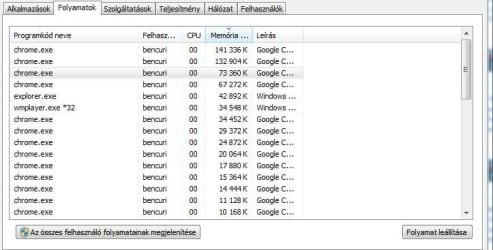
chrome.JPG
 

My Computer My Computer

Computer type
Laptop
Computer Manufacturer/Model Number
Hp Probook 6570b
OS
Windows 7 Ultimate 64bit
CPU
i5 3210m
Memory
8GB
Try disabling all chrome extensions, just for testing purposes.

There are some tools that can help you troubleshoot your issue:

ProcessHacker ( Overview - Process Hacker ) . It's a better task manager. You should look for memory, cpu or input/output-intensive process.

Procmon ( Process Monitor - Windows Sysinternals | Microsoft Docs ) . This will show all events in real time. This could show you wich process is taking over the system.

CurrPort ( CurrPorts: Monitoring TCP/IP network connections on Windows ). This will show you your current connections status. Only if you suspect you are infected with some virus. Check for process that shouldn't be using the network.
 

My Computers My Computers

System One System Two

  • Computer type
    PC/Desktop
    OS
    Windows 7 Ultimate 64-bit SP1
    CPU
    Intel Core 2 Quad Q6700 @ 2.66GHz
    Motherboard
    ECS MCP73PVT-SM
    Memory
    4.00GB Single-Channel DDR2 @ 399MHz
    Graphics Card(s)
    2047MB NVIDIA GeForce GT 710 (ASUStek Computer Inc)
    Sound Card
    Realtek High Definition Audio
    Monitor(s) Displays
    HP 21kd
    Screen Resolution
    1920x1080@60Hz
    Hard Drives
    149GB Western Digital WDC WD1600AABS-61PRA0 ATA Device (SATA )
    4000GB Seagate ST4000DM004-2U9104 ATA Device (SATA )
    931GB TOSHIBA External USB 3.0 USB Device (USB (SATA) )
    Antivirus
    None. Don't Need it.
    Browser
    Librewolf Portable
    Other Info
    It's a very old system.
  • Computer type
    PC/Desktop
Please edit your profile with ALL your hardware specs. It will help us to help you
System Info - See Your System Specs

Your specs doesn't mention how much memory you have.

I don't like Chrome as it loads on startup, spy everything you do (online and offline) and uses a lot of memory.
I suggest you use Firefox or Edge.

Every antivirus slows down the computer as it runs in the background and scans any file before it opens.

Is your Win 7 SP1?
I suggest you run Single file with all updates - Simplix
 

My Computers My Computers

System One System Two

  • Computer type
    PC/Desktop
    Computer Manufacturer/Model Number
    custom build
    OS
    Windows 7 HP 64
    CPU
    i5 6600K - 800MHz to 4200MHz
    Motherboard
    GA-Z170-HD3P
    Memory
    4+4G GSkill DDR4 3000
    Graphics Card(s)
    IG - Intel 530
    Monitor(s) Displays
    Samsung 226BW
    Screen Resolution
    1680x1050
    Hard Drives
    (1) -1 SM951 – 128GB M.2 AHCI PCIe SSD drive for Windows 7 and Lubuntu
    (2) -1 WD SATA 3 - 1T for Data
    (3) -1 WD SATA 3 - 1T for backup
    PSU
    Thermaltake 450W TR2 gold
    Keyboard
    Old and good Chicony mechanical keyboard
    Mouse
    Logitech mX performance - 9 buttons (had to disable some)
    Internet Speed
    500Mb/s
    Browser
    Firefox 64
    Other Info
    TinyWall firewall
  • Computer type
    Laptop
    System Manufacturer/Model Number
    Asus Q550LF
    OS
    Windows 7 Pro
    CPU
    i7-4500U 800MHz to 3.0GHz
    Motherboard
    Asus Q550LF
    Memory
    (4+4)G DDR3 1600
    Graphics Card(s)
    IG intel 4400 + NVIDIA GeForce GT 745M
    Sound Card
    Realtek
    Monitor(s) Displays
    LG Display LP156WF4-SPH1
    Screen Resolution
    1920 x 1080
    Hard Drives
    BX500 120G SSD for Windows and programs +
    1T HDD for data
    Internet Speed
    500 Mb/s
    Browser
    Firefox
    Other Info
    TinyWall firewall
Please edit your profile with ALL your hardware specs. It will help us to help you
System Info - See Your System Specs

Your specs doesn't mention how much memory you have.

I don't like Chrome as it loads on startup, spy everything you do (online and offline) and uses a lot of memory.
I suggest you use Firefox or Edge.

Every antivirus slows down the computer as it runs in the background and scans any file before it opens.

Is your Win 7 SP1?
I suggest you run Single file with all updates - Simplix

The system had no issue during 3 years without updates until I reinstalled my virus scanner recently to the same version as before. My hardware is: HP Probook 6570b, 8GB memory, i5-3210M CPU.

I will try the apps Diz suggested to check the processes.

- - - Updated - - -

I have checked the recent processes with process hacker. I have saved the results, attached it to this post. Do you see any suspicious things in it?

The only odd thing I see is that I have 9 Chrome tab opened, but the process list shows much more chrome.exe running. I don't have any extensions installed except for the default ones: Google Docs, Slideshows, Documents, Tables.
 

Attachments

My Computer My Computer

Computer type
Laptop
Computer Manufacturer/Model Number
Hp Probook 6570b
OS
Windows 7 Ultimate 64bit
CPU
i5 3210m
Memory
8GB
You have a proxy running eguiProxy.exe 7,4 MB ESET Proxy GUI
that can slow it to a crawl as all internet idownload to the proxy and then again transfered to the pc remove est see if it work ok then
 

My Computer My Computer

Computer type
PC/Desktop
OS
win 8 32 bit
I see but as I told you I had no problems like this before the reinstall, for three years. I had Eset 14.0 before and after the reinstall, just needed to remove it becuase it reported the modules cannot be downloaded.

I managed to find a wide spectrum system check tool, that is a script actually compiled by some volunteer. It is called Tron script, that is a batch file that runs several official tools to check and repair your machine. Do you know anything about it? Whether it is safe? It is a GitHUB kind of project, but I am still hesitating to install it.

Tron fights for the User
 

My Computer My Computer

Computer type
Laptop
Computer Manufacturer/Model Number
Hp Probook 6570b
OS
Windows 7 Ultimate 64bit
CPU
i5 3210m
Memory
8GB

My Computer My Computer

Computer type
PC/Desktop
Computer Manufacturer/Model Number
medionl/Aspire 6930G/acer x55a
OS
W7 home premium 32bit/W7HP 64bit/w10 tp insider ring
CPU
E5300 dual core
Motherboard
medion MS7366
Memory
3gb
Graphics Card(s)
Nvidia Geforce 7100 Nforce 630i
Monitor(s) Displays
avixc
Internet Speed
n (isp resticted to 72)
Antivirus
mse/pands
Browser
palemoon
Other Info
Belkin Fd7050 n USB using Railink RT2870 drivers, more upto date

My Computers My Computers

System One System Two

  • Computer type
    PC/Desktop
    Computer Manufacturer/Model Number
    custom build
    OS
    Windows 7 HP 64
    CPU
    i5 6600K - 800MHz to 4200MHz
    Motherboard
    GA-Z170-HD3P
    Memory
    4+4G GSkill DDR4 3000
    Graphics Card(s)
    IG - Intel 530
    Monitor(s) Displays
    Samsung 226BW
    Screen Resolution
    1680x1050
    Hard Drives
    (1) -1 SM951 – 128GB M.2 AHCI PCIe SSD drive for Windows 7 and Lubuntu
    (2) -1 WD SATA 3 - 1T for Data
    (3) -1 WD SATA 3 - 1T for backup
    PSU
    Thermaltake 450W TR2 gold
    Keyboard
    Old and good Chicony mechanical keyboard
    Mouse
    Logitech mX performance - 9 buttons (had to disable some)
    Internet Speed
    500Mb/s
    Browser
    Firefox 64
    Other Info
    TinyWall firewall
  • Computer type
    Laptop
    System Manufacturer/Model Number
    Asus Q550LF
    OS
    Windows 7 Pro
    CPU
    i7-4500U 800MHz to 3.0GHz
    Motherboard
    Asus Q550LF
    Memory
    (4+4)G DDR3 1600
    Graphics Card(s)
    IG intel 4400 + NVIDIA GeForce GT 745M
    Sound Card
    Realtek
    Monitor(s) Displays
    LG Display LP156WF4-SPH1
    Screen Resolution
    1920 x 1080
    Hard Drives
    BX500 120G SSD for Windows and programs +
    1T HDD for data
    Internet Speed
    500 Mb/s
    Browser
    Firefox
    Other Info
    TinyWall firewall
Yes, I have the license for the Ultimate. It was installed from the DVD with the license.

About the SHA2 update: Eset did ask for certain updates, but as I remember only 2 segments, I downloaded and installed them separately. Interestingly, the modules still did not update after that. I had no licensing issues because the license still had like a year time to expire or so.

I am just hesitating with the updates because usually it slows down the computer, that is what I experienced. But as a last choice, I will try, if no other idea comes up.
 

My Computer My Computer

Computer type
Laptop
Computer Manufacturer/Model Number
Hp Probook 6570b
OS
Windows 7 Ultimate 64bit
CPU
i5 3210m
Memory
8GB
If you read the Simplix thread you will see that it install the updates without the telemetry and tracking. It is very good.
Does your Win 7 has SP1?
On a cmd window type winver
 

My Computers My Computers

System One System Two

  • Computer type
    PC/Desktop
    Computer Manufacturer/Model Number
    custom build
    OS
    Windows 7 HP 64
    CPU
    i5 6600K - 800MHz to 4200MHz
    Motherboard
    GA-Z170-HD3P
    Memory
    4+4G GSkill DDR4 3000
    Graphics Card(s)
    IG - Intel 530
    Monitor(s) Displays
    Samsung 226BW
    Screen Resolution
    1680x1050
    Hard Drives
    (1) -1 SM951 – 128GB M.2 AHCI PCIe SSD drive for Windows 7 and Lubuntu
    (2) -1 WD SATA 3 - 1T for Data
    (3) -1 WD SATA 3 - 1T for backup
    PSU
    Thermaltake 450W TR2 gold
    Keyboard
    Old and good Chicony mechanical keyboard
    Mouse
    Logitech mX performance - 9 buttons (had to disable some)
    Internet Speed
    500Mb/s
    Browser
    Firefox 64
    Other Info
    TinyWall firewall
  • Computer type
    Laptop
    System Manufacturer/Model Number
    Asus Q550LF
    OS
    Windows 7 Pro
    CPU
    i7-4500U 800MHz to 3.0GHz
    Motherboard
    Asus Q550LF
    Memory
    (4+4)G DDR3 1600
    Graphics Card(s)
    IG intel 4400 + NVIDIA GeForce GT 745M
    Sound Card
    Realtek
    Monitor(s) Displays
    LG Display LP156WF4-SPH1
    Screen Resolution
    1920 x 1080
    Hard Drives
    BX500 120G SSD for Windows and programs +
    1T HDD for data
    Internet Speed
    500 Mb/s
    Browser
    Firefox
    Other Info
    TinyWall firewall
Yes, I have SP1, the original state that the DVD sets the system to, and the two update segments installed, that Eset suggested. Okay, I try the update, and will see what happens.
 

My Computer My Computer

Computer type
Laptop
Computer Manufacturer/Model Number
Hp Probook 6570b
OS
Windows 7 Ultimate 64bit
CPU
i5 3210m
Memory
8GB
Im sorry but it does need the SHA2 windows update, if Eset then failed to install the required modules, something is definately wrong with your OS, further updates maybe required, there is no reason why they should slow down your system in fact quite the opposite
Just because you installed installed Ultimate with a DVD and a licence does NOT mean its genuine---
you need to run this tool so we can check, copy/paste the results
Download Microsoft Genuine Advantage Diagnostic Tool - MajorGeeks
note MS no longer provides this tool, hence 3rd party download

Can you also provide the Eset link you used
 

My Computer My Computer

Computer type
PC/Desktop
Computer Manufacturer/Model Number
medionl/Aspire 6930G/acer x55a
OS
W7 home premium 32bit/W7HP 64bit/w10 tp insider ring
CPU
E5300 dual core
Motherboard
medion MS7366
Memory
3gb
Graphics Card(s)
Nvidia Geforce 7100 Nforce 630i
Monitor(s) Displays
avixc
Internet Speed
n (isp resticted to 72)
Antivirus
mse/pands
Browser
palemoon
Other Info
Belkin Fd7050 n USB using Railink RT2870 drivers, more upto date
I don't really know about Majorgeeks, and I don't really like to download softwares from collections of third party sites. If you can link the Genuine Advantage Tool from the developer site, I can install it, but anyway I would not. Or if you suggest a workaround in the CMD, I don't mind checking there.

I wonder why my Windows would not be genuine, especially that I have the COA label for the DVD, that the validating system accepted all the 3 times during 8 years when I had to do a reinstall. I doubt that the slowing down of the computer has anything to do with this. Especially, as I emphasized several times, everything was fine, until I uninstalled Eset, and reinstalled the same version again. So very likely, something was changed at that point, because the system is slow since then. But I did not have any problem with the validation. Windows is still shown as activated.

This is the Eset link I used:
ESET NOD32 Antivirus - virusirto program Windows-ra | ESET
 

My Computer My Computer

Computer type
Laptop
Computer Manufacturer/Model Number
Hp Probook 6570b
OS
Windows 7 Ultimate 64bit
CPU
i5 3210m
Memory
8GB

My Computers My Computers

System One System Two

  • Computer type
    PC/Desktop
    Computer Manufacturer/Model Number
    custom build
    OS
    Windows 7 HP 64
    CPU
    i5 6600K - 800MHz to 4200MHz
    Motherboard
    GA-Z170-HD3P
    Memory
    4+4G GSkill DDR4 3000
    Graphics Card(s)
    IG - Intel 530
    Monitor(s) Displays
    Samsung 226BW
    Screen Resolution
    1680x1050
    Hard Drives
    (1) -1 SM951 – 128GB M.2 AHCI PCIe SSD drive for Windows 7 and Lubuntu
    (2) -1 WD SATA 3 - 1T for Data
    (3) -1 WD SATA 3 - 1T for backup
    PSU
    Thermaltake 450W TR2 gold
    Keyboard
    Old and good Chicony mechanical keyboard
    Mouse
    Logitech mX performance - 9 buttons (had to disable some)
    Internet Speed
    500Mb/s
    Browser
    Firefox 64
    Other Info
    TinyWall firewall
  • Computer type
    Laptop
    System Manufacturer/Model Number
    Asus Q550LF
    OS
    Windows 7 Pro
    CPU
    i7-4500U 800MHz to 3.0GHz
    Motherboard
    Asus Q550LF
    Memory
    (4+4)G DDR3 1600
    Graphics Card(s)
    IG intel 4400 + NVIDIA GeForce GT 745M
    Sound Card
    Realtek
    Monitor(s) Displays
    LG Display LP156WF4-SPH1
    Screen Resolution
    1920 x 1080
    Hard Drives
    BX500 120G SSD for Windows and programs +
    1T HDD for data
    Internet Speed
    500 Mb/s
    Browser
    Firefox
    Other Info
    TinyWall firewall
I noticed that but I don't see a link for it on their sites.
 

My Computer My Computer

Computer type
Laptop
Computer Manufacturer/Model Number
Hp Probook 6570b
OS
Windows 7 Ultimate 64bit
CPU
i5 3210m
Memory
8GB
I noticed that but I don't see a link for it on their sites.
You don't see it on M$ site because it apply s only for Win 7 and M$ don't support Win 7 any more. I gave you a link from one I've downloaded from M$.
 

My Computers My Computers

System One System Two

  • Computer type
    PC/Desktop
    Computer Manufacturer/Model Number
    custom build
    OS
    Windows 7 HP 64
    CPU
    i5 6600K - 800MHz to 4200MHz
    Motherboard
    GA-Z170-HD3P
    Memory
    4+4G GSkill DDR4 3000
    Graphics Card(s)
    IG - Intel 530
    Monitor(s) Displays
    Samsung 226BW
    Screen Resolution
    1680x1050
    Hard Drives
    (1) -1 SM951 – 128GB M.2 AHCI PCIe SSD drive for Windows 7 and Lubuntu
    (2) -1 WD SATA 3 - 1T for Data
    (3) -1 WD SATA 3 - 1T for backup
    PSU
    Thermaltake 450W TR2 gold
    Keyboard
    Old and good Chicony mechanical keyboard
    Mouse
    Logitech mX performance - 9 buttons (had to disable some)
    Internet Speed
    500Mb/s
    Browser
    Firefox 64
    Other Info
    TinyWall firewall
  • Computer type
    Laptop
    System Manufacturer/Model Number
    Asus Q550LF
    OS
    Windows 7 Pro
    CPU
    i7-4500U 800MHz to 3.0GHz
    Motherboard
    Asus Q550LF
    Memory
    (4+4)G DDR3 1600
    Graphics Card(s)
    IG intel 4400 + NVIDIA GeForce GT 745M
    Sound Card
    Realtek
    Monitor(s) Displays
    LG Display LP156WF4-SPH1
    Screen Resolution
    1920 x 1080
    Hard Drives
    BX500 120G SSD for Windows and programs +
    1T HDD for data
    Internet Speed
    500 Mb/s
    Browser
    Firefox
    Other Info
    TinyWall firewall
For the moment the problem seems to have been solved. As I mentioned the slowing down most of the time happens when explorer.exe is doing something: a file browser window is opened, or when saving/opening something in an application. I choose rebuilding the index and also run a registry optimization in the app called Advanced Uninstaller, and now the speed seems to be okay. Still did not run the update, so the system is like before in the original state.
 

My Computer My Computer

Computer type
Laptop
Computer Manufacturer/Model Number
Hp Probook 6570b
OS
Windows 7 Ultimate 64bit
CPU
i5 3210m
Memory
8GB
Back
Top