System Sounds Refuse to be Disabled

wyldoxz

New member
Local time
7:36 AM
Messages
2
The specific irritation I am dealing with at the moment is the fact that I have not opened Outlook (2010) on my laptop in ... well, a long time. So, now I have a tonne of new email notifications pouring in, and they will not shut up.

First, I tried setting the Windows New Mail Notification to 'no sound': no effect. I restarted Outlook with no effect; I restarted my PC with no effect. Next, I tried disabling all the system sounds: no effect. Again, I restarted Outlook and the PC with no effect. Then, I remembered to check Outlook's localised settings and unselected 'play a sound': no effect. Once again, I restarted Outlook and the PC with no effect. (Also, this problem is not isolated to Outlook because, after each system restart, other system alert sounds have made noise).

I am at a complete loss. I could simply mute the sound, but I am trying to watch some DVDs. This is, in fact, an old problem that I could not be bothered resolving previously, but now I want it fixed.
 

My Computer My Computer

Computer type
Laptop
Computer Manufacturer/Model Number
HP Pavilion dv6
OS
Windows 7 Home Premium x64
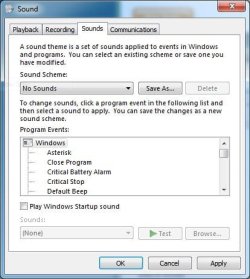
Disabling (no systems sounds) should take care of it. That is how I have my PC set as I also use it for my recording studio. I have Outlook 2003 and I don't get any incoming mail sounds, or any other Windows sounds.

This is my setup:
 

Attachments

  • Sound Scheme.JPG
    Sound Scheme.JPG
    38.5 KB · Views: 8

My Computer My Computer

Computer type
PC/Desktop
Computer Manufacturer/Model Number
My Own Build
OS
Windows 10 64 bit
CPU
Intel i7 6700K
Motherboard
ASUS ROG Maximus VIII Hero
Memory
16GB Corsair Dominator
Graphics Card(s)
Intel CPU Graphics
Sound Card
RealTek
Monitor(s) Displays
27" Dell S2719dgf
Screen Resolution
2560X1440
Hard Drives
1 TB Samsung 850 EVO SSD for Win 10 Pro
500GB Samsung 850 EVO SSD for Win 10 Insider
2 TB drive for backup
PSU
EVGA Supernova 750G2
Case
BeQuiet Silent Base 600
Cooling
Deepcool Captain 120EX
Keyboard
Microsoft Wireless 2000
Mouse
Microsoft wireless
Internet Speed
100 MB/sec (Cable)
Antivirus
Microsoft Defender and Malwarebytes
Browser
Edge/Firefox
Other Info
Cakewalk (Sonar) by BandLab and Studio One 4.1 Pro recording studio software. MOTU 896Mk3 Hybrid recording interface, Frontier Tranzport wireless control unit, Behringer X-Touch Control Surface.
Five USB connected optical drives for CD Audio production using Nero BurningROM
Yup, that is exactly what I thought, too; however, my sound settings match your image, and yet system sounds persist. Any ideas as to what the problem could possibly be?
 

My Computer My Computer

Computer type
Laptop
Computer Manufacturer/Model Number
HP Pavilion dv6
OS
Windows 7 Home Premium x64
What I've done is the procedure to mute all sounds. If its still happening something in the Registry is probably the problem. However, I don't know where in the Registry this gets set (if this is the problem).
 

My Computer My Computer

Computer type
PC/Desktop
Computer Manufacturer/Model Number
My Own Build
OS
Windows 10 64 bit
CPU
Intel i7 6700K
Motherboard
ASUS ROG Maximus VIII Hero
Memory
16GB Corsair Dominator
Graphics Card(s)
Intel CPU Graphics
Sound Card
RealTek
Monitor(s) Displays
27" Dell S2719dgf
Screen Resolution
2560X1440
Hard Drives
1 TB Samsung 850 EVO SSD for Win 10 Pro
500GB Samsung 850 EVO SSD for Win 10 Insider
2 TB drive for backup
PSU
EVGA Supernova 750G2
Case
BeQuiet Silent Base 600
Cooling
Deepcool Captain 120EX
Keyboard
Microsoft Wireless 2000
Mouse
Microsoft wireless
Internet Speed
100 MB/sec (Cable)
Antivirus
Microsoft Defender and Malwarebytes
Browser
Edge/Firefox
Other Info
Cakewalk (Sonar) by BandLab and Studio One 4.1 Pro recording studio software. MOTU 896Mk3 Hybrid recording interface, Frontier Tranzport wireless control unit, Behringer X-Touch Control Surface.
Five USB connected optical drives for CD Audio production using Nero BurningROM
Back
Top