System trying to connect to static IP that no longer exists

nelsonha

New member
Local time
3:06 AM
Messages
2
Background:
I had my Win7 desktop configured to connect to my laptop via crossover cable using a static IP. Everything with this setup worked fine.

Now I no longer use this setup(the laptop is no longer around), yet my desktop is still trying to access the static IP 10.1.1.2. It seems that netbios is trying to make the connection because when I disable netbios it stops trying to connect. I can't find where in netbios it is using this IP. All of the networked drives ot this static IP have long since been deleted. I've scoured the registry and did a nbtstat -rr command to flush the netbios cache with no luck.

Any ideas?
 

My Computer My Computer

At a glance

Windows 7 Home Premium 64 bitIntel Core i5-650 @ 3.2 GHz8GBNvidia GT630
Computer type
PC/Desktop
Computer Manufacturer/Model Number
HP HPe-140f
OS
Windows 7 Home Premium 64 bit
CPU
Intel Core i5-650 @ 3.2 GHz
Memory
8GB
Graphics Card(s)
Nvidia GT630
Hard Drives
Hitachi 1TB -7200RPM -System
Western Digital 1TB -7200RPM
Background:
I had my Win7 desktop configured to connect to my laptop via crossover cable using a static IP. Everything with this setup worked fine.

Now I no longer use this setup(the laptop is no longer around), yet my desktop is still trying to access the static IP 10.1.1.2. It seems that netbios is trying to make the connection because when I disable netbios it stops trying to connect. I can't find where in netbios it is using this IP. All of the networked drives ot this static IP have long since been deleted. I've scoured the registry and did a nbtstat -rr command to flush the netbios cache with no luck.

Any ideas?

You should be able to change back to using DHCP by going into the IPv4 properties and change over to DHCP. Go to the Network and Sharing Center, then to the left click on Change Adaptor Settings, right click the active connection and choose properties, scroll down to IPv4 and choose properties again then make sure that DHCP is enabled etc. click the Advanced tab and make sure it's set to use DHCP as well.
 

Attachments

  • IPv4 DHCP enabled.PNG
    IPv4 DHCP enabled.PNG
    17.8 KB · Views: 1

My Computer My Computer

At a glance

Windows 7 Ult, Windows 8.1 Pro,Q9650-4.275GHz, E8600 4.5GHz, E6750-3.8GHzG.Skill PC2 9600 1200Mhz 5 5 5 15 2TGTX480
Computer type
PC/Desktop
Computer Manufacturer/Model Number
Home built
OS
Windows 7 Ult, Windows 8.1 Pro,
CPU
Q9650-4.275GHz, E8600 4.5GHz, E6750-3.8GHz
Motherboard
Evga 780i FTW
Memory
G.Skill PC2 9600 1200Mhz 5 5 5 15 2T
Graphics Card(s)
GTX480
Sound Card
Asus Xonar D2
Monitor(s) Displays
HannsG
Screen Resolution
1680X1050
Hard Drives
GSkill Phoenix Pro 120GB SSD
PSU
ThermalTake Toughpower 1000Watt modular
Case
ThermalTake XaserV
Cooling
Xigmatek S1283
Keyboard
Logitech G15
Mouse
Logitech G9
Internet Speed
T1
I should have mentioned that I'm using DHCP with my router as the DHCP server yet something is still trying connect to this static IP. I can see in my router's firewall logs where it tries to connect, but router blocks it.

Here's is one of the log entries that shows where it blocks the computer from accessing this IP.

Packet Details


Source IP: 192.168.1.46
Destination IP: 10.1.1.2
Protocol: UDP
Source Port: 137
Destination Port: 137

It's using a netbios port, but I can't find where in any netbios settings this IP is still being used.
 

My Computer My Computer

At a glance

Windows 7 Home Premium 64 bitIntel Core i5-650 @ 3.2 GHz8GBNvidia GT630
Computer type
PC/Desktop
Computer Manufacturer/Model Number
HP HPe-140f
OS
Windows 7 Home Premium 64 bit
CPU
Intel Core i5-650 @ 3.2 GHz
Memory
8GB
Graphics Card(s)
Nvidia GT630
Hard Drives
Hitachi 1TB -7200RPM -System
Western Digital 1TB -7200RPM
After following Chev65's suggestions could you possibly try the following command and see if you obtain a new IP address from your DHCP server:

Code:
ipconfig /renew

Josh
 

My Computer My Computer

At a glance

Windows 7 Professional x64 SP1 ; Windows Serv...Intel Core i5 2400 @ 3.10GHz8.0GB DDR3 @ 665MHz (2GBx4)AMD Radeon HD 6870
Computer type
PC/Desktop
Computer Manufacturer/Model Number
Custom Built
OS
Windows 7 Professional x64 SP1 ; Windows Server 2012 R2 Standard
CPU
Intel Core i5 2400 @ 3.10GHz
Motherboard
Foxconn H67MP-S/-V/H67MP
Memory
8.0GB DDR3 @ 665MHz (2GBx4)
Graphics Card(s)
AMD Radeon HD 6870
Sound Card
Realtek High Definition Audio
Monitor(s) Displays
AOC 2243W & SMB1930NW
Screen Resolution
1440x900 & 1920x1080
Hard Drives
977GB Seagate ST31000524AS ATA Drive (SATA)
250GB WD iSCSI attached Drive
PSU
750W Gaming PSU
Case
Novatech Night
Cooling
Fan
Keyboard
Dell Standard PS/2 Keyboard
Mouse
R.A.T 07 Gaming Mouse
Internet Speed
Download: 10 Mbps Ping: 30ms Upload: 0.81 Mbps
Browser
Google Chrome
Other Info
Optiarc DVD RW AD-5260S ATA Device
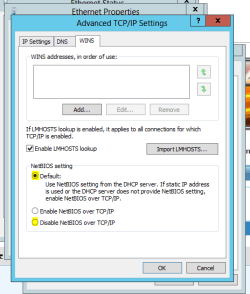
In addition have you tried to disable or set to default the netBIOS setting in the advanced properties of your connection?

netbios.PNG

Josh
 

My Computer My Computer

At a glance

Windows 7 Professional x64 SP1 ; Windows Serv...Intel Core i5 2400 @ 3.10GHz8.0GB DDR3 @ 665MHz (2GBx4)AMD Radeon HD 6870
Computer type
PC/Desktop
Computer Manufacturer/Model Number
Custom Built
OS
Windows 7 Professional x64 SP1 ; Windows Server 2012 R2 Standard
CPU
Intel Core i5 2400 @ 3.10GHz
Motherboard
Foxconn H67MP-S/-V/H67MP
Memory
8.0GB DDR3 @ 665MHz (2GBx4)
Graphics Card(s)
AMD Radeon HD 6870
Sound Card
Realtek High Definition Audio
Monitor(s) Displays
AOC 2243W & SMB1930NW
Screen Resolution
1440x900 & 1920x1080
Hard Drives
977GB Seagate ST31000524AS ATA Drive (SATA)
250GB WD iSCSI attached Drive
PSU
750W Gaming PSU
Case
Novatech Night
Cooling
Fan
Keyboard
Dell Standard PS/2 Keyboard
Mouse
R.A.T 07 Gaming Mouse
Internet Speed
Download: 10 Mbps Ping: 30ms Upload: 0.81 Mbps
Browser
Google Chrome
Other Info
Optiarc DVD RW AD-5260S ATA Device
Sometimes the Nic card or Wifi adapter get stuck in that static mode, and those values keep coming back, shutting off DHCP, is this what is happening, the numbers keep getting put back in?

Try stopping "Wired Autoconfig" - Set your network connection to DHCP, and then start Autoconfig again, I think it is just because your system was used to connecting that way, Networks develop certain behaviours, they remember their settings for the most part, so you are just teaching it a new thing.
 

My Computer My Computer

At a glance

Windows 10/Windows 7 (My Idea- Virtual PC)Intel(R) Core(TM) i5-3470 CPU @ 3.20GHz16 GBnVidia GeForce GTX 750 Ti (2GB)
Computer type
PC/Desktop
Computer Manufacturer/Model Number
Lenovo Thinkcenter M92p
OS
Windows 10/Windows 7 (My Idea- Virtual PC)
CPU
Intel(R) Core(TM) i5-3470 CPU @ 3.20GHz
Motherboard
Lenovo MahoBay
Memory
16 GB
Graphics Card(s)
nVidia GeForce GTX 750 Ti (2GB)
Sound Card
nVidia HD Audio
Monitor(s) Displays
RCA 4KTV 50"
Screen Resolution
3840p x 2160p
Hard Drives
Onboard:
Seagate ST500DM009-2F110A 500GB
WDC WD4000FYYZ-01UL1B1 (WD-WCC131910831) [3726 GB]

USB 3.0
My Book 1140 (WCAZAD122454) [1862 GB]
Apple MDT MD10EAVS-00D7B0 (0000AB123473) [931 GB]

External:
WD Blue Innostar/Matsunichi (465 GB)
WD
PSU
Stock Thinkcenter M92p
Case
Stock Thinkcenter M92p
Cooling
Active
Keyboard
BYTEC BY-GA-KT-100-AC
Mouse
BYTEC
Internet Speed
1 GHz Down, 40 Mbps Up
Antivirus
Windows Defender
Browser
EDGE
Other Info
Old Other Info:
I finally have an Intel machine that has more than 8GB of Ram.
My ASUS M2N-SE AMD Windows 7 machine is back to Windows 7. Replaced the AMD 4400+ CPU and maxed out the RAM (4GB).
My Core Duo machine is only 2GB of Ram and it is locked to Windows XP in order to run Pro Tools 6.4, which I have been using since 2004.
I have one other Dell OptiPlex 980 tower, Identical to this one,
Back
Top