Tabbed Browser Settings

2ManyQuestions

New member
Local time
6:17 PM
Messages
5
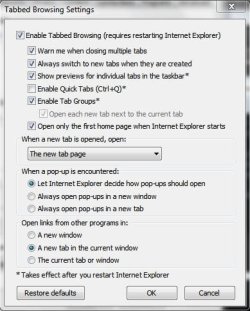
Everyday I have to go into my Internet Options and Tabbed Browser Settings and set the settings to "The New Tab Page".

I got so sick and tired of this, I installed Firefox and I would like to go back to Internet Explorer but the the Tab setting won't stay.

Any help would be greatly appreciated and thanks in advance!
 

My Computer

OS
Windows 7 Home Premium 64bit
My honest opinion. There are about 10 browsers better than IE for 90% of the internet.
Firefox is one of those.
 

My Computer

Computer Manufacturer/Model Number
Insane hobo technologies. ;-)
OS
Windows 7 x64
CPU
Intel i7 2600k
Motherboard
Asrock z68 extreme 4 gen 3
Memory
G.skill Ripjaw 16gigs @ 1866
Graphics Card(s)
Nvidia gtx580 (evga)
Sound Card
Integrated HD audio + hdmi
Monitor(s) Displays
24" ASUS widescreen + 42" insignia
Screen Resolution
1080p (1920x1080)
Hard Drives
128 Samsung 830
256 Samsung 840
3 x 1tb storage drive (various)
1 western digital 1tb (eSATA)
1 Seagate 1tb (eSATA)
PSU
1 kilowatt SLI/Crossfire rated Silverstone modular
Case
NZXT Phantom + additional 220 fan
Cooling
Zalmann
Keyboard
Microsoft wireless 3000 (v2)
Mouse
MS - wireless 5000 (bluetrack)
Internet Speed
depends on if you ask me or my provider.
Other Info
The above information is provided as is, and the author assumes no responsibility for issues it may cause with your sanity or fanboyism.
The OP's question was about a problem they're having with IE, not what browser somebody else uses or an opinion on which browser is better than another.

Hi 2ManyQuestions, on the Internet options, General tab, Change how web pages are displayed in tabs, choose settings and what is the "When a new tab is opened, open:" set to? Are you logged on as administrator?

I've included a snip of mine below, try setting yours like mine and see what happens. After you set it restart IE. Make sure you log on as admin before doing any changes. Good luck.
 

Attachments

  • tabbed browsing.JPG
    tabbed browsing.JPG
    41.7 KB · Views: 6

My Computer

Computer type
PC/Desktop
Computer Manufacturer/Model Number
Self built
OS
Windows 11 Home x64
CPU
AMD Ryzen 5 5600G
Motherboard
ASUSTeK Prime B450M-A II
Memory
G.SKILL Ripjaws Gaming Series (2x8G) DDR4
Graphics Card(s)
None (AMD Radeon Graphics on MB and CPU)
Sound Card
None (integrated on MB)
Monitor(s) Displays
Acer S200HLAbd Black 20"
Screen Resolution
1600 x 900
Hard Drives
Samsung SSD 840 EVO 120GB (W10)
WD Blue 500G SATA 6G WDBAAX5000ENC-NRSN (Backup/Storage)
PSU
Corsair CX500 500W ATX12V v2.3 80 Plus Bronze Active PFC
Case
Unknown
Cooling
CPU-stock cooling fan, 1 extra 80mm case fan
Keyboard
Azio KB505U Large Print Tri-Color Illuminated USB Keyboard
Mouse
MS Optical Wheel Mouse (USB)
Internet Speed
ATT Fiber 5000/VOIP 5G down/5G up
Antivirus
Win Defender, SAS, Spyware Blaster all free editions
Browser
Firefox, Waterfox, sometimes Edge
Thank you for your help Steve, unfortunately it didn't work.
I don't know what happened.
All I know is that it was working and then after an update...I couldn't tell you which one because there were like 10 updates at the same time....it just stopped working.
I'd go into the settings how you show and it's just constant resetting and it's a pain in the arse..whatever update it was...it messed it up.

Now I have something else going on, which I just noticed today....because I haven't been using IE...since the tab mess up...but now, if I click on a link, a new tab will display in the same browser window...which is how I have it set up...but the URL will do this:

api.viglink. and so on....

When did this start? Maybe I just never paid much attention to it and it's always been there and maybe it has something to do with the tab mess up...looks like I'm back to using Firefox...sorry Microsoft....
 

My Computer

OS
Windows 7 Home Premium 64bit
I googled api.viglink, found a page that you can opt out of it VigLink - Opt-Out, you need to close and restart your browser (IE9) after opting out.

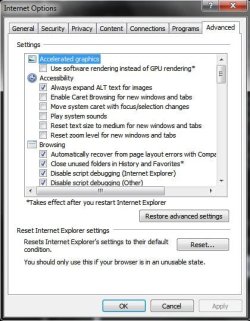
You could also reset IE, Tools > Internet Options > Advanced at the lower part of that tab there is a button to reset Internet Explorer. see snip below:
 

Attachments

  • Internet Options.JPG
    Internet Options.JPG
    47.9 KB · Views: 4

My Computer

Computer type
PC/Desktop
Computer Manufacturer/Model Number
Self built
OS
Windows 11 Home x64
CPU
AMD Ryzen 5 5600G
Motherboard
ASUSTeK Prime B450M-A II
Memory
G.SKILL Ripjaws Gaming Series (2x8G) DDR4
Graphics Card(s)
None (AMD Radeon Graphics on MB and CPU)
Sound Card
None (integrated on MB)
Monitor(s) Displays
Acer S200HLAbd Black 20"
Screen Resolution
1600 x 900
Hard Drives
Samsung SSD 840 EVO 120GB (W10)
WD Blue 500G SATA 6G WDBAAX5000ENC-NRSN (Backup/Storage)
PSU
Corsair CX500 500W ATX12V v2.3 80 Plus Bronze Active PFC
Case
Unknown
Cooling
CPU-stock cooling fan, 1 extra 80mm case fan
Keyboard
Azio KB505U Large Print Tri-Color Illuminated USB Keyboard
Mouse
MS Optical Wheel Mouse (USB)
Internet Speed
ATT Fiber 5000/VOIP 5G down/5G up
Antivirus
Win Defender, SAS, Spyware Blaster all free editions
Browser
Firefox, Waterfox, sometimes Edge
Back
Top