Hi there
I have windows 7 ultimate and until recently whenever I opened up internet Exlorer and clicked anything in that page I used to get another tab appear across the top of the page thereby keeping the original page to return to easily, for the past 2 weeks however everything opens in the same window, ( I know this is no big deal, but it is very useful) I have installed nothing new and have also tried to change the tabbed view setting by turning them off and restarting IE and then turning them back on and restarting IE again but to no avail. Can any of you brainy people out there tell me please what I am doing wrong and also how to put this very useful setting back.
Thank you Betty
My Computer
Computer Manufacturer/Model Number
Dell Studio 1745 laptop 17.4 touchscreen
OS
windows 7 ultimate 64 bit
CPU
Intyel core i7 cpu Q720 @1.60Ghz 1.60GHz
Motherboard
Standard Dell i guess
Memory
4.00 GB
Graphics Card(s)
ATI Mobility Radeon HD 4650
Sound Card
ATI High Definition Audio Device
Monitor(s) Displays
Generic PnP Monitor
Hard Drives
Toshiba MK5056GSV ATA Device 500GB
Buffalo 1Tb External
WD 1TbExternal
HP 2TB External
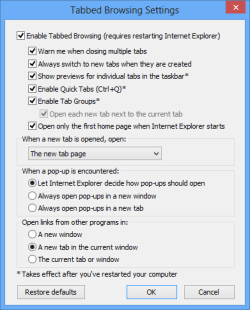
First, open Internet Explorer and click on Tools and then Internet Options.
Now click on the Settings button under the Tabs section on the General tab.
Finally, under the heading “When a pop-up is encountered”, choose Always open pop-ups in a new tab.
Now you will need to restart Internet Explorer and hopefully your problem should be fixed
4 x 4GB DDR3-1600 Corsair Vengeance CMZ8GX3M2A1600C9B (16GB)
Graphics Card(s)
MSI GeForce GTX770 Gaming OC 2GB
Sound Card
Realtek High Definition on board solution (ALC 898)
Monitor(s) Displays
ViewSonic VA1912w Widescreen (VGA)
Screen Resolution
1440x900
Hard Drives
OCZ Agility 3 SSD 120GB SATA III x2 (RAID 0)
Samsung HD501LJ 500GB SATA II x2
Hitachi HDS721010CLA332 1TB SATA II
Iomega 1.5TB Ext USB 2.0
WD 2.0TB Ext USB 3.0
Firstly close all open programs next click on your start menu and launch a command prompt by typing "cmd" (without the ") in the box at the bottom called "Search programs and files" and press enter.
In the black box that appears type "regsvr32 urlmon.dll" (without the ") and then press enter. When you receive the "DllRegisterServer in urlmon.dll succeeded" message, click OK then try internet explorer again.

 Hi there


 Thank you