Take multiple full system image backups

tempid159

New member
Member
Local time
6:54 PM
Messages
13
Is it possible to take multiple full system image backups? I don't want increments. I want full everytime like ghost 2003. Here is what I'm trying to do - Clean Windows 7 Install and activation (and do a full backup) Install anti-virus, other utilities (and do a full backup) Install Photoshop (and do a full backup) Install Premiere (and do a full backup) and the list goes on.. I need to be able to restore to any backup image and do a full system image restore. I do want to increments and heard of volume shadow copy blah blah.. I don't want to use 3rd-party tools like acronis, macrium unless I really need to. Thanks for any help.
 

My Computer

OS
Windows 7 Ultimate 64-bit
CPU
Core i7 920
Motherboard
EVGA SLI LE
Memory
Corsair 6GB Triple Channel
Graphics Card(s)
PNY NVIDIA 1GB DDR3
Sound Card
(Onboard)
Monitor(s) Displays
DELL 2009WA 22" IPS (it's awesome!)
Screen Resolution
1680x1050
Hard Drives
1 TB Seagate 7200 RPM
PSU
Corsair 750w
Case
HAF 922
Cooling
3 fans that came with the case
Keyboard
Plain HP keyboard
Mouse
Logitech VX Nano Wireless (love it)
Internet Speed
6 Mbps AT&T
Other Info
My first custom built PC. Everything went smooth :)
tempid,
One of way doing this would be to create a small partition on an external disk and use Win 7's Backup to do a full system image backup. Then create another small partition, install you next program, and backup. You would continue creating a parition, adding software and the backing up.

Another approach, which I've not tried yet, would be to use Disk2VHD and put the image on a vhd file on your external drive. Then when needed you would restore from the
VHD. As said, I've not done this yet and don't like to recommend something I've not done myself. The first solution I've tried and that works like a champ.

Another approach would be to work with WIM files. ImageX in the Windows Automated Installation Kit can create and apply WIM files. The one time I tried this it worked but I did have a couple of peculiarities which may have been due to the fact that I restored to different sized partitions. Right now the only procedure I can recommend, using only Microsoft software is the first offered solution. I have just today used Acronis True Image 2010 successfully to save and restore and using the Acronis software then multiple images would be easy to work with, however, this is a non-microsoft solution and there are others out there.

My trouble is that presently I don't have a system that I can sacrifice for the type of experimentation I'd like to try. Let's hope that someone else has a good solution for you using MS software.
 

My Computer

Computer Manufacturer/Model Number
Toshiba Satellite S875D-S7239 laptop
OS
MS Windows 7 Ultimate SP1 64-bit
CPU
AMD A10-4600M
Motherboard
AMD Pumori (Socket FT1)
Memory
6.00 GB Dual-Channel DDR3 @ 798MHz (11-11-12-28)
Graphics Card(s)
AMD Radeon HD 7660G
Sound Card
High Definition Audio Device
Monitor(s) Displays
Generic PnP Monitor (1600x900@60Hz)
Screen Resolution
1600x900@60Hz
Hard Drives
SSD 119GB Corsair CSSD-V128GB2 ATA Device
Keyboard
Standard PS/2 Keyboard
Mouse
HP Wireless Optical Mobile Mouse Model FHA-3410
Internet Speed
What the local pub, local coffee shop offers.
Other Info
Optical Drive:MATSHITA BD-CMB UJ160B ATA Device


Also have an Asus ha1002xp netbook with Win 7 Ultimate installed.
You can do this with Windows Image Backup. Just save each backup in a
separate file.

Richard
 

My Computer

Computer Manufacturer/Model Number
Dell DXP061
OS
windows 7 RTM
CPU
Intel core 2 6400 @2.13GHz
Motherboard
Dell ??
Memory
2 Gig.
Graphics Card(s)
NVIDIA GeForce 7300 GT
Sound Card
High Definition Audio Device - Microsoft
Monitor(s) Displays
Dell LCD
Screen Resolution
1280 x 1024 75 hertz
Hard Drives
WDC WD2500JS-75NCB3 ATA Device

WDC WD5000AAKS-65YGA0 ATA Device
Keyboard
Logitech Cordless
Mouse
Logitech Cordless
Internet Speed
760k
Just save each backup in a
separate file.

Richard

Hi Richard, could you please elaborate?

Here is what I've done so far -

I've 1 hdd with 2 partitions C (50gb) and D (850gb). C drive has Windows. D is for storage. After a clean install, I created a system restore backup image on the D drive. Windows created a "WindowsImageBackup" folder on the D drive and inside it has a folder with my machine name something like this -

D:\WindowsImageBackup\MyPC\<backup files>

Total size is about 7.5gb. I read somewhere that if I rename the MyPC folder to something else (like MyPC-CleanInstall) and create another system image, it creates a full image instead of an incremental image because a full image with the machine name doesn't already exist. So I created a new text document on the desktop (so I can differentiate this image from the original one) and created a new system image. It created a new folder in the WindowsImageBackup folder with my machine name and it's about the same size as my original image. At this point, I ended up with 2 folders in the WindowsImageBackup folder -

D:\WindowsImageBackup\MyPC-CleanInstall (original image re-named)
D:\WindowsImageBackup\MyPC (second image)

I now wanted to restore to my original "MyPC-CleanInstall" image to make sure the text document I created on the desktop doesn't show up. I booted into WinRE and I saw 2 images (MyPC & MyPC-CleanInstall) to restore from. I selected "MyPC-CleanInstall" and once it's done and restarted, I did not see the text document I created which meant that this is the original image.

Here's the weird part -- I now connected my external USB drive, created a WindowsImageBackup folder at the root and copied the contents of MyPC-CleanInstall (D:\WindowsImageBackup\MyPC-CleanInstall) into it and re-named it. I wanted to make sure that the images are not tied to the location somehow (D drive and volume shadow copy thing). I need to be able to move these images anywhere and should be able to restore. So now it looked something like -

E:\WindowsImageBackup\MyPC-CleanInstall-External

and I booted into WinRE with my USB drive still connected. To my surprise, the only image I could restore from was this one - D:\WindowsImageBackup\MyPC. It's the second image which has the text document on the desktop. It didn't recognize the other image that is at the same location nor did it the recognize the image on the USB drive. There was an option to select a driver and open any other storage device which opened a browse window and I was able to see the external drive, C and D drives. I thought I will be able to see 3 restore images to choose from but I saw only one!

At this point, I'm totally confused. :confused:
 

My Computer

OS
Windows 7 Ultimate 64-bit
CPU
Core i7 920
Motherboard
EVGA SLI LE
Memory
Corsair 6GB Triple Channel
Graphics Card(s)
PNY NVIDIA 1GB DDR3
Sound Card
(Onboard)
Monitor(s) Displays
DELL 2009WA 22" IPS (it's awesome!)
Screen Resolution
1680x1050
Hard Drives
1 TB Seagate 7200 RPM
PSU
Corsair 750w
Case
HAF 922
Cooling
3 fans that came with the case
Keyboard
Plain HP keyboard
Mouse
Logitech VX Nano Wireless (love it)
Internet Speed
6 Mbps AT&T
Other Info
My first custom built PC. Everything went smooth :)
tempid,
One of way doing this would be to create a small partition on an external disk and use Win 7's Backup to do a full system image backup. Then create another small partition, install you next program, and backup. You would continue creating a parition, adding software and the backing up.

That seems very tedious. There should an easier way.

Another approach, which I've not tried yet, would be to use Disk2VHD and put the image on a vhd file on your external drive.

Another approach would be to work with WIM files. ImageX in the Windows Automated Installation Kit can create and apply WIM files.

I will look into it and let you know. Thanks :).
 

My Computer

OS
Windows 7 Ultimate 64-bit
CPU
Core i7 920
Motherboard
EVGA SLI LE
Memory
Corsair 6GB Triple Channel
Graphics Card(s)
PNY NVIDIA 1GB DDR3
Sound Card
(Onboard)
Monitor(s) Displays
DELL 2009WA 22" IPS (it's awesome!)
Screen Resolution
1680x1050
Hard Drives
1 TB Seagate 7200 RPM
PSU
Corsair 750w
Case
HAF 922
Cooling
3 fans that came with the case
Keyboard
Plain HP keyboard
Mouse
Logitech VX Nano Wireless (love it)
Internet Speed
6 Mbps AT&T
Other Info
My first custom built PC. Everything went smooth :)
tempid,
the rename approach should work for you, if you always put your backups on an external drive. Backing up to a drive you want to backup is sort of senseless in my opinion.
 

My Computer

Computer Manufacturer/Model Number
Toshiba Satellite S875D-S7239 laptop
OS
MS Windows 7 Ultimate SP1 64-bit
CPU
AMD A10-4600M
Motherboard
AMD Pumori (Socket FT1)
Memory
6.00 GB Dual-Channel DDR3 @ 798MHz (11-11-12-28)
Graphics Card(s)
AMD Radeon HD 7660G
Sound Card
High Definition Audio Device
Monitor(s) Displays
Generic PnP Monitor (1600x900@60Hz)
Screen Resolution
1600x900@60Hz
Hard Drives
SSD 119GB Corsair CSSD-V128GB2 ATA Device
Keyboard
Standard PS/2 Keyboard
Mouse
HP Wireless Optical Mobile Mouse Model FHA-3410
Internet Speed
What the local pub, local coffee shop offers.
Other Info
Optical Drive:MATSHITA BD-CMB UJ160B ATA Device


Also have an Asus ha1002xp netbook with Win 7 Ultimate installed.
I have been testing Paragon Backup and Recovery for a few months now and have backup my system and restored it every which way... Worth the look and the read... GL :)
 

My Computer

Computer Manufacturer/Model Number
Toshiba Satellite
OS
Windows 7 Home Premium 64-bit
CPU
Pentium(R) Dual-Core T4300 @ 2.10GHz
Motherboard
Toshiba Model KSWAA - Chipset Intel GL40 Rev 07
Memory
3 GB DDR2 PC2-6400 (400 MHz) Samsung M4 70T2864Q23-CF7
Graphics Card(s)
Mobile Intel GMA4500M 32bit OS (64bit OS) dynamically
Sound Card
Realtek ALC272-GR Software Sound
Monitor(s) Displays
16.0" HD TFT with TrueBrite Matrix colour LCD display
Screen Resolution
1366 x 768
Hard Drives
FUJITSU MJA2320BH G2-(S2) 320GB (5400RPM) Serial-ATA
Keyboard
Canadian Bilingual Keyboard 105 keys with 13 Function keys
Mouse
Touchpad Point device & Lexma USB Mouse
Internet Speed
Walking is Faster
Other Info
Wireless LAN Realtek RTL89191SE 802.11n PCI-E NIC + a
LAN Realek PCIe FE Family Controller and
TOSHIBA Software Modem
tempid,
the rename approach should work for you, if you always put your backups on an external drive. Backing up to a drive you want to backup is sort of senseless in my opinion.

I get your point. But I want 2 copies of the backups just to be safe. I will have to move the backup images to some other location anyway and looks like it's not gonna work that way. With Ghost 2003, I could copy/move the backups to any location and it still restores everything nicely as long as it's able to find the image.
 

My Computer

OS
Windows 7 Ultimate 64-bit
CPU
Core i7 920
Motherboard
EVGA SLI LE
Memory
Corsair 6GB Triple Channel
Graphics Card(s)
PNY NVIDIA 1GB DDR3
Sound Card
(Onboard)
Monitor(s) Displays
DELL 2009WA 22" IPS (it's awesome!)
Screen Resolution
1680x1050
Hard Drives
1 TB Seagate 7200 RPM
PSU
Corsair 750w
Case
HAF 922
Cooling
3 fans that came with the case
Keyboard
Plain HP keyboard
Mouse
Logitech VX Nano Wireless (love it)
Internet Speed
6 Mbps AT&T
Other Info
My first custom built PC. Everything went smooth :)

My Computer

OS
Windows 7 Ultimate 64-bit
CPU
Core i7 920
Motherboard
EVGA SLI LE
Memory
Corsair 6GB Triple Channel
Graphics Card(s)
PNY NVIDIA 1GB DDR3
Sound Card
(Onboard)
Monitor(s) Displays
DELL 2009WA 22" IPS (it's awesome!)
Screen Resolution
1680x1050
Hard Drives
1 TB Seagate 7200 RPM
PSU
Corsair 750w
Case
HAF 922
Cooling
3 fans that came with the case
Keyboard
Plain HP keyboard
Mouse
Logitech VX Nano Wireless (love it)
Internet Speed
6 Mbps AT&T
Other Info
My first custom built PC. Everything went smooth :)
tempid,
the rename approach should work for you, if you always put your backups on an external drive. Backing up to a drive you want to backup is sort of senseless in my opinion.

Also, when I had 2 images on the D drive and backed-up to the first image and booted into WinRE to restore the 2nd image, it's not able to see the second image. It only recognizes the first one. The reason I believe is that the second copy was created later than the first one and I'm now in the environment where the second image hasn't been created yet so Windows doesn't know its there. (hope i'm making sense) :)
 

My Computer

OS
Windows 7 Ultimate 64-bit
CPU
Core i7 920
Motherboard
EVGA SLI LE
Memory
Corsair 6GB Triple Channel
Graphics Card(s)
PNY NVIDIA 1GB DDR3
Sound Card
(Onboard)
Monitor(s) Displays
DELL 2009WA 22" IPS (it's awesome!)
Screen Resolution
1680x1050
Hard Drives
1 TB Seagate 7200 RPM
PSU
Corsair 750w
Case
HAF 922
Cooling
3 fans that came with the case
Keyboard
Plain HP keyboard
Mouse
Logitech VX Nano Wireless (love it)
Internet Speed
6 Mbps AT&T
Other Info
My first custom built PC. Everything went smooth :)

My Computer

Computer Manufacturer/Model Number
Toshiba Satellite
OS
Windows 7 Home Premium 64-bit
CPU
Pentium(R) Dual-Core T4300 @ 2.10GHz
Motherboard
Toshiba Model KSWAA - Chipset Intel GL40 Rev 07
Memory
3 GB DDR2 PC2-6400 (400 MHz) Samsung M4 70T2864Q23-CF7
Graphics Card(s)
Mobile Intel GMA4500M 32bit OS (64bit OS) dynamically
Sound Card
Realtek ALC272-GR Software Sound
Monitor(s) Displays
16.0" HD TFT with TrueBrite Matrix colour LCD display
Screen Resolution
1366 x 768
Hard Drives
FUJITSU MJA2320BH G2-(S2) 320GB (5400RPM) Serial-ATA
Keyboard
Canadian Bilingual Keyboard 105 keys with 13 Function keys
Mouse
Touchpad Point device & Lexma USB Mouse
Internet Speed
Walking is Faster
Other Info
Wireless LAN Realtek RTL89191SE 802.11n PCI-E NIC + a
LAN Realek PCIe FE Family Controller and
TOSHIBA Software Modem
tempid,
I've been doing some testing lately with Acronis True Image Home 2010. This product will do what you are looking for but this product is also not free.
 

My Computer

Computer Manufacturer/Model Number
Toshiba Satellite S875D-S7239 laptop
OS
MS Windows 7 Ultimate SP1 64-bit
CPU
AMD A10-4600M
Motherboard
AMD Pumori (Socket FT1)
Memory
6.00 GB Dual-Channel DDR3 @ 798MHz (11-11-12-28)
Graphics Card(s)
AMD Radeon HD 7660G
Sound Card
High Definition Audio Device
Monitor(s) Displays
Generic PnP Monitor (1600x900@60Hz)
Screen Resolution
1600x900@60Hz
Hard Drives
SSD 119GB Corsair CSSD-V128GB2 ATA Device
Keyboard
Standard PS/2 Keyboard
Mouse
HP Wireless Optical Mobile Mouse Model FHA-3410
Internet Speed
What the local pub, local coffee shop offers.
Other Info
Optical Drive:MATSHITA BD-CMB UJ160B ATA Device


Also have an Asus ha1002xp netbook with Win 7 Ultimate installed.

Attachments

  • Macrium.PNG
    Macrium.PNG
    21.6 KB · Views: 15

My Computer

Computer type
PC/Desktop
Computer Manufacturer/Model Number
Home Built
OS
Windows 8.1 Pro w/Media Center 64bit, Windows 7 HP 64bit
CPU
Phenom II X6 1100T
Motherboard
ASUS M5A99X EVO
Memory
Crucial Balistic 8gb DDR3-1866 CL9
Graphics Card(s)
MSI R6850 Cyclone IGD5 PE
Sound Card
On Board
Monitor(s) Displays
ASUS VE258Q 25" LED with DVI-HDMI-DisplayPort
Screen Resolution
1920 x 1080
Hard Drives
Two WD Cavier Black 2TB Sata III, WD My Book Essential 2TB USB 3.0
PSU
Seasonic X650 80 Plus GOLD Modular
Case
Corsair 400R
Cooling
Antec Kuhler H2O 620, Two 120mm and four 140mm
Keyboard
Logitech K120
Mouse
Logitech Marble Mouse USB, Logitech Precision Game Pad
Internet Speed
15MB
Antivirus
Norton IS 2013, Malwarebytes Pro Beta 2
Browser
IE-11, FF-27
Other Info
APC UPS ES 750, Netgear WNR3500L Gigabit & Wireless N Router with SamKnows Test Program, Motorola SB6120 Gigabit Cable Modem. Brother HL-2170W Laser Printer, Epson V300 Scanner
Here you go Paragon is free today... Hope you catch this before the offer expires... GL :)
 

My Computer

Computer Manufacturer/Model Number
Toshiba Satellite
OS
Windows 7 Home Premium 64-bit
CPU
Pentium(R) Dual-Core T4300 @ 2.10GHz
Motherboard
Toshiba Model KSWAA - Chipset Intel GL40 Rev 07
Memory
3 GB DDR2 PC2-6400 (400 MHz) Samsung M4 70T2864Q23-CF7
Graphics Card(s)
Mobile Intel GMA4500M 32bit OS (64bit OS) dynamically
Sound Card
Realtek ALC272-GR Software Sound
Monitor(s) Displays
16.0" HD TFT with TrueBrite Matrix colour LCD display
Screen Resolution
1366 x 768
Hard Drives
FUJITSU MJA2320BH G2-(S2) 320GB (5400RPM) Serial-ATA
Keyboard
Canadian Bilingual Keyboard 105 keys with 13 Function keys
Mouse
Touchpad Point device & Lexma USB Mouse
Internet Speed
Walking is Faster
Other Info
Wireless LAN Realtek RTL89191SE 802.11n PCI-E NIC + a
LAN Realek PCIe FE Family Controller and
TOSHIBA Software Modem
give this a shot

when you go to replace an image scan for images. it should bring up all images. (i think that i have done it this way)

i did the same thing - I system imaged my computer at basic and then with everything installed to dvd. I now create a system image once a week to an external drive. I move the old image to a new folder then create the new on onto the drive. Works fine.

just remembered - If you move the file/folder to another location (usb) and the computer doesn't see it and you want to put this image on. Copy the file/folder to your desktop. For some reason it will then work. This is how i managed to do it in the past.
 

My Computer

Computer Manufacturer/Model Number
Hp DVD6 1242tx
OS
windows 7 Home premium 32 bit
CPU
intel core 2 duo cpu t6500 @ 2.10 ghz 2095 mhz
Memory
4
Graphics Card(s)
Ati mobility radeon hd 4530
But I want 2 copies of the backups just to be safe.
get 2 external drives :P
backing up to the same drive is indeed a #fail
 

My Computer

Computer type
PC/Desktop
Computer Manufacturer/Model Number
Motherboard ASUS P6T SE
OS
Windows 10 32 bit oem & Arch Linux x86_64
CPU
Intel® Core™ i7-920 Processor
Motherboard
ASUSTeK model: P6T SE v: Rev 1.xx Bios: American Megatrends
Memory
6GB DDR3 1600 MHz Kingston RAM 3x2GB Triple channel
Graphics Card(s)
Advanced Micro Devices [AMD/ATI] RV770 [Radeon HD 4870]
Sound Card
[AMD/ATI] RV770 HDMI Audio [Radeon]
Monitor(s) Displays
1 X 22" LG M2262D : 1 X 23" Dell Ultrasharp
Screen Resolution
[email protected] + [email protected] : 3840x1080
Hard Drives
HDD Total Size: 1388.6GB (0.1% used) ID-1: /dev/sda model: HDS728080PLA380 size: 82.3GB
ID-2: /dev/sdb model: Hitachi_HTS54164 size: 40.0GB
ID-3: /dev/sdc model: SAMSUNG_HM250HI size: 250.1GB
ID-4: USB /dev/sdd mod
PSU
Corsair VX550W power supply unit
Case
AVP Mamba chassis
Cooling
ARCTIC Alpine 11 Pro Rev.2 - 95 Watts Low Noise
Keyboard
Dell
Mouse
Logitech M515
Internet Speed
ADSL+ up to 12MB 9 is the norm
Browser
Firefox
Other Info
i got sick of windows , so i moved to linux now i can get some work done without having to constantly watch my back & do scans for malware.
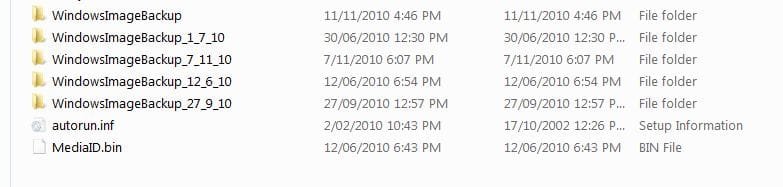
Windows wants to see a valid image folder [WindowsImageBackup] in the root of a partition. I use a number of partitions but more importantly rename to something like WindowsImageBackup_12_11_10 and store as many as I like. Once renamed windows imaging will act like they don't exist and a fresh image can be made.
Simply rename back to windowsimagebackup and provided the image was valid in the first place, the image restore will recognise it and restore it. Also:
1) I only make one image (ie. I don't image over an existing image)
2) Renaming in prime root folder is easy to do from the system repair disk
3) I have recovered from a renamed root image folder without problem.

I think poking down deeper towards the vhd file or files is risky.
 

Attachments

  • imagefolders.JPG
    imagefolders.JPG
    28.9 KB · Views: 38

My Computer

Computer type
PC/Desktop
Computer Manufacturer/Model Number
Own build
OS
Windows 7x64 Home Premium SP1
CPU
Intel i7 2600k
Motherboard
ASUS P8Z68 Deluxe
Memory
G.Skill Ripjaws (DDR3-1600) 2x4GB
Graphics Card(s)
Nvidia GeForce GTS 450; Intel HD Graphics 3000(GT2+)
Monitor(s) Displays
Dell Ultrasharp IPS panel U2311H, Samsung SyncMaster P2350
Screen Resolution
1920x1080
Hard Drives
Samsung 850 Pro SSD 256GB, Samsung SSD 840 120GB, Seagates 1TB Barracuda ST31000528AS x2
PSU
Seasonic M12II 520W
Case
Lian Li Lancool PC-K60
Cooling
Case: 1x120mm, 3x140mm CPU: Hyper 212+
Keyboard
Logitech MK520 (wireless)
Mouse
Logitech MK520
Internet Speed
6-7 Mbps
Antivirus
Norton Security Premium, Malwarebytes on 2 (MSE on 3rd PC)
Browser
FireFox
Other Info
Audio: Logitech Z523 2.1
tempid,
I've been doing some testing lately with Acronis True Image Home 2010. This product will do what you are looking for but this product is also not free.

Exactly what I have been doing for a long time with Acronis.
I have 4 small external Esata drives where each week I create a full image
of my C and D drives.

Each has a different name based on time/date so you get to pick which one
you want to restore when you boot your system with the Cd that you create
from within Acronis.

BTW: Acronis is cheaper if you are a member of a user group by going to
the UGR.COM store (user group connection) and they are a dist for acronis
and give a good cheap price.
I don't have any financial connection but have bought several copies for
my clients and friends.

Rich
 

My Computer

Computer type
Laptop
Computer Manufacturer/Model Number
Toshiba Laptop Qosimo X870
OS
Windows 7 Pro x64 SP1
CPU
Intel Core I7
Motherboard
Toshiba Qosmio
Memory
16 Gigs
Graphics Card(s)
NVIDIA GeForce GTX 670M
Monitor(s) Displays
17.7" laptop
Screen Resolution
1600 x 900
Hard Drives
256 Gig SanDisk SSD for C
256 Gig Intel SSD for D
Internet Speed
50/25 FIOS
Antivirus
Vipre (all you can eat for 10 machines)
Browser
IE and FF
Other Info
I have dos 6.22, wfwg 3.11, win98, 2000 and xp VHD's available for testing. MS's Virtual PC works great.
It's true you gain more flexibility by using the two other preferred free apps Macrium and Paragon 10, however you can do what you want as Richard said by simply placing the whole backup folder WindowsImageBackup into another folder with the date and your code name for it.

When you are ready to use it, remove it from the folder and place it in the root of the external.

Or you can rename it, but as Michael says it must be named back to exactly WindowsImageBackup to be detected.

Do not mess with the contents of the sub-folders.
 
Back
Top