Solved Takes 2-4 times power on / off before booting (2 beeps) Mystery

Mike14

New member
Member
Local time
3:10 PM
Messages
30
Hi Guys.

I have a Dell Desktop that works well. However, I often press the power button and get no signal to the monitors. I hear 2 short beeps.

Then I press the power button again briefly, and the fan immediately turns off. I press the power again (not hold) and it starts to boot, but again, 2 short beeps and no signal to monitor.

After 2-5 times doing this, it all loads, and everything is great, and won't mess up if I leave the p.c. on.

Anyone have any ideas? Could it be a graphics card going? ram problem? battery on the mother board?

What could be causing this mystery?

M14
 

My Computer My Computer

At a glance

Windows 7 Ultimate x64
Computer type
PC/Desktop
Computer Manufacturer/Model Number
Dell Precision 490
OS
Windows 7 Ultimate x64
Browser
FireFox
Last edited:

My Computer My Computer

At a glance

Windows 10 Pro X64Intel(R) Core(TM) i5-3570K CPU OC@ 4.5GHZ Turbo8.00 GB DDR3 1600MhzMSI Gaming X GTX 1070
Computer type
PC/Desktop
Computer Manufacturer/Model Number
Dude Build
OS
Windows 10 Pro X64
CPU
Intel(R) Core(TM) i5-3570K CPU OC@ 4.5GHZ Turbo
Motherboard
MSI Z77A-G45 Gaming
Memory
8.00 GB DDR3 1600Mhz
Graphics Card(s)
MSI Gaming X GTX 1070
Sound Card
Realtek High Definition
Monitor(s) Displays
Dell S23O9W, HP L1710
Screen Resolution
DELL-1920 x 1080 HP-1280 x1024
Hard Drives
Crucial m4 256 SSD, WD 7200RPM 500GB WD 1TB
PSU
Seasonic X650 GOLD
Case
Zalman Z12
Cooling
Antec Kuhler 920
Keyboard
Logitech
Mouse
MSI DS100 Interceptor
Internet Speed
50 down and 5 up
Antivirus
MSE
Browser
Chrome, IE 11
Other Info
Logitech X-620 Speakers
I have had at least three systems with that very same problem or similar - it needs multiple attempts to start.
The solution that always worked for me was a new power supply.
 

My Computer My Computer

At a glance

Win10 Pro 64-bitAMD Ryzen 7 3800X32 GB Kingston DDR4-2666MSI nVidia GT 710 (2GB)
Computer type
PC/Desktop
Computer Manufacturer/Model Number
Self-Built
OS
Win10 Pro 64-bit
CPU
AMD Ryzen 7 3800X
Motherboard
Gigabyte X570 UD
Memory
32 GB Kingston DDR4-2666
Graphics Card(s)
MSI nVidia GT 710 (2GB)
Sound Card
Creative Audigy FX 5.1
Monitor(s) Displays
ViewSonic VG2439Smh 24"
Screen Resolution
1920x1080
Hard Drives
3xWD1TB; 1xSeagate 1TB... all spinning rust
PSU
EVGA 100-W1-0500-KR (500w)
Case
SilverStone PS10 (modified)
Cooling
CPU:AMD Wraith Prism. Case:3x Noctua 120mm
Keyboard
Compaq Professional PS/2
Mouse
Microsoft Basic Optical Mouse 2.0
Internet Speed
Fiber 1Gbit/sec down/up
Antivirus
Avast Free
Browser
FF, Chrome
Other Info
2x LG GH24NSC0 DVD burners, Mackie CR3 monitor speakers
Hey Guys, thanks so much for the good tips.

Dude, I will try and fill out specs tom. (plus mem test). I did change the Cmos battery with another PC and reseat ram..

Unfortunately, now my PC is going into recovery mode :( OverMaster I wish I had read your advice before I turned it on and off 20 times.. I think I've probably done more damage than I even would have.
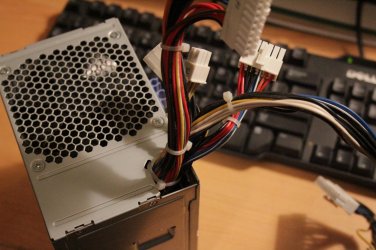
I think you're probably right about the P suppy.. Anyway of testing that with a multi meter?
 

My Computer My Computer

At a glance

Windows 7 Ultimate x64
Computer type
PC/Desktop
Computer Manufacturer/Model Number
Dell Precision 490
OS
Windows 7 Ultimate x64
Browser
FireFox

My Computer My Computer

At a glance

Windows 10 Pro X64Intel(R) Core(TM) i5-3570K CPU OC@ 4.5GHZ Turbo8.00 GB DDR3 1600MhzMSI Gaming X GTX 1070
Computer type
PC/Desktop
Computer Manufacturer/Model Number
Dude Build
OS
Windows 10 Pro X64
CPU
Intel(R) Core(TM) i5-3570K CPU OC@ 4.5GHZ Turbo
Motherboard
MSI Z77A-G45 Gaming
Memory
8.00 GB DDR3 1600Mhz
Graphics Card(s)
MSI Gaming X GTX 1070
Sound Card
Realtek High Definition
Monitor(s) Displays
Dell S23O9W, HP L1710
Screen Resolution
DELL-1920 x 1080 HP-1280 x1024
Hard Drives
Crucial m4 256 SSD, WD 7200RPM 500GB WD 1TB
PSU
Seasonic X650 GOLD
Case
Zalman Z12
Cooling
Antec Kuhler 920
Keyboard
Logitech
Mouse
MSI DS100 Interceptor
Internet Speed
50 down and 5 up
Antivirus
MSE
Browser
Chrome, IE 11
Other Info
Logitech X-620 Speakers
A power supply that's failing can damage other parts!
I've lost keyboards, mice, DVD burners, hard drives, and on one system, the motherboard because of damaged BIOS and IDE controller chips, all because I wanted to try to start a computer with a flaky PSU "one more time".
 

My Computer My Computer

At a glance

Win10 Pro 64-bitAMD Ryzen 7 3800X32 GB Kingston DDR4-2666MSI nVidia GT 710 (2GB)
Computer type
PC/Desktop
Computer Manufacturer/Model Number
Self-Built
OS
Win10 Pro 64-bit
CPU
AMD Ryzen 7 3800X
Motherboard
Gigabyte X570 UD
Memory
32 GB Kingston DDR4-2666
Graphics Card(s)
MSI nVidia GT 710 (2GB)
Sound Card
Creative Audigy FX 5.1
Monitor(s) Displays
ViewSonic VG2439Smh 24"
Screen Resolution
1920x1080
Hard Drives
3xWD1TB; 1xSeagate 1TB... all spinning rust
PSU
EVGA 100-W1-0500-KR (500w)
Case
SilverStone PS10 (modified)
Cooling
CPU:AMD Wraith Prism. Case:3x Noctua 120mm
Keyboard
Compaq Professional PS/2
Mouse
Microsoft Basic Optical Mouse 2.0
Internet Speed
Fiber 1Gbit/sec down/up
Antivirus
Avast Free
Browser
FF, Chrome
Other Info
2x LG GH24NSC0 DVD burners, Mackie CR3 monitor speakers
Dude, thanks for the good tips, and Oh Man OvenMaster, that sounds scary.

I've located a Precision 490 power supply (used at a local shop), but am thinking it may be something else actually. I find that when I manage to get the computer going, it goes into recovery mode. Eventually when I click finish, it goes to restart and won't.. Just goes black.

However, when I unplug the hard drives, I can get it to boot every time, and get into the bios etc without any trouble. Do you guys think this suggests it's just a bad system drive, and that I may be buying this power supply in vain? Or is it maybe just booting to bios easily without the hard drive attached because it doesn't need the power load to spin the disc?

If you guys can think of anything to try tonight (like maybe booting to a Linux live image and see if I can access the disks from there, and if so, it's maybe it's just the system drive that's bad?) I'd love to hear about em.

Any other tips on what to do when recovery doesn't work would be awesome too.

Sorry this thread is crashing out of control, and thanks for your patience,

M14
 

My Computer My Computer

At a glance

Windows 7 Ultimate x64
Computer type
PC/Desktop
Computer Manufacturer/Model Number
Dell Precision 490
OS
Windows 7 Ultimate x64
Browser
FireFox
Dude, thanks for the good tips, and Oh Man OvenMaster, that sounds scary.

I've located a Precision 490 power supply (used at a local shop), but am thinking it may be something else actually. I find that when I manage to get the computer going, it goes into recovery mode. Eventually when I click finish, it goes to restart and won't.. Just goes black.

However, when I unplug the hard drives, I can get it to boot every time, and get into the bios etc without any trouble. Do you guys think this suggests it's just a bad system drive, and that I may be buying this power supply in vain? Or is it maybe just booting to bios easily without the hard drive attached because it doesn't need the power load to spin the disc?

If you guys can think of anything to try tonight (like maybe booting to a Linux live image and see if I can access the disks from there, and if so, it's maybe it's just the system drive that's bad?) I'd love to hear about em.

Any other tips on what to do when recovery doesn't work would be awesome too.

Sorry this thread is crashing out of control, and thanks for your patience,

M14
This.
Removing hard drives takes some of the load off the PSU because spinning up platters takes a fair amount of juice. When I start my PC, all four hard drives spin up when I hit the power switch.
I'd still put my money on the PSU. I'd try it if I were in your shoes.
 

My Computer My Computer

At a glance

Win10 Pro 64-bitAMD Ryzen 7 3800X32 GB Kingston DDR4-2666MSI nVidia GT 710 (2GB)
Computer type
PC/Desktop
Computer Manufacturer/Model Number
Self-Built
OS
Win10 Pro 64-bit
CPU
AMD Ryzen 7 3800X
Motherboard
Gigabyte X570 UD
Memory
32 GB Kingston DDR4-2666
Graphics Card(s)
MSI nVidia GT 710 (2GB)
Sound Card
Creative Audigy FX 5.1
Monitor(s) Displays
ViewSonic VG2439Smh 24"
Screen Resolution
1920x1080
Hard Drives
3xWD1TB; 1xSeagate 1TB... all spinning rust
PSU
EVGA 100-W1-0500-KR (500w)
Case
SilverStone PS10 (modified)
Cooling
CPU:AMD Wraith Prism. Case:3x Noctua 120mm
Keyboard
Compaq Professional PS/2
Mouse
Microsoft Basic Optical Mouse 2.0
Internet Speed
Fiber 1Gbit/sec down/up
Antivirus
Avast Free
Browser
FF, Chrome
Other Info
2x LG GH24NSC0 DVD burners, Mackie CR3 monitor speakers
OvenMaster (and Dude), thanks very much for the support and guidance.

I'll be picking up that power supply today. Fingers crossed!

M14
 

My Computer My Computer

At a glance

Windows 7 Ultimate x64
Computer type
PC/Desktop
Computer Manufacturer/Model Number
Dell Precision 490
OS
Windows 7 Ultimate x64
Browser
FireFox
Hi Guys,

So, located the new power supply today, installed it annnnnnd, No love :shock:

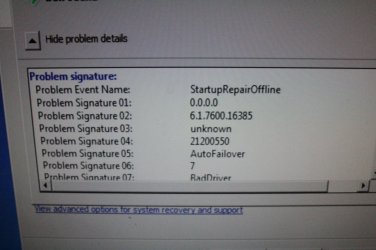
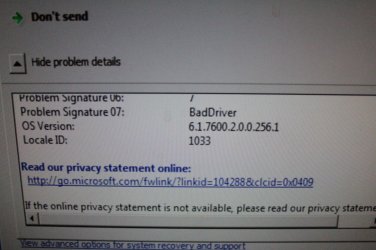
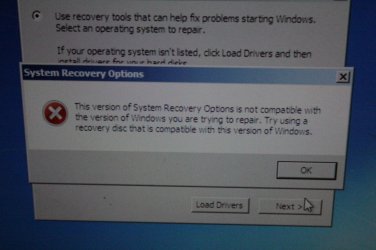
Well, maybe it was the power supply, that damaged the operating system, and now the operating system is taking me to a black screen? In any case, moving forward. After I power up / down 4 or 5 times, I can get to the system restore option, but it says system restore is offline. Also, when I insert a new W7 disc, it says it's not compatible.

Does it make sense to: take out system drive, and view it in a dock from another computer to discover exactly which version of W7 it was, then copy that down and try and track down an older disc?

I have a lot of important data on the disc, so don't want to reformat and loose all info.

Any suggestions?
 

Attachments

  • IMG_0932.jpg
    IMG_0932.jpg
    438 KB · Views: 0
  • IMG_0930.jpg
    IMG_0930.jpg
    543.4 KB · Views: 0
  • IMG_0933.jpg
    IMG_0933.jpg
    528.6 KB · Views: 0

My Computer My Computer

At a glance

Windows 7 Ultimate x64
Computer type
PC/Desktop
Computer Manufacturer/Model Number
Dell Precision 490
OS
Windows 7 Ultimate x64
Browser
FireFox
Do these codes help maybe?
 

Attachments

  • IMG_0929.jpg
    IMG_0929.jpg
    529.5 KB · Views: 0

My Computer My Computer

At a glance

Windows 7 Ultimate x64
Computer type
PC/Desktop
Computer Manufacturer/Model Number
Dell Precision 490
OS
Windows 7 Ultimate x64
Browser
FireFox
any ideas fellas? I'm dying here..

I can't even consistently boot to a W7 DVD / USB.. Just the two beeps and black screen.
 

My Computer My Computer

At a glance

Windows 7 Ultimate x64
Computer type
PC/Desktop
Computer Manufacturer/Model Number
Dell Precision 490
OS
Windows 7 Ultimate x64
Browser
FireFox

My Computer My Computer

At a glance

x64 (6.3.9600) Win8.1 Pro & soon dual boot x6...AMD A6-3420M APU with Radeon(tm) HD Graphics6.00 GBAMD Radeon(TM) HD 6520G
Computer type
Laptop
Computer Manufacturer/Model Number
HP Pavilion dv6-6c10us
OS
x64 (6.3.9600) Win8.1 Pro & soon dual boot x64 (6.1.7601) Win7_SP1 HomePrem
CPU
AMD A6-3420M APU with Radeon(tm) HD Graphics
Motherboard
Hewlett-Packard 1805
Memory
6.00 GB
Graphics Card(s)
AMD Radeon(TM) HD 6520G
Sound Card
(1) AMD High Definition Audio Device (2) IDT High Definiti
Monitor(s) Displays
HP W2072a 20" LCD (1600 x 900) @ 60 Hz
Screen Resolution
1366 x 768 x 32 bits (4294967296 colors) @ 60 Hz
Hard Drives
ST640LM0 00 HM641JI SATA Disk Device
Keyboard
Logitech k520 wireless KB
Mouse
Logitech m320 wireless mouse (bundled with KB)
Internet Speed
15/5 | 54 MB Wireless 'n'
Antivirus
Realtime: Defender or Avast | On-demand: Malwarebytes, ESET
Browser
IE 11 on Win8, IE 10 on win 7
Other Info
Media: [Gimp, Audacity, VLC] || Comm: [WEmail 2012, Skype] || Productivity: [OpenOffice,| Textpad] || Utils: [Sysinternals, cCleaner, Speccy, Defraggler]
Thanks for chiming in Slartybart.

I've checked the manual many times and am aware of the triplets. However, this system is not making any triplet beep codes.

Also, I've managed to run the windows memory test other times from advanced start up, and it's come back clean.

Do you still think it's important to do the steps you recommended above?
 

My Computer My Computer

At a glance

Windows 7 Ultimate x64
Computer type
PC/Desktop
Computer Manufacturer/Model Number
Dell Precision 490
OS
Windows 7 Ultimate x64
Browser
FireFox
Oh, man. Mike, I'm so sorry. I'd have bet a ton of money that it was the PSU.

I have seen in a few places that two beeps on a Dell can mean that no RAM is detected. That means either some of the RAM is defective, or something's up with the motherboard.
Like I say, this happened to me with BIOS chips and IDE controllers... killed by my dying PSU.

I strongly agree with Slartybart's suggestions!
 

My Computer My Computer

At a glance

Win10 Pro 64-bitAMD Ryzen 7 3800X32 GB Kingston DDR4-2666MSI nVidia GT 710 (2GB)
Computer type
PC/Desktop
Computer Manufacturer/Model Number
Self-Built
OS
Win10 Pro 64-bit
CPU
AMD Ryzen 7 3800X
Motherboard
Gigabyte X570 UD
Memory
32 GB Kingston DDR4-2666
Graphics Card(s)
MSI nVidia GT 710 (2GB)
Sound Card
Creative Audigy FX 5.1
Monitor(s) Displays
ViewSonic VG2439Smh 24"
Screen Resolution
1920x1080
Hard Drives
3xWD1TB; 1xSeagate 1TB... all spinning rust
PSU
EVGA 100-W1-0500-KR (500w)
Case
SilverStone PS10 (modified)
Cooling
CPU:AMD Wraith Prism. Case:3x Noctua 120mm
Keyboard
Compaq Professional PS/2
Mouse
Microsoft Basic Optical Mouse 2.0
Internet Speed
Fiber 1Gbit/sec down/up
Antivirus
Avast Free
Browser
FF, Chrome
Other Info
2x LG GH24NSC0 DVD burners, Mackie CR3 monitor speakers
OvenMaster,

thanks very much for your empathy, and your response! On your suggestion (backing Slartybart's), I decided to give the ram reseat another go (I had done this yesterday with no luck). Low and behold, it booted to my W7 disc on the first go!

now, I had also commandeered a new cmos battery from my Dad's PC, but it that wasn't working on the first few boots.

I can't be exactly sure if it was the PSU, the CMOS, the RAM, or what, but in any case, there is a fresh W7 Installing as I write, and I'm VERY VERY VERY Grateful to the three of you guys for taking the time to support me during my hell week.

1000 thanks!
M14
 

My Computer My Computer

At a glance

Windows 7 Ultimate x64
Computer type
PC/Desktop
Computer Manufacturer/Model Number
Dell Precision 490
OS
Windows 7 Ultimate x64
Browser
FireFox
Oh Man.. I Jinxed it.

Problem is back with a vengeance.

And it started like 5 times in a row no problem while installing.

Doh!
 

My Computer My Computer

At a glance

Windows 7 Ultimate x64
Computer type
PC/Desktop
Computer Manufacturer/Model Number
Dell Precision 490
OS
Windows 7 Ultimate x64
Browser
FireFox
Are you certain the battery from your dad's machine is what your dell needs? 75481 - Bios Battery (3V, 190MAH) For Dell Computers

I asked you to put the original one back in, but I don't see where you did that.
I also asked you to pull all memory and try restarting.

Then you need to put ONE memory stick in and test in each slot.
Then put the other (assuming 2) in a slot and test, then move that SAME memory to the other slot and test.

It might actually be a bad memory stick and the only way to test this is one at a time. Or it might be a bad slot - again testing ONE stick in one slot ONE at a time.

Maybe you did this, but I can't see what you see and you haven't sufficiently explained all of your efforts.
It is promising that you got that far, so hopefully it's just a bad memory stick.
 

My Computer My Computer

At a glance

x64 (6.3.9600) Win8.1 Pro & soon dual boot x6...AMD A6-3420M APU with Radeon(tm) HD Graphics6.00 GBAMD Radeon(TM) HD 6520G
Computer type
Laptop
Computer Manufacturer/Model Number
HP Pavilion dv6-6c10us
OS
x64 (6.3.9600) Win8.1 Pro & soon dual boot x64 (6.1.7601) Win7_SP1 HomePrem
CPU
AMD A6-3420M APU with Radeon(tm) HD Graphics
Motherboard
Hewlett-Packard 1805
Memory
6.00 GB
Graphics Card(s)
AMD Radeon(TM) HD 6520G
Sound Card
(1) AMD High Definition Audio Device (2) IDT High Definiti
Monitor(s) Displays
HP W2072a 20" LCD (1600 x 900) @ 60 Hz
Screen Resolution
1366 x 768 x 32 bits (4294967296 colors) @ 60 Hz
Hard Drives
ST640LM0 00 HM641JI SATA Disk Device
Keyboard
Logitech k520 wireless KB
Mouse
Logitech m320 wireless mouse (bundled with KB)
Internet Speed
15/5 | 54 MB Wireless 'n'
Antivirus
Realtime: Defender or Avast | On-demand: Malwarebytes, ESET
Browser
IE 11 on Win8, IE 10 on win 7
Other Info
Media: [Gimp, Audacity, VLC] || Comm: [WEmail 2012, Skype] || Productivity: [OpenOffice,| Textpad] || Utils: [Sysinternals, cCleaner, Speccy, Defraggler]
Slartybart,
thanks for the feedback.

I'm pretty sure the battery from my Dad's system is compatible, as it is the same model (Panasonic CR 2032 3V) and his PC was also a Dell. To be safe, I went and bought a brand new 2032 battery today.

I have experimented with pulling all ram (except for 2 sticks), but I will try that again systematically.

However, I have a new problem. I got it going, and installed windows 7 again, but upon reboot, it now goes to a screen that says:

[Serial ATA AHCI BIOS, etc etc et]

then
Controller Bus#00, Device#1F, Funciton#02: 01 Ports, 01 Devices

and it's stuck on this black page (with the above text). I'm able to see the screen offering me F2 or F12 when I start the PC, but it always ends up on this screen.

I will note that at some point today before this, I had reset the bios settings to factory default, and did change the date later (to a newer time, when installing the new battery).

Any tips?
 

My Computer My Computer

At a glance

Windows 7 Ultimate x64
Computer type
PC/Desktop
Computer Manufacturer/Model Number
Dell Precision 490
OS
Windows 7 Ultimate x64
Browser
FireFox
update:
So I figured out it was a ATA vs AHCI problem.. (possibly because I had reset the bios).

Got past that black screen by some steps I found online. Now it's set to ATA and I'm trying a second W7 install again.
 

My Computer My Computer

At a glance

Windows 7 Ultimate x64
Computer type
PC/Desktop
Computer Manufacturer/Model Number
Dell Precision 490
OS
Windows 7 Ultimate x64
Browser
FireFox
Back
Top