Taking the jump into Win 7 need some advice

eaglepi

New member
Member
VIP
Local time
10:56 PM
Messages
193
Hello All,

I'm rather new here and I just bought my copy of Windows 7 Home Premium and intend to install the 32 bit version.

I read the very well written tutorial on doing a dual boot but having never done a dual boot I am somewhat confused ( not hard for me ) I plan to install 7 on a completely different drive than my XP Pro is on now. I want to keep XP Pro as it is now and not have to do a fresh install of it.

Once I get use to Windows 7 I will delete XP or may keep it as I have plenty of space. I have attached a image of my disk management to show my drives, the first 3 are 500 GB SATA drives partitioned into 2 drives each the last 2 are 2 500GB drives in a external enclosure. I would install 7 on "D" most likely because it is totally free ( nothing on it )

As I read the tutorial on dual boot I did download each suggested download so I do have them if needed.

I guess I am lost as to how to go about this install, I know the tutorial gives all the steps but I guess I need someone to tell me if I need to do all the steps with the way I want to install Win 7 on a different drive. Never done a dual boot so I don't know if my system will see 2 OS's and then ask which one I want to boot to or do I have to setup a boot manager???

Any help is appreciated very much

Ron
 

Attachments
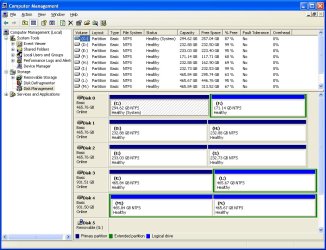
  • manage disk.jpg
    manage disk.jpg
    125.8 KB · Views: 7

My Computer My Computer

Computer type
PC/Desktop
Computer Manufacturer/Model Number
Home made :)
OS
Windows 7 ultimate SP1
CPU
Intel Core i7-870 Lynnfield 4.00GHz
Motherboard
ASUS Z97-A ATX DDR3 2600 LGA 1150 Motherboards Z97-A
Memory
Corsair Vengeance 16GB (2x8GB) DDR3 1600 MHz (PC3 12800) Des
Graphics Card(s)
MSI NX8600GTS T2D256EZ
Sound Card
intergraded on MB
Monitor(s) Displays
Two 24" Samsung
Screen Resolution
1920 X1200
Hard Drives
3 of: Seagate 2TB Desktop HDD SATA 6Gb/s 64MB Cache 3.5-Inch Internal Bare Drive
1 of: Seagate 1TB Desktop HDD SATA 6Gb/s 64MB Cache 3.5-Inch Internal Bare Drive
PSU
OCZ GameXStream OCZ700GXSSLI 700W ATX12V
Case
Antec Performance TX640B ATX Mini Tower Case
Cooling
Thermalright Ultima 90
Keyboard
Logitech
Mouse
Logitec
Internet Speed
10 Mbps cable
EaglePi,

Now, since day one, I've not been a fan of dual-boots so that warps my answer to you.

My advice: backup all data dear to your heart.

Then make a true clean install using following tutorial:
http://www.sevenforums.com/tutorials/91339-ssd-hdd-optimize-windows-reinstallation.html

some of the others do regularly use dual-boot and I'm sure they will point you in the best direction for dual-booting.

Once you start using Win 7, then you will never look back. In other words, XP will simply become a memory.
 

My Computer My Computer

Computer Manufacturer/Model Number
Toshiba Satellite S875D-S7239 laptop
OS
MS Windows 7 Ultimate SP1 64-bit
CPU
AMD A10-4600M
Motherboard
AMD Pumori (Socket FT1)
Memory
6.00 GB Dual-Channel DDR3 @ 798MHz (11-11-12-28)
Graphics Card(s)
AMD Radeon HD 7660G
Sound Card
High Definition Audio Device
Monitor(s) Displays
Generic PnP Monitor (1600x900@60Hz)
Screen Resolution
1600x900@60Hz
Hard Drives
SSD 119GB Corsair CSSD-V128GB2 ATA Device
Keyboard
Standard PS/2 Keyboard
Mouse
HP Wireless Optical Mobile Mouse Model FHA-3410
Internet Speed
What the local pub, local coffee shop offers.
Other Info
Optical Drive:MATSHITA BD-CMB UJ160B ATA Device


Also have an Asus ha1002xp netbook with Win 7 Ultimate installed.
Everything dear to me is always saved to a different hard drive not the same as my OS that way I don't have to worry about losing any of it. The only reason I want to do a dual boot is in case Win 7 and some of my XP software son't work together... just want to cover the bases
 

My Computer My Computer

Computer type
PC/Desktop
Computer Manufacturer/Model Number
Home made :)
OS
Windows 7 ultimate SP1
CPU
Intel Core i7-870 Lynnfield 4.00GHz
Motherboard
ASUS Z97-A ATX DDR3 2600 LGA 1150 Motherboards Z97-A
Memory
Corsair Vengeance 16GB (2x8GB) DDR3 1600 MHz (PC3 12800) Des
Graphics Card(s)
MSI NX8600GTS T2D256EZ
Sound Card
intergraded on MB
Monitor(s) Displays
Two 24" Samsung
Screen Resolution
1920 X1200
Hard Drives
3 of: Seagate 2TB Desktop HDD SATA 6Gb/s 64MB Cache 3.5-Inch Internal Bare Drive
1 of: Seagate 1TB Desktop HDD SATA 6Gb/s 64MB Cache 3.5-Inch Internal Bare Drive
PSU
OCZ GameXStream OCZ700GXSSLI 700W ATX12V
Case
Antec Performance TX640B ATX Mini Tower Case
Cooling
Thermalright Ultima 90
Keyboard
Logitech
Mouse
Logitec
Internet Speed
10 Mbps cable
Hello eaglepi, welcome to Seven Forums!


As you have XP installed to one Hard Disk Drive (HDD) already; disconnect that HDD and leave only the HDD you want to install Windows 7 to connected for the second install and when that's done connect the other, then whenever the PC is booted choose which OS / HDD to start using the BIOS boot menu; this way is just easier to remove one HDD and still have a working/booting OS to use if needed.


When you have Windows 7 installed you set the OS you want to boot as default in the main BIOS boot menu then when you need to boot to the other you use the one time BIOS boot menu most all motherboard/BIOSs have; who manufactured the mobo you use, ASUS?
 

My Computer My Computer

Computer Manufacturer/Model Number
* BFK Customs *
OS
W 7 64-bit Ultimate
CPU
Intel Q9550 Yorkfield
Motherboard
ASUS P5Q Pro
Memory
8GB Dominator 8500C5D
Graphics Card(s)
ATI : XFX 5870
Sound Card
Realtek HD Audio 7-1
Monitor(s) Displays
1x 47" LCD HDMI & 3x 26" LCD HDMI
Screen Resolution
1920x1080P & 1920x1200
Hard Drives
1x 80GB Intel X25-M G2 SSD : 1x 500GB & 1x 640GB WD Caviar Black(s)
PSU
Corsair 620HX
Case
Cooler Master RC-690
Cooling
Tuniq Tower 120, 2x 140mm and 3x 120mm case fans
Keyboard
Microsoft 500
Mouse
Razer Diamondback 3G
Internet Speed
14 Mb/s
Other Info
1x Koutech 3Gb/s SATA HDD Hot Swap Rack
Award I believe, can you please explain why I have to disconnect the HDD that has XP on it before installing 7
 

My Computer My Computer

Computer type
PC/Desktop
Computer Manufacturer/Model Number
Home made :)
OS
Windows 7 ultimate SP1
CPU
Intel Core i7-870 Lynnfield 4.00GHz
Motherboard
ASUS Z97-A ATX DDR3 2600 LGA 1150 Motherboards Z97-A
Memory
Corsair Vengeance 16GB (2x8GB) DDR3 1600 MHz (PC3 12800) Des
Graphics Card(s)
MSI NX8600GTS T2D256EZ
Sound Card
intergraded on MB
Monitor(s) Displays
Two 24" Samsung
Screen Resolution
1920 X1200
Hard Drives
3 of: Seagate 2TB Desktop HDD SATA 6Gb/s 64MB Cache 3.5-Inch Internal Bare Drive
1 of: Seagate 1TB Desktop HDD SATA 6Gb/s 64MB Cache 3.5-Inch Internal Bare Drive
PSU
OCZ GameXStream OCZ700GXSSLI 700W ATX12V
Case
Antec Performance TX640B ATX Mini Tower Case
Cooling
Thermalright Ultima 90
Keyboard
Logitech
Mouse
Logitec
Internet Speed
10 Mbps cable
If you leave XP plugged in during Win7 install, the installer will auto-configure a windows-managed Dual Boot which is harder to later remove.

So as BFK suggests, it is better to unplug XP during Win7 install so that the HD's remain independent and can come and go as you please.

Set Win7 target HD first to boot in BIOS setup, after DVD drive.

After 7 install, plug XP back in and boot it by tapping one-time BIOS Boot menu key which on Asus P5B mobo is F8. Or do nothing and Win7 will boot via BIOS boot order.
 
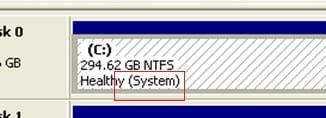
Have a look at the snip I took of your disk management, you see it says "System" that means that's where the boot files are stored for the system and if a second OS is installed while the XP HDD is connected the boot files for Windows 7 will be added to the XP boot files and the 2 OSs will effectively share the files needed to boot either one.

Have a look at the tutorial at the link below for a further explanation.

Startup Repair - Run 3 Separate Times

This is also how you would have to repair the boot files if ever you want to discontinue the dual boot.


click to enlarge
123.jpg


My Computer My Computer

Computer Manufacturer/Model Number
* BFK Customs *
OS
W 7 64-bit Ultimate
CPU
Intel Q9550 Yorkfield
Motherboard
ASUS P5Q Pro
Memory
8GB Dominator 8500C5D
Graphics Card(s)
ATI : XFX 5870
Sound Card
Realtek HD Audio 7-1
Monitor(s) Displays
1x 47" LCD HDMI & 3x 26" LCD HDMI
Screen Resolution
1920x1080P & 1920x1200
Hard Drives
1x 80GB Intel X25-M G2 SSD : 1x 500GB & 1x 640GB WD Caviar Black(s)
PSU
Corsair 620HX
Case
Cooler Master RC-690
Cooling
Tuniq Tower 120, 2x 140mm and 3x 120mm case fans
Keyboard
Microsoft 500
Mouse
Razer Diamondback 3G
Internet Speed
14 Mb/s
Other Info
1x Koutech 3Gb/s SATA HDD Hot Swap Rack
I understand what you are saying but in my case I will want XP to be my main system until I can get everything installed on Win 7 and get use to using it.

When you put the Win 7 DVD in doesn't it show you your drives and allow you to select which drive to install it on?? I guess not otherwise you would have told me to unplug the XP drive. This is starting to sound like a bad idea ( dual boot ) maybe I should just bite the bullet and install win 7 on the drive that XP is on. I assume that if I put the 7 dvd in it will do the same as if I put the XP in to do a fresh install...it will delete the partition, then I create a new partition and then select what partition to install Win 7 Right?
 

My Computer My Computer

Computer type
PC/Desktop
Computer Manufacturer/Model Number
Home made :)
OS
Windows 7 ultimate SP1
CPU
Intel Core i7-870 Lynnfield 4.00GHz
Motherboard
ASUS Z97-A ATX DDR3 2600 LGA 1150 Motherboards Z97-A
Memory
Corsair Vengeance 16GB (2x8GB) DDR3 1600 MHz (PC3 12800) Des
Graphics Card(s)
MSI NX8600GTS T2D256EZ
Sound Card
intergraded on MB
Monitor(s) Displays
Two 24" Samsung
Screen Resolution
1920 X1200
Hard Drives
3 of: Seagate 2TB Desktop HDD SATA 6Gb/s 64MB Cache 3.5-Inch Internal Bare Drive
1 of: Seagate 1TB Desktop HDD SATA 6Gb/s 64MB Cache 3.5-Inch Internal Bare Drive
PSU
OCZ GameXStream OCZ700GXSSLI 700W ATX12V
Case
Antec Performance TX640B ATX Mini Tower Case
Cooling
Thermalright Ultima 90
Keyboard
Logitech
Mouse
Logitec
Internet Speed
10 Mbps cable
Hello eaglepi, welcome to Seven Forums!


As you have XP installed to one Hard Disk Drive (HDD) already; disconnect that HDD and leave only the HDD you want to install Windows 7 to connected for the second install and when that's done connect the other, then whenever the PC is booted choose which OS / HDD to start using the BIOS boot menu; this way is just easier to remove one HDD and still have a working/booting OS to use if needed.


When you have Windows 7 installed you set the OS you want to boot as default in the main BIOS boot menu then when you need to boot to the other you use the one time BIOS boot menu most all motherboard/BIOSs have; who manufactured the mobo you use, ASUS?


Please read this again from my first post to you.
 

My Computer My Computer

Computer Manufacturer/Model Number
* BFK Customs *
OS
W 7 64-bit Ultimate
CPU
Intel Q9550 Yorkfield
Motherboard
ASUS P5Q Pro
Memory
8GB Dominator 8500C5D
Graphics Card(s)
ATI : XFX 5870
Sound Card
Realtek HD Audio 7-1
Monitor(s) Displays
1x 47" LCD HDMI & 3x 26" LCD HDMI
Screen Resolution
1920x1080P & 1920x1200
Hard Drives
1x 80GB Intel X25-M G2 SSD : 1x 500GB & 1x 640GB WD Caviar Black(s)
PSU
Corsair 620HX
Case
Cooler Master RC-690
Cooling
Tuniq Tower 120, 2x 140mm and 3x 120mm case fans
Keyboard
Microsoft 500
Mouse
Razer Diamondback 3G
Internet Speed
14 Mb/s
Other Info
1x Koutech 3Gb/s SATA HDD Hot Swap Rack
I read your post but every system is set up different and your way is not so easy for me to do with my system. I have 3 500 GB HDD's, in my bios it only lists the model numbers for the HDD's and in my case all three are the same.


does that make it easier to understand why I can't quite do it that way easy. or am I missing something.

If so please tell me I'm here to learn

Thanks
Ron
 

My Computer My Computer

Computer type
PC/Desktop
Computer Manufacturer/Model Number
Home made :)
OS
Windows 7 ultimate SP1
CPU
Intel Core i7-870 Lynnfield 4.00GHz
Motherboard
ASUS Z97-A ATX DDR3 2600 LGA 1150 Motherboards Z97-A
Memory
Corsair Vengeance 16GB (2x8GB) DDR3 1600 MHz (PC3 12800) Des
Graphics Card(s)
MSI NX8600GTS T2D256EZ
Sound Card
intergraded on MB
Monitor(s) Displays
Two 24" Samsung
Screen Resolution
1920 X1200
Hard Drives
3 of: Seagate 2TB Desktop HDD SATA 6Gb/s 64MB Cache 3.5-Inch Internal Bare Drive
1 of: Seagate 1TB Desktop HDD SATA 6Gb/s 64MB Cache 3.5-Inch Internal Bare Drive
PSU
OCZ GameXStream OCZ700GXSSLI 700W ATX12V
Case
Antec Performance TX640B ATX Mini Tower Case
Cooling
Thermalright Ultima 90
Keyboard
Logitech
Mouse
Logitec
Internet Speed
10 Mbps cable
Hello Ron.


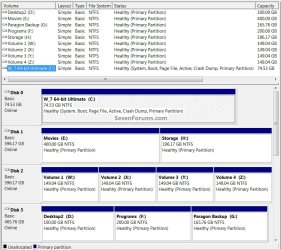
I understand your dilemma as I'm in the same boat as you that's a snip of my disk management below.

All you would have to do is disconnect one HDD at a time until XP won't boot and that way you will know when you have the XP HDD and leave that one disconnected and boot the Windows 7 DVD to install to the "Disk 1, D:" you mentioned, the easy way to recognize that during install is to name it in the "Computer" window to something easy to recognize before you start (right click, rename).


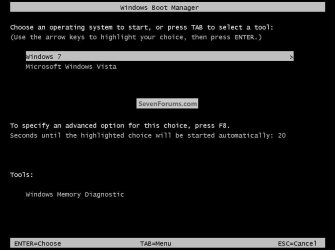
In the Widows managed you get a boot menu at boot to select which OS to start after Windows has started, like in the snip below.
You would leave both HDDs connected during the install and Windows will automatically configure the boot files to be shared by the 2 separate OSs.

The draw-back to this method is XP and Windows 7 will be linked together by sharing the boot files as previously mentioned.
Dual Boot.jpg


this is mine, see how they all have easily recognized names "Labels"
Disk Management.jpg
 

My Computer My Computer

Computer Manufacturer/Model Number
* BFK Customs *
OS
W 7 64-bit Ultimate
CPU
Intel Q9550 Yorkfield
Motherboard
ASUS P5Q Pro
Memory
8GB Dominator 8500C5D
Graphics Card(s)
ATI : XFX 5870
Sound Card
Realtek HD Audio 7-1
Monitor(s) Displays
1x 47" LCD HDMI & 3x 26" LCD HDMI
Screen Resolution
1920x1080P & 1920x1200
Hard Drives
1x 80GB Intel X25-M G2 SSD : 1x 500GB & 1x 640GB WD Caviar Black(s)
PSU
Corsair 620HX
Case
Cooler Master RC-690
Cooling
Tuniq Tower 120, 2x 140mm and 3x 120mm case fans
Keyboard
Microsoft 500
Mouse
Razer Diamondback 3G
Internet Speed
14 Mb/s
Other Info
1x Koutech 3Gb/s SATA HDD Hot Swap Rack
BFK,

That isn't my problem, I labeled the drives so I can disconnect the XP drive without a problem.. the problem comes in when I try to boot to the one I want in bios, in there they are not labeled.

I have pretty much decided to install Win 7 on the drive that has Xp on it, itt is time to do a fresh install of XP anyway so instead of installing XP I'll just install Win 7 I would have to save my data and reinstall all my programs anyway if I did a fresh install of XP. So I'm going to start a new thread asking specific question about the Win 7 install, I'd appreciate your input on those questions

Ron
 

My Computer My Computer

Computer type
PC/Desktop
Computer Manufacturer/Model Number
Home made :)
OS
Windows 7 ultimate SP1
CPU
Intel Core i7-870 Lynnfield 4.00GHz
Motherboard
ASUS Z97-A ATX DDR3 2600 LGA 1150 Motherboards Z97-A
Memory
Corsair Vengeance 16GB (2x8GB) DDR3 1600 MHz (PC3 12800) Des
Graphics Card(s)
MSI NX8600GTS T2D256EZ
Sound Card
intergraded on MB
Monitor(s) Displays
Two 24" Samsung
Screen Resolution
1920 X1200
Hard Drives
3 of: Seagate 2TB Desktop HDD SATA 6Gb/s 64MB Cache 3.5-Inch Internal Bare Drive
1 of: Seagate 1TB Desktop HDD SATA 6Gb/s 64MB Cache 3.5-Inch Internal Bare Drive
PSU
OCZ GameXStream OCZ700GXSSLI 700W ATX12V
Case
Antec Performance TX640B ATX Mini Tower Case
Cooling
Thermalright Ultima 90
Keyboard
Logitech
Mouse
Logitec
Internet Speed
10 Mbps cable

My Computer My Computer

Computer Manufacturer/Model Number
* BFK Customs *
OS
W 7 64-bit Ultimate
CPU
Intel Q9550 Yorkfield
Motherboard
ASUS P5Q Pro
Memory
8GB Dominator 8500C5D
Graphics Card(s)
ATI : XFX 5870
Sound Card
Realtek HD Audio 7-1
Monitor(s) Displays
1x 47" LCD HDMI & 3x 26" LCD HDMI
Screen Resolution
1920x1080P & 1920x1200
Hard Drives
1x 80GB Intel X25-M G2 SSD : 1x 500GB & 1x 640GB WD Caviar Black(s)
PSU
Corsair 620HX
Case
Cooler Master RC-690
Cooling
Tuniq Tower 120, 2x 140mm and 3x 120mm case fans
Keyboard
Microsoft 500
Mouse
Razer Diamondback 3G
Internet Speed
14 Mb/s
Other Info
1x Koutech 3Gb/s SATA HDD Hot Swap Rack
I have a 500 GB drive that I partitioned into 2 drives, my XP is on one of the partitions. If I follow what you suggest does it partition only the half with the XP on it now or the whole 500 Gb ?

Also how is this different than formating in the blue screen when installing XP doesn't Win 7 have the same feature
 

My Computer My Computer

Computer type
PC/Desktop
Computer Manufacturer/Model Number
Home made :)
OS
Windows 7 ultimate SP1
CPU
Intel Core i7-870 Lynnfield 4.00GHz
Motherboard
ASUS Z97-A ATX DDR3 2600 LGA 1150 Motherboards Z97-A
Memory
Corsair Vengeance 16GB (2x8GB) DDR3 1600 MHz (PC3 12800) Des
Graphics Card(s)
MSI NX8600GTS T2D256EZ
Sound Card
intergraded on MB
Monitor(s) Displays
Two 24" Samsung
Screen Resolution
1920 X1200
Hard Drives
3 of: Seagate 2TB Desktop HDD SATA 6Gb/s 64MB Cache 3.5-Inch Internal Bare Drive
1 of: Seagate 1TB Desktop HDD SATA 6Gb/s 64MB Cache 3.5-Inch Internal Bare Drive
PSU
OCZ GameXStream OCZ700GXSSLI 700W ATX12V
Case
Antec Performance TX640B ATX Mini Tower Case
Cooling
Thermalright Ultima 90
Keyboard
Logitech
Mouse
Logitec
Internet Speed
10 Mbps cable
If you want to put Win7 on the same HD as XP, I'd create New partition and then format with the booted Win7 installer Custom>Drive options:


The Win7 installer should create a Dual Boot menu with XP if you do this, as it would on a separate HD where you might benefit from a little faster performance for Win7 having it in the preferred lower (left hand) address.

Our suggestion to boot via BIOS Boot Menu is completely optional and just to save work later removing one of the HD's.
 
Not going to do a dual boot. So when I boot with the win 7 dvd I can delete and format the xp partition then create a new partition the same size and install win 7 on that which will replace Xp. this will work the same way correct?
 

My Computer My Computer

Computer type
PC/Desktop
Computer Manufacturer/Model Number
Home made :)
OS
Windows 7 ultimate SP1
CPU
Intel Core i7-870 Lynnfield 4.00GHz
Motherboard
ASUS Z97-A ATX DDR3 2600 LGA 1150 Motherboards Z97-A
Memory
Corsair Vengeance 16GB (2x8GB) DDR3 1600 MHz (PC3 12800) Des
Graphics Card(s)
MSI NX8600GTS T2D256EZ
Sound Card
intergraded on MB
Monitor(s) Displays
Two 24" Samsung
Screen Resolution
1920 X1200
Hard Drives
3 of: Seagate 2TB Desktop HDD SATA 6Gb/s 64MB Cache 3.5-Inch Internal Bare Drive
1 of: Seagate 1TB Desktop HDD SATA 6Gb/s 64MB Cache 3.5-Inch Internal Bare Drive
PSU
OCZ GameXStream OCZ700GXSSLI 700W ATX12V
Case
Antec Performance TX640B ATX Mini Tower Case
Cooling
Thermalright Ultima 90
Keyboard
Logitech
Mouse
Logitec
Internet Speed
10 Mbps cable
Yes. Use the delete choice on the Drive Options menu shown above.

If you want the cleanest possible slate, wipe the HD first.
 
Here's the wipe "secure erase" he's referring to though this one can't be done to a single partition on a Hard Disk Drive (HDD) this one will do the entire HDD, it marks the whole HDD as unallocated space and over-writes everything with zeroes for the best possible space to install Windows to.

SSD / HDD : Optimize for Windows Reinstallation


There is Option Three in this tutorial that will do a partition specific wipe of a single partition and not the whole HDD, it over-writes all the old code as the one above does but is safe to use on a single partition.

Partition Wizard : Use the Bootable CD
 

My Computer My Computer

Computer Manufacturer/Model Number
* BFK Customs *
OS
W 7 64-bit Ultimate
CPU
Intel Q9550 Yorkfield
Motherboard
ASUS P5Q Pro
Memory
8GB Dominator 8500C5D
Graphics Card(s)
ATI : XFX 5870
Sound Card
Realtek HD Audio 7-1
Monitor(s) Displays
1x 47" LCD HDMI & 3x 26" LCD HDMI
Screen Resolution
1920x1080P & 1920x1200
Hard Drives
1x 80GB Intel X25-M G2 SSD : 1x 500GB & 1x 640GB WD Caviar Black(s)
PSU
Corsair 620HX
Case
Cooler Master RC-690
Cooling
Tuniq Tower 120, 2x 140mm and 3x 120mm case fans
Keyboard
Microsoft 500
Mouse
Razer Diamondback 3G
Internet Speed
14 Mb/s
Other Info
1x Koutech 3Gb/s SATA HDD Hot Swap Rack
Back
Top