Target commands in Win7?

ProPlaya7

New member
Local time
11:44 PM
Messages
2
So, I was wondering how can I do the shortcut target commands in Win7 ?

In XP and Vista it was all about right click on the shortcut, properties and boom, there it was the third line from the top, target line with space to edit it.

How is it done in Win7? Anyone?
 

My Computer

Computer Manufacturer/Model Number
Built
OS
Win 7
CPU
Q9450
Motherboard
P5q Deluxe
Memory
4GB Corsair
Graphics Card(s)
Crossfire 4870s
Sound Card
Audigy ZS2
Monitor(s) Displays
Viewsonic P220f 22"
Hard Drives
500GB
PSU
Corsair TX 750
Case
Thermaltake Armor +MX
Cooling
Xigmatek Dark Knight
So, I was wondering how can I do the shortcut target commands in Win7 ?

In XP and Vista it was all about right click on the shortcut, properties and boom, there it was the third line from the top, target line with space to edit it.

How is it done in Win7? Anyone?
Welcome to the forums!

I am assuming you mean the desktop shortcuts.

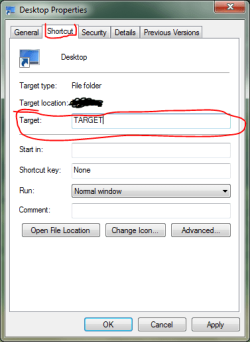
Just right click on a shortcut (or create a new one) and go to the ShortCut tab. Look at the screenshot attached.
Hope this answers your question.

~Lordbob
 

Attachments

  • Capture.PNG
    Capture.PNG
    13.5 KB · Views: 144

My Computer

Computer Manufacturer/Model Number
Hera
OS
Windows 7 Ultimate x64, Mint 9
CPU
Intel i5-2500k
Motherboard
ASUS P8P67 Pro
Memory
2x 4Gb Corsair VENGEANCE DDR3-1600
Graphics Card(s)
NVidia GeForce N260GTX Twin Frozr
Sound Card
Realtek HD OnBoard Audio
Monitor(s) Displays
ASUS 24" Monitor
Screen Resolution
1920x1080
Hard Drives
G.SKILL Phoenix Series 60GB SATA II MLC Internal Solid State Drive (SSD)
SAMSUNG Spinpoint F3R 1TB 7200 RPM 32MB Cache SATA II
PSU
Cooler Master Real Power Pro 750W
Case
Cooler Master Haf 932
Cooling
Fans
Keyboard
Razer Tarantula
Mouse
Razer Lachesis
Internet Speed
not fast enough
Hello and thanks for the welcome.

Hmmm, so it is the same way as the XP and Vista. I need to check it again, maybe I got confused with the original in folder shortcut.

I will post again if I have some issues with it.

Thank you for reply.
 

My Computer

Computer Manufacturer/Model Number
Built
OS
Win 7
CPU
Q9450
Motherboard
P5q Deluxe
Memory
4GB Corsair
Graphics Card(s)
Crossfire 4870s
Sound Card
Audigy ZS2
Monitor(s) Displays
Viewsonic P220f 22"
Hard Drives
500GB
PSU
Corsair TX 750
Case
Thermaltake Armor +MX
Cooling
Xigmatek Dark Knight
Back
Top