I'm using Win7 Ultimate. I've actually been using it for a while but since reformatting..I want to customize everything that bugs me.
1. Is there a way to get the date on the task bar under without having to make the task bar stretched/thicker?
2. Can I get rid of the arrow that you have to click to see hidden items? The items on the "hid" I have already gone into the settings to not have them showing.
3. Why can't I move the tabs on the task bar like I could with Vista? Not sure how to explain this..but there used to be "sections" and if you clicked on the them..you could scroll them or stretch them to move. These are locked even though the taskbar is not set to be locked..If this makes sense.
#1. I don't believe so. There may be modification software that you could use, but I don't believe there is a native process that would allow this. The best solution you could use is using larger icons which causes your task-bar to be a little larger to compensate for the icons.
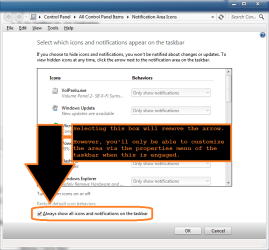
#2. When you click on the Customize link within the hidden icons pop-up, you'll see a check box at the bottom which says show all items all the time. If you select this box, no arrow will show. Guided Help: Customize the notification area in Windows 7
#3. You can still move the sections of the taskbar, you just have to drag them around. When you unlock the task-bar, you'll see a bar on the left of each section (icons set, toolbars, etc). You should be able to drag these to the left and right. When you drag them all the way to the right/left it should skip over the other toolbar. In other words, to move a toolbar to the left of the icons, you have to squish the icons all the way to the right in order to get the toolbar to skip over it.