Solved Task Manager Help

18MW

New member
Local time
1:08 AM
Messages
6
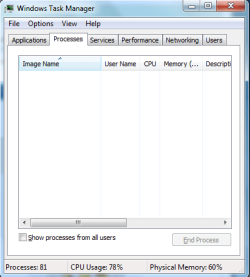
For some reason, I can't view the processes or applications properly.
It seems like it refreshes all the time. Can somebody help me with this?
 

Attachments

  • Capture.PNG
    Capture.PNG
    12.4 KB · Views: 4

My Computer

Computer Manufacturer/Model Number
HP Pavilion dv6
OS
Vista Home Premium 32-bit and 7 64-bit Ultimate
CPU
Core 2 Duo P8600
Memory
3 GB
Graphics Card(s)
ATI Radeon HD 4650
I notice that "Show processes from all users" is unchecked. Try checking it to see if that cures your problem.
 

My Computer

Computer Manufacturer/Model Number
HP Pavilion Elite 495UK
OS
Windows 7 Ultimate SP1 64-Bit
CPU
Intel Core i7 870 @ 2.93GHz
Motherboard
MSI 2A9C (CPU1)
Memory
8Gb Dual-Channel DDR3 @ 664MHz
Graphics Card(s)
nVidia GeForce GTX 460 1024MB dedicated RAM
Sound Card
Realtek HD Audio
Monitor(s) Displays
HP2310i
Screen Resolution
1920 x 1080
Hard Drives
1x1954GB Hitachi HDS22020ALA 330 (RAID), 1x1954GB Hitachi External for backup and storage
PSU
460W
Case
HP Elite
Cooling
Air cooled
Keyboard
Logitech K750 solar-powered keyboard
Mouse
Logitech Wireless M180 mouse
Internet Speed
2Mb
Other Info
Pure Avanti Flow Internet Radio with iPod Dock, 64Gb iPod, HP USB Speakers, Sony MDR-V500 Headphones, Sony Vaio F-Series Laptop
Oh no that doesn't do anything. The screenshot doesn't show my problem, sorry for that.
The problem is, I can't view my processes or applications properly. It shows the list of processes then disappears, then reappears, on and on. That's my problem. It seems like it keeps on refreshing the list.

EDIT* after restarting my PC, for some reason it is now alright. Should I report this thread as "Solved"?
But anyway, if anyone can give any info about this problem it would still be appreciated. Thanks! :)
 
Last edited:

My Computer

Computer Manufacturer/Model Number
HP Pavilion dv6
OS
Vista Home Premium 32-bit and 7 64-bit Ultimate
CPU
Core 2 Duo P8600
Memory
3 GB
Graphics Card(s)
ATI Radeon HD 4650

My Computer

Computer type
PC/Desktop
Computer Manufacturer/Model Number
Dell XPS 420
OS
Windows 10, Home Clean Install
CPU
Intel Core2 processsor Q8200(2.33Ghz 1333FSB) Quad Core Tech
Motherboard
Dell
Memory
6 gb
Graphics Card(s)
ATI Radeon 256MB HD3650
Sound Card
Intergrated 7.1 Channel Audio
Monitor(s) Displays
Dell SP2009W 20"
Hard Drives
640 GB Serial ATA Hard drive
Cooling
Fan
Keyboard
Dell USB Keyboard
Mouse
Dell Premium Optical USB
Internet Speed
DSL 2.85
OK, sorry about that.

Have you tried it in Safe Mode? Is it possible your anti-virus software is screwing things up?

Other than that, you might want to use a third-party utility such as Process Explorer.

Process Explorer
 

My Computer

Computer Manufacturer/Model Number
HP Pavilion Elite 495UK
OS
Windows 7 Ultimate SP1 64-Bit
CPU
Intel Core i7 870 @ 2.93GHz
Motherboard
MSI 2A9C (CPU1)
Memory
8Gb Dual-Channel DDR3 @ 664MHz
Graphics Card(s)
nVidia GeForce GTX 460 1024MB dedicated RAM
Sound Card
Realtek HD Audio
Monitor(s) Displays
HP2310i
Screen Resolution
1920 x 1080
Hard Drives
1x1954GB Hitachi HDS22020ALA 330 (RAID), 1x1954GB Hitachi External for backup and storage
PSU
460W
Case
HP Elite
Cooling
Air cooled
Keyboard
Logitech K750 solar-powered keyboard
Mouse
Logitech Wireless M180 mouse
Internet Speed
2Mb
Other Info
Pure Avanti Flow Internet Radio with iPod Dock, 64Gb iPod, HP USB Speakers, Sony MDR-V500 Headphones, Sony Vaio F-Series Laptop
In Task Manager go to View > Update Speed, then change it to a different setting and then back to whichever you prefer to see if normal behaviour is resumed.

Or change to one of the other suggested replacements and see if that improves things- my preference is Process Explorer.
 

My Computer

Computer type
PC/Desktop
OS
Windows 7
Thanks for the help and recommendation guys!
Problem solved. :D
 

My Computer

Computer Manufacturer/Model Number
HP Pavilion dv6
OS
Vista Home Premium 32-bit and 7 64-bit Ultimate
CPU
Core 2 Duo P8600
Memory
3 GB
Graphics Card(s)
ATI Radeon HD 4650
Pleased to hear it and thanks for letting us know. Did you pin it down to anything specific or was it Windows just gone walkabout for a while? :)
 

My Computer

Computer Manufacturer/Model Number
HP Pavilion Elite 495UK
OS
Windows 7 Ultimate SP1 64-Bit
CPU
Intel Core i7 870 @ 2.93GHz
Motherboard
MSI 2A9C (CPU1)
Memory
8Gb Dual-Channel DDR3 @ 664MHz
Graphics Card(s)
nVidia GeForce GTX 460 1024MB dedicated RAM
Sound Card
Realtek HD Audio
Monitor(s) Displays
HP2310i
Screen Resolution
1920 x 1080
Hard Drives
1x1954GB Hitachi HDS22020ALA 330 (RAID), 1x1954GB Hitachi External for backup and storage
PSU
460W
Case
HP Elite
Cooling
Air cooled
Keyboard
Logitech K750 solar-powered keyboard
Mouse
Logitech Wireless M180 mouse
Internet Speed
2Mb
Other Info
Pure Avanti Flow Internet Radio with iPod Dock, 64Gb iPod, HP USB Speakers, Sony MDR-V500 Headphones, Sony Vaio F-Series Laptop
Sorry for taking such a long time to post a reply but anyway, seavixen32, the problem just went away. Seems like Windows had a tantrum, is all. Again, thanks for the help!
 

My Computer

Computer Manufacturer/Model Number
HP Pavilion dv6
OS
Vista Home Premium 32-bit and 7 64-bit Ultimate
CPU
Core 2 Duo P8600
Memory
3 GB
Graphics Card(s)
ATI Radeon HD 4650
Back
Top
