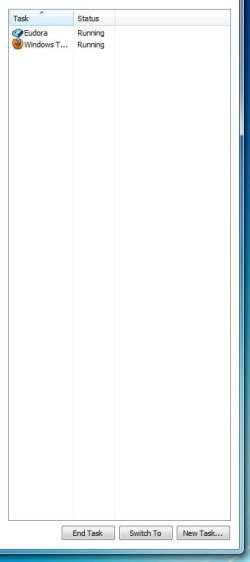
C choco New member Local time 7:10 AM Messages 40 May 21, 2010 #1 I only see the columns Task and Status when I open Task Manager. I am also missing the red X close icon. How do I make it complete? Attachments TMANAGER 10-05-21.jpg 14.4 KB · Views: 32 My Computer OSWindows 7
I only see the columns Task and Status when I open Task Manager. I am also missing the red X close icon. How do I make it complete?
logicearth New member Guru Gold Member VIP Local time 7:10 AM Messages 5,642 Location California, Southern May 21, 2010 #2 Double click on the window frame. Task Manager - Small Footprint Mode - Vista Forums Last edited by a moderator: May 21, 2010 My Computer Computer typePC/DesktopComputer Manufacturer/Model NumberAlienware Aurora ALX R4OSWindows 10 Pro (x64)CPUIntel Core i7-3930K (3.2GHz - 4.5GHz)MotherboardAlienware Aurora-R4 x79Memory4x Samsung 4GB PC3-12800 DDR3 (16GB 1600MHz)Graphics Card(s)Nvidia Geforce GTX 690Sound CardSteelSeries Siberia EliteMonitor(s) DisplaysDell UltraSharp U3011Screen Resolution2560x1600Hard DrivesSamsung 850 Pro 256 GB, Seagate 1TB Desktop Hybrid HDD, 2x Western Digital 4TB Green HDDPSU875W Some Dell PSU <.<CaseAlienware Aurora ALXCoolingCustom Liquid Cooling (EK CPU & GPU blocks) dual EK 480RADKeyboardLogitech G710+ MechanicalMouseLogitech G700sInternet SpeedVerizon Fios (50 mbps average)Other InfoServer: Intel NUC D54250WYK: i5-4250U, 16GB, 256 GB mSATA, Windows Server 2012 R2
kucing13 New member Pro User Local time 10:10 PM Messages 1,747 Location bermuda triangle May 21, 2010 #3 how about right click on the task tab? and thick the thing that you want to show My Computer OSwindow's 7CPUcore 2 quadMotherboardgigabyteMemory2gb corsairGraphics Card(s)ati hd4850Monitor(s) DisplayslgScreen Resolution1600 X 900Casepower logicOther Infonone of the spec above is accurate