
You are using an out of date browser. It may not display this or other websites correctly.
You should upgrade or use an alternative browser.
You should upgrade or use an alternative browser.
Task Manager Needs Repair
- Thread starter seagrape
- Start date

Are you talking about Task Manager itself or the selection menu you get when you press Ctrl+Alt+Del?
There is no Shutdown in Task Manger itself but there is a Shutdown selection at the lower right corner of the Ctrl+Alt+Del screen.
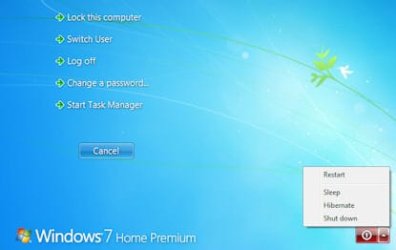
There is no Shutdown in Task Manger itself but there is a Shutdown selection at the lower right corner of the Ctrl+Alt+Del screen.
My Computer
- Computer type
- PC/Desktop
- Computer Manufacturer/Model Number
- Lenovo IdeaCenter 450
- OS
- Windows 10 Pro X64
- CPU
- Intel Quad Core i7-4770 @ 3.4Ghz
- Memory
- 16.0GB PC3-12800 DDR3 SDRAM 1600 MHz
- Graphics Card(s)
- Intel Integrated HD Graphics
- Sound Card
- Realtek HD Audio
- Monitor(s) Displays
- HP 22" LCD
- Screen Resolution
- 1680 x 1050
- Hard Drives
- 250GB Samsung EVO SATA-3 SSD
2TB Seagate ST2000DM001 SATA-2
1.5TB Seagate ST3150041AS SATA
- Keyboard
- Dell USB
- Mouse
- Lenovo USB
- Internet Speed
- Cable via Road Runner 3MB Upload, 30MB Download
- Antivirus
- Windows Defender, MBAM Pro, MBAE
- Browser
- Seamonkey
- Other Info
- UEFI/GPT
PLDS DVD-RW DH16AERSH

I just installed Windows 7 Pro 64 bit a couple of days ago and the Task Manager Pane is missing the Shut Down feature that it had in Windows XP. Is this the way it is supposed to be?
It is the way it is supposed to be.
My Computer
- Computer Manufacturer/Model Number
- Asus N73SV
- OS
- Windows 7 x64 Ultimate SP1
- CPU
- Core i7-2630QM
- Motherboard
- Intel HM 65
- Memory
- 6 GB DDR3
- Graphics Card(s)
- Nvidia GT 540M / Intel HD 3000 - Optimus switching
- Sound Card
- HD Audio (Intel Azalia/Realtek) ALC269
- Monitor(s) Displays
- LED flat panel
- Screen Resolution
- 1920 x 1080
- Hard Drives
- 2x Seagate Momentus 640 GB - 1,28 TB in total
- Internet Speed
- 4 MB/256 kbps
- Other Info
- External HDs
WD Elements 1,5 TB
WD MyBook 500 GB

Task manager with no close button. Double click any part of the white window frame around the edge.
My Computer
- Computer type
- PC/Desktop
- Computer Manufacturer/Model Number
- Custom 2014 Upgrade.
- OS
- Windows 7 Ultimate x64 sp1
- CPU
- Intel i5 4590 Haswell refresh 3.30GHz(3.7GHz Turbo) Quad.
- Motherboard
- Gigabyte GA-H97-HD3 LGA 1150
- Memory
- G.Skill Ripjaws F3-12800CL9D-8GBRL 16GB (4x4GB) (1600MHz)
- Graphics Card(s)
- Gigabyte GeForce GT 740 4GB
- Sound Card
- Onboard. Realtek High Definition Audio
- Monitor(s) Displays
- Asus VW266H x 2
- Screen Resolution
- 1920x1200 @ 60Hz
- Hard Drives
- Samsung 840 EVO 120GB SSD /
Samsung 850 Pro Series 1TB SSD x 2 /
Western Digital WD Black 1TB /
Western Digital VelociRaptor 150 GB.
- PSU
- Corsair 650 hx modular
- Case
- Cooler Master
- Cooling
- 3x fans
- Keyboard
- Logitech Media Keyboard 600
- Mouse
- Logitech Performance Mouse MX
- Internet Speed
- Cable Broadband 100mbs/D, 2mbs/U
- Antivirus
- MSE, Malwarebytes, AdwCleaner, SUPERAntiSpyware
- Browser
- Mozilla Firefox, Google Chrome
- Other Info
- 1GB DataRam

Ditto.Task manager with no close button. Double click any part of the white window frame around the edge.
That will expand it or shrink it.
My Computer
- Computer Manufacturer/Model Number
- Custom
- OS
- Windows 7 Pro x64 -- PCLinuxOS KDE4 FullMonty 2011
- CPU
- i7-875k @ Turbo - 7,6,5,5 - 3.6ghz
- Motherboard
- Asus P7P55D-E Deluxe
- Memory
- Corsair CMD8GX3M4A1600C8 8gb
- Graphics Card(s)
- Asus EAH5850 DirectCU/2DIS/1GD5
- Sound Card
- On Board
- Monitor(s) Displays
- Samsung SyncMaster T220 - Panasonic VT30a 50"
- Screen Resolution
- 1680x1050 -
- Hard Drives
- Corsair Force 3 SSD 120GB x 2 ::
WD VelociRaptor 150GB WD1500HLFS x 2
- PSU
- Corsair HX-850 Power Supply
- Case
- Coolmaster HAF 932
- Cooling
- Corsair H50
- Keyboard
- Logitech Wireless MK700
- Mouse
- Logitech Wireless MX620
- Internet Speed
- Good enough for now
- Other Info
- Voip. Insanely cheap phone calls.
Shutdown is on the window you choose Task Manager from. It is not a part of the Task Manager window.
Rustberger, what will that accomplish other than show or hide the tabs?
Rustberger, what will that accomplish other than show or hide the tabs?
My Computer
- Computer type
- PC/Desktop
- Computer Manufacturer/Model Number
- Lenovo IdeaCenter 450
- OS
- Windows 10 Pro X64
- CPU
- Intel Quad Core i7-4770 @ 3.4Ghz
- Memory
- 16.0GB PC3-12800 DDR3 SDRAM 1600 MHz
- Graphics Card(s)
- Intel Integrated HD Graphics
- Sound Card
- Realtek HD Audio
- Monitor(s) Displays
- HP 22" LCD
- Screen Resolution
- 1680 x 1050
- Hard Drives
- 250GB Samsung EVO SATA-3 SSD
2TB Seagate ST2000DM001 SATA-2
1.5TB Seagate ST3150041AS SATA
- Keyboard
- Dell USB
- Mouse
- Lenovo USB
- Internet Speed
- Cable via Road Runner 3MB Upload, 30MB Download
- Antivirus
- Windows Defender, MBAM Pro, MBAE
- Browser
- Seamonkey
- Other Info
- UEFI/GPT
PLDS DVD-RW DH16AERSH