Task Manager Physical Memory % not releasing, after running VLC MP

Ghot

New member
Local time
1:29 PM
Messages
23
Specs in profile are up to date.
VLC Media Player v 2.2.0
Movies stored on 2TB HDD
TV - LG 37 inch
Monitor running off DVI
TV - HDMI

Up until about 3-4 months ago, I could watch any of my movies stored on HDD, and after closing VLC Media Player, and via Nvidia Control Panel, UN-checking the TV, and the Physical Memory %, would release and drop back down to my normal 11-12%. Sometime in the past 3-4 months, the Physical Memory % rises to ~22% and does not drop back to it normal 11-12%.

I went back to an older version, same issue. I removed the IE plugin and the Firefox plugin .dll's, and the vlc-cache-gen.exe file, as per: VLC Media Player by VideoLAN Team - Should I Remove It?

This dropped the Physical Memory % from approx. 28% to it's current 22%. Running CCleaner does not aid in releasing the Physical Memory.

I have no viruses or infections, don't have ANY other issues at all, with this computer.

I'm still running the 331.82 Nvidia drivers, which I've been running since they came out, aka long ago. I don't wish to update the vid drivers, as the newer ones are packed full or useless (for me) junk.
Prior to 3-4 months ago, even on these drivers, this issue did not occur.

I only have 33 Processes running, and only 19 programs installed. No games, no chat clients, etc.

I'm beginning to suspect that a Windows Update is the cause.

I ONLY do manual updates of anything, namely things like Adobe Flash, Firefox, CCleaner, and Windows Updates. As for Windows Updates I only do the Important and Critical ones,

I'm running Microsoft .NET Framework 3.5.1.

NOTHING has changed on this system except for MS Tuesday Windows Updates.


I run this comp 24/7, only a reboot will release the Physical Memory % after running VLC Media Player.

Any help with this would be appreciated.
 

My Computer My Computer

At a glance

Windows 7 Home Premium x64 SP1AMD FX-8350 Vishera 4.0GHz (4.2GHz Turbo) (st...CORSAIR Dominator Platinum 16GB (2 x 8GB) DDR...EVGA GeForce GTX 780 Ti (stock)
Computer type
PC/Desktop
Computer Manufacturer/Model Number
Me
OS
Windows 7 Home Premium x64 SP1
CPU
AMD FX-8350 Vishera 4.0GHz (4.2GHz Turbo) (stock speed)
Motherboard
ASUS SABERTOOTH 990FX R2.0 AM3+
Memory
CORSAIR Dominator Platinum 16GB (2 x 8GB) DDR3 1866Mhz
Graphics Card(s)
EVGA GeForce GTX 780 Ti (stock)
Sound Card
onboard
Monitor(s) Displays
DELL Ultrasharp U3011, 30" IPS monitor
Screen Resolution
2560 x 1600
Hard Drives
WD 500GB Velociraptor,
WD 2TB Caviar Black FZEX (2)
PSU
PC Power & Cooling Silencer 750W Quad EPS12V
Case
Coolermaster ATCS 840 Full Tower Case
Cooling
COOLER MASTER Hyper 212 EVO (push/pull), 7 case fans
Keyboard
Ducky DK9008 Shine II Blue LED Backlit Mechanical (MX Black)
Mouse
$15 Logiitech
Internet Speed
50/50 Verizon FIOS
Antivirus
Bitdefender Internet Security 2019 (paid)
Browser
Mozilla Firefox 67.0.2 x64
Maybe the process for vlc not ending? Did you check processes?

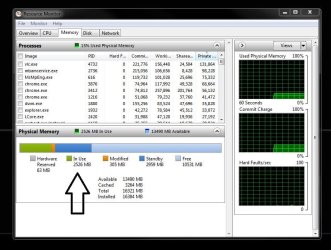
Did you check memory tab of performance monitor? It can give detailed information.

You can install nvidia drivers without the bloatware. You should try it.
 

My Computer My Computer

At a glance

Windows 7 Ultimate x64 SP1AMD Phenom 2 1090T2x8GB Kingston HyperX Fury Black 1600Mhz Unga...MSI GTX 970 Gaming 4G
Computer type
PC/Desktop
Computer Manufacturer/Model Number
Custom Build
OS
Windows 7 Ultimate x64 SP1
CPU
AMD Phenom 2 1090T
Motherboard
Gigabyte GA-890FXA-UD5
Memory
2x8GB Kingston HyperX Fury Black 1600Mhz Unganged
Graphics Card(s)
MSI GTX 970 Gaming 4G
Sound Card
Realtek On-Board HD 7.1 Audio / Logitech G35
Monitor(s) Displays
3xAcer GD245HQ
Screen Resolution
1920x1080
Hard Drives
Samsung 850 Pro 512GB SSD - OS /
WD Caviar Black SATA 3 - 1 TBx2 - Dynamic RAID 0 /
WD Caviar Green SATA 2 - 640GBx2 - Dynamic RAID 0 /
WD Caviar Green SATA 2 - 640GB - Internal Backup /
Seagate Barracude SATA 3 - 3TB - External Backup/ Sync
PSU
HighPower 1000W
Case
Cooler Master HAF 932
Cooling
Noctua NH-D14
Keyboard
Logitech G19
Mouse
Logitech G500
Internet Speed
100/4 Mbit Cable (100GB quota)
Antivirus
ZoneAlarm Extreme Security / MBAM Pro / MBAE Free / SAS Free
Browser
IE 11 - Firefox - Chrome
Other Info
Logitech F710/ G27/ G940/ Z5500 // TrackIR 5 // Nvidia 3D Surround Vision
Yes, Task Manager show VLC.exe has stopped.
The Memory Tab of Performance Monitor shows nothing unusual, except for what I mentioned above.
Yes I know how to install Nvidia drivers. I only install the Grfx , HD Audio and PhysX portions of the driver. Unfortunately later Nvidia driver versions don't give this much latitude, which is why I'm still using the 331.82 drivers.


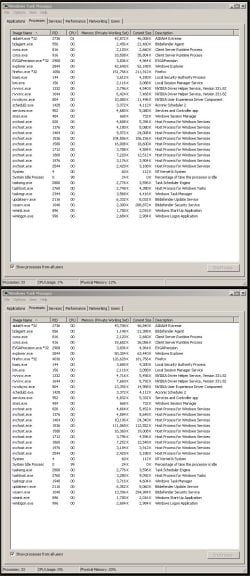
As for the problem with VLC Media player (which I can reproduce infinitly...here's a screen shot of before and after...


I rebooted comp to get the before, then played a few minutes of 4-5 movies on TV via VLC media player and this is the result...

2EPNYbR.jpg


I included a CCleaner run in between the before and after screen shots, but NOT a reboot.
 

My Computer My Computer

At a glance

Windows 7 Home Premium x64 SP1AMD FX-8350 Vishera 4.0GHz (4.2GHz Turbo) (st...CORSAIR Dominator Platinum 16GB (2 x 8GB) DDR...EVGA GeForce GTX 780 Ti (stock)
Computer type
PC/Desktop
Computer Manufacturer/Model Number
Me
OS
Windows 7 Home Premium x64 SP1
CPU
AMD FX-8350 Vishera 4.0GHz (4.2GHz Turbo) (stock speed)
Motherboard
ASUS SABERTOOTH 990FX R2.0 AM3+
Memory
CORSAIR Dominator Platinum 16GB (2 x 8GB) DDR3 1866Mhz
Graphics Card(s)
EVGA GeForce GTX 780 Ti (stock)
Sound Card
onboard
Monitor(s) Displays
DELL Ultrasharp U3011, 30" IPS monitor
Screen Resolution
2560 x 1600
Hard Drives
WD 500GB Velociraptor,
WD 2TB Caviar Black FZEX (2)
PSU
PC Power & Cooling Silencer 750W Quad EPS12V
Case
Coolermaster ATCS 840 Full Tower Case
Cooling
COOLER MASTER Hyper 212 EVO (push/pull), 7 case fans
Keyboard
Ducky DK9008 Shine II Blue LED Backlit Mechanical (MX Black)
Mouse
$15 Logiitech
Internet Speed
50/50 Verizon FIOS
Antivirus
Bitdefender Internet Security 2019 (paid)
Browser
Mozilla Firefox 67.0.2 x64

My Computer My Computer

At a glance

Windows 7 Ultimate x64 SP1AMD Phenom 2 1090T2x8GB Kingston HyperX Fury Black 1600Mhz Unga...MSI GTX 970 Gaming 4G
Computer type
PC/Desktop
Computer Manufacturer/Model Number
Custom Build
OS
Windows 7 Ultimate x64 SP1
CPU
AMD Phenom 2 1090T
Motherboard
Gigabyte GA-890FXA-UD5
Memory
2x8GB Kingston HyperX Fury Black 1600Mhz Unganged
Graphics Card(s)
MSI GTX 970 Gaming 4G
Sound Card
Realtek On-Board HD 7.1 Audio / Logitech G35
Monitor(s) Displays
3xAcer GD245HQ
Screen Resolution
1920x1080
Hard Drives
Samsung 850 Pro 512GB SSD - OS /
WD Caviar Black SATA 3 - 1 TBx2 - Dynamic RAID 0 /
WD Caviar Green SATA 2 - 640GBx2 - Dynamic RAID 0 /
WD Caviar Green SATA 2 - 640GB - Internal Backup /
Seagate Barracude SATA 3 - 3TB - External Backup/ Sync
PSU
HighPower 1000W
Case
Cooler Master HAF 932
Cooling
Noctua NH-D14
Keyboard
Logitech G19
Mouse
Logitech G500
Internet Speed
100/4 Mbit Cable (100GB quota)
Antivirus
ZoneAlarm Extreme Security / MBAM Pro / MBAE Free / SAS Free
Browser
IE 11 - Firefox - Chrome
Other Info
Logitech F710/ G27/ G940/ Z5500 // TrackIR 5 // Nvidia 3D Surround Vision
I can see it, here it is though,
 

Attachments

  • 2EPNYbR.jpg
    2EPNYbR.jpg
    217 KB · Views: 5

My Computer My Computer

At a glance

Win 10 Pro x64Intel I5-2500K @3.3GHz16GB G.Skill Ripjaws X (4x4GB)EVGA GeForce 750 Ti SC 2GB
Computer type
PC/Desktop
Computer Manufacturer/Model Number
Self Built
OS
Win 10 Pro x64
CPU
Intel I5-2500K @3.3GHz
Motherboard
Asrock P67 Extreme4
Memory
16GB G.Skill Ripjaws X (4x4GB)
Graphics Card(s)
EVGA GeForce 750 Ti SC 2GB
Sound Card
ASUS Xonar DG 5.1 Channels 24-bit 96KHz PCI Interface Sound
Monitor(s) Displays
auria eq2367
Screen Resolution
1920 x 1080
Hard Drives
250GB Samsung 850 EVO SSD
1TB WD Blue
1TB Hitachi
PSU
SeaSonic X 650W 80 Plus Gold
Case
Corsair Obsidian 750D
Cooling
Corsair H60, Three 140mm case fans
Keyboard
Logitech Wireless Keyboard K520
Mouse
Logitech Wireless Mouse M310
Internet Speed
Wave Broadband ~ 100 dn 5 up
Antivirus
Windows Defender, Malwarebytes Premium
Browser
Edge, IE11, Chrome
Other Info
Laptop specs: HP g7-1365dx /
CPU: AMD A6-3420M APU with Radeon(tm) HD Graphics /
RAM: Crucial 8Gb (2x4Gb) /
SSD: Crucial M4-CT128M4SSD2 ATA Device/ FW 000F /
GFX: AMD Radeon HD 6520G /
OS: Windows 10 Pro x64
Alright. What is the problem? You have 16 GB of RAM and you are concerned about 20%? Get real. Come back when it stays at 90% for an hour. If you don't want that RAM to be used. Take it out of the machine. Then your precious RAM will not be touched. I am serious by the way.
 

My Computer My Computer

At a glance

Windows 10 Pro (x64)Intel Core i7-3930K (3.2GHz - 4.5GHz)4x Samsung 4GB PC3-12800 DDR3 (16GB 1600MHz)Nvidia Geforce GTX 690
Computer type
PC/Desktop
Computer Manufacturer/Model Number
Alienware Aurora ALX R4
OS
Windows 10 Pro (x64)
CPU
Intel Core i7-3930K (3.2GHz - 4.5GHz)
Motherboard
Alienware Aurora-R4 x79
Memory
4x Samsung 4GB PC3-12800 DDR3 (16GB 1600MHz)
Graphics Card(s)
Nvidia Geforce GTX 690
Sound Card
SteelSeries Siberia Elite
Monitor(s) Displays
Dell UltraSharp U3011
Screen Resolution
2560x1600
Hard Drives
Samsung 850 Pro 256 GB, Seagate 1TB Desktop Hybrid HDD, 2x Western Digital 4TB Green HDD
PSU
875W Some Dell PSU <.<
Case
Alienware Aurora ALX
Cooling
Custom Liquid Cooling (EK CPU & GPU blocks) dual EK 480RAD
Keyboard
Logitech G710+ Mechanical
Mouse
Logitech G700s
Internet Speed
Verizon Fios (50 mbps average)
Other Info
Server: Intel NUC D54250WYK: i5-4250U, 16GB, 256 GB mSATA, Windows Server 2012 R2
The problem is not how much of my RAM it's using...it's WHY it has almost doubled.
3-5 months ago, this problem did not exist. The only thing I can find that causes it, appears to be VLC Media player, it does not release the Physical Memory after using the program.

The only other thing I can thing that may be causing the issue, is a flaky Windows Update.

Nothing has changed on my comp except Windows Updates. 3-5 months ago the problem did NOT exist, now it does. I thought I made that pretty clear in my original post.
 

My Computer My Computer

At a glance

Windows 7 Home Premium x64 SP1AMD FX-8350 Vishera 4.0GHz (4.2GHz Turbo) (st...CORSAIR Dominator Platinum 16GB (2 x 8GB) DDR...EVGA GeForce GTX 780 Ti (stock)
Computer type
PC/Desktop
Computer Manufacturer/Model Number
Me
OS
Windows 7 Home Premium x64 SP1
CPU
AMD FX-8350 Vishera 4.0GHz (4.2GHz Turbo) (stock speed)
Motherboard
ASUS SABERTOOTH 990FX R2.0 AM3+
Memory
CORSAIR Dominator Platinum 16GB (2 x 8GB) DDR3 1866Mhz
Graphics Card(s)
EVGA GeForce GTX 780 Ti (stock)
Sound Card
onboard
Monitor(s) Displays
DELL Ultrasharp U3011, 30" IPS monitor
Screen Resolution
2560 x 1600
Hard Drives
WD 500GB Velociraptor,
WD 2TB Caviar Black FZEX (2)
PSU
PC Power & Cooling Silencer 750W Quad EPS12V
Case
Coolermaster ATCS 840 Full Tower Case
Cooling
COOLER MASTER Hyper 212 EVO (push/pull), 7 case fans
Keyboard
Ducky DK9008 Shine II Blue LED Backlit Mechanical (MX Black)
Mouse
$15 Logiitech
Internet Speed
50/50 Verizon FIOS
Antivirus
Bitdefender Internet Security 2019 (paid)
Browser
Mozilla Firefox 67.0.2 x64
The ram builds and builds in standby the longer you use the PC, it`s totally normal, that`s how windows 7 does it.

It goes back to normal when you reboot the pc because memory is volatile, totally normal.

I don`t have any issues with VLC, I`ve always used it :)

If the in use number keeps going up then you have a problem.
 

Attachments

  • Capture.JPG
    Capture.JPG
    84.9 KB · Views: 1

My Computer My Computer

At a glance

Windows 10 Pro x64Intel Core i7 6700KGSkill TridentZ RGB 16GB 3600 16-16-16-36EVGA GTX 980 Ti SC x2
Computer type
PC/Desktop
Computer Manufacturer/Model Number
Skylake Special #666
OS
Windows 10 Pro x64
CPU
Intel Core i7 6700K
Motherboard
Asus Sabertooth Z170 Mark 1
Memory
GSkill TridentZ RGB 16GB 3600 16-16-16-36
Graphics Card(s)
EVGA GTX 980 Ti SC x2
Sound Card
Realtek High Definition
Monitor(s) Displays
AOC G2460PG
Screen Resolution
1920 x 1080 144Hz
Hard Drives
Samsung 860 Pro 256GB, Seagate Barracuda 4TB x2
PSU
EVGA 1000 P2, EVGA White Custom Braided Cables
Case
Corsair Vengeance C70 Gunmetal Black
Cooling
Corsair H100i v2, Corsair ML120 x2, Thermal Grizzly Kryonaut
Keyboard
Logitech G910 Orion Spectrum
Mouse
Logitech G700s
Internet Speed
Verizon Fios Quantum Gateway 75/75
Antivirus
Windows Defender, Malwarebytes Free 3.8.3
Browser
Chrome
Other Info
Corsair SP120 x4, LG Blu-ray Drive, Durabrand HT-395 100 Watt Dolby Digital Amp, Corsair H2100 Wireless 7.1 Headset
Yeah that's all well and good. The only issue is...this did NOT occur, 3-5 months ago.
 

My Computer My Computer

At a glance

Windows 7 Home Premium x64 SP1AMD FX-8350 Vishera 4.0GHz (4.2GHz Turbo) (st...CORSAIR Dominator Platinum 16GB (2 x 8GB) DDR...EVGA GeForce GTX 780 Ti (stock)
Computer type
PC/Desktop
Computer Manufacturer/Model Number
Me
OS
Windows 7 Home Premium x64 SP1
CPU
AMD FX-8350 Vishera 4.0GHz (4.2GHz Turbo) (stock speed)
Motherboard
ASUS SABERTOOTH 990FX R2.0 AM3+
Memory
CORSAIR Dominator Platinum 16GB (2 x 8GB) DDR3 1866Mhz
Graphics Card(s)
EVGA GeForce GTX 780 Ti (stock)
Sound Card
onboard
Monitor(s) Displays
DELL Ultrasharp U3011, 30" IPS monitor
Screen Resolution
2560 x 1600
Hard Drives
WD 500GB Velociraptor,
WD 2TB Caviar Black FZEX (2)
PSU
PC Power & Cooling Silencer 750W Quad EPS12V
Case
Coolermaster ATCS 840 Full Tower Case
Cooling
COOLER MASTER Hyper 212 EVO (push/pull), 7 case fans
Keyboard
Ducky DK9008 Shine II Blue LED Backlit Mechanical (MX Black)
Mouse
$15 Logiitech
Internet Speed
50/50 Verizon FIOS
Antivirus
Bitdefender Internet Security 2019 (paid)
Browser
Mozilla Firefox 67.0.2 x64
Back
Top