
You are using an out of date browser. It may not display this or other websites correctly.
You should upgrade or use an alternative browser.
You should upgrade or use an alternative browser.
Task Manager
- Thread starter rscott4
- Start date

- Local time
- 1:05 AM
- Messages
- 797
Welcome, Bob!
I am not sure what are you asking though.
Pressing ctrl-alt-del brings me to a screen with options to lock the computer, switch user, change password, log off, and start the task manager.
If you just need the task manager, then you can right-click on the taskbar and choose the task manager from the pop-up menu.
I have never before tried clicking on the task manager icon in the system32 folder - it's so much easier from the taskbar, but I tried it now and it starts the task manager right away, as one would expect.
So, are you saying this is not the behavior you observe? If not, then what exactly happens when you do this?
I am not sure what are you asking though.
Pressing ctrl-alt-del brings me to a screen with options to lock the computer, switch user, change password, log off, and start the task manager.
If you just need the task manager, then you can right-click on the taskbar and choose the task manager from the pop-up menu.
I have never before tried clicking on the task manager icon in the system32 folder - it's so much easier from the taskbar, but I tried it now and it starts the task manager right away, as one would expect.
So, are you saying this is not the behavior you observe? If not, then what exactly happens when you do this?
My Computer
- Computer Manufacturer/Model Number
- Dell Inspiron 530
- OS
- Windows 7 Ultimate (x64)
- CPU
- Q6600
- Memory
- 8 GB
- Graphics Card(s)
- ATI Radeon HD 2600 XT
- Monitor(s) Displays
- Samsung Syncmaster P2450
- Screen Resolution
- 1920x1080
- Hard Drives
- Samsung HD103UJ
Samsung HD501LJ
- Internet Speed
- 25 Mb/s

It brings up a screen giving various choices. The last choice is start task manager. Thats what happens on my computer.
If you feel it is not working, you can try in a Administrator account, type cmd in search. In CMD, type sfc /scannow. See it that helps.
If you feel it is not working, you can try in a Administrator account, type cmd in search. In CMD, type sfc /scannow. See it that helps.
My Computer
- Computer type
- PC/Desktop
- Computer Manufacturer/Model Number
- Dell XPS 420
- OS
- Windows 10, Home Clean Install
- CPU
- Intel Core2 processsor Q8200(2.33Ghz 1333FSB) Quad Core Tech
- Motherboard
- Dell
- Memory
- 6 gb
- Graphics Card(s)
- ATI Radeon 256MB HD3650
- Sound Card
- Intergrated 7.1 Channel Audio
- Monitor(s) Displays
- Dell SP2009W 20"
- Hard Drives
- 640 GB Serial ATA Hard drive
- Cooling
- Fan
- Keyboard
- Dell USB Keyboard
- Mouse
- Dell Premium Optical USB
- Internet Speed
- DSL 2.85

He means selecting the manager from the ctrl alt del screen.
Try opening the command prompt as the administrator and typing in :
sfc /scannow
It sounds like something may have gotten mixed up in the Windows settings, and this command will scan and try to repair corrupted files.
Try opening the command prompt as the administrator and typing in :
sfc /scannow
It sounds like something may have gotten mixed up in the Windows settings, and this command will scan and try to repair corrupted files.
My Computer
- Computer type
- PC/Desktop
- Computer Manufacturer/Model Number
- The Dominator?
- OS
- Windows Seven Ultimate
- CPU
- AMD Piledriver FX 8320 @ 3.5GHz
- Motherboard
- ASUS M5A97 EVO R2.0
- Memory
- Crucial Ballistix 8GB 1600 MHz DDR3
- Graphics Card(s)
- ASUS GeForce GTX 970 Strix Edition @ 1.114 GHz
- Sound Card
- Integrated
- Monitor(s) Displays
- LG 23EA63V 23" IPS 1080p Monitor
- Screen Resolution
- 1920x1080
- Hard Drives
- Samsung SSD 840 EVO 120 GB
1x WD GreenPower 500GB 7200RPM
1 External HDD 1TB
- PSU
- Corsair CX500
- Case
- Zalman Z9 Plus
- Cooling
- CPU - Corsair Hydro H80i, Case - 3x Aerocool Shark Edition
- Keyboard
- Xenta Backlit Keyboard (Not very good!)
- Mouse
- Logitech G400
- Internet Speed
- Download: 7 mb/s Upload: 0.76 mb/s
- Antivirus
- Microsoft Security Essentials
- Browser
- Google Chrome
- Other Info
- Overclockers UK Desk Pad 89 x 45 cm
1200x730x600mm Desk
Using Virtual Audio Cable to split stereo sound into Audio Technica ATH-M50 headphones and Logitech X-530 speakers.
Haha you posted first!It brings up a screen giving various choices. The last choice is start task manager. Thats what happens on my computer.
If you feel it is not working, you can try in a Administrator account, type cmd in search. In CMD, type sfc /scannow. See it that helps.
That has been happening a lot to me recently

My Computer
- Computer type
- PC/Desktop
- Computer Manufacturer/Model Number
- The Dominator?
- OS
- Windows Seven Ultimate
- CPU
- AMD Piledriver FX 8320 @ 3.5GHz
- Motherboard
- ASUS M5A97 EVO R2.0
- Memory
- Crucial Ballistix 8GB 1600 MHz DDR3
- Graphics Card(s)
- ASUS GeForce GTX 970 Strix Edition @ 1.114 GHz
- Sound Card
- Integrated
- Monitor(s) Displays
- LG 23EA63V 23" IPS 1080p Monitor
- Screen Resolution
- 1920x1080
- Hard Drives
- Samsung SSD 840 EVO 120 GB
1x WD GreenPower 500GB 7200RPM
1 External HDD 1TB
- PSU
- Corsair CX500
- Case
- Zalman Z9 Plus
- Cooling
- CPU - Corsair Hydro H80i, Case - 3x Aerocool Shark Edition
- Keyboard
- Xenta Backlit Keyboard (Not very good!)
- Mouse
- Logitech G400
- Internet Speed
- Download: 7 mb/s Upload: 0.76 mb/s
- Antivirus
- Microsoft Security Essentials
- Browser
- Google Chrome
- Other Info
- Overclockers UK Desk Pad 89 x 45 cm
1200x730x600mm Desk
Using Virtual Audio Cable to split stereo sound into Audio Technica ATH-M50 headphones and Logitech X-530 speakers.
Happens to us all. Not a problem. The OP now knows that several members have the same solution.
My Computer
- Computer type
- PC/Desktop
- Computer Manufacturer/Model Number
- Dell XPS 420
- OS
- Windows 10, Home Clean Install
- CPU
- Intel Core2 processsor Q8200(2.33Ghz 1333FSB) Quad Core Tech
- Motherboard
- Dell
- Memory
- 6 gb
- Graphics Card(s)
- ATI Radeon 256MB HD3650
- Sound Card
- Intergrated 7.1 Channel Audio
- Monitor(s) Displays
- Dell SP2009W 20"
- Hard Drives
- 640 GB Serial ATA Hard drive
- Cooling
- Fan
- Keyboard
- Dell USB Keyboard
- Mouse
- Dell Premium Optical USB
- Internet Speed
- DSL 2.85

When I do Alt-ctrl-delete, or click on the Task Manager Icon in the windows system 32 file, in Win 7 it brings up somthing else.
How do i correct this? It used to work.
Thanks!!
Bob
Hello Bob, and welcome to Seven Forums.
Not sure if this is what you mean, but you press CTRL + SHIFT + ESCAPE, or right click on taskbar and click on Task Manager, to open Task Mananger now in Windows 7.
Hope this helps,
Shawn
My Computer
- Computer type
- PC/Desktop
- Computer Manufacturer/Model Number
- Self built custom
- OS
- 64-bit Windows 11 Pro for Workstations
- CPU
- Intel i7-8700K OC'd to 5 GHz
- Motherboard
- ASUS ROG Maximus XI Formula Z390
- Memory
- 64 GB (4x16GB) G.SKILL TridentZ RGB DDR4 3600 MHz
- Graphics Card(s)
- ASUS ROG-STRIX-GTX1080TI-O11G-GAMING
- Sound Card
- Integrated
- Monitor(s) Displays
- 2 x Samsung Odyssey G7 27"
- Screen Resolution
- 2560x1440
- Hard Drives
- 1TB Samsung 990 PRO M.2,
4TB Samsung 990 PRO PRO M.2,
TerraMaster F8 SSD Plus NAS
- PSU
- Seasonic Prime Titanium 850W
- Case
- Thermaltake Core P3
- Cooling
- Corsair Hydro H115i
- Keyboard
- Logitech wireless K800
- Mouse
- Logitech MX Master 4
- Internet Speed
- 2 Gb/s Download and 100 Mb/s Upload
- Antivirus
- Malwarebyte Anti-Malware Premium
- Browser
- Google Chrome
- Other Info
- Logitech Z625 speaker system,
Logitech BRIO 4K Pro webcam,
HP Color LaserJet Pro MFP M477fdn,
APC SMART-UPS RT 1000 XL - SURT1000XLI,
Galaxy S23 Plus phone

What does it bring up? As Shawn has stated, the keyboard shortcut is Ctrl + Shift + Esc.When I do Alt-ctrl-delete, or click on the Task Manager Icon in the windows system 32 file, in Win 7 it brings up somthing else.
How do i correct this? It used to work.
Thanks!!
Bob
My Computer
- Computer type
- PC/Desktop
- Computer Manufacturer/Model Number
- Dwarf Dwf/11/2012 r09/2013
- OS
- Windows 8.1 Pro RTM x64
- CPU
- Intel Core-i5-3570K 4-core @ 3.4GHz (Ivy Bridge) (OC 4.4GHz)
- Motherboard
- ASRock Z77 Extreme4-M
- Memory
- 4 x 4GB DDR3-1600 Corsair Vengeance CMZ8GX3M2A1600C9B (16GB)
- Graphics Card(s)
- MSI GeForce GTX770 Gaming OC 2GB
- Sound Card
- Realtek High Definition on board solution (ALC 898)
- Monitor(s) Displays
- ViewSonic VA1912w Widescreen (VGA)
- Screen Resolution
- 1440x900
- Hard Drives
- OCZ Agility 3 SSD 120GB SATA III x2 (RAID 0)
Samsung HD501LJ 500GB SATA II x2
Hitachi HDS721010CLA332 1TB SATA II
Iomega 1.5TB Ext USB 2.0
WD 2.0TB Ext USB 3.0
- PSU
- XFX Pro Series 850W Semi-Modular
- Case
- Gigabyte IF233
- Cooling
- 1 x 120mm Front Inlet 1 x 120mm Rear Exhaust
- Keyboard
- Microsoft Comfort Curve Keyboard 3000 (USB)
- Mouse
- Microsoft Comfort Mouse 3000 for Business (USB)
- Internet Speed
- NetGear DG834Gv3 ADSL Modem/Router (Ethernet) ~4.0 Mb/s (O2)
- Antivirus
- Avast! 8.0.1497
- Browser
- IE 11
- Other Info
- Optical Drive: HL-DT-ST BD-RE BH10LS30 SATA Bluray
Lexmark S305 Printer/Scanner/Copier (USB)
WEI Score: 8.1/8.1/8.5/8.5/8.25
Asus Eee PC 1011PX Netbook (Windows 7 x86 Starter)

I think the OP is new to 7, and skipped Vista entirely, so he is expecting the system to work like XP... where alt-ctrl-del went directly to task Manager.
My Computer
- Computer Manufacturer/Model Number
- me / #1
- OS
- windows 7 x64 Home Premium
- CPU
- intel q6600
- Motherboard
- gigbyte ga ep45 ud3l
- Memory
- g.skill 8gb ddr2 1066 (pc2 8500)
- Graphics Card(s)
- evga geforce 9800 gtx 512 mb
- Screen Resolution
- 1680 x 1050
- Hard Drives
- wd caviar black 500 gb
wd caviar black 1tb
wd elements 1tb external hd x2
- PSU
- raidmax 500w
- Case
- smilodon (yes, t'was the pretty blue lites that got me!)
But he opened task manager by the system32 file as well, and came up with something different :sarc:I think the OP is new to 7, and skipped Vista entirely, so he is expecting the system to work like XP... where alt-ctrl-del went directly to task Manager.
My Computer
- Computer type
- PC/Desktop
- Computer Manufacturer/Model Number
- The Dominator?
- OS
- Windows Seven Ultimate
- CPU
- AMD Piledriver FX 8320 @ 3.5GHz
- Motherboard
- ASUS M5A97 EVO R2.0
- Memory
- Crucial Ballistix 8GB 1600 MHz DDR3
- Graphics Card(s)
- ASUS GeForce GTX 970 Strix Edition @ 1.114 GHz
- Sound Card
- Integrated
- Monitor(s) Displays
- LG 23EA63V 23" IPS 1080p Monitor
- Screen Resolution
- 1920x1080
- Hard Drives
- Samsung SSD 840 EVO 120 GB
1x WD GreenPower 500GB 7200RPM
1 External HDD 1TB
- PSU
- Corsair CX500
- Case
- Zalman Z9 Plus
- Cooling
- CPU - Corsair Hydro H80i, Case - 3x Aerocool Shark Edition
- Keyboard
- Xenta Backlit Keyboard (Not very good!)
- Mouse
- Logitech G400
- Internet Speed
- Download: 7 mb/s Upload: 0.76 mb/s
- Antivirus
- Microsoft Security Essentials
- Browser
- Google Chrome
- Other Info
- Overclockers UK Desk Pad 89 x 45 cm
1200x730x600mm Desk
Using Virtual Audio Cable to split stereo sound into Audio Technica ATH-M50 headphones and Logitech X-530 speakers.
But he opened task manager by the system32 file as well, and came up with something different :sarc:
Hmmm... you're right. I missed that.
My Computer
- Computer Manufacturer/Model Number
- me / #1
- OS
- windows 7 x64 Home Premium
- CPU
- intel q6600
- Motherboard
- gigbyte ga ep45 ud3l
- Memory
- g.skill 8gb ddr2 1066 (pc2 8500)
- Graphics Card(s)
- evga geforce 9800 gtx 512 mb
- Screen Resolution
- 1680 x 1050
- Hard Drives
- wd caviar black 500 gb
wd caviar black 1tb
wd elements 1tb external hd x2
- PSU
- raidmax 500w
- Case
- smilodon (yes, t'was the pretty blue lites that got me!)
But he opened task manager by the system32 file as well, and came up with something different :sarc:
Hmmm... you're right. I missed that.
Don't worry, I do it all the time

My Computer
- Computer type
- PC/Desktop
- Computer Manufacturer/Model Number
- The Dominator?
- OS
- Windows Seven Ultimate
- CPU
- AMD Piledriver FX 8320 @ 3.5GHz
- Motherboard
- ASUS M5A97 EVO R2.0
- Memory
- Crucial Ballistix 8GB 1600 MHz DDR3
- Graphics Card(s)
- ASUS GeForce GTX 970 Strix Edition @ 1.114 GHz
- Sound Card
- Integrated
- Monitor(s) Displays
- LG 23EA63V 23" IPS 1080p Monitor
- Screen Resolution
- 1920x1080
- Hard Drives
- Samsung SSD 840 EVO 120 GB
1x WD GreenPower 500GB 7200RPM
1 External HDD 1TB
- PSU
- Corsair CX500
- Case
- Zalman Z9 Plus
- Cooling
- CPU - Corsair Hydro H80i, Case - 3x Aerocool Shark Edition
- Keyboard
- Xenta Backlit Keyboard (Not very good!)
- Mouse
- Logitech G400
- Internet Speed
- Download: 7 mb/s Upload: 0.76 mb/s
- Antivirus
- Microsoft Security Essentials
- Browser
- Google Chrome
- Other Info
- Overclockers UK Desk Pad 89 x 45 cm
1200x730x600mm Desk
Using Virtual Audio Cable to split stereo sound into Audio Technica ATH-M50 headphones and Logitech X-530 speakers.
No matter how I attempt to open Task Manager, including the icon in sys 32, I get somthing else with a services tab on the bottom right.
I have tried the scan command in cmd but it says there are no errors.
This all started happening about a week ago and i have no viruses or bots.
HELP!!
Bob
I have tried the scan command in cmd but it says there are no errors.
This all started happening about a week ago and i have no viruses or bots.
HELP!!
Bob
My Computer
- OS
- win 7
Hello Bob,
This is normal to have a Services button on the bottom right to open the Services window when you have the Services tab opened instead of another one.
This is normal to have a Services button on the bottom right to open the Services window when you have the Services tab opened instead of another one.
Last edited:
My Computer
- Computer type
- PC/Desktop
- Computer Manufacturer/Model Number
- Self built custom
- OS
- 64-bit Windows 11 Pro for Workstations
- CPU
- Intel i7-8700K OC'd to 5 GHz
- Motherboard
- ASUS ROG Maximus XI Formula Z390
- Memory
- 64 GB (4x16GB) G.SKILL TridentZ RGB DDR4 3600 MHz
- Graphics Card(s)
- ASUS ROG-STRIX-GTX1080TI-O11G-GAMING
- Sound Card
- Integrated
- Monitor(s) Displays
- 2 x Samsung Odyssey G7 27"
- Screen Resolution
- 2560x1440
- Hard Drives
- 1TB Samsung 990 PRO M.2,
4TB Samsung 990 PRO PRO M.2,
TerraMaster F8 SSD Plus NAS
- PSU
- Seasonic Prime Titanium 850W
- Case
- Thermaltake Core P3
- Cooling
- Corsair Hydro H115i
- Keyboard
- Logitech wireless K800
- Mouse
- Logitech MX Master 4
- Internet Speed
- 2 Gb/s Download and 100 Mb/s Upload
- Antivirus
- Malwarebyte Anti-Malware Premium
- Browser
- Google Chrome
- Other Info
- Logitech Z625 speaker system,
Logitech BRIO 4K Pro webcam,
HP Color LaserJet Pro MFP M477fdn,
APC SMART-UPS RT 1000 XL - SURT1000XLI,
Galaxy S23 Plus phone
Please upload a picture of this unknown thing using the Snipping Tool. Thanks.
My Computer
- Computer Manufacturer/Model Number
- me / #1
- OS
- windows 7 x64 Home Premium
- CPU
- intel q6600
- Motherboard
- gigbyte ga ep45 ud3l
- Memory
- g.skill 8gb ddr2 1066 (pc2 8500)
- Graphics Card(s)
- evga geforce 9800 gtx 512 mb
- Screen Resolution
- 1680 x 1050
- Hard Drives
- wd caviar black 500 gb
wd caviar black 1tb
wd elements 1tb external hd x2
- PSU
- raidmax 500w
- Case
- smilodon (yes, t'was the pretty blue lites that got me!)
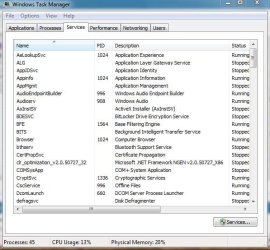
Task Manager has a services tab on the bottom right.No matter how I attempt to open Task Manager, including the icon in sys 32, I get somthing else with a services tab on the bottom right.
My Computer
- Computer Manufacturer/Model Number
- Homebuilt
- OS
- Windows 7 x64
- CPU
- i7-2600K
- Motherboard
- Asus P8Z77-v Pro
- Memory
- 8 G
- Graphics Card(s)
- GTX 480
- Sound Card
- Onboard
- Monitor(s) Displays
- LG W2753V
- Screen Resolution
- 1920x1080
- Hard Drives
- Crucial M4 128 G SSD
Bob,
This can help show you how to post a screenshot here at Seven Forums if needed.
http://www.sevenforums.com/tutorials/9733-how-post-screenshot-seven-forums.html
This can help show you how to post a screenshot here at Seven Forums if needed.
http://www.sevenforums.com/tutorials/9733-how-post-screenshot-seven-forums.html
My Computer
- Computer type
- PC/Desktop
- Computer Manufacturer/Model Number
- Self built custom
- OS
- 64-bit Windows 11 Pro for Workstations
- CPU
- Intel i7-8700K OC'd to 5 GHz
- Motherboard
- ASUS ROG Maximus XI Formula Z390
- Memory
- 64 GB (4x16GB) G.SKILL TridentZ RGB DDR4 3600 MHz
- Graphics Card(s)
- ASUS ROG-STRIX-GTX1080TI-O11G-GAMING
- Sound Card
- Integrated
- Monitor(s) Displays
- 2 x Samsung Odyssey G7 27"
- Screen Resolution
- 2560x1440
- Hard Drives
- 1TB Samsung 990 PRO M.2,
4TB Samsung 990 PRO PRO M.2,
TerraMaster F8 SSD Plus NAS
- PSU
- Seasonic Prime Titanium 850W
- Case
- Thermaltake Core P3
- Cooling
- Corsair Hydro H115i
- Keyboard
- Logitech wireless K800
- Mouse
- Logitech MX Master 4
- Internet Speed
- 2 Gb/s Download and 100 Mb/s Upload
- Antivirus
- Malwarebyte Anti-Malware Premium
- Browser
- Google Chrome
- Other Info
- Logitech Z625 speaker system,
Logitech BRIO 4K Pro webcam,
HP Color LaserJet Pro MFP M477fdn,
APC SMART-UPS RT 1000 XL - SURT1000XLI,
Galaxy S23 Plus phone
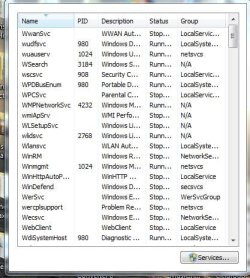
This is what i Get when i try to open Task Managerr by any manner used to open it. It worked until about a week ago and now i get this. I have no viruses and have run the system scan and tried to repair but to no avail.
Thanks for your support
Thanks for your support
My Computer
- OS
- win 7
That is the task manager, but without the window around it.
There was something that changed this but I forgotten!
Can someone remind me ?
There was something that changed this but I forgotten!
Can someone remind me ?
My Computer
- Computer type
- PC/Desktop
- Computer Manufacturer/Model Number
- The Dominator?
- OS
- Windows Seven Ultimate
- CPU
- AMD Piledriver FX 8320 @ 3.5GHz
- Motherboard
- ASUS M5A97 EVO R2.0
- Memory
- Crucial Ballistix 8GB 1600 MHz DDR3
- Graphics Card(s)
- ASUS GeForce GTX 970 Strix Edition @ 1.114 GHz
- Sound Card
- Integrated
- Monitor(s) Displays
- LG 23EA63V 23" IPS 1080p Monitor
- Screen Resolution
- 1920x1080
- Hard Drives
- Samsung SSD 840 EVO 120 GB
1x WD GreenPower 500GB 7200RPM
1 External HDD 1TB
- PSU
- Corsair CX500
- Case
- Zalman Z9 Plus
- Cooling
- CPU - Corsair Hydro H80i, Case - 3x Aerocool Shark Edition
- Keyboard
- Xenta Backlit Keyboard (Not very good!)
- Mouse
- Logitech G400
- Internet Speed
- Download: 7 mb/s Upload: 0.76 mb/s
- Antivirus
- Microsoft Security Essentials
- Browser
- Google Chrome
- Other Info
- Overclockers UK Desk Pad 89 x 45 cm
1200x730x600mm Desk
Using Virtual Audio Cable to split stereo sound into Audio Technica ATH-M50 headphones and Logitech X-530 speakers.