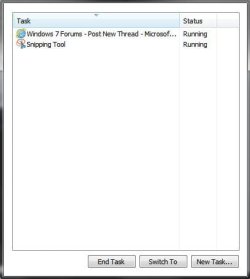
Yesterday I looked at task manager and it now has no tabs or even a menu bar. I need help restoring it to how it used to look with tabs and the menu bar. I've included a screen shot below.
My Computer
Computer type
PC/Desktop
Computer Manufacturer/Model Number
Self built
OS
Windows 11 Home x64
CPU
AMD Ryzen 5 5600G
Motherboard
ASUSTeK Prime B450M-A II
Memory
G.SKILL Ripjaws Gaming Series (2x8G) DDR4
Graphics Card(s)
None (AMD Radeon Graphics on MB and CPU)
Sound Card
None (integrated on MB)
Monitor(s) Displays
Acer S200HLAbd Black 20"
Screen Resolution
1600 x 900
Hard Drives
Samsung SSD 840 EVO 120GB (W10)
WD Blue 500G SATA 6G WDBAAX5000ENC-NRSN (Backup/Storage)
PSU
Corsair CX500 500W ATX12V v2.3 80 Plus Bronze Active PFC
Case
Unknown
Cooling
CPU-stock cooling fan, 1 extra 80mm case fan
Keyboard
Azio KB505U Large Print Tri-Color Illuminated USB Keyboard
Mouse
MS Optical Wheel Mouse (USB)
Internet Speed
ATT Fiber 5000/VOIP 5G down/5G up
Antivirus
Win Defender, SAS, Spyware Blaster all free editions
First time I have heard of this kind of problem. I would start with sfc /scannow in cmd. prompt/admin. It will run it and chech Windows 7 System Files and repair them if it can. Run it 3 times with a boot after each time. This can't hurt but might help.
My Computer
Computer type
PC/Desktop
Computer Manufacturer/Model Number
Home made Desktop
OS
Windows 10 Pro. 64/ version 1709 Windows 7 Pro/64
CPU
Intel i7-6800K @ 4.3
Motherboard
ASUS X-99 Deluxe II
Memory
Corsair Platinum 16 gig @2400
Graphics Card(s)
EVGA GTX 1070 OC
Monitor(s) Displays
Asus 27" LED LCD/VE278Q
Screen Resolution
1920-1080 or 1280-720 HDMI
Hard Drives
INTEL SSD 730-240 Gb Sata 3.0/
PSU
EVGA Platium 1200W
Case
Phanteks Luxe Tempered Glass 8 fans/ one radiator
Cooling
XSPC/ Water Cooled CPU
Keyboard
Das 4 Professional
Mouse
Logitech M705/MX Anywhere 2-S
Internet Speed
100 mbits
Antivirus
Microsoft Security Essentials/ Malwarebytes Premium 3.0/ SAS
Browser
I.E. 11 default/Firefox/ ISP Time Warner Cable/Spectrum
Other Info
LG BluRay Burner/
Sound system-KLipsch-THX/
Icy Dock ssd Hot Swap bays.
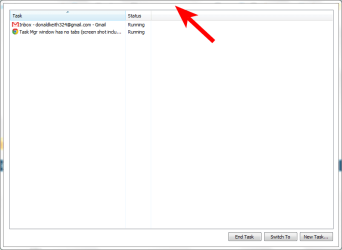
No worries. You just have Task Manager in small footprint mode. You can double click near a border as show in the tutorial below to switch back to normal mode.
Double click in the border where the arrow points.
Damn. Shawn's beaten me to it again.
My Computer
Computer type
Laptop
Computer Manufacturer/Model Number
Hewlett-Packard/G62-107SA Notebook
OS
Microsoft Windows 7 Home Premium 64-bit Service Pack 1
CPU
Intel(R) Core(TM) i3 CPU M 330 @ 2.13GHz
Motherboard
Hewlett-Packard 1425
Memory
8 GB DDR3
Graphics Card(s)
Intel(R) HD Graphics
Sound Card
Realtek High Definition Audio
Monitor(s) Displays
Builtin
Screen Resolution
1366 x 768 x 32 bits (4294967296 colors) @ 60 Hz
Hard Drives
250 GB SATA Hard Disk Drive 7200 rpm
2TB Seagate GoFlex USB 2 Drive
1TB Iomega Prestige USB 2 Drive
1.5TB Iomega Prestige USB 2 Drive (Samsung)
2TB WD MyBook Live NAS.