Task Scheduler: Batch file stuck in 'running' status

MidwestSteve

New member
Local time
10:09 AM
Messages
7
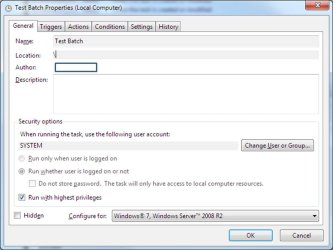
I need to run a batch file using the System account when a user logs on. This is needed for Crashplan to see network drives, following the tip at The Crashplan Network Drive Workaround

My batch file does the following:

net use r: \\server\folder1
net use s: \\server\folder2

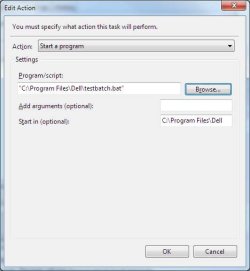
I have created the batch file and can run it myself just fine. However, when I run it via task scheduler, the status changes to Running and the drives aren't mapped. In troubleshooting I scheduled a batch file to just open Explorer, and I get the same result.

Seeing other tips on this, I have specified the "Start in" field as the location of the batch file.

Any idea on how to get it to run?
 

Attachments
  • Task Scheduler - General.jpg
    Task Scheduler - General.jpg
    70.5 KB · Views: 3
  • Task Scheduler - Action.jpg
    Task Scheduler - Action.jpg
    26.4 KB · Views: 22

My Computer

Computer type
PC/Desktop
OS
Windows 7 Home Premium 64bit
My guess is you don't see the Explorer window because you are running the task as a different user (SYSTEM).
Change the task to run using your User account and see what it does.

Also Enable All Tasks History so you can see if there are any errors in the History tab.
 

My Computer

Computer type
PC/Desktop
Computer Manufacturer/Model Number
home built
OS
Multi-Boot W7_Pro_x64 W8.1_Pro_x64 W10_Pro_x64 +Linux_VMs +Chromium_VM
CPU
AMD Athlon II x4 620
Motherboard
Gigabyte GA-MA785G-UD3H
Memory
6GB GSkill DDR2 800
Graphics Card(s)
AMD 4670 GPU + AMD 4200 IGP
Sound Card
on board Realtek ALC889A
Monitor(s) Displays
RCA 40" LCD TV, Insignia 32" LCD TV, HP 15" LCD monitor
Screen Resolution
1680 x 1050
Hard Drives
OCZ Vertex 3 120GB,
Samsung F3 1TB (3),
Several others - WD, Seagate, Hitachi, ...
PSU
Corsair 500 W
Case
Rosewill mid tower
Cooling
CM 90mm rifle
Keyboard
Gyration wireless, Logitech wireless, Dell USB wired
Mouse
Gyration wireless, Logitech wireless, V7 USB wired
Internet Speed
Spectrum - 100Mbps D / 10Mbps U
Antivirus
Avast, MBAM3, EMET, WinPatrol
Browser
Pale Moon, Firefox, IE
Other Info
2 multi-boot PC's
Mainly HTPC/Office/Gen purpose (no gaming).
Trendnet USB KVM.
LG DVD burner/Blue Ray Player.
Tray system for removable SATA backup drives.

Not currently OCd, under-volted.
I use Hybrid sleep, rarely re-boot or shutdown.

Hauppauge HD-PVR, Avermedia PCIe TV Tuner, Hauppauge PCI TV Tuner.
Thanks. When I change it to my user account I get an error message "An error has occurred for task Test Batch. Error message: One or more of the specified arguments are not valid."

However, I do not have any arguments specified.

Here's my history - is there something specific to look for here?

Thanks for your help.
 

Attachments

  • Task Scheduler History.JPG
    Task Scheduler History.JPG
    41.5 KB · Views: 0

My Computer

Computer type
PC/Desktop
OS
Windows 7 Home Premium 64bit
I don't know why you get that error message when changing the user account.
In the screen print in post #1 i see the Author is blank.
I've never seen that before, i don't know why or how the Author is blank, maybe that is the problem.

I would create a new task with
- Run only when user is logged on
- Don't check Run with highest privileges
- For the program use explorer.exe instead of a BAT file

That should create a "simple" task for testing.
See if that works, and the task has your user for the Author.
For me, when i run the task it opens an Explorer window.

In the History list you can double click any entry and see if there are any error message(s) that might help.
 

My Computer

Computer type
PC/Desktop
Computer Manufacturer/Model Number
home built
OS
Multi-Boot W7_Pro_x64 W8.1_Pro_x64 W10_Pro_x64 +Linux_VMs +Chromium_VM
CPU
AMD Athlon II x4 620
Motherboard
Gigabyte GA-MA785G-UD3H
Memory
6GB GSkill DDR2 800
Graphics Card(s)
AMD 4670 GPU + AMD 4200 IGP
Sound Card
on board Realtek ALC889A
Monitor(s) Displays
RCA 40" LCD TV, Insignia 32" LCD TV, HP 15" LCD monitor
Screen Resolution
1680 x 1050
Hard Drives
OCZ Vertex 3 120GB,
Samsung F3 1TB (3),
Several others - WD, Seagate, Hitachi, ...
PSU
Corsair 500 W
Case
Rosewill mid tower
Cooling
CM 90mm rifle
Keyboard
Gyration wireless, Logitech wireless, Dell USB wired
Mouse
Gyration wireless, Logitech wireless, V7 USB wired
Internet Speed
Spectrum - 100Mbps D / 10Mbps U
Antivirus
Avast, MBAM3, EMET, WinPatrol
Browser
Pale Moon, Firefox, IE
Other Info
2 multi-boot PC's
Mainly HTPC/Office/Gen purpose (no gaming).
Trendnet USB KVM.
LG DVD burner/Blue Ray Player.
Tray system for removable SATA backup drives.

Not currently OCd, under-volted.
I use Hybrid sleep, rarely re-boot or shutdown.

Hauppauge HD-PVR, Avermedia PCIe TV Tuner, Hauppauge PCI TV Tuner.
~~~
In the screen print in post #1 i see the Author is blank.
I've never seen that before, i don't know why or how the Author is blank, maybe that is the problem.
~~~
I'm guessing that the Author was edited out of the screenshot by the OP; hence, the colored rectangle.
 

My Computer

Computer type
Laptop
Computer Manufacturer/Model Number
Employer provided Dell Latitude
OS
W7 Pro SP1 64bit
CPU
i7
Memory
8GB
Graphics Card(s)
Intel HD Graphics
Hard Drives
crappy SSD
Antivirus
Employer mandated Symantec Endpoint Protection
Browser
Pale Moon 64bit, IE11 64bit & Chrome 64bit
Thanks - I blocked out the author field for confidentiality :)

This gets more bizarre. I have created a variety of new tasks, each to launch explorer, and varying the following attributes:

Configure for (either Vista or Win7)
Run with highest privileges checked on or off
Start in C:\ or blank

All launch explorer appropriately but they mostly stay stuck in the running status. Once in a rare while I can get a task to end in the Ready status if I have it configured for Win7 (my OS), running with highest privileges, and start in C:\. But if I delete that task, and create a new one with the exact same attributes, it gets stuck with a running status.

Does that help anybody figure out what's wrong?
 

My Computer

Computer type
PC/Desktop
OS
Windows 7 Home Premium 64bit
I don't know why your task stays in the running status.
When i manually run a simple task i created to run Explorer the status changes to Ready.

In the Task History do you see an entry for Task Completed successfully ?
Or, do you see any errors ?

Back in post #1 you said
I have created the batch file and can run it myself just fine. However, when I run it via task scheduler, the status changes to Running and the drives aren't mapped.
Are you sure you need to run the scheduled task as SYSTEM ?
Can you test running it with your userid to see if that works, and what it does ?

Debugging a scheduled task that runs under a different user is more difficult.
 

My Computer

Computer type
PC/Desktop
Computer Manufacturer/Model Number
home built
OS
Multi-Boot W7_Pro_x64 W8.1_Pro_x64 W10_Pro_x64 +Linux_VMs +Chromium_VM
CPU
AMD Athlon II x4 620
Motherboard
Gigabyte GA-MA785G-UD3H
Memory
6GB GSkill DDR2 800
Graphics Card(s)
AMD 4670 GPU + AMD 4200 IGP
Sound Card
on board Realtek ALC889A
Monitor(s) Displays
RCA 40" LCD TV, Insignia 32" LCD TV, HP 15" LCD monitor
Screen Resolution
1680 x 1050
Hard Drives
OCZ Vertex 3 120GB,
Samsung F3 1TB (3),
Several others - WD, Seagate, Hitachi, ...
PSU
Corsair 500 W
Case
Rosewill mid tower
Cooling
CM 90mm rifle
Keyboard
Gyration wireless, Logitech wireless, Dell USB wired
Mouse
Gyration wireless, Logitech wireless, V7 USB wired
Internet Speed
Spectrum - 100Mbps D / 10Mbps U
Antivirus
Avast, MBAM3, EMET, WinPatrol
Browser
Pale Moon, Firefox, IE
Other Info
2 multi-boot PC's
Mainly HTPC/Office/Gen purpose (no gaming).
Trendnet USB KVM.
LG DVD burner/Blue Ray Player.
Tray system for removable SATA backup drives.

Not currently OCd, under-volted.
I use Hybrid sleep, rarely re-boot or shutdown.

Hauppauge HD-PVR, Avermedia PCIe TV Tuner, Hauppauge PCI TV Tuner.
Back
Top