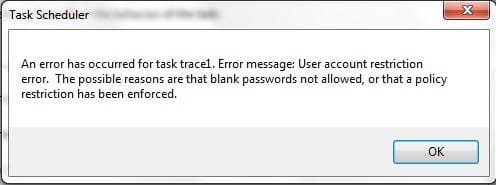
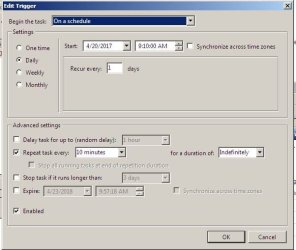
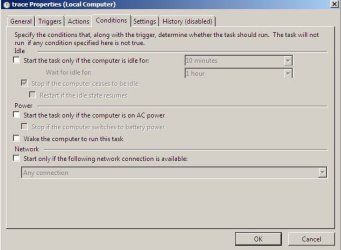
I have created a new task, placed it in the scheduler, it runs on schedule, but I get no output.
If I double click the task it works.
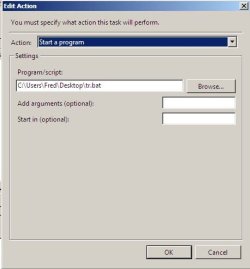
My task is this: c:\users\fred\desktop\tr.bat
****************** echo off
echo. >> tracelog.txt
echo --------------------------------------------------------- >> tracelog.txt
echo Date: %date% Time: %time% >> tracelog.txt
echo --------------------------------------------------------- >> tracelog.txt
echo on
tracert -4 207.118.111.181 >> tracelog.txt
tracert -4 lax.testmy.net >> tracelog.txt
rem tracert -4 sf.testmy.net >> tracelog.txt
exit
****************
Output when started manually:
***********************
---------------------------------------------------------
Date: Sun 04/23/2017 Time: 10:11:06.66
---------------------------------------------------------
Tracing route to 207-118-111-181.dyn.centurytel.net [207.118.111.181]
over a maximum of 30 hops:
1 <1 ms <1 ms <1 ms modem.Home [192.168.0.1]
2 24 ms 23 ms 24 ms rb2-bras-sea.core.centurylink.net [63.231.10.152]
3 76 ms 76 ms 75 ms 207-118-111-181.dyn.centurytel.net [207.118.111.181]
Trace complete.
Tracing route to lax.testmy.net [172.98.72.95]
over a maximum of 30 hops:
1 <1 ms <1 ms <1 ms modem.Home [192.168.0.1]
2 24 ms 23 ms 27 ms rb2-bras-sea.core.centurylink.net [63.231.10.152]
3 24 ms 24 ms 24 ms tukw-agw1.inet.qwest.net [71.217.187.9]
4 23 ms 24 ms 24 ms sea-brdr-02.inet.qwest.net [67.14.41.190]
5 24 ms 25 ms 24 ms be209.ccr21.sea02.atlas.cogentco.com [154.54.11.1]
6 25 ms 28 ms 25 ms be2084.ccr22.sea01.atlas.cogentco.com [154.54.0.253]
7 44 ms 43 ms 43 ms be2077.ccr22.sfo01.atlas.cogentco.com [154.54.0.241]
8 44 ms 43 ms 44 ms be3179.ccr22.sjc01.atlas.cogentco.com [154.54.43.150]
9 53 ms 53 ms 52 ms be3177.ccr22.lax01.atlas.cogentco.com [154.54.40.145]
10 53 ms 55 ms 54 ms be2020.rcr22.lax04.atlas.cogentco.com [154.54.7.186]
11 52 ms 54 ms 54 ms te0-0-1-3.agr12.lax04.atlas.cogentco.com [154.24.35.18]
12 54 ms 53 ms 53 ms te0-0-2-0.nr11.b002695-2.lax04.atlas.cogentco.com [154.24.29.94]
13 52 ms 53 ms 53 ms as46562.demarc.cogentco.com [38.88.196.166]
14 54 ms 53 ms 53 ms vl51.dist-aa.lax01.as46562.net [104.200.152.57]
15 52 ms 53 ms 53 ms lax.testmy.net [172.98.72.95]
Trace complete.
**************************
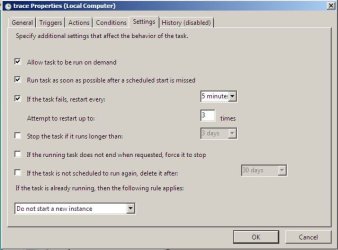
A query of the task scheduler using schtasks (last screen shot) shows it is running.
Anybody have a clue?
Thanks for your time, Fred
If I double click the task it works.
My task is this: c:\users\fred\desktop\tr.bat
****************** echo off
echo. >> tracelog.txt
echo --------------------------------------------------------- >> tracelog.txt
echo Date: %date% Time: %time% >> tracelog.txt
echo --------------------------------------------------------- >> tracelog.txt
echo on
tracert -4 207.118.111.181 >> tracelog.txt
tracert -4 lax.testmy.net >> tracelog.txt
rem tracert -4 sf.testmy.net >> tracelog.txt
exit
****************
Output when started manually:
***********************
---------------------------------------------------------
Date: Sun 04/23/2017 Time: 10:11:06.66
---------------------------------------------------------
Tracing route to 207-118-111-181.dyn.centurytel.net [207.118.111.181]
over a maximum of 30 hops:
1 <1 ms <1 ms <1 ms modem.Home [192.168.0.1]
2 24 ms 23 ms 24 ms rb2-bras-sea.core.centurylink.net [63.231.10.152]
3 76 ms 76 ms 75 ms 207-118-111-181.dyn.centurytel.net [207.118.111.181]
Trace complete.
Tracing route to lax.testmy.net [172.98.72.95]
over a maximum of 30 hops:
1 <1 ms <1 ms <1 ms modem.Home [192.168.0.1]
2 24 ms 23 ms 27 ms rb2-bras-sea.core.centurylink.net [63.231.10.152]
3 24 ms 24 ms 24 ms tukw-agw1.inet.qwest.net [71.217.187.9]
4 23 ms 24 ms 24 ms sea-brdr-02.inet.qwest.net [67.14.41.190]
5 24 ms 25 ms 24 ms be209.ccr21.sea02.atlas.cogentco.com [154.54.11.1]
6 25 ms 28 ms 25 ms be2084.ccr22.sea01.atlas.cogentco.com [154.54.0.253]
7 44 ms 43 ms 43 ms be2077.ccr22.sfo01.atlas.cogentco.com [154.54.0.241]
8 44 ms 43 ms 44 ms be3179.ccr22.sjc01.atlas.cogentco.com [154.54.43.150]
9 53 ms 53 ms 52 ms be3177.ccr22.lax01.atlas.cogentco.com [154.54.40.145]
10 53 ms 55 ms 54 ms be2020.rcr22.lax04.atlas.cogentco.com [154.54.7.186]
11 52 ms 54 ms 54 ms te0-0-1-3.agr12.lax04.atlas.cogentco.com [154.24.35.18]
12 54 ms 53 ms 53 ms te0-0-2-0.nr11.b002695-2.lax04.atlas.cogentco.com [154.24.29.94]
13 52 ms 53 ms 53 ms as46562.demarc.cogentco.com [38.88.196.166]
14 54 ms 53 ms 53 ms vl51.dist-aa.lax01.as46562.net [104.200.152.57]
15 52 ms 53 ms 53 ms lax.testmy.net [172.98.72.95]
Trace complete.
**************************
A query of the task scheduler using schtasks (last screen shot) shows it is running.
Anybody have a clue?
Thanks for your time, Fred
Attachments



My Computer
At a glance
Windows 7 Pro 32/64 bit
- Computer type
- PC/Desktop
- Computer Manufacturer/Model Number
- Dell 64bit desktop, HP 32 bit laptop
- OS
- Windows 7 Pro 32/64 bit