Task Scheduler - Create New Task

How to Create Automated Task that Runs at Set Time in Windows 7


   Information
A very handy feature within Vista, Windows Server 2008 & now Windows 7 is the Task Scheduler. This app will allow the automated running of files and programs at a user designated time.


Here's How:
1. Open up Task Scheduler by either typing "task" into the Start Menu search bar, or by opening All Programs - Accesories - System Tools.​
Task Scheduler (Step 1 - Start).png
2. Select 'Create Basic Task' from the right hand pane and the 'Create Basic Task Wizard will open.
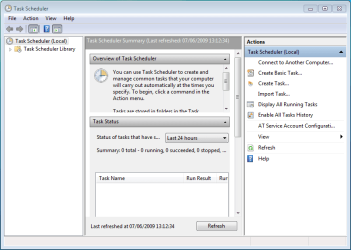
Task Scheduler (Step 2 - Opened).png


3. With the Wizard open, type a 'Name' and 'Description' for your new task and click Next.
NOTE: The Next button will only be accessible once a 'Name' has been entered.
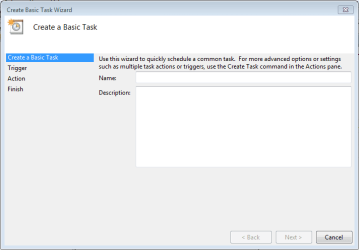
Task Scheduler (Step 3a - Create basic task).png


4. Select when you would like the event/task to run and click Next.
NOTE: For this tutorial i've selected 'Daily'.
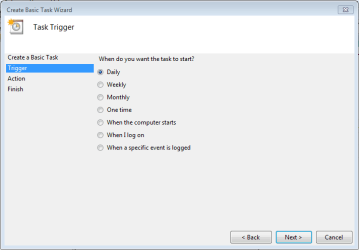
Task Scheduler (Step 3b - Create basic task - trigger).png


5. Select the exact time and date at which you wish the first task to start (each task afterward will run based on your selection in step 4) then click Next.
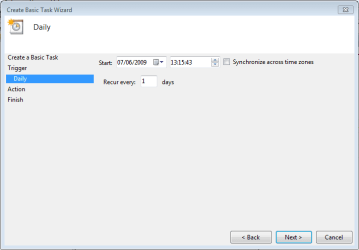
Task Scheduler (Step 3c - Create basic task - time & date).png


6. Choose the action you with the task to execute from the list then click Next.
NOTE: For this tutorial i've selected 'Start a program'.

Task Scheduler (Step 3d - Create basic task - action).png


7. Click 'Browse' and navigate to the executable (exe) file of the program you wish to run then click Next.
NOTE: I've chosen to ignore 'Add arguments' and 'Start in'.
Task Scheduler (Step 3e - Create basic task - select program).png


8. Review the task and make sure that you've set all your required information correctly. If satisfied click Finish.
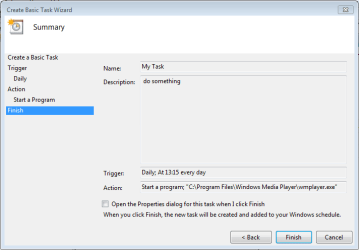
Task Scheduler (Step 3f - Create basic task - review task).png


9. Your new task has been created and will run at the user specified time. Click 'Refresh' and scroll the list to see your new task (in this case 'My Task'.
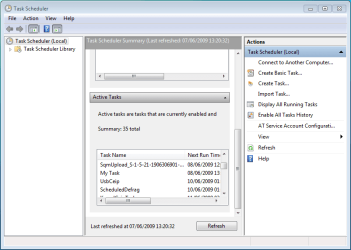
Task Scheduler (Step 4 - check task).png


   Note
You can create a new task with the 'Create Task' option in the right hand pane, this will just open the 'Create New Task' windows without the Wizard

Task Scheduler (Create task step 1).png


10. If you Created a Task to Wake Up the Computer and Run
A) You would need to change how long Windows 7 will wait to go back to sleep mode automatically after waking up unattended (no activity made by the actual user) and idle. The default time is only 120 seconds (2 minutes), so you would need to set this for how long it may take for the program or task to run instead. The tutorial below can help show you how to. It will be the same in Windows 7. For how, see:

Sleep Return Timeout for Unattended Wake Up - Vista Forums

Edit/Change Task:

1. You can change you task settings at any time, just double-click the new task.
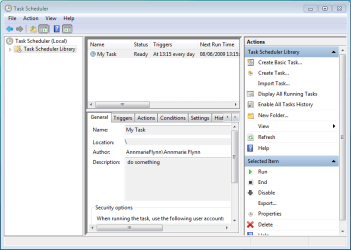
Task Scheduler (Step 5 - edit run disable delete).png


OR

2. If you wish to delete the task you can just click the 'Delete' button in the right hand pane. You will get the confimation dialog upon clicking 'delete'
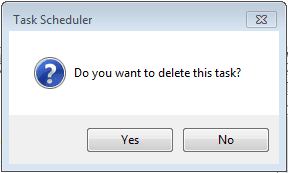
Task Scheduler Confirmation dialog.png


Last edited by a moderator:
Good tutorial. Don't forget about command line though

schtasks.exe /Create /RU "NT AUTHORITY\SYSTEM" /SC DAILY /TN "Run Notepad Daily" /TR "%SystemRoot%\notepad.exe" /ST 00:00:01


To me two of the most useful features of Vista or higher Task Scheduler are:

1- Allow you to run tasks with administrative rights at startup. This is great for apps that require admin rights and would previously run at startup via registry or start menu.

2- Triggers. You can trigger tasks (i.e. emails) based on event log errors or other events.
 

My Computer

Computer Manufacturer/Model Number
My HTPC
OS
6x W2K8 R2 (x64), 6x W7 7600 (x64), 2x Gentoo (x64), 1x Ubuntu 9.04 (x64), 1x pfSense (FreeBSD)
CPU
Core2 Duo E8400 3.0Ghz
Motherboard
ASUS P5E-VM
Memory
Corsair DDR-800 4GB RAM
Graphics Card(s)
EVGA NVidia GeForce GT240
Screen Resolution
1080p
Hard Drives
OCZ Vertex 60GB (C:\D: System\Apps)
WD 1TB x1 (G: Temp\Recorded TV)
WD 2TB x8 (On Server)
PSU
Corsair HX520w
Case
Antec Fusion Max
Cooling
Passive Thermalright HR-1 CPU Heatsink w/ Nexus Fan
Great Tutorial.

Some programs might need 'Run as Administrator' privileges.
In the task properties, General tab, near the bottom check the 'Run with highest privileges' box.
 

My Computer

Computer type
PC/Desktop
Computer Manufacturer/Model Number
76~2.0
OS
Windows 7 Ult x64 - SP1/ Windows 8 Pro x64
CPU
Intel Core i5-3570K 4.6GHz
Motherboard
Gigabyte GA-Z77X UD3H, f18
Memory
8GB (2X4GB) DDR3 1600 Corsair Vengeance CL8 1.5v
Graphics Card(s)
Sapphire HD 7770 Vapor-X OC 1GB DDR5
Sound Card
Onboard VIA VT2021
Monitor(s) Displays
22" LCD Dell
Screen Resolution
1680x1050
Hard Drives
Samsung 840Pro 128GB SSD,
Seagate Barracuda 500GB SATA2 7200rpm 32MB cache, Seagate Barracuda 1TB SATA2 7200rpm 32MB cache,
PSU
Corsair HX650W
Case
Cooler Master Storm Scout
Cooling
Corsair H80 2x12cm Noctua NF P12 , 2x14cm case fans
Keyboard
Logitech Wave
Mouse
CM Sentinel
Internet Speed
Dismal
Antivirus
Avast
Browser
Opera Next
Other Info
Haswell laptop: HP Envy 17t-j, i7-4700MQ, GeForce 740M 2GB DDR3, 17.3" Full HD 1920x1080, 16GB RAM, Samsung 840 Pro 128GB, 1TB Hitachi 7200 HDD,
Desktop: eSATA ports,
External eSATA Seagate 500GB SATA2 7200rpm,
External WD USB 500GB
I followed this step by step, but Task Manager refuses to start the program.

Just to make sure, I followed each step for Paint.net, set a time, but no program. As I use a User account, I had to give admin privileges to open Task Manager, and I went to settings and selected to start whether admin was logged in or not and with highest privileges. This is the error log:

picture.php


Where should I go from here?

Robert
 

My Computer

OS
...
Task scheduler event = Low Battery

I would like to know how to access the event low battery. I am planning to initiate a program when the trigger = low battery takes place. I have searched high and low about this and just get dead-ends.:rolleyes:

Thanks for any response.:party:
 

My Computer

OS
Windows 2000
I would like to know how to access the event low battery. I am planning to initiate a program when the trigger = low battery takes place. I have searched high and low about this and just get dead-ends.:rolleyes:

Thanks for any response.:party:

The easiest way to get battery notifications is via the RegisterPowerSettingNotification API
 

My Computer

Computer Manufacturer/Model Number
My HTPC
OS
6x W2K8 R2 (x64), 6x W7 7600 (x64), 2x Gentoo (x64), 1x Ubuntu 9.04 (x64), 1x pfSense (FreeBSD)
CPU
Core2 Duo E8400 3.0Ghz
Motherboard
ASUS P5E-VM
Memory
Corsair DDR-800 4GB RAM
Graphics Card(s)
EVGA NVidia GeForce GT240
Screen Resolution
1080p
Hard Drives
OCZ Vertex 60GB (C:\D: System\Apps)
WD 1TB x1 (G: Temp\Recorded TV)
WD 2TB x8 (On Server)
PSU
Corsair HX520w
Case
Antec Fusion Max
Cooling
Passive Thermalright HR-1 CPU Heatsink w/ Nexus Fan
Will task scheduler wake your computer if it is in sleep mode?
 

My Computer

Computer Manufacturer/Model Number
Toshiba Satellite A215-S4757
OS
Windows 7 Home Premium x86
Motherboard
AMD Turion™ 64 X2 Dual-Core Mobile Technology TL56 1.8 GHz
Memory
4096MB (2 x 2048) DDR2 667mhz Corsair
Graphics Card(s)
ATI Radeon® X1200 128MB-319MB dynamically allocated shared g
Sound Card
Realtek
Monitor(s) Displays
15.4” diagonal widescreen TruBrite®TFT LCD display at 1280x8
Screen Resolution
1280x800
Hard Drives
Internal HD: 250GB (4200RPM); Serial ATA HDD
External HD: Western Digital 320GB My Passport Elite WDMLZ3200TN USB 2.0 Portable Hard Drive (Bronze)
Case
Targus
Mouse
Logitech G7
Internet Speed
6meg

My Computer

Computer Manufacturer/Model Number
My HTPC
OS
6x W2K8 R2 (x64), 6x W7 7600 (x64), 2x Gentoo (x64), 1x Ubuntu 9.04 (x64), 1x pfSense (FreeBSD)
CPU
Core2 Duo E8400 3.0Ghz
Motherboard
ASUS P5E-VM
Memory
Corsair DDR-800 4GB RAM
Graphics Card(s)
EVGA NVidia GeForce GT240
Screen Resolution
1080p
Hard Drives
OCZ Vertex 60GB (C:\D: System\Apps)
WD 1TB x1 (G: Temp\Recorded TV)
WD 2TB x8 (On Server)
PSU
Corsair HX520w
Case
Antec Fusion Max
Cooling
Passive Thermalright HR-1 CPU Heatsink w/ Nexus Fan
Okay, so I have never been able browse for programs (Ex. Want to open a pdf file, need to browse for program, want to open adobe reader) What is the proper way to search for a program? Do I go into Program Files or some other path? For this particular issue, I what task scheduler to run a defrag at 3am (I put my computer to sleep so I want it to wake up and then run the defrag that is built into W7). How do I browse for Disk Defrag (the path to get there in browse)?
 

My Computer

Computer Manufacturer/Model Number
Toshiba Satellite A215-S4757
OS
Windows 7 Home Premium x86
Motherboard
AMD Turion™ 64 X2 Dual-Core Mobile Technology TL56 1.8 GHz
Memory
4096MB (2 x 2048) DDR2 667mhz Corsair
Graphics Card(s)
ATI Radeon® X1200 128MB-319MB dynamically allocated shared g
Sound Card
Realtek
Monitor(s) Displays
15.4” diagonal widescreen TruBrite®TFT LCD display at 1280x8
Screen Resolution
1280x800
Hard Drives
Internal HD: 250GB (4200RPM); Serial ATA HDD
External HD: Western Digital 320GB My Passport Elite WDMLZ3200TN USB 2.0 Portable Hard Drive (Bronze)
Case
Targus
Mouse
Logitech G7
Internet Speed
6meg
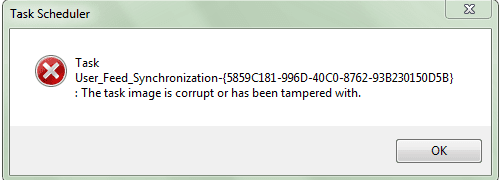
Also, when I start Task Scheduler this error shows up. And how do I see task that I have created in Task Scheduler?
 

Attachments

  • Task Scheduler.PNG
    Task Scheduler.PNG
    21.8 KB · Views: 139,480

My Computer

Computer Manufacturer/Model Number
Toshiba Satellite A215-S4757
OS
Windows 7 Home Premium x86
Motherboard
AMD Turion™ 64 X2 Dual-Core Mobile Technology TL56 1.8 GHz
Memory
4096MB (2 x 2048) DDR2 667mhz Corsair
Graphics Card(s)
ATI Radeon® X1200 128MB-319MB dynamically allocated shared g
Sound Card
Realtek
Monitor(s) Displays
15.4” diagonal widescreen TruBrite®TFT LCD display at 1280x8
Screen Resolution
1280x800
Hard Drives
Internal HD: 250GB (4200RPM); Serial ATA HDD
External HD: Western Digital 320GB My Passport Elite WDMLZ3200TN USB 2.0 Portable Hard Drive (Bronze)
Case
Targus
Mouse
Logitech G7
Internet Speed
6meg
Anyone?
 

My Computer

Computer Manufacturer/Model Number
Toshiba Satellite A215-S4757
OS
Windows 7 Home Premium x86
Motherboard
AMD Turion™ 64 X2 Dual-Core Mobile Technology TL56 1.8 GHz
Memory
4096MB (2 x 2048) DDR2 667mhz Corsair
Graphics Card(s)
ATI Radeon® X1200 128MB-319MB dynamically allocated shared g
Sound Card
Realtek
Monitor(s) Displays
15.4” diagonal widescreen TruBrite®TFT LCD display at 1280x8
Screen Resolution
1280x800
Hard Drives
Internal HD: 250GB (4200RPM); Serial ATA HDD
External HD: Western Digital 320GB My Passport Elite WDMLZ3200TN USB 2.0 Portable Hard Drive (Bronze)
Case
Targus
Mouse
Logitech G7
Internet Speed
6meg
Given that the scheduler is to run an Mp3, should it open WMP to do so? I have posted a thread on the subject But i believe i am asking more questions than i am getting answers.
 

My Computer

OS
Windows 7
I would like to have system restore feature only run when a new program is installed on my computer and at no other time unless I manually create one. Is this possible with Task Scheduler and HOW Please? Thanks everyone.
 

My Computer

Computer Manufacturer/Model Number
HP Pavilion DV6600 Laptop
OS
Windows 7 Ultimate 32bit
CPU
Intel Core Duo T5250
hi ahamprema, i believe windows does this automatically anyway, i'm not sure what your asking, do you mean you want it to not create automated restore points every few days?
 

My Computer

Computer type
PC/Desktop
Computer Manufacturer/Model Number
Medion Erazer (note to self: insert model number) - with custom additions
OS
Windows 10 Pro x64
CPU
Intel Core i5 7400 @ 3.00GHz
Motherboard
OEM supllied with PC
Memory
8GB 2133Mhz DDR4 (OEM supplied)
Graphics Card(s)
Gygabyte Windforce GTX 1050Ti (Factory Overclocked)
Sound Card
Realtek
Monitor(s) Displays
Acer Al1980 + HKC
Screen Resolution
1360*768(HKC) / 1280*1024(Acer)
Hard Drives
1TB Toshiba
1TB WD Caviar Green
120GB Samsung Evo 840
PSU
OEM supplied (no power rating on case)
Case
OEM Supplied
Cooling
Stock
Keyboard
Logitech Wireless
Mouse
Logitect Wireless
Internet Speed
40Mb/s Down 10Mb/s Up
Antivirus
Defender
Browser
Firefox
Yes I would like to only create a restore point when a program is installed and not every few days. I would also like to know if turning off system restore means I can't use restore anymore or it just turns off automated creation of restore points. Anyone know the answers to these questions or know where I might find them?
Thanks.
 

My Computer

Computer Manufacturer/Model Number
HP Pavilion DV6600 Laptop
OS
Windows 7 Ultimate 32bit
CPU
Intel Core Duo T5250
Hi,

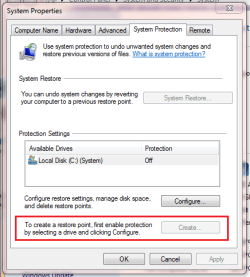
Unfortunately you cannot create system restore points after the system protection has been turned off.
Capture.PNG

This may affect how restore schedules work but that part isn't my speciality ;)
 

My Computer

Computer Manufacturer/Model Number
Compaq Desktop
OS
Windows 7 Ultimate x64
CPU
AMD Sempron Dual Core
Memory
3GB
Graphics Card(s)
NVIDIA GeForce 6150SE nForce 430
Screen Resolution
1024x768
Hard Drives
150GB Sata
When I create a task that runs a batch file, what folder is it stored in?
 

My Computer

Computer type
Laptop
Computer Manufacturer/Model Number
Asus
OS
W7 Ultimate
CPU
2.2 bh Intel Core i3-2330M
Motherboard
Asustek Computer Inc. P53E 1.0
Memory
4MB
Graphics Card(s)
On Board
Sound Card
On Board
Monitor(s) Displays
On Board
Screen Resolution
1366 X 768
Hard Drives
ST9500423AS
ST2000DM USB Backup Drive External
Wow, what a coincidence!

I was wondering if Windows 7 had a Reminder/Notes/Task thing like this about 5 minutes before I came across this thread.

Great job, buddy! Sure made my life a tad bit easier.
 

My Computer

Computer Manufacturer/Model Number
Toshiba A500
OS
Windows 7
I've used Task Scheduler to make SpeedFan run on startup. I need this program because my Ferrari 3400 has overheat issues. I set speedfan.exe to run on log on. I logged off and logged on but it didn't show up. It dosen't run on system startup. Can anyone help me fix this?
 

My Computer

Computer Manufacturer/Model Number
Custom built
OS
Windows 7 Ultimate x64/Windows 8 Enterprise
CPU
Intel Core i7-2600k
Motherboard
Asus Sabertooth P67
Memory
8 GB
Graphics Card(s)
AMD Radeon HD 6990
Sound Card
Realtek HD Audio
Monitor(s) Displays
2x Samsung S22B300
Screen Resolution
1920x1080
Hard Drives
Corsair Force Series 3
WD Caviar Green
PSU
Corsair GS700
Case
Antec p193
Cooling
Cooler Master Hyper 212 +
Mouse
Logitech Peformance MX
Internet Speed
15M down/1M up
Antivirus
Kaspersky Pure
scheduling and e-mail to be sent...

I've done all this and tried to have the scheduler send an e-mail with a file attached - it never works - anytone else experienced this or can nayone offer advice as to where I might be going astray?
 

My Computer

OS
Windows 7
Back
Top