

I need your advice I am getting this error when I open Task Scheduler
"the selected task 0 no longer exists"
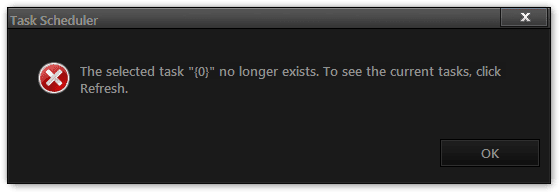
Then this

Then the 1st one again
after doing some googling I found this, should I go ahead and try this or do you have any other ideas.
"the selected task 0 no longer exists"
Then this
Then the 1st one again
after doing some googling I found this, should I go ahead and try this or do you have any other ideas.
Thanks Jerry1. Open the Task Scheduler Library.
2. Open Microsoft
3. Open Windows
4. Click on every folder until you get the error code.
5. Open up C:\Windows\System32\Tasks\Microsoft\Windows\
6. Click on the folder that gave the error in the Task Scheduler
7. Delete what is INSIDE the folder....NOT the folder its self.
My Computer
- Computer type
- Laptop
- Computer Manufacturer/Model Number
- Sager NP9170
- OS
- Win 7 Pro x64 / Win 10 Pro
- CPU
- Intel(R) Core(TM) i7-3630QM CPU @ 2.40GHz
- Motherboard
- CLEVO P170EM
- Memory
- 12 GB
- Graphics Card(s)
- (1) Intel(R) HD Graphics 4000 (2) NVIDIA GeForce GTX 675M
- Sound Card
- (1) Realtek High Definition Audio (2) Intel(R) Display Aud
- Monitor(s) Displays
- 17.3
- Screen Resolution
- 1920x1080
- Hard Drives
- (1) Samsung 860 EVO 500GB(OS) (1) Samsung 860 EVO 500GB(Data)
- Keyboard
- Backlite
- Antivirus
- MSE, Malwarebytes Pro
- Browser
- Firefox
- Other Info
- DESKTOP: Custom-built.
OS: Win 10 Pro x64.
CASE: Rosewill R5.
CPU: Intel I5 4670K CPU @ 3.40GHz.
CPU COOLER: Cool Master Hyper 212 EVO.
MOTHERBOARD: Asus Z87-A.
MEMORY: Kingston HyperX 2x4 GB.
GPU: Nvidia Geforce 650 TI.
PSU: Corsair TX750.
DRIVES: (1) Samsung 840 120 GB SSD (2) Western Digital blue 500 GB 7200 RPM.

